
How to Integrate Live Streaming into a uni-app WeChat Mini Program: An App + Mini Program Commerce Solution
POLYV's upgraded WeChat Mini Program Viewing Page SDK now supports uni-app framework integration and allows customers to choose among the Polyv viewing plugin, native live-player, and video player according to their mini-program qualifications, helping App-centric brands launch mini-program live commerce faster.
For self-operated product brands, private-domain live commerce is rarely built around a mini program alone. Many brands already run their own App, while the WeChat mini program works more like a mirror entry inside the WeChat ecosystem: it receives traffic from communities, official accounts, WeCom, and lightweight purchase journeys. For health devices, home equipment, consumer electronics, and similar product categories, live streaming needs to serve existing App users while also reaching WeChat users quickly.
The challenge is not simply whether a live room can be opened. It is how different endpoints, mini-program qualifications, player capabilities, and business systems can work together. Teams using uni-app for mini-program development want to reuse their existing engineering framework, but they may still worry that WeChat live streaming capabilities, plugin configuration, service categories, player selection, and real-device review will slow down launch.
Bottom line: For brands whose main private-domain operation is inside an App while the WeChat mini program serves as a mirror entry, a practical approach is to combine App live-streaming integration with uni-app WeChat mini-program viewing-page integration. POLYV’s upgraded WeChat Mini Program Viewing Page SDK now supports uni-app framework integration in addition to native WeChat mini-program integration. It also allows customers to choose among the Polyv viewing plugin, nativelive-player, andvideoplayer according to their own mini-program qualifications, reducing integration barriers, review risk, and repeated adaptation costs.
01 Why Do Self-Operated Brands Need Both App and Mini-Program Live Entries?
For health devices, home equipment, and consumer electronics brands, private-domain live streaming is not only about one promotion. It connects product explanation, usage education, user Q&A, repurchase conversion, and membership operations into one private-domain journey.
1.1 The App carries deeper service and existing-user operations
The App usually holds user accounts, device binding, health data, after-sales service, membership benefits, and order information. For products such as glucose meters and other health devices, users may need to check device data, learn usage methods, purchase consumables, or join membership activities over time. Integrating live streaming into the App keeps content services closer to the existing user relationship.
1.2 The mini program receives WeChat ecosystem traffic
The mini program is more suitable for traffic from communities, official accounts, Moments, WeCom, and store consultants. Users can enter a live room, interact, ask questions, and move toward purchase without downloading the App again.
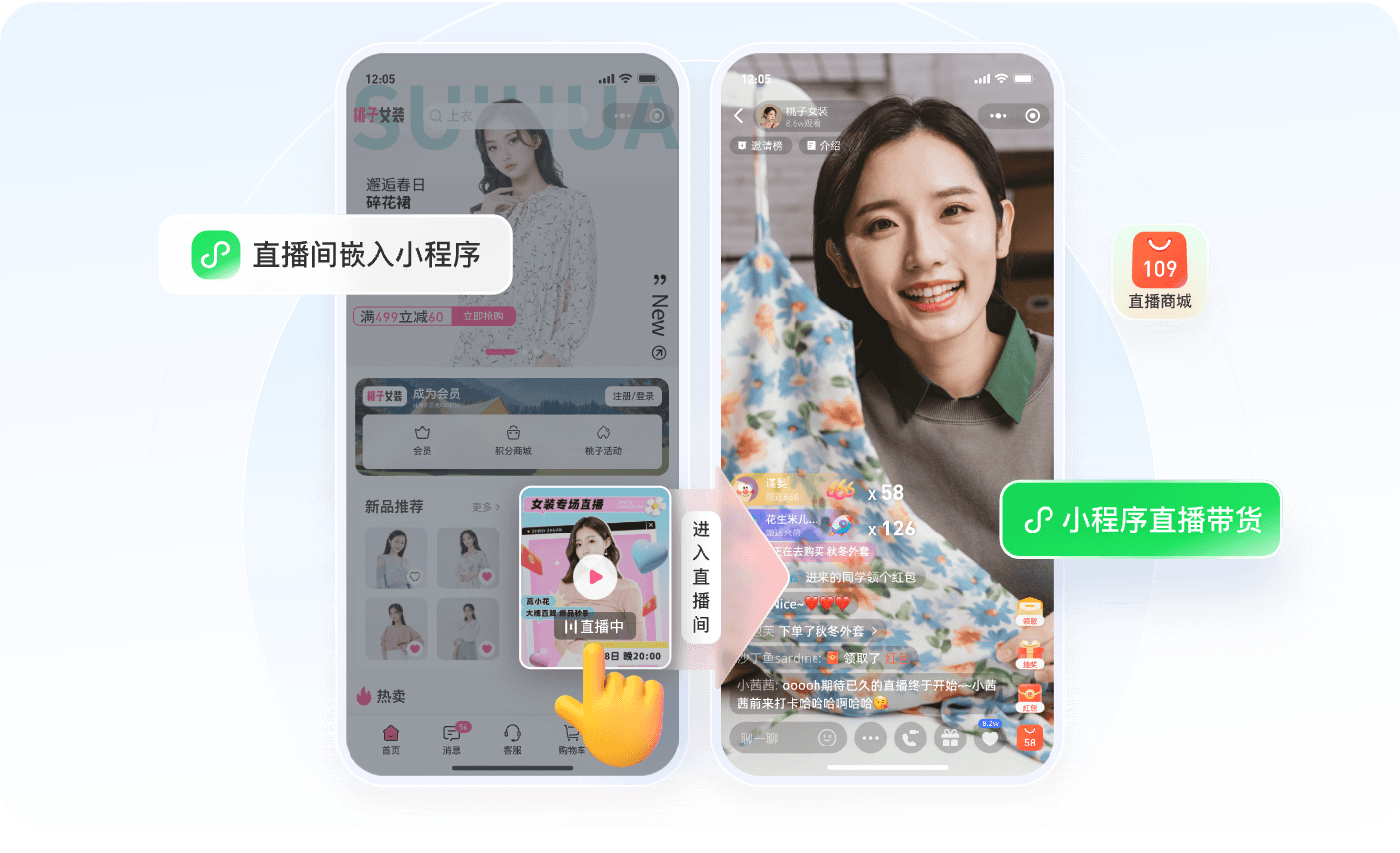
*Figure 1: The mini program can work as a lightweight WeChat entry for App-centered private-domain operations, guiding users from the store, campaign pages, or shared cards into the live room. Image source: POLYV Mini Program Live Streaming Solution*
1.3 The two entries need a consistent experience, not duplicated development
Ideally, both App and mini program users can enter the same live session, with a similar live-room style, product flow, interaction logic, and data framework. But that does not mean both endpoints need to build a viewing page from scratch. A better approach is to choose the right SDK, component, or player option for each endpoint.
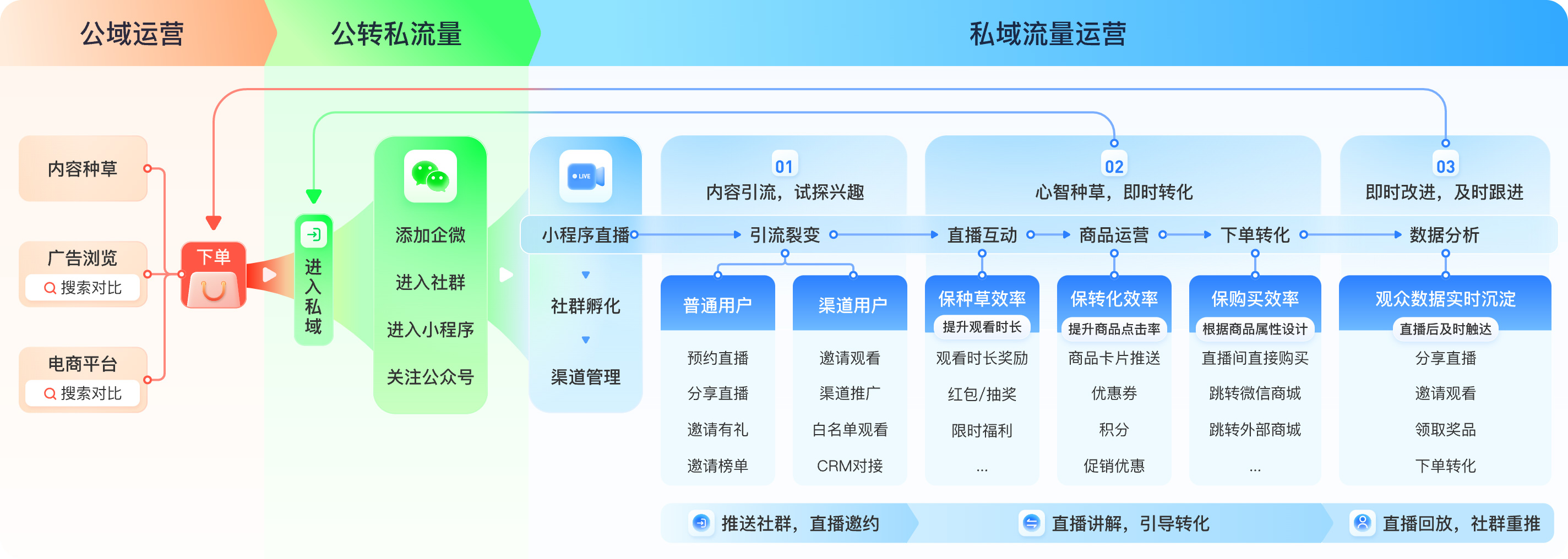
*Figure 2: Mini-program live streaming can connect public-domain traffic, private-domain conversion, repurchase operations, App services, communities, and product systems. Image source: POLYV Mini Program Live Streaming Solution*
02 What Integration Bottlenecks Does the Upgrade Address?
In mini-program viewing-page integration, two bottlenecks often appear: the project framework may not match the original integration method, and the customer’s mini-program qualifications may not match one specific player capability. The upgraded solution separates these two problems.
2.1 uni-app projects can integrate native WeChat viewing components
The new uni-app WeChat mini-program viewing component is designed for uni-app projects whose compilation target ismp-weixin. The integration places thepolyv-live-watchnative WeChat mini-program custom component package into the uni-app project’swxcomponentsdirectory, registers it on the required page, and mounts thepolyv-watch-roomcomponent.
The main viewing page is handled inside the component. The host page only needs to provide the container, pass channel configuration, and process events that cross the component boundary, such as opening the brand’s own WebView page, jumping to its login page, configuring sharing, or recording analytics events.
2.2 Player options can be selected based on qualifications
Another important part of this upgrade is that customers can choose a player solution according to their mini-program qualifications. They can flexibly choose among the Polyv viewing plugin, nativelive-player, andvideoplayer, avoiding a situation where one missing qualification blocks the entire live-streaming integration.
This matters especially for self-operated brands. Different mini-program entities, service categories, plugin permissions, camera and microphone capabilities, and live playback permissions may vary. Flexible player options help the project find an available launch path first and then enhance capabilities according to business needs.
2.3 Repeated development and adaptation cost can be reduced
For teams that already have a uni-app project, rebuilding a WeChat mini-program viewing page every time is expensive and error-prone. Styles, routing, events, permissions, and real-device compatibility can all create repeated work. Component-based integration allows the development team to focus more on accounts, products, orders, memberships, and data links.
03 How Should the App and Mini Program Divide Responsibilities?
The project should first be clear about one thing: the App is the main business base, while the mini program is the WeChat ecosystem mirror. Both endpoints may serve the same live session, but they do not need to carry exactly the same business responsibilities.
3.1 The App continues to carry core business
POLYV already provides App live-streaming integration solutions for different endpoints and technology stacks. If a brand App uses uni-app or another cross-end framework, the team can learn the App-side integration path from POLYV Developer Center and related SDK documentation.
The App is better suited for deeper membership systems, device data, after-sales service, repurchase reminders, and long-term content retention. When live streaming enters the App, it can connect more deeply with user profiles, orders, and device relationships.
3.2 The mini program serves as the WeChat private-domain entry
The mini program is suitable for community and consultant sharing, allowing users to enter the live room quickly. For users who only need lightweight viewing, interaction, or product browsing, the mini-program path is shorter.
In the uni-app WeChat mini-program viewing component solution, the mini-program page only mountspolyv-watch-roomand passes configuration such as the channel ID. Live viewing, replay, chat room, viewing conditions, and interaction reception are handled inside the component according to the channel configuration.
3.3 Products and orders still belong to the brand’s business system
The live-streaming system can provide product display, product push, interaction, and data capabilities inside the live room. However, inventory, pricing, payment, orders, refunds, fulfillment, and after-sales service are usually still handled by the brand’s own commerce or business system. Before launch, the team should define whether product clicks open an App page, a mini-program page, or a WebView page, and unify order attribution.
04 What Links Matter Most for Health-Device Private-Domain Live Commerce?
For self-operated products such as glucose meters, health monitoring devices, consumables, and membership services, live commerce should not rely only on discounts. It also needs to explain product usage, suitable scenarios, and service guarantees clearly.
4.1 Before the live session: reservation and audience reach
The operations team can reach users through App messages, WeCom communities, official accounts, mini-program subscription messages, and consultant sharing. Live-session themes may include new product explanation, usage education, expert Q&A, consumable repurchase, and membership activities.
If the mini program is a mirror entry of the App, the reservation and sharing path should remain simple so that users can reserve and enter the live room within WeChat.
4.2 During the live session: explanation, interaction, and product conversion
POLYV’s Mini Program Live Streaming Solution focuses on live commerce conversion and includes capabilities such as live interaction, product operations, and data analytics. Products can be displayed in the live room, and operators can push, sort, list, and remove products so that explanation and purchase entry stay aligned.
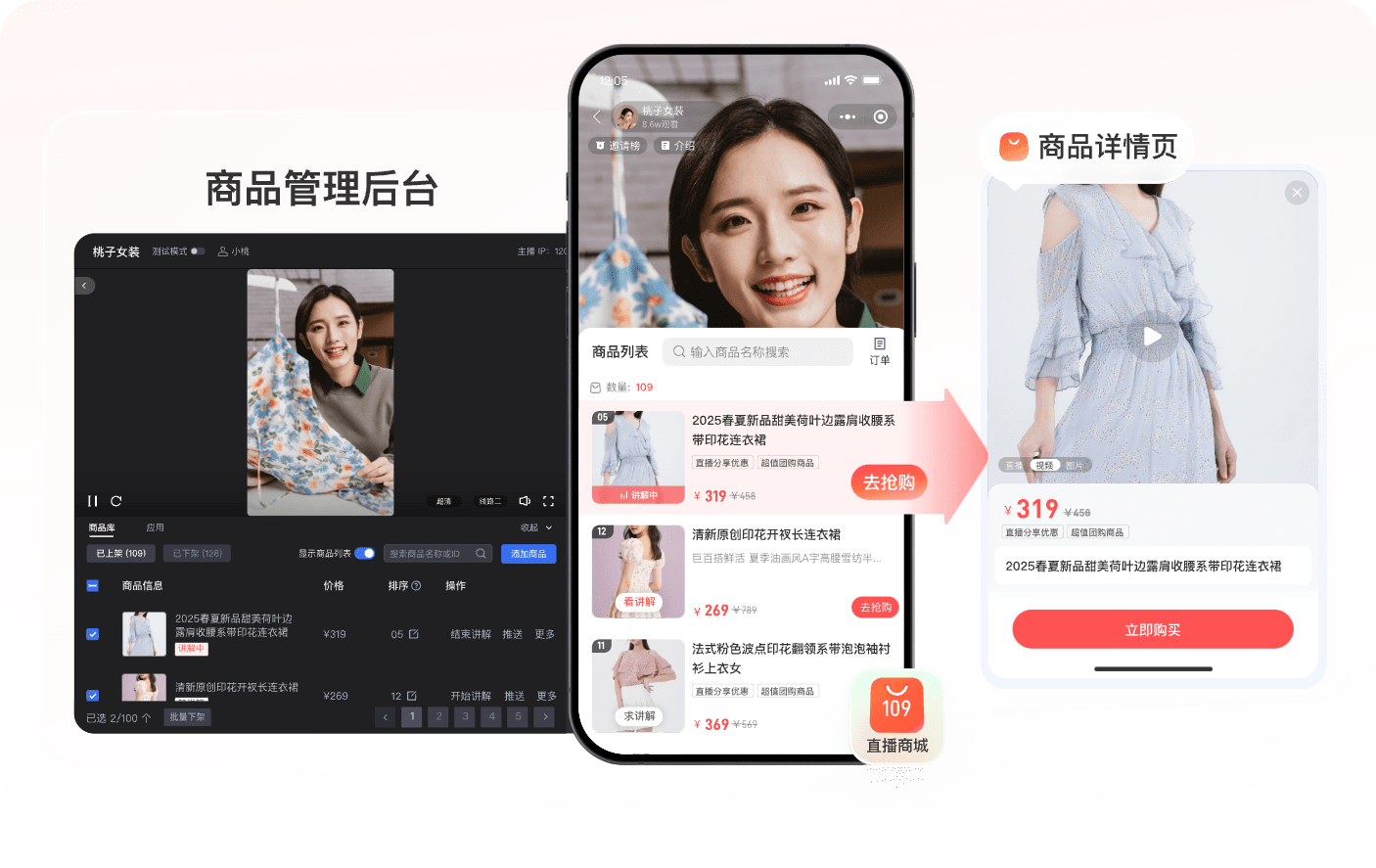
*Figure 3: Products can be managed in the live console and presented in the mini-program live room through product lists, product cards, and detail pages. Image source: POLYV Mini Program Live Streaming Solution*
Health-device live sessions should also observe content boundaries. When content involves health, medical, testing, or monitoring information, brands should avoid exaggerated claims, replacing professional medical advice, or making improper promises. Product descriptions, host scripts, and page copy should be reviewed according to industry requirements.
4.3 After the live session: replay, review, and follow-up
After the live session, replay can continue to serve users who did not watch in real time. The operations team should review viewing count, dwell time, interaction behavior, product clicks, order conversion, and repurchase recommendations to understand which content actually helps users understand and buy.
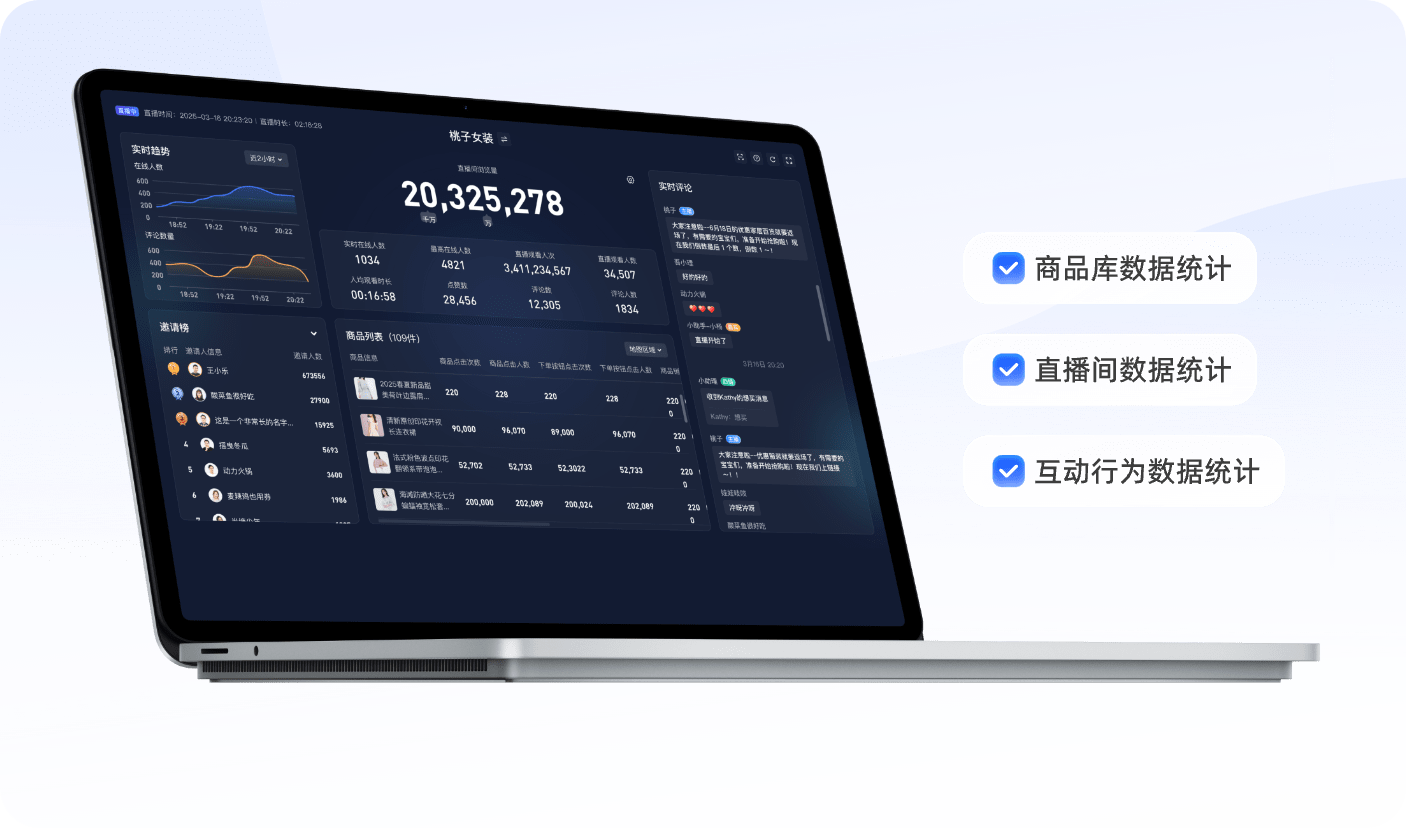
*Figure 4: Viewing, product clicks, order conversion, and interaction data help brands review private-domain live streaming results. Image source: POLYV Mini Program Live Streaming Solution*
05 How Does the uni-app WeChat Mini-Program Viewing Component Work?
5.1 Prepare the account, channel, and mini-program qualifications
Before integration, the team needs a POLYV live account, a created live channel, and a test channel ID. Viewing conditions, replay, chat room, and interaction capabilities are still configured in the POLYV live backend.
At the same time, the customer must confirm its own mini-program entity, service category, plugin permissions, interface permissions, business domains, and privacy guidelines. Live playback, co-streaming, plugin usage, and other capabilities are tied to the customer’s own WeChat mini-program AppID, not a test AppID.
5.2 Copy the component package and configure the project
The integration places thepolyv-live-watchcomponent package undersrc/wxcomponentsin the uni-app project. Inmanifest.json, themp-weixinsection enables custom component support and declares the required mini-program plugins according to the delivery guide. Thenpolyv-watch-roomis registered inpages.json.
It is important thatpolyv-live-watchis a complete native WeChat mini-program custom component package. Do not copy only thewatch-roomfolder. The business WXSS, static assets, and internal modules in the package must remain complete.
5.3 The host page handles only boundary events
polyv-watch-roominternally handles states such as loading, splash, watch, and error, and it carries the player, chat room, and interaction components. The host page handles only business boundary events, such as:
- ready: record component initialization;
- viewChange: record internal view changes;
- webview: open the brand’s own WebView page;
- loginRequired: redirect to the brand’s own login page;
- destroy: clean up temporary host-side state.
Do not remount a new viewing component afterviewChange; otherwise repeated initialization, duplicate chat connections, or playback-state issues may occur.
5.4 Real-device testing matters more than simulator testing
After building themp-weixinoutput, the team should open the final output in WeChat Developer Tools and use the customer’s own AppID for preview and real-device testing. Verify whether the viewing page opens, whether live and replay playback works, whether the chat room connects, whether product and external links are passed to the host page, and whether sharing, returning, destroying the page, and re-entering all work properly.
If co-streaming is involved, also verify camera and microphone permissions and service-category requirements.
06 What Is Outside the Scope of This Solution?
6.1 It is not a full multi-end uni-app SDK
This uni-app WeChat mini-program viewing component targets themp-weixinoutput of a uni-app project. It does not cover App, H5, Alipay mini programs, Douyin mini programs, or other endpoints. App live-streaming integration should use the corresponding App-side solution and development documentation.
6.2 It does not replace the customer’s product and order system
The viewing component solves viewing-page integration, viewing conditions, live/replay viewing, chat room, and interaction reception. Products, memberships, orders, payments, refunds, fulfillment, and after-sales service still need to be handled by the customer’s own business system.
6.3 It does not guarantee automatic approval of all mini-program qualifications
Flexible player options can reduce integration blockers caused by qualification mismatch, but service categories, plugin addition, interface permissions, privacy documents, and review results still depend on the WeChat Official Accounts Platform. Customers need to complete review and configuration under their own mini-program AppID.
07 What Should Be Piloted First?
For self-operated product brands, start with one live session that has a clear goal and product path.
Three pilot scenarios are suitable:
- New product explanation: explain one health device or consumable scenario;
- Existing-user Q&A: answer usage, consumable repurchase, and service questions for App users;
- Membership activity: combine membership benefits, coupons, and repurchase reminders to drive conversion.
During the pilot, do not only check whether the live room opens. Also verify whether the App, mini program, community, and commerce system work together smoothly: whether users can enter from a community into the mini program, whether product clicks open the correct product page, whether orders return to the membership system, and whether live data supports operational review.
08 FAQ
8.1 If we already have App live integration, do we still need mini-program live streaming?
If the brand operates heavily in the WeChat ecosystem, mini-program live streaming is still valuable. The App is suitable for deep service to existing users, while the mini program is suitable for traffic from communities, official accounts, and consultant sharing.
8.2 Does uni-app mini-program integration mean the App is also integrated?
No. The uni-app WeChat mini-program viewing component only targets the compiledmp-weixinendpoint. App integration requires POLYV’s App-side live-streaming solution and should be evaluated according to the App technology stack.
8.3 Why support multiple player options?
Different mini-program entities, service categories, and plugin permissions vary. Supporting the Polyv viewing plugin, nativelive-player, andvideogives customers a more suitable integration path according to their qualifications and reduces launch risk caused by a single player requirement.
8.4 Can mini-program live commerce data be connected with commerce data?
Yes, but the mapping should be designed in advance. User ID, channel, live session, product, and order relationships should be aligned. The live-streaming system can provide viewing, interaction, and product behavior data, while final transactions, refunds, and repurchases should be linked with the customer’s transaction system.
For projects where the App is the main private-domain base and the mini program is the WeChat mirror, the value of the uni-app WeChat Mini Program Viewing Page SDK upgrade is not only one more integration method. It gives brands a faster launch path under different technology stacks and qualification conditions. The App continues to carry deep business services, while the mini program receives WeChat private-domain traffic. Together, they turn self-operated product live streaming from a one-time campaign into a long-term operating capability.