
How Can Small-Class Live Streaming Integrate with Existing Apps and Academic Systems? A System Integration Guide for Education Institutions
For education institutions with existing Apps, mini programs, academic systems, and order systems, small-class live streaming can be integrated through SDKs, APIs, viewing pages, interaction, and data feedback instead of rebuilding a full platform.
Many education institutions are not starting live streaming from scratch.
They often already have their own App, WeChat mini program, academic system, course store, order system, and customer operation workflow. The real question is not whether to do live streaming, but how small-class live streaming can integrate with existing systems without disrupting current business while adding online classroom, interaction, and private-domain conversion capabilities.
If an institution rebuilds a complete platform just for small-class live streaming, the cost is high, the cycle is long, and student data, order data, and scheduling data may become scattered later.
A more reasonable approach is to treat live streaming as an integratable capability layer: the frontend carries WeChat and mini program entry, the live streaming layer handles viewing and interaction, existing Apps and academic systems continue to carry students, scheduling, orders, and fulfillment, and data returns to operations workflows.
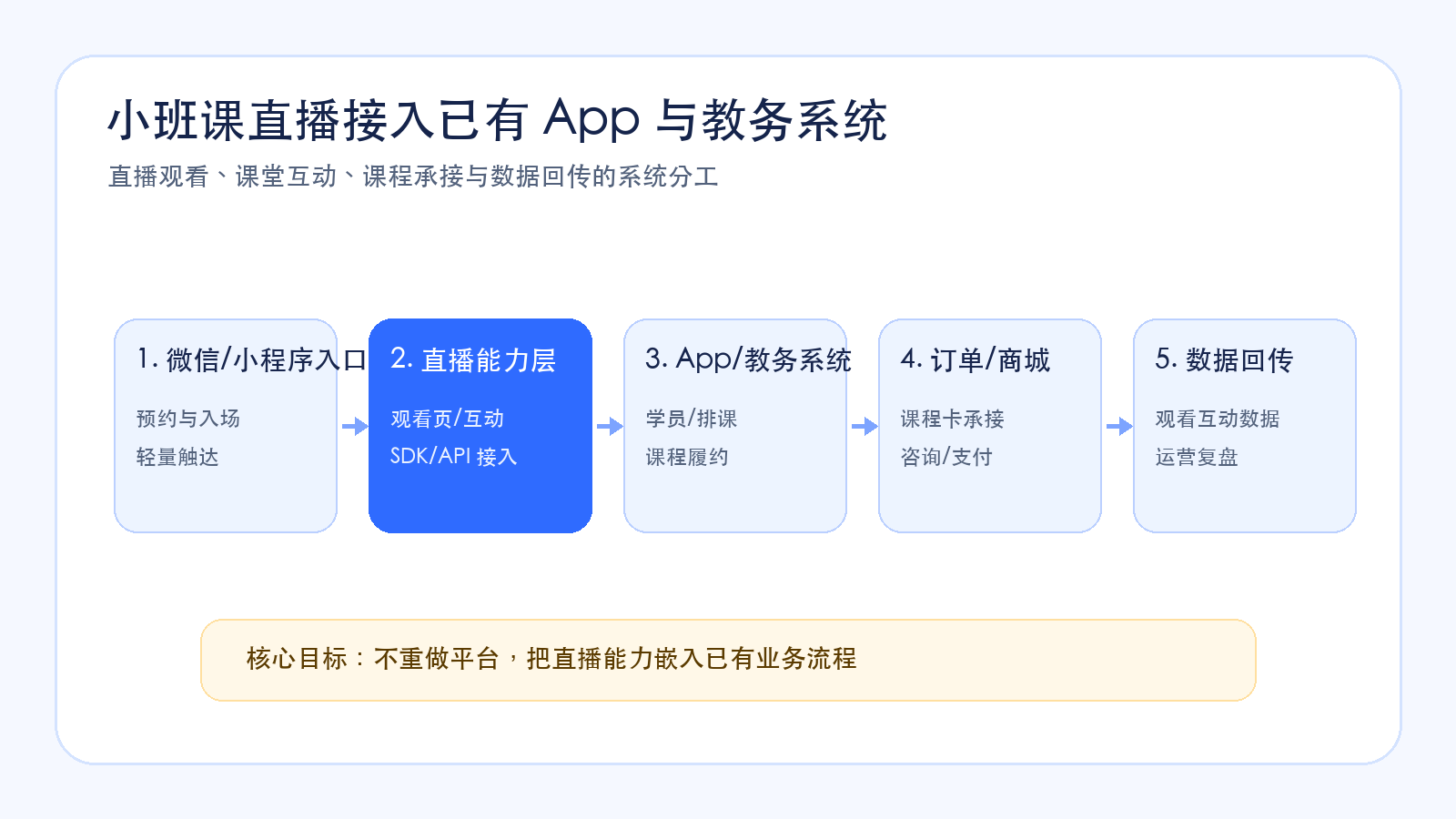
In short: the key to small-class live system integration is not rebuilding everything, but clarifying responsibilities. WeChat and mini programs carry lightweight entry, live SDKs and APIs carry viewing and interaction, Apps and academic systems carry students, scheduling, and fulfillment, order systems carry payment and course purchase, and data feedback supports after-class review and operational follow-up.
01 Why Is It Not Recommended to Rebuild a Complete Platform?
Existing systems in education institutions usually carry many business rules.
An App may carry long-term learning entry. An academic system may manage students, classes, instructors, and schedules. A store may manage course products and pricing. An order system may manage payment and fulfillment status. A customer operation system may record advisor follow-up.
If a new platform is built only for small-class live streaming, two problems can appear.
First, business processes can become fragmented. Users watch courses in the new live platform, but student information, orders, and after-class services remain in existing systems, forcing operations teams to switch back and forth.
Second, data can become scattered. Viewing, interaction, and course intent data generated in the live room become hard to use if they cannot return to existing systems.
Therefore, for institutions with existing business systems, small-class live streaming is more suitable as “capability integration” rather than “platform replacement”.
02 Frontend Entry: How Should WeChat, Mini Program, and App Work Together?
Small-class live streaming can have multiple frontend entries.
If users mainly come from WeChat private-domain channels, the mini program can serve as a lightweight entry. Parents enter the live room from WeChat groups, enterprise WeChat, official accounts, or mini program messages, then complete reservation, viewing, interaction, and course conversion.
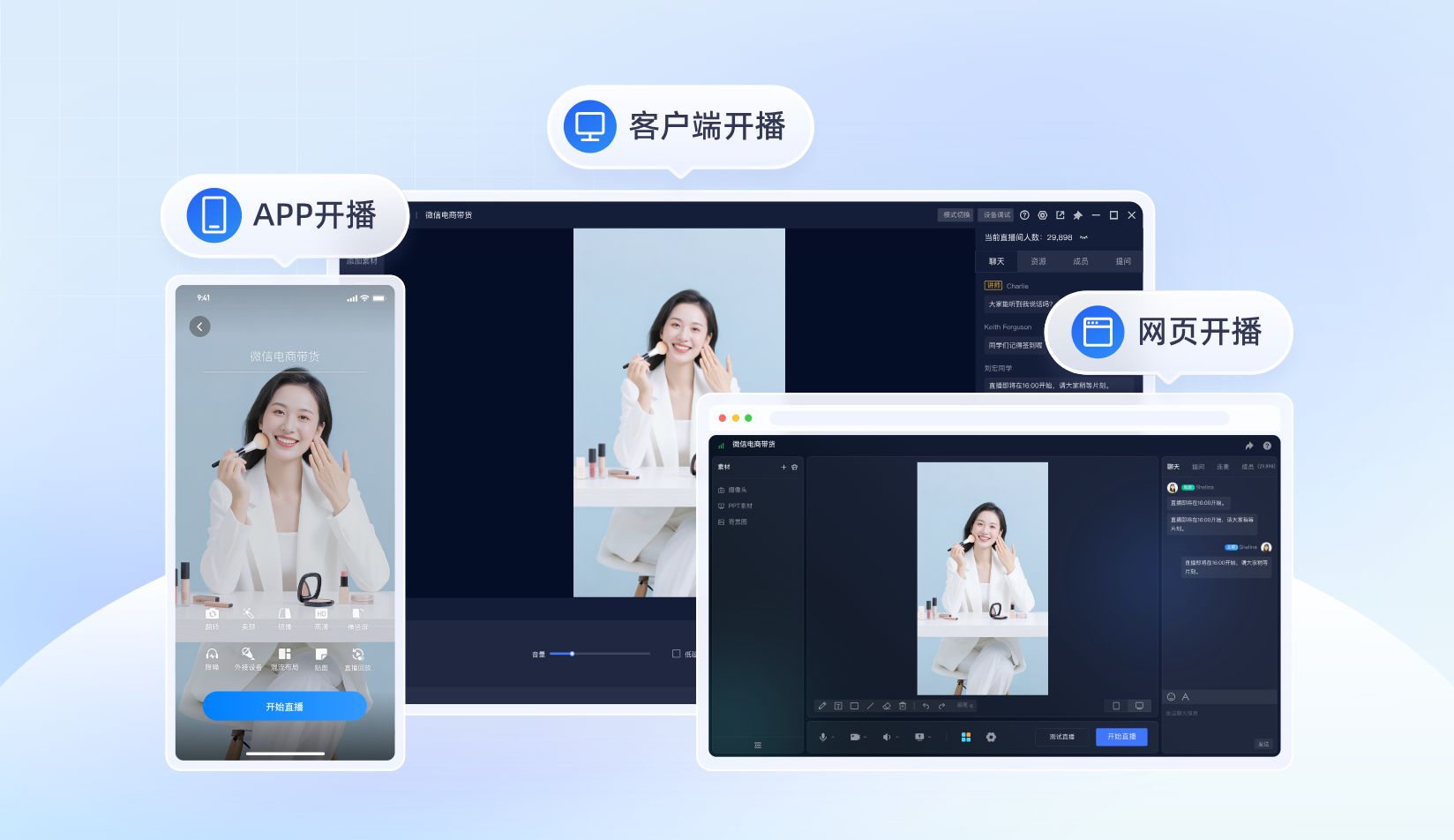
If the institution already has an App, the App can continue to carry long-term learning, course schedules, learning materials, homework, and review content. The live viewing page can be embedded in the App, while the mini program can carry WeChat private-domain traffic. These two entries do not conflict.
The key is to avoid forcing users to jump repeatedly between entries.
For example, WeChat private-domain users can first enter the live room through a mini program, complete viewing and consultation, while users already learning inside the App can enter live classes through the App. After-class learning and fulfillment can still return to the existing learning system.
03 Live Capability Layer: How Should SDKs, Viewing Pages, and Interaction Be Integrated?
The live capability layer mainly handles three things: viewing, interaction, and data.
The viewing layer needs to support live playback, replay, access across different terminals, and stable viewing experience. In mini program scenarios, institutions also need to choose the right player or viewing page solution according to their mini program qualifications, player capabilities, and technology stack.
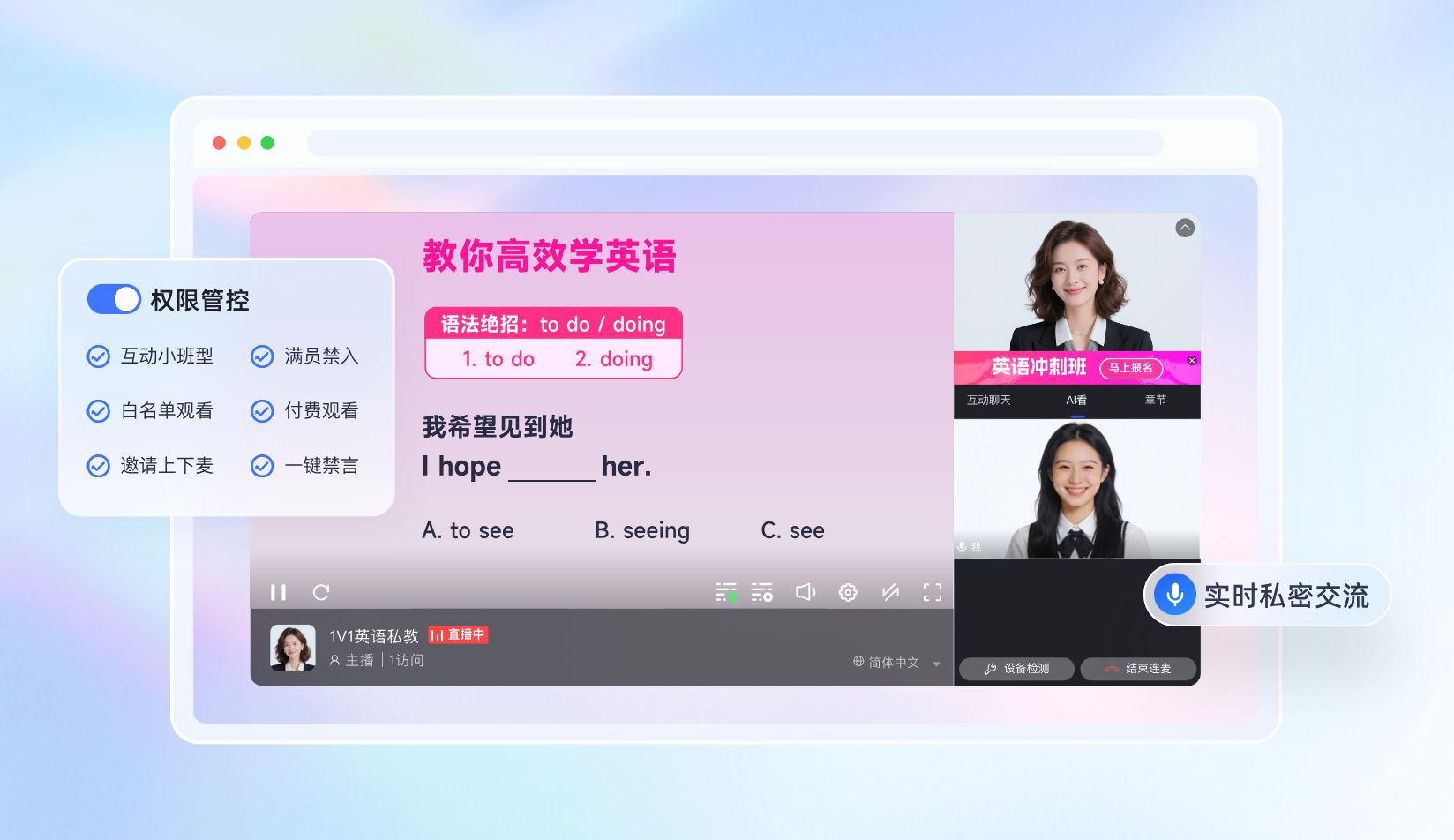
The interaction layer needs to support classroom features needed by small classes, such as comments, Q&A, hand raising, co-hosting, courseware display, and material delivery, so the online classroom is not just one-way viewing.
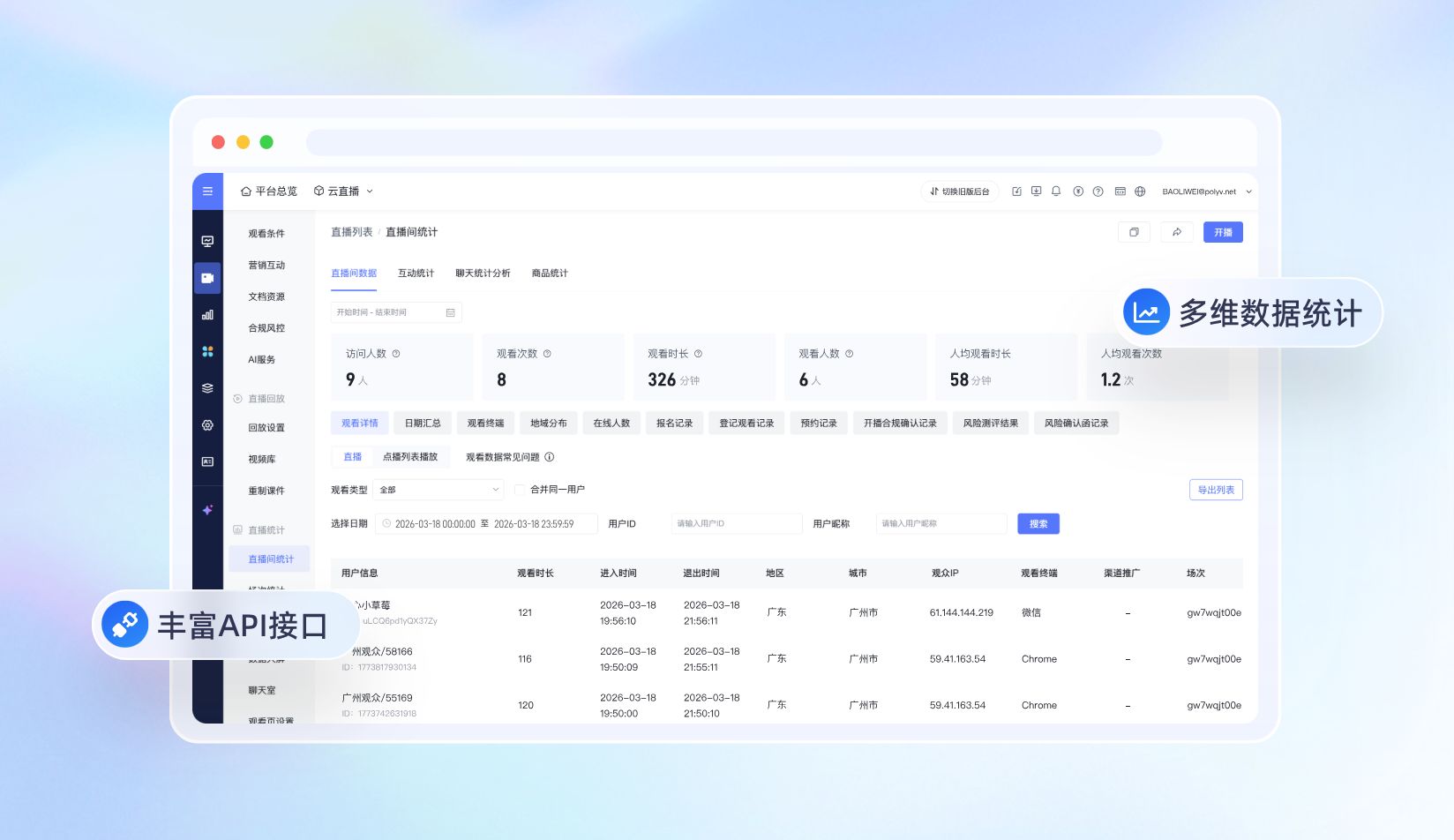
The data layer needs to record reservation, entry, viewing duration, interaction behavior, course card clicks, and follow-up conversion actions, providing a basis for subsequent operations.
For integration, live SDK, Web viewing page SDK, Web interaction receiving SDK, player capabilities, and APIs can help institutions embed live streaming capabilities into existing Apps, mini programs, or business systems instead of building an isolated live streaming platform.
04 What Should Academic and Order Systems Continue to Handle?
Small-class live streaming should not replace the academic system.
Academic systems are better suited to continue managing students, classes, instructor scheduling, timetables, learning materials, after-class homework, and service fulfillment. The live streaming system should open the classroom and record viewing and interaction data.
The same applies to order systems.
Course products, pricing, discounts, payment status, invoicing, and fulfillment are often already managed in the institution’s existing store or order system. Course cards in the live room can serve as conversion entries, guiding users to consultation, reservation, or payment, without placing every transaction rule inside the live system.
This division of responsibilities reduces duplicate construction and preserves the institution’s existing business assets.
05 How Should Data Feedback Be Designed to Avoid Data Silos?
The key to small-class live system integration is data feedback.
The live room generates many high-value behaviors: who reserved the class, who entered the live room, who watched key content, who participated in interaction, who clicked course cards, who entered consultation or payment, and who needs class-start service after purchase.
If these data remain only in the live backend, they are difficult to use in operations.
A more reasonable approach is to return viewing, interaction, course card clicks, consultation, and payment status to customer operation systems, order systems, academic systems, or dashboards through APIs or business workflows.
In this way, advisors can know who needs follow-up, instructors can see who participated actively, academic teams can serve purchased students, and operations teams can review the conversion path of each live session.
06 How Can POLYV Support System Integration?
For education institutions that already have Apps, mini programs, and academic systems, POLYV can provide live viewing, classroom interaction, course or product recommendation, data statistics, and integration capabilities, helping institutions embed small-class live streaming into existing business processes.
In mini program scenarios, POLYV supports native WeChat mini program integration as well as uni-app framework integration. Customers can choose among the Polyv viewing plugin, native live-player, and video player according to their mini program qualifications, player capabilities, and technology stack.
In App and Web scenarios, institutions can combine live SDK, Web viewing page SDK, Web interaction receiving SDK, player capabilities, and APIs to integrate viewing pages, interaction, course cards, payment jumps, and data feedback into existing systems.
In other words, POLYV is more suitable as the small-class live capability layer, helping institutions add online classroom and private-domain conversion capabilities without rebuilding their platforms.
FAQ
1. If an institution already has an App, does it still need mini program live streaming?
If users mainly come from WeChat private-domain channels, mini program live streaming can serve as a lightweight entry, while the App continues to carry long-term learning and fulfillment. The two can work together and do not necessarily replace each other.
2. Does the live system need to take over payment and orders?
Not necessarily. Standardized courses can carry payment inside the live room, while high-ticket courses can first carry consultation or reservation. Orders, pricing, and fulfillment can still be handled by the institution’s existing store or order system.
3. What is most easily overlooked in system integration?
Data feedback. Embedding the live video is not enough. Viewing, interaction, course card clicks, and purchase status need to return to operations, order, or academic systems, so follow-up service can continue.
About POLYV
POLYV is a leading enterprise-grade video SaaS brand. From 2020 to 2025, POLYV ranked No. 1 on the Enterprise Live Streaming Service Provider Ranking for six consecutive years. Its core products and services include low-latency live streaming, video on demand, MR live streaming, digital humans, and live streaming studios, providing enterprises with integrated services such as private-domain video technology and platforms, content operations, and live streaming operations and execution for digital transformation.
Since its founding in 2013, POLYV has served the CCTV Spring Festival Gala live broadcast for six consecutive years. It has also provided video live streaming systems and services for large enterprises and financial institutions, including China Construction Bank, China Everbright Bank, Bank of Ningbo, Kingdee, Tencent, Huawei, iFLYTEK, Midea, and NetEase.