
A Live Demo Platform for Enterprise Software: Content Encryption, Identity Authorization, External Invitations, and Trial Applications
Plan software demos with controlled access, private questions, protected recordings, and clear trial applications using POLYV and your existing business systems.
Enterprise software demonstrations bring together business managers, technical evaluators, and partners. They need to see how a real workflow operates and understand interfaces, permissions, and deployment conditions. The software vendor must make external participation convenient while controlling access to unreleased features, business data, and replay content.
A suitable platform combines identity authorization, video encryption, questions, and trial entry points. POLYV Cloud Live offers viewing conditions and interaction capabilities for invited demonstrations. Recordings can be managed through Cloud VOD and PlaySafe® video copyright protection. A card can link to the vendor’s trial application page, while the vendor remains responsible for eligibility, account creation, and trial support.
01 Match the Demonstration to Content Sensitivity
Public demonstrations, targeted evaluations, and formal trials require different levels of detail. A public event explains a typical workflow and product value. A targeted session can discuss interfaces, configuration, and implementation. A trial moves into validation against the customer’s own needs.
For example, a work-order demonstration can show submission, assignment, processing, and review, including the information visible to each role. Replace real customer structures and records with de-identified examples. Reserve unreleased functionality or customer-specific details for appropriately restricted sessions. Content control begins in the demonstration environment rather than relying entirely on viewer access controls.
Build the script around business tasks, with inputs, actions, and outcomes. Business participants can assess the workflow, while technical participants identify integration and permission requirements. A tour of menus alone shows available functions without establishing business fit.
02 Make External Access Convenient and Controlled
External customers are not employees of the vendor. Requiring an internal staff login creates an unnecessary obstacle. POLYV offers registration approval, allowlists, and external authorization paths suited to different audiences and account systems.
For first-time participants without customer accounts, collect the required registration details and approve access. For a known invitee list, configure an allowlist and use the documented dedicated viewing links, delivered through existing email or WeCom channels. Treat dedicated links as access credentials and explain their intended recipient and use.
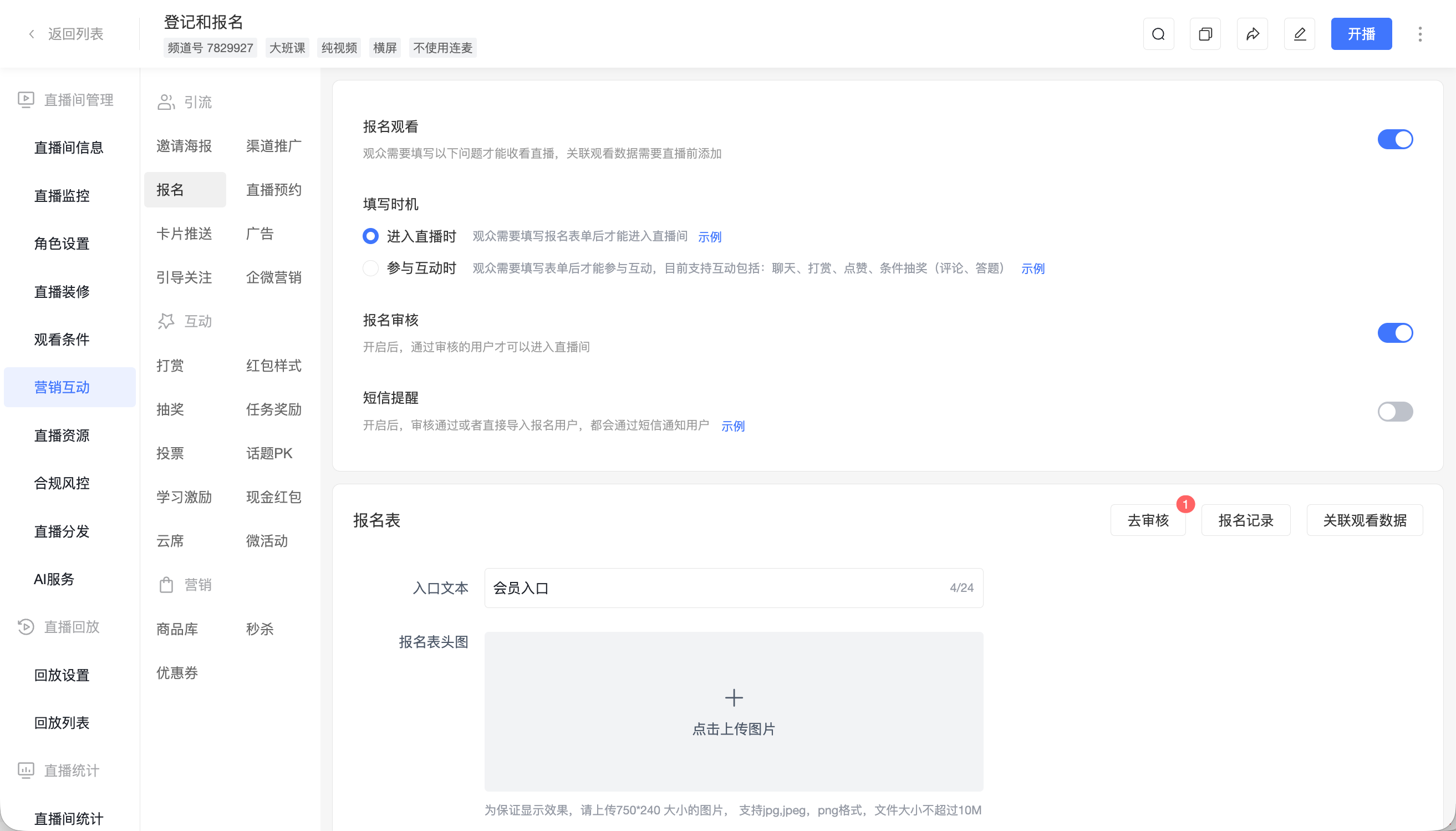
*Figure 1: Registration information and approval help manage invited participants. Source: POLYV Help Center.*
Companies with a customer portal can evaluate external authorization. The customer enters through the company’s system, with required identity and signature parameters generated server-side. POLYV checks the parameters and calls the configured authorization endpoint; the customer system performs its own eligibility check and returns identity information. Keep secrets and authorization logic on the server, and let the business system decide who may attend each session.
These mechanisms serve different purposes. Registration approval screens participation eligibility, account authorization connects existing identities, and encryption protects video content. Validate each separately rather than treating a registration form as complete identity authorization.
03 Protect Content and Authorize Replays in Layers
Sensitive information can appear in the video, shared desktop, browser tabs, notification pop-ups, or demonstration account. Prepare a dedicated environment, remove real customer data, suppress unrelated notifications, and use permissions appropriate to the demonstration.
POLYV Cloud Live provides stream encryption and viewing controls. For recorded demonstrations, POLYV PlaySafe® and Cloud VOD provide capabilities including video encryption, authorized playback, anti-hotlinking, and watermarks. Encryption raises the barrier to unauthorized acquisition; authorization controls access; domain restrictions constrain playback locations; watermarks can assist tracing.
These measures reduce the risk of unauthorized downloading, redistribution, and screen recording. Account sharing, external cameras, and internal forwarding still require account rules, content classification, and authorization management. Combine technical protection with operating procedures.
Review the replay separately after the event. Live Q&A can contain unpublished commercial terms, customer architecture, or personal information. Material suitable for a live conversation is not automatically suitable for unrestricted recording distribution. Place approved general demonstrations in a product content center and distribute targeted recordings within their agreed audience and review schedule.
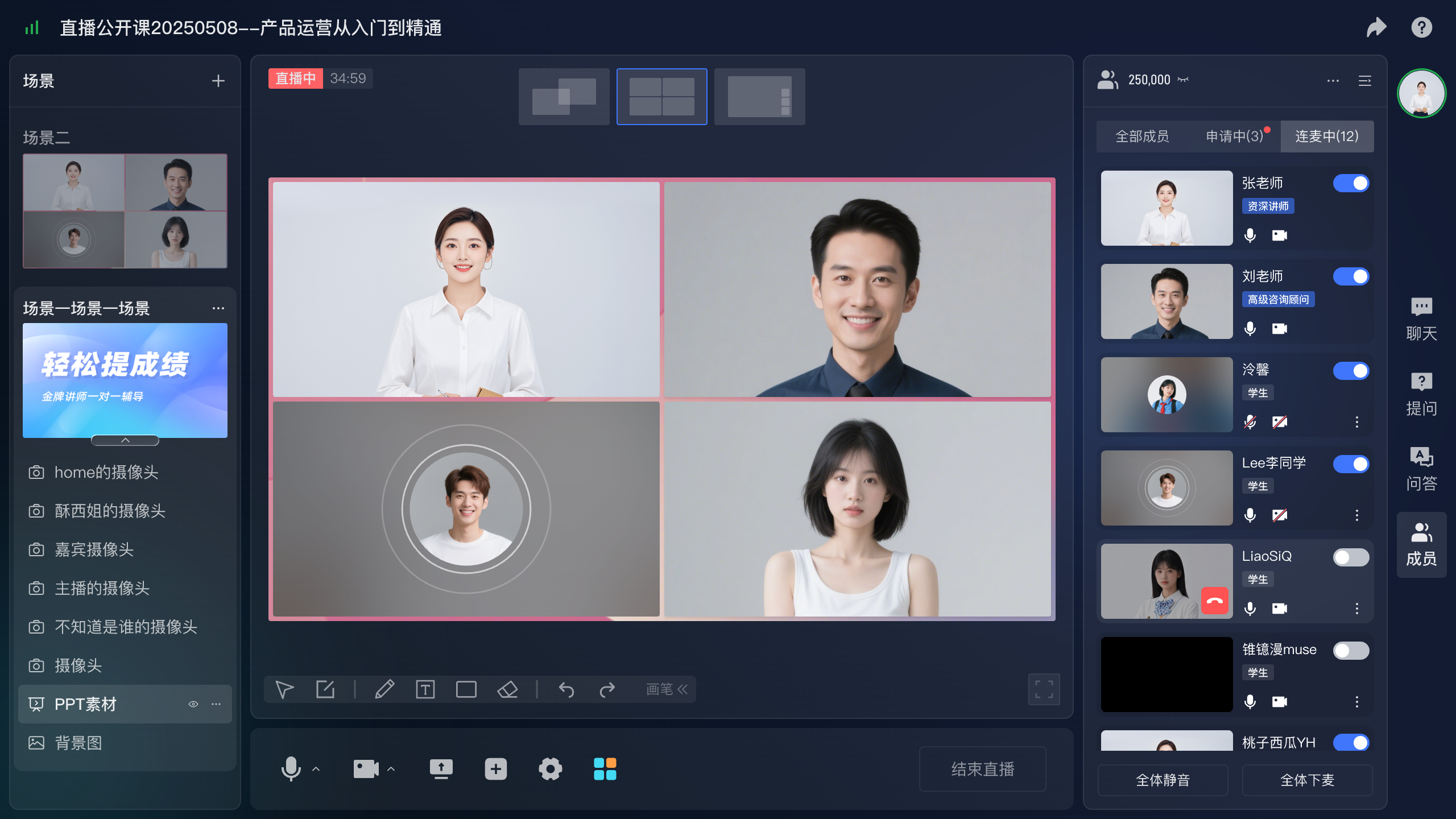
*Figure 2: Multi-person interaction and guest-management interface illustration showing role and audio/video controls during a demonstration.*
04 Collect Questions Without Unnecessary Public Exposure
Software-demo questions are often specific: can data be isolated by department, or how must an existing interface change? POLYV’s separate question function sends questions to the presenter, assistant, or guest. Its official documentation states that these submissions are not displayed like ordinary public chat messages by default.
An operator can group questions, identify common themes, and ask the presenter to answer generally relevant points. Move customer-specific environment questions into follow-up. This selection is a host or assistant workflow; public-chat review, when required, must be configured separately through the corresponding controls.
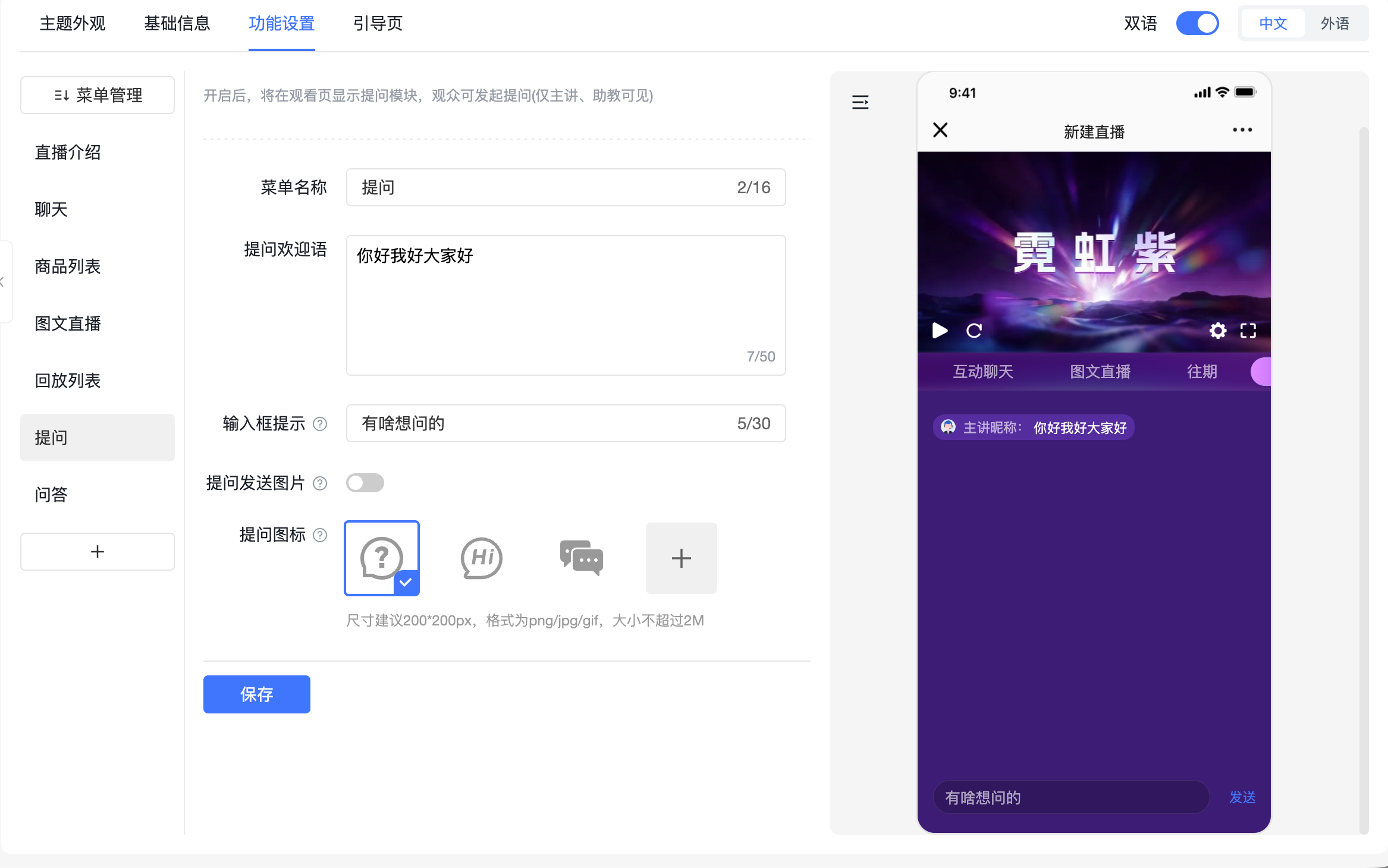
*Figure 3: The separate question entry collects submissions for presenters, assistants, or guests. Source: POLYV Help Center.*
Some targeted sessions also require attendees to be unable to see one another’s identities. Turn that requirement into specific acceptance checks: attendee lists, names, avatars, public chat, interaction results, and question visibility. Configure the selected viewing page and test it with two audience accounts. A private question channel alone does not define the visibility of every other page element.
05 Explain What a Trial Applicant Will Receive
Introduce the trial application after demonstrating the relevant workflow. The audience can then judge whether it is worth investing time in validation. POLYV regular cards can link to the vendor’s application page and provide click records. The application page collects needs, while the business system records submission and processing.
Ask about the workflow to validate, user roles, existing environment, and contact details. For a standard SaaS product, explain the trial scope and account activation process. For a product requiring deployment or technical collaboration, an “Apply for technical evaluation” entry may be more appropriate: agree on validation conditions before arranging an environment.
After approval, give the customer a concrete task—for example, completing an approval workflow with de-identified samples and checking role permissions. First login, task completion, and a request for a next step are more informative than the number of accounts issued. The software product or business system supplies those results, while livestream data adds participation context.
06 Validate the Workflow with Real Roles
Test four roles: host, demonstration guest, approved viewer, and unapproved viewer. The host checks controls and questions; the guest checks sharing and readability; the approved viewer checks access, viewing, and application; the unapproved viewer checks refusal or application guidance.
Continue beyond submission: verify that the request is recorded, a responsible person receives it, and confirmation is delivered. Check replay de-identification, viewing scope, and version accuracy. Reassess recordings after product changes and replace outdated demonstrations.
Agree on interruption handling in advance. The host explains progress, the demonstrator restores the environment, and the assistant retains unanswered questions. For operations with external dependencies, prepare backup material that has passed the same content review. Clearly describe the presentation format so the discussion remains accurate.
07 Frequently Asked Questions
7.1 Can customers without a company account attend?
Use registration approval or an allowlist where appropriate. Companies with a customer portal can evaluate external authorization against their existing identity system.
7.2 Is demonstration-data review still necessary with encryption?
Yes. Encryption protects access and distribution. Demonstration permissions and information visible on screen are controlled through preparation and content review.
7.3 Does the live platform automatically create trial accounts?
Trial accounts belong to the software vendor’s product or business system. Automation requires integration that receives the request, applies approval rules, and calls the relevant provisioning interface.
08 About POLYV
POLYV provides enterprise live streaming, viewing authorization, questions, Cloud VOD, and PlaySafe® video copyright protection. Software vendors can start with one targeted demonstration and validate access eligibility, content boundaries, consultation entry points, and trial handoff together.