
B2B Webinar Tools for Ongoing Lead Generation: Live Sessions, Replays, Short Videos, and Topic Hubs
Reuse B2B webinar content through edited replays, focused clips, and topic hubs. Plan POLYV viewing experiences, consultation entry points, measurement, and maintenance.
A B2B company may invest in experts, content, and promotion for a webinar, only to retain a single long recording afterward. People who missed the live session cannot easily tell which section answers their question. Evaluators struggle to locate technical explanations. The content exists, but the route into it is unclear.
Ongoing lead generation requires webinar content that is easy to find, understand, and act on. POLYV Cloud Live supports presentations and interaction; Cloud VOD provides recording management, cloud editing, and playback; and the aggregation page can organize live streams, replays, on-demand videos, and articles. The operating team selects content, produces short videos, maintains topic pages, and connects appropriate resource or consultation entry points.
01 Plan Reusable Content Before Going Live
Replay quality depends partly on the original session structure. Long introductions, unclear topic boundaries, and references that depend on earlier discussion make clips difficult to understand independently. Break the agenda into complete questions, each with context, a judgment, an implementation approach, and applicable conditions.
For example, an equipment-maintenance webinar for manufacturers could separately explain how to collect fault records, assign maintenance work, and assess execution. Present and discuss those questions as distinct units. They can then support different content uses without requiring the entire session to be recorded again.
Agree on which materials can be distributed publicly and which belong in targeted conversations. Resolve the usage scope of images, customer information, and third-party materials during preparation. Assign an owner for accuracy and updates, including how long the content remains useful.
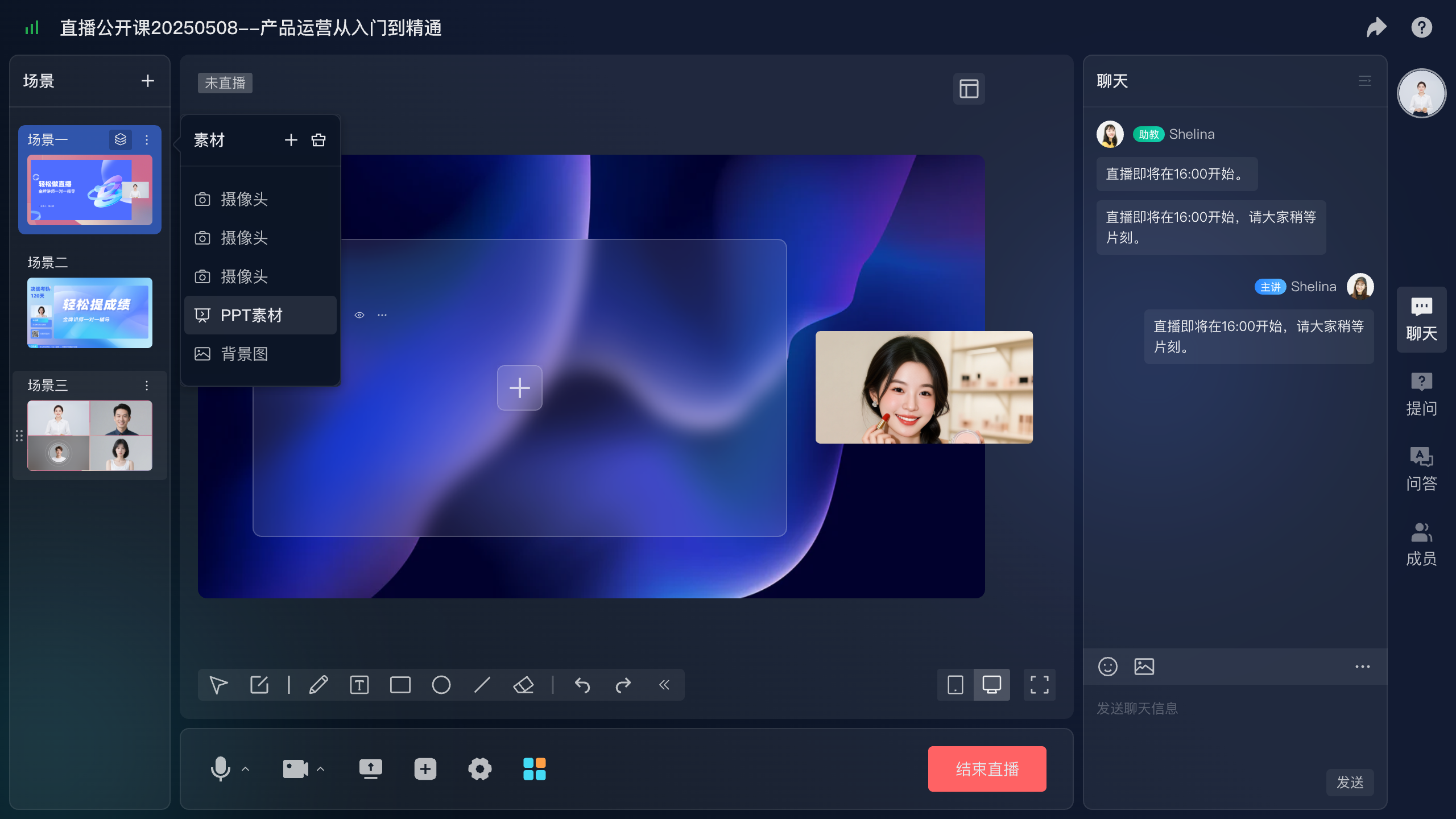
*Figure 1: Organizing scenes and materials around content units before broadcast gives later editing a clearer structure.*
02 Help Replay Viewers Find an Answer Quickly
The full recording preserves the discussion; a public replay should also respect viewing time. Remove waiting, technical adjustments, and repetitive explanations. Retain the problem context, important demonstrations, and useful Q&A. Add a clear introduction, chapter guidance, and intended audience on the surrounding page.
POLYV Cloud VOD provides video management, cloud editing, and playback for organizing recorded live content. Manage videos by topic, product area, and version, and publish suitable material through a stable entry point. If a complete record must be retained, distinguish the original recording from the external publication version.
Replays also need relevant next actions. An industry discussion can lead to a resource request, while a detailed demonstration can lead to a consultation. Configure the corresponding form or business link on the replay’s hosting page. If using a channel replay page, separately test registration, identity, and interaction settings in that viewing mode.
Do not assume that a card pushed live will automatically reappear at the same moment in a replay. Evergreen content benefits from a stable, clear page entry point that remains useful whenever someone watches.
03 Edit Short Videos Around Questions, Not Arbitrary Durations
A useful B2B short video answers one complete small question. It might explain why a project becomes difficult or show how a particular operation works. Let complexity determine length; preserve a coherent answer rather than force every clip into the same duration.
POLYV Cloud VOD includes cloud editing and intelligent video-processing capabilities as a tool foundation. Operators choose clip boundaries, verify subtitles and product names, and retain necessary qualifications. Business specialists should review automatically generated or assisted output, especially statements about versions, metrics, and product functionality.
A clip should have an explicit relationship to the longer resource. A video about cross-department approval delays should lead to the relevant workflow demonstration, not an unrelated event homepage. Consistent wording across the title, clip, and destination helps people continue their investigation.
The same material can be framed for different audiences. Business managers may focus on outcomes, while technical staff examine interfaces and permissions. Change the emphasis without removing conditions that make the explanation accurate.
04 Build a Topic Hub for Different Evaluation Stages
As the library grows, individual replay links become insufficient navigation. Organize materials into an updated entry point where customers can explore a problem at their own depth.
POLYV’s aggregation page can combine live streams, replays, VOD, and articles and connect subsequent business-service entry points. Teams can arrange sections around understanding the problem, examining an approach, watching a demonstration, and requesting discussion. This is more useful than listing videos by upload date alone.
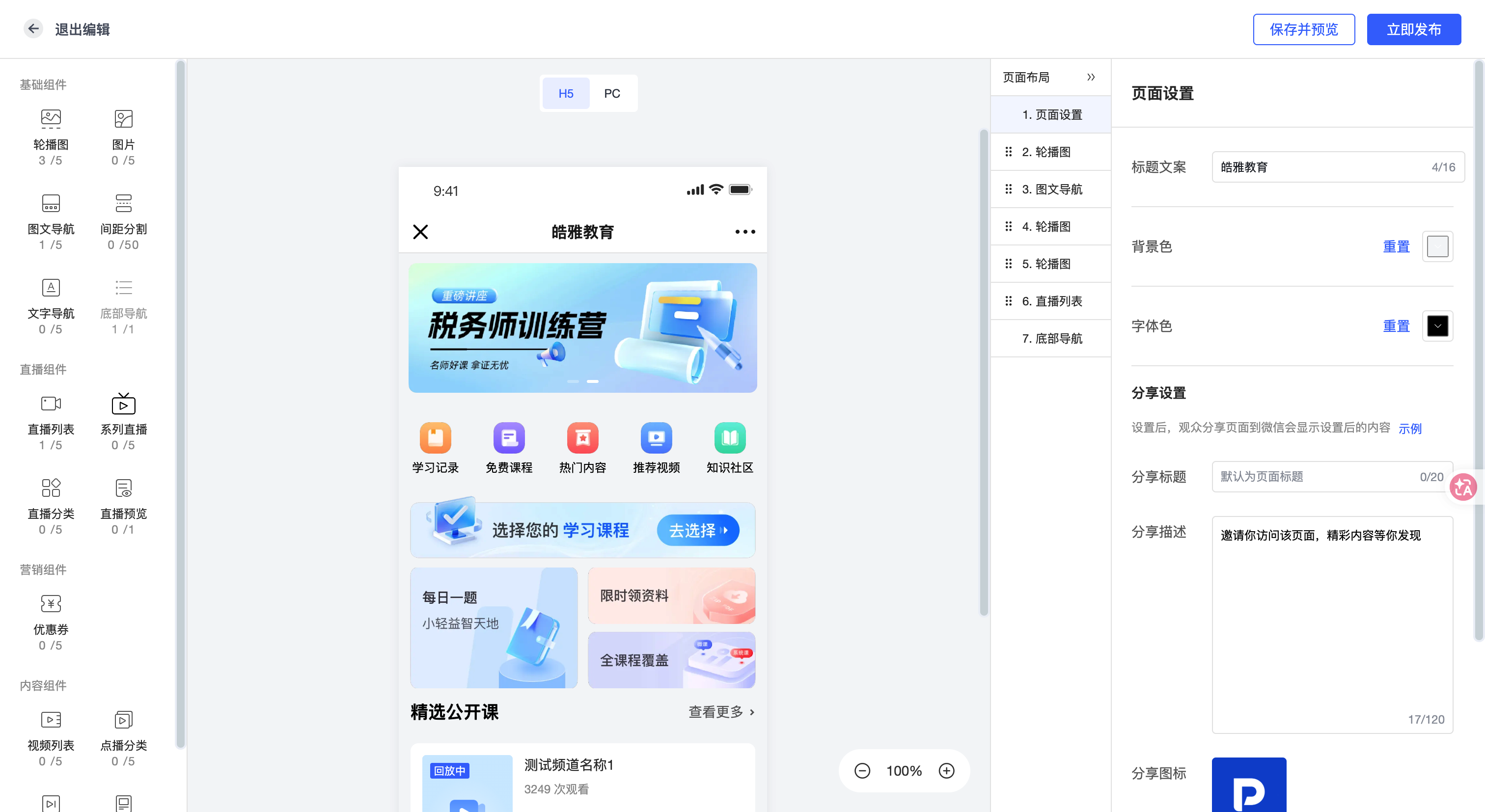
*Figure 2: The aggregation-page editor supports page, section, and content configuration. The image is an official template-interface illustration. Source: POLYV.*
For a business-process digitization topic, sections might include industry issues, workflow demonstrations, technical questions, and a discussion entry point. New visitors explore the background; active evaluators move to demonstrations; people with a defined need submit a question. Allow visitors to choose the appropriate depth rather than requiring one fixed sequence.
A topic hub can also become the stable home for a recurring series. Highlight the live event when it takes place, replace it with an edited replay afterward, and add explanations of new questions. The external link stays consistent while the material evolves, making it easier for sales to share something relevant.
05 Ask for Information at an Appropriate Point
Different content supports different collection requirements. A short explanation can introduce a problem, a detailed guide can support a resource request, and a targeted technical discussion can justify asking about the environment and intended use. Decide whether to use a form based on value, participation, and service needs.
In POLYV live scenarios, registration captures participation information and regular cards can link to resource or consultation pages. For VOD and topic content, configure business entry points according to the chosen page solution. When using an existing website form, the website or business system records submission and can be integrated with viewing data as needed.
Give each content unit a stable identifier and record its topic, original event, version, and intended action. Preserve source information on downstream consultation forms to understand which recordings or clips preceded a request. Test parameter transfer and cross-page identity association before launch.
06 Distinguish Popularity, Contribution, and Sales Outcomes
Viewing indicates content consumption. Consultation requests indicate willingness to discuss further. Subsequent business progress indicates fit. They are related but different outcomes.
POLYV viewing data supports filtering by live or replay viewing and includes dimensions such as viewing duration, page-stay duration, device, and channel. Distinguish actual playback from time spent on the page and fix the deduplication method and observation period. Interpret cross-date and cross-device totals according to the report definition rather than treating them automatically as unique customers.
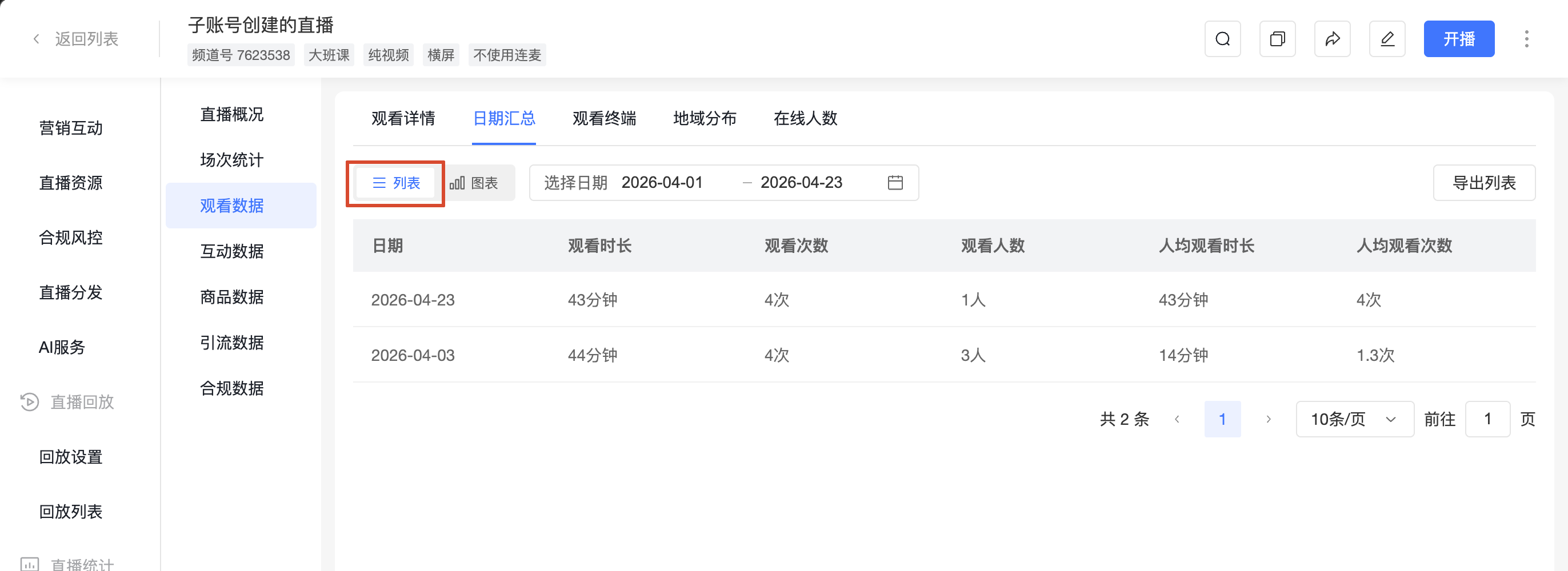
*Figure 3: Viewing reports support content analysis. Assess live and replay use separately under consistent definitions. Source: POLYV Help Center.*
A technical replay with a modest audience may be valuable if it repeatedly precedes substantive consultations. A widely viewed clip with few onward visits calls for checking the next-step wording and destination relevance. Evaluate content within the customer’s path.
One customer may encounter several events and resources. Record first source, subsequent participation, and consultation source separately and establish an attribution policy. Avoid assigning the full outcome to the last click. Participation records show where content was involved; business outcomes also depend on sales service and the customer’s decision process.
07 Assign Responsibility for Long-Term Accuracy
Ongoing acquisition requires maintenance. Interfaces, integration conditions, and service scope change. Record an owner, recording date, applicable version, and review schedule for each video. Detailed product demonstrations need particular attention.
For recordings restricted to selected customers, evaluate POLYV PlaySafe® video copyright protection and video encryption alongside authorized playback, anti-hotlinking, and watermarks. These measures reduce unauthorized downloading, redistribution, and screen-recording risks. Account rules and permitted-use boundaries remain necessary; video technology alone cannot eliminate external-camera capture.
Use unanswered customer questions to plan the next webinar. Live sessions generate discussion, replays preserve complete explanations, short videos provide accessible entry points, and topic hubs connect the material. Actual customer questions then guide updates to the library.
08 Frequently Asked Questions
8.1 Should the full recording be published immediately?
Review waiting segments, usage permissions, and sensitive information first. Manage the original record separately from the external replay when appropriate.
8.2 Is a shorter clip always better?
A clip should answer one question independently. Retain essential context and conditions, then adapt the length to its distribution location.
8.3 How can replay viewers request a consultation?
Provide a relevant entry point on the replay or topic page and record applications in the form or business system. Test the chosen channel replay’s registration and interaction settings before enabling them.
09 About POLYV
POLYV provides Cloud Live, Cloud VOD, cloud editing, and aggregation-page capabilities for live presentations and longer-term content operations. Start with one focused webinar, organize its replay and clips, build the destination page, and expand based on viewing and consultation feedback.