
Which WeChat Mini Program Live Streaming SDK Is Right for You? Polyv’s uni-app, Native, and WebView Options
Choose a Polyv Mini Program live viewing path by your existing codebase, the required live-room features, WeChat permissions, and the depth of membership and commerce integration.
When a business asks which WeChat Mini Program live streaming SDK to choose, the real question is broader than whether a video will play. The live room must fit an existing Mini Program, support viewing, chat, interactions, product discovery, and access rules, and hand users back to the business’s membership and commerce flows. Polyv offers three practical integration paths: a WebView viewing page, a native WeChat Mini Program viewing page, and a native viewing component for Mini Programs built with uni-app. The right path depends on the existing codebase, the level of customization, WeChat permissions, and how deeply the live room must connect to business systems.
Choose a WebView viewing page to launch a standard live room quickly. Choose the native viewing page SDK when in-app sharing, product navigation, and analytics need deeper integration. If the current Mini Program is built with uni-app, evaluate Polyv’s native component in the compiled
mp-weixinbuild. Test login, navigation, and playback on target devices for every path.
01 / Match the integration path to the existing Mini Program
Polyv’s Mini Program solution guide covers WebView H5 viewing pages and native viewing page SDK options. Before choosing an implementation, identify the existing framework, whether a standard live room is acceptable, and which membership or shopping steps must remain inside the company’s own Mini Program.
| Path | Best fit | What the business implements |
|---|---|---|
| WebView viewing page | A quick launch with a standard live room, or an existing H5 delivery team | Business domains, entry points, login handoff, and navigation |
| Native WeChat Mini Program viewing page SDK | A live room closely connected to native sharing, interactions, and commerce pages | Native page integration, player selection, and business events |
| uni-app Mini Program component | An existing uni-app project that needs native viewing capabilities in its WeChat build | wxcomponents setup and host page event handling in mp-weixin |
The WebView path has more than one implementation. A Mini Program can open Polyv’s standard SaaS/H5 viewing page directly. A business can first open its own H5 entry page to check membership and campaign parameters, then enter the standard viewing page. For a highly customized H5 live room, the business builds and hosts its own H5 page and integrates Polyv’s Web viewing page SDK inside that page.
This distinction matters: a WebView opens a page, not an SDK. The Web SDK must run in an H5 page before the Mini Program opens it. Embedding a standard viewing page inside another H5 page also needs a separate check for embedding permission, cross-origin behavior, full-screen playback, sharing, and message exchange. Similarly, the three paths in this article are integration approaches rather than three interchangeable SDK packages.
List four user actions before development starts: how a viewer enters the live room, how the viewer is identified, what interaction is needed during viewing, and where a product click goes. Those answers make it easier to choose between a standard WebView page and a native integration.
02 / How native and uni-app integration work
2.1 / Put the viewing page inside the existing business journey
The native viewing page SDK is designed for teams that want playback, chat, interactions, products, and viewing conditions in a Mini Program experience. The business still owns its member rules, product catalog, routing, and commerce transactions. It should define which events cross from the viewing page into its own pages before implementation.
Polyv’s uni-app WeChat Mini Program integration guide applies to uni-app projects compiled to mp-weixin. Developers place Polyv’s native custom component package under wxcomponents, register it on the page, mount polyv-watch-room, and pass the live channel ID. The component manages loading, authorization, viewing, and error views. The host page handles its own routing, login, sharing, and analytics.
A membership home page can link to an upcoming stream, and a product page can link to a live demonstration. When a viewer leaves the live room to consult or purchase, the business’s own pages continue the journey. The division of responsibility is clear: Polyv provides the viewing capability; the existing business system controls membership entitlements and transaction rules.

The uni-app component described here is specific to the WeChat Mini Program build. An App, an H5 site, or another Mini Program platform needs its corresponding integration path and separate feature testing. Polyv’s developer center is the starting point for those choices.
2.2 / Check permissions before choosing the player
Prepare a Polyv account, a live channel, and a test channel ID. Then check the business’s own WeChat Mini Program AppID, verified entity, service category, plugin authorization, component permissions, business domains, and privacy disclosures. The player choice affects the implementation. A project eligible for the “Polyv Viewing” plugin can evaluate that path after plugin authorization. A path based on live-player requires the relevant WeChat component permission. A video path does not depend on live-player permission, but its available features must be checked against the actual use case. Co-hosting also requires the appropriate live-pusher, camera, and microphone conditions. WeChat’s current review and permissions determine what can go live.
In a uni-app project, configure the mp-weixin section of manifest.json, register the viewing component in pages.json, and pass the channel configuration to the mounted page as described in Polyv’s guide. Keep long-lived secrets out of Mini Program code and page parameters; use a business server for signing and authorization. Map business campaign IDs to channel IDs so operations teams can change events without rewriting page logic.
2.3 / Return business actions to the host Mini Program
Products, advertisements, or external links in the viewing component may need to open pages owned by the business. The host page handles the relevant component events and applies its own routing rules. When a viewing condition requires login, the host should invoke the company’s login flow and return the user to the live journey. Mount the viewing component once; recreating it on every internal view change can disturb playback or chat state.
Test the full path: enter the live room, view and interact, open a business page, return, leave, and enter again. A player that starts successfully is only one part of that test.
03 / Evaluate picture-in-picture with the actual viewing path
Viewers may switch pages or temporarily leave WeChat during a live session. Polyv documents a Mini Program background picture-in-picture integration that can be evaluated when WeChat and device conditions are met. The native viewing path requests background playback from the active native player. The Mini Program WebView route uses a native intermediary page for live playback. The official WebView description covers live streams; it should not be extended to replays or on-demand video without a separate supported path.
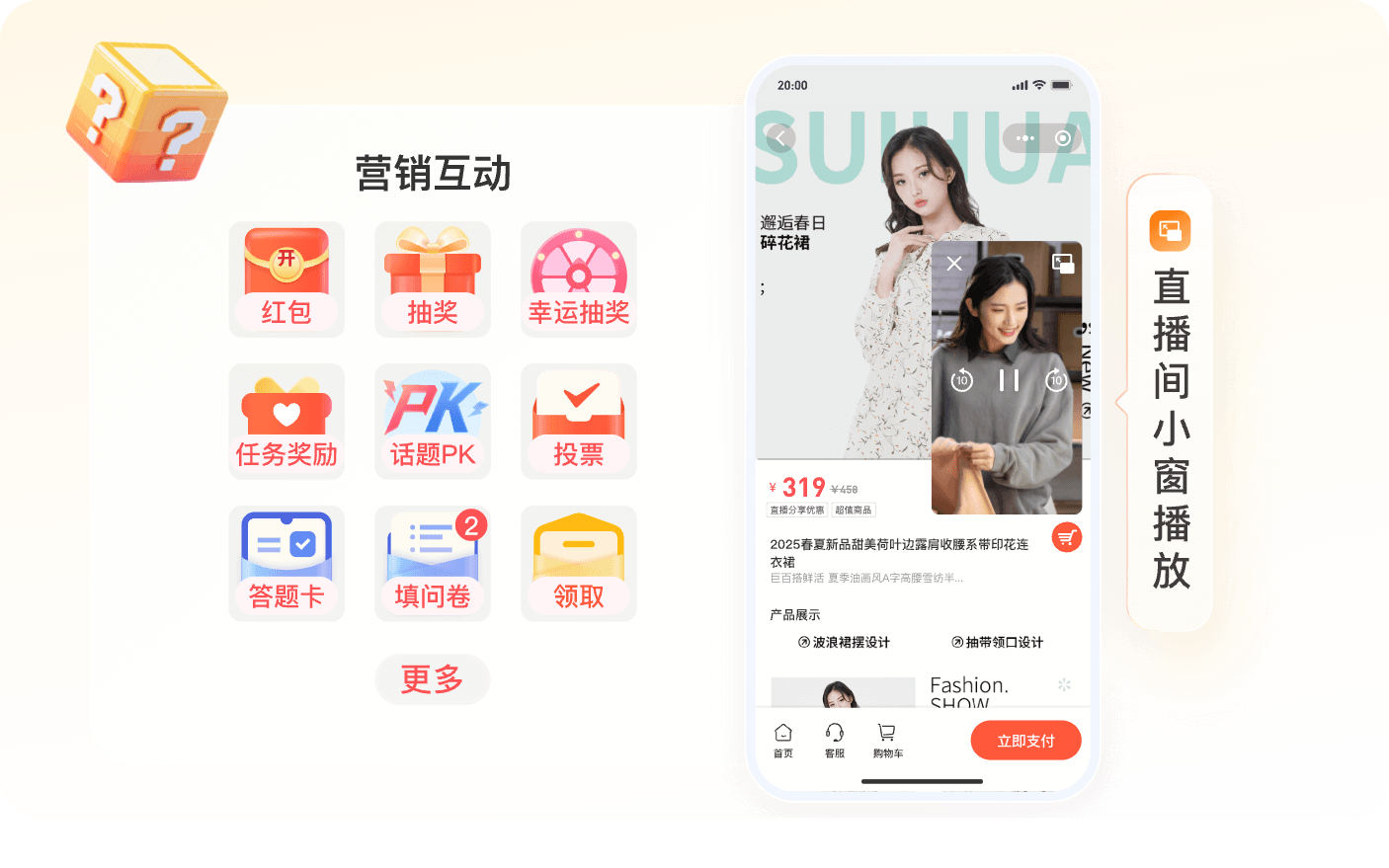
The result depends on the WeChat base library and operating system version, service category, account settings, player state, and integration path. Test on the target iOS and Android devices. Also verify whether navigation to a product page unloads the original player and what happens when the viewer returns; an image of picture-in-picture is not a substitute for that acceptance test.
04 / A four-step selection and acceptance checklist
First, draw the route from the Mini Program home, campaign, member, or product page into the live room. Compare WebView, native, and uni-app by development effort and the business actions each can hand back to the host. If the requirement is only to play a video, assess the player-specific options separately.
Second, validate identity and viewing conditions. Test channel configuration, login handoff, sharing, chat, and interactions. If the business needs to connect viewers to members, define identifiers and authorization rules before launch.
Third, validate commerce navigation. Product cards and consultation links should open the correct business pages, retaining channel, campaign, and product source information. The system responsible for transactions continues to own orders, payment, inventory, and after-sales service.
Fourth, repeat the journey on devices under realistic network conditions. Check startup, return navigation, component teardown and re-entry, expired login, picture-in-picture, and differences between iOS and Android. Developer tool preview cannot replace device acceptance testing.
Frequently asked questions
Can an existing native WeChat Mini Program use the uni-app component? The cited uni-app integration guide targets projects compiled to mp-weixin. A native WeChat Mini Program should evaluate the native viewing page SDK, player components, or WebView path.
Will member and order data synchronize automatically after integration? No automatic cross-system synchronization should be assumed. The business must define identity mapping, product master data, order ownership, APIs, and event responsibilities.
Can a WebView directly load Polyv’s Web viewing page SDK? A WebView loads a page. To use the Web SDK, integrate it in a business-owned H5 page and then open that page in the Mini Program.
What should “the right SDK” be judged against? Check the required viewing features, current codebase, WeChat permissions, product navigation, data attribution, and device acceptance criteria. Then evaluate whether the proposed Polyv path covers them.
WeChat Mini Program livestream integration series
Follow these 13 task-focused guides from preparation through implementation, testing and troubleshooting.
Preparation and route selection
- Before Integrating Livestreaming into a WeChat Mini Program: AppID, Categories, Domains, Channels and Permissions
- Choosing a WeChat Mini Program Livestream Player: Plugin, live-player and video Permission Boundaries
- WebView vs Native Mini Program Viewing Pages: Login, Sharing, Product Navigation and Maintenance
Implementation
- Integrating a POLYV Viewing Room into a uni-app Mini Program: From wxcomponents to Device Testing
- Embedding a Livestream Room in a WeChat Mini Program WebView: Standard Page, Custom H5 and Web SDK
- Native WeChat Mini Program vs uni-app: What Development Work Does Livestream Integration Require?
Acceptance and launch
- What Should a WeChat Mini Program Livestream POC Test? A Script for Live, Replay, Chat, Products and Login
- How to Test Mini Program Small-Window Playback on Native and WebView Routes Across iOS and Android
- A WeChat Mini Program Livestream Launch Checklist: Shares, Product Routes, Analytics and Return Paths
Industry scenarios
- How a Chain Retailer Can Add Livestreaming to an Existing WeChat Member Mini Program
- Adding Live Classes and Replay to an Existing uni-app Course Mini Program
Misconceptions and troubleshooting
- Can a WebView Directly Embed a Livestream SDK? Three Mini Program Viewing-Page Misconceptions
- Livestream Plays but the Product Will Not Open: Troubleshooting WebView Domains and Mini Program Navigation
For Chinese readers, see the Chinese overview.
About Polyv
Polyv provides enterprise live streaming, Mini Program viewing pages, and SDK/API integration paths. A business with an existing WeChat Mini Program can choose a viewing page by its framework, WeChat permissions, and desired business journey, then connect it to its current membership, product, and consultation flows.