
Which Mini Program Live Commerce SDK Should You Choose? Connecting Members, Products, and Orders with Polyv
Compare Polyv WebView, native, and uni-app Mini Program viewing paths, then connect member identity, product data, order ownership, and attribution to your existing store.
For a business with an existing membership program and online store, the best Mini Program live commerce integration is not determined by playback alone. A complete viewing page must identify the viewer, display relevant products, route a purchase to the right page, and preserve enough information to connect viewing, clicks, and paid orders. Polyv offers WebView, native WeChat Mini Program, and uni-app Mini Program paths. Each gives the business a different level of control over login, product navigation, and analytics. Define the systems that own member identity, product master data, and orders before choosing the viewing path.
Start with shared member, channel, product, and order identifiers. A WebView viewing page can help validate a standard live room quickly. A native viewing page SDK is a stronger candidate when login, product navigation, sharing, and analytics need deep in-app integration. A uni-app project can mount Polyv’s native viewing component in its
mp-weixinbuild. Always distinguish a product click from an order and a paid transaction.
01 / Draw the journey from viewing to purchase
A live commerce session has a series of separate actions: a member enters from a Mini Program home page, community, or campaign; the viewing page recognizes or requests login; the host presents a product; the viewer opens a product or checkout page; and operations teams review viewing, clicks, and orders afterward. Decide which system owns each action before development starts.
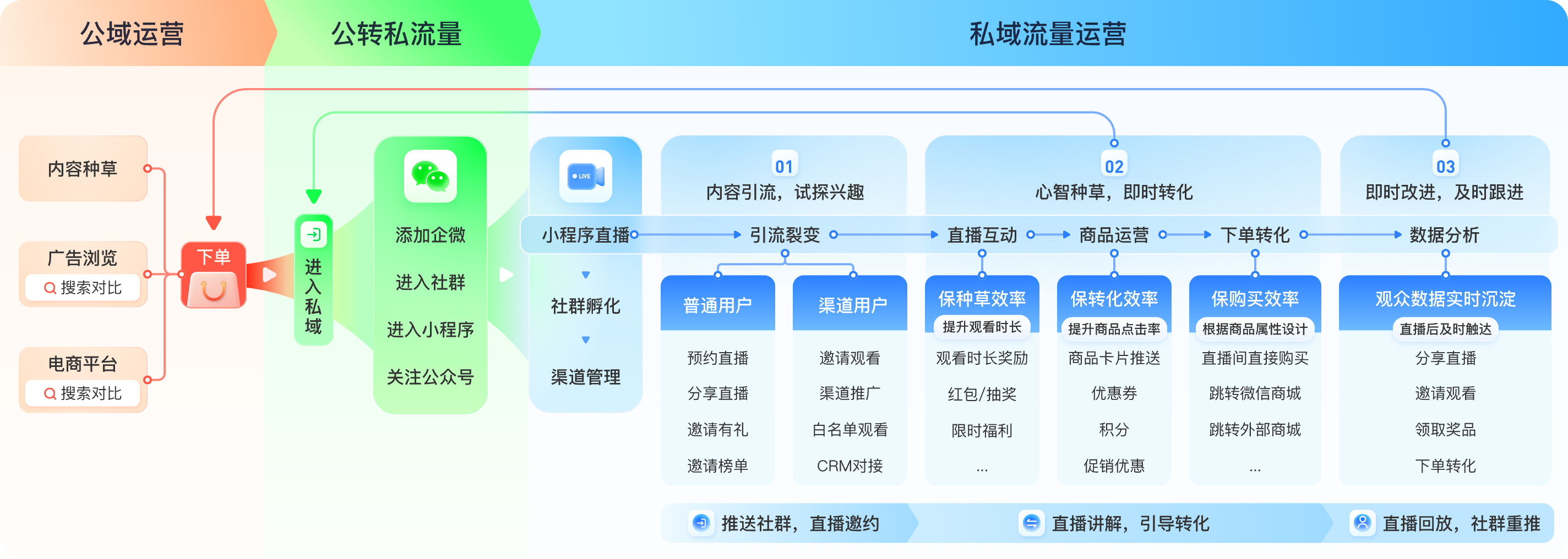
For example, a brand may already operate member levels, prices, inventory, coupons, payment, delivery, and after-sales service in its own store. The live room can handle content and interactions while a product click opens the company’s existing product page. If a project instead uses Polyv product-order capabilities, the team must define how those orders are queried and reconciled with its other systems. A product click is not proof that a store order was created.
Define four identifiers early: business member ID, live channel or session ID, product ID, and order ID. Keep campaign source information across navigation, and agree on what counts as a click, created order, paid order, cancellation, and refund. Attribution is only useful if the identifiers and event definitions align.
02 / Members: connect the viewing page to existing entitlements
2.1 / Let the host Mini Program handle login
Viewers should not need a second business account solely to watch a live session. Polyv’s uni-app WeChat Mini Program integration guide describes an event that asks the host page to handle login when required. The host can open its own login page or component and then return the viewer to the live journey. Whether a stream is open, requires registration, or is reserved for members should follow the channel configuration and business rules tested for that project.
Keep the WeChat user identifier, business member ID, and live viewing identifier distinct. They may come from different systems and should not overwrite one another. The business server can maintain the necessary mapping while limiting what personal information is exposed to the viewing front end. Operations can analyze member segments and campaign sources without placing a phone number in a live-room URL.
2.2 / Keep benefits where their rules already live
Member prices, points, and coupon eligibility often have existing rules. A product or campaign entry in the live room can lead to the business’s own store, where the store applies those rules at checkout. This avoids separate, conflicting implementations of price or benefits.
If a business wants to award a benefit for watching, define an eligible viewing event first. Then let the business server apply its campaign rule using available viewing data. Simply opening a page should not automatically be treated as completing a viewing task.
03 / Products: map live-room cards to the store catalog
Polyv’s Mini Program viewing page product module documents product lists and labels, as well as events for adding, removing, pushing, and clicking products. These capabilities let operations teams organize products around the live presentation. The integration team still needs a mapping to the company’s store catalog.
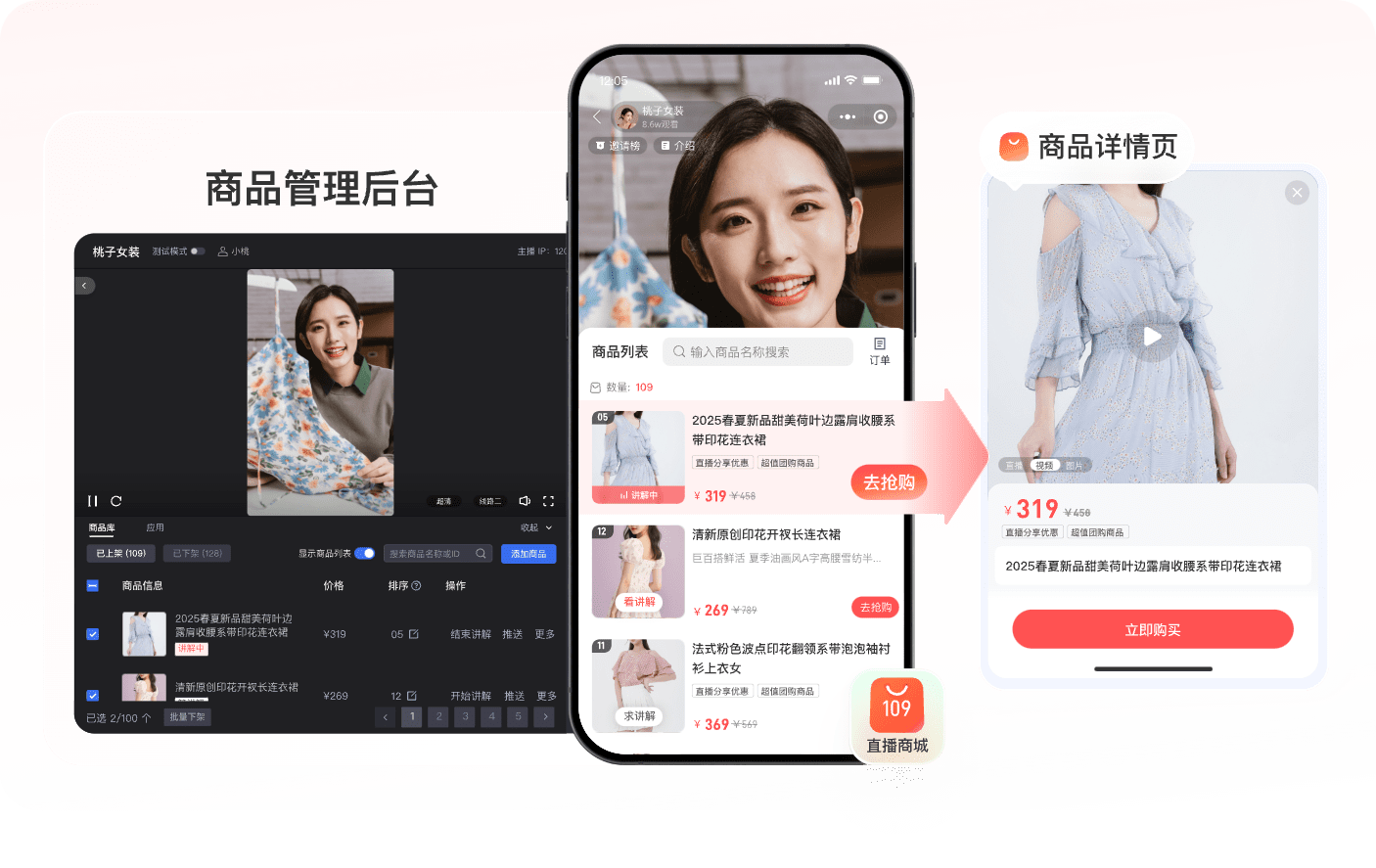
Before launch, decide which system is authoritative for title, image, SKU, price, inventory, sales region, and detail-page URL. Test where a click goes and how the viewing page reflects a product being removed or repriced. If multiple channels share a catalog, the store can remain the source of truth and supply display information through an agreed API or operations workflow.
A product card turns a demonstration into a next action; it does not replace checkout. Polyv’s product module records a purchase-button click event for live-side statistics. When the business uses its own store, preserve the channel, session, and product source through navigation and ordering so a click can later be associated with an order. Report clicks and completed orders separately.
04 / Orders: choose the transaction owner before the data flow
4.1 / Existing store owns the order
Many Mini Programs already have product details, cart, and payment pages. A live-room product entry can open those pages while the business store continues to create orders. Keep the source channel and campaign in a routing parameter or server-side session, then record attribution at order creation, successful payment, cancellation, and refund. Any data sent back to live operations must follow the actual APIs and the business’s data governance rules.
This path is useful when member pricing, inventory, promotions, logistics, and after-sales service are already established. Acceptance testing should cover three separate results: the product click, the created order, and the paid transaction. A functioning button is not a completed commerce integration.
4.2 / Project uses Polyv product orders
Polyv also documents a product-order query API with fields such as order number, channel ID, viewer ID, amount, and payment or fulfillment status. A project using this order path can plan querying, status synchronization, and reconciliation around those fields. API credentials belong on the business server: Polyv’s API documentation requires requests to pass through the customer’s server rather than storing long-lived secrets in a Mini Program client.
Choose one transaction path based on the existing store, payment and service responsibilities, member-benefit rules, and the system where operations needs to review orders. A pilot with one session and a small product set can verify status changes and refund attribution before wider rollout.
05 / Which viewing path supports the required commerce integration?
Polyv’s Mini Program solution guide presents WebView H5 and native viewing page options. WebView can be a practical first step when a team wants to validate a standard live room and product presentation. The Mini Program opens Polyv’s H5 viewing page; the business verifies domains, entry points, and product navigation. A business-owned H5 entry page can check membership and record campaign source before opening the standard viewing page. The behavior after entry still needs testing.
For a customized H5 room, the business integrates Polyv’s Web viewing page SDK into its own hosted H5 page and then opens that page with WebView. WebView carries the page; the SDK runs inside it. The business owns that page’s development and maintenance. Native integration is a better candidate when member login, product navigation, sharing, and analytics need closer alignment with the Mini Program. Choose the underlying player in light of the project’s WeChat category, plugin authorization, and live-player permissions. Order and payment responsibilities remain with the chosen transaction system.
uni-app integration fits an existing uni-app Mini Program project. Polyv’s guide places the native viewing component under wxcomponents, mounts it on a mp-weixin page, and leaves login, routing, sharing, and business analytics to the host. A product click can then be routed to a business-owned page. This component path is specific to the compiled WeChat Mini Program; an App or H5 site uses its corresponding Polyv developer integration and must be tested separately.
06 / Test picture-in-picture alongside product navigation
Viewers may navigate or temporarily leave WeChat while watching. Polyv provides a Mini Program background playback guide. The native viewing page and WebView route use different implementations; the documented WebView intermediary currently covers live streaming. Whether background picture-in-picture appears depends on the WeChat base library and system version, Mini Program category and permissions, account settings, player state, and the specific path. Test on target iOS and Android devices. Check whether a product-page transition unloads the original player, and verify playback and attribution when the viewer returns.
07 / Use a joint acceptance checklist
Members: Does the same viewer follow the intended login and benefit rules when entering from different sources? Are campaign sources preserved without exposing unnecessary personal data?
Products: Do the live-room product and store SKU, price, inventory, and URL match? Does the viewing page reflect a pushed, removed, or changed product?
Orders: Does a click open the correct page? Are created, paid, canceled, and refunded orders recorded under the agreed attribution rules? If Polyv product orders are used, can the server query the relevant status?
Experience: Can viewers move among the live room, product page, payment page, and return route on actual devices? Do picture-in-picture, weak networks, expired login, and page teardown cause duplicate playback or lost attribution?
Product, engineering, store, and live operations teams should review this checklist together. A commerce loop is complete when each team can explain where its data comes from and how exceptions are handled.
Frequently asked questions
Will Polyv’s product module automatically synchronize every store SKU? The method depends on the chosen Polyv product capability and the business’s catalog. Define product IDs, authoritative prices and inventory, and the API or operations workflow first.
Can product clicks be reported as live sales? No. A click records intent. Sales figures must use actual order and payment results, accounting for cancellations, refunds, and duplicate attribution.
Does one uni-app codebase provide the same viewing capability in a Mini Program and an App? The viewing component described here targets mp-weixin. App and H5 integrations use their corresponding SDKs, plugins, or viewing pages and need separate feature validation.
Are WebView, native, and uni-app the same type of SDK? No. WebView opens an H5 page; the native path uses a WeChat Mini Program viewing page SDK; a uni-app Mini Program mounts a native custom component in its WeChat build.
About Polyv
Polyv provides Mini Program live viewing pages, product interaction modules, and server APIs. A business can add live content to an existing Mini Program, then choose the viewing path and data contracts that connect it to established member, catalog, and order processes.