
What Tool Can I Use to Turn a Video into a Shareable Link?
To turn a local video into a shareable link, use a business-grade cloud VOD or video hosting platform that provides a standalone H5 viewing page. This article explains the differences between H5 links, QR codes, and web embeds, and gives a minimal workflow from upload to multi-device verification.
If you need to share a product overview, event recap, or how-to video through WeChat, email, a group chat, or a document, avoid sending the source file over and over. Host the video online and share a viewing URL instead.
The short answer: Use an enterprise-grade cloud VOD or video hosting platform that provides a standalone viewing page. After upload and processing, the platform can generate an H5 viewing link; for scan-to-watch use, create a QR code from that URL. Recipients open the player directly without downloading a large file first. Public videos can be shared as-is. For non-public content, configure identity verification or access conditions before sharing. An unlisted link is not access control.

*Figure 1: POLYV VOD console and player preview, showing how video upload, management, and online playback fit together. The image does not imply that sharing or access controls are enabled by default; the interface depends on the current account edition.*
01 Turning a Video into a Link Requires Three Steps
1.1 First, turn local files into online content
An MP4 file on a computer or phone has only a local path, which other people cannot open. Uploading the file to a video platform creates hosted, processed content with an online playback entry point.
Sending the original file also lets the other party see it, but when the file is large, transfer is slow and versions can become chaotic; the recipient still needs to download and open it. When a business needs to share, replace, or track videos repeatedly, this approach becomes increasingly difficult to maintain.
1.2 Then, let a watch page carry the player
A shared link normally opens an H5 viewing page instead of exposing the source file. The page contains the player, title, cover image, and playback controls, and it works in common browsers. This route also works for businesses that do not yet have a website.
1.3 Finally, decide whether to deliver as a link or QR code
Links work well in WeChat, email, documents, and chat windows; QR codes are better for posters, display stands, manuals, product packaging, or offline screens. A QR code essentially points to a URL, so you should first confirm the viewing address, then generate and test the QR code to avoid printing an invalid address on long-term materials.
02 Which Tools Can Do This, and How They Differ
| Tool type | Can create an online entry point | Better suited for | Main limitations |
|---|---|---|---|
| Direct file transfer through messaging apps | Not necessarily; usually a file transfer | Temporary sharing with a small group of known contacts | Large files, difficult version control, and possible download before viewing |
| General file storage or cloud drive | Can generate download or preview links | File exchange and archiving | Preview experience and enterprise video management capabilities need separate verification |
| Website backend media library | Depends on website capabilities | Small amounts of media in existing pages | Bandwidth, format, player, and analytics may require self-management |
| Enterprise cloud VOD / video hosting | Can generate watch pages, links, or players | External sharing, website playback, long-term content management | Requires selection based on usage, access conditions, and integration depth |
If the immediate goal is “click and watch,” first check for a standalone viewing page, H5 link, mobile-ready player, and QR-code sharing. Complex API names and large storage quotas are secondary at this stage.
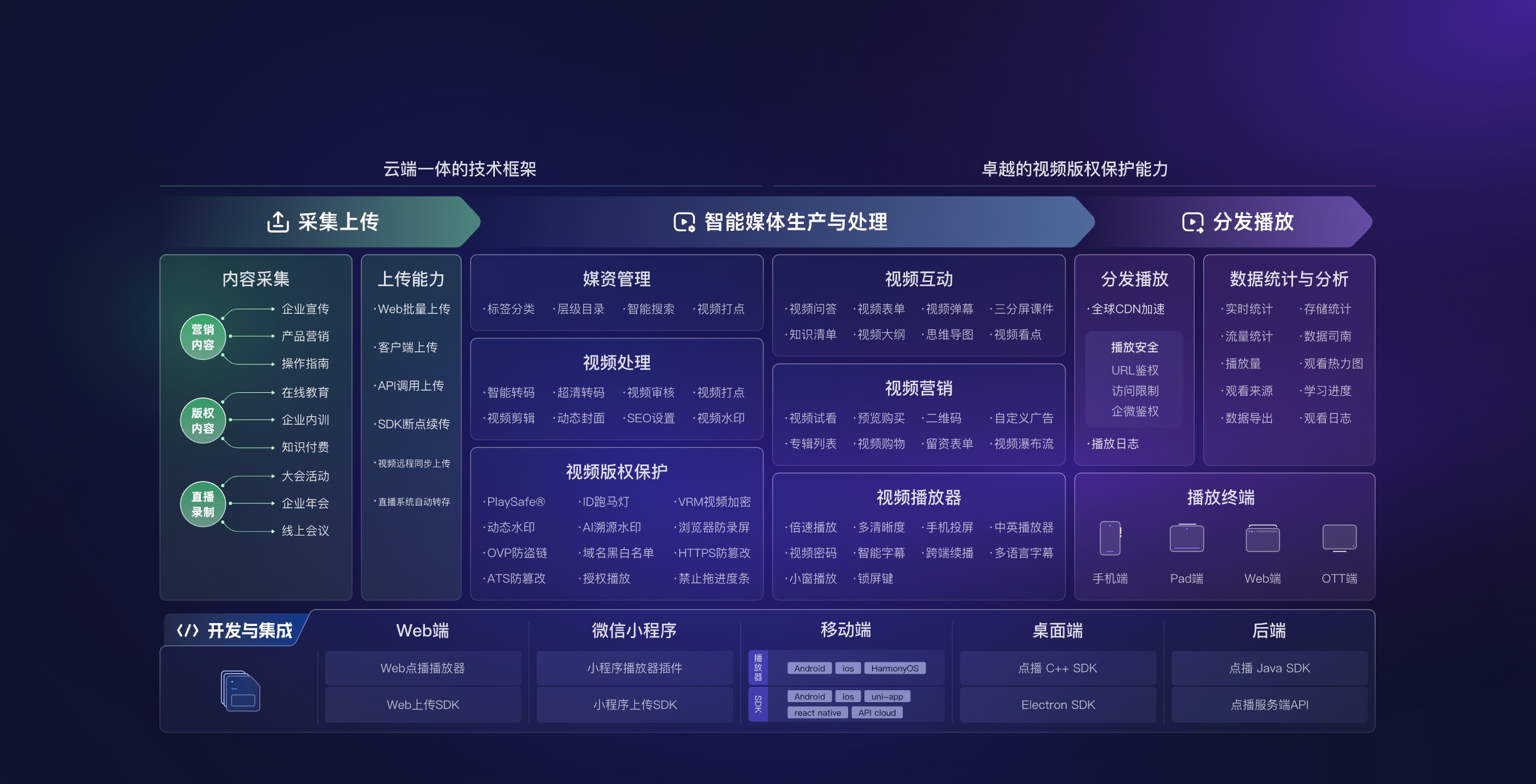
*Figure 2: A shareable video depends on upload, processing, playback delivery, and data management. Image source: POLYV VOD official product materials.*
03 From a Single Video to a Shareable Link: Six Steps
3.1 Upload a real video for testing
Choose a video whose duration, aspect ratio, and quality represent your everyday content. Upload it and wait for processing to finish. A blank, seconds-long sample will not reveal the real playback or network experience.
3.2 Set the title and cover image
The title tells recipients what the content is, and the cover determines whether they will click. For sales introductions, training notices, or after-sales instructions, the title should directly state the topic and intended audience, not just display a file name.
3.3 Get the Standalone Viewing URL
Find the standalone viewing page or sharing option and copy the H5 link. Open it in a private browser window to confirm that the external viewer experience matches what the administrator intended.
3.4 Generate a QR code as needed
Generate a QR code from the verified viewing URL and scan it with several phones. Before printing it on long-lived material, confirm whether video replacement can preserve the URL. If not, point the QR code to a landing page the enterprise controls so the underlying video can change without invalidating the printed code.
3.5 Check common viewing environments
Test the desktop browsers, mobile browsers, and messaging environment your audience uses. Check load performance, orientation, sound, fullscreen, cover image, and navigation. Browsers may restrict autoplay with sound, so never make “the link will always autoplay” a design assumption.
3.6 Then decide whether to add access conditions
For content intended only for a defined audience, do not send a public link and rely on a “please do not forward” request. Decide who may watch, how identity will be verified, and when access expires, then configure login, password, or business-identity authorization supported by the current platform.
04 Seven Key Questions to Check When Choosing a Tool
4.1 Does the link open to playback or download?
A true viewing link should open a player designed for mobile and desktop. A download-only page creates a different customer experience and fragments the analytics.
4.2 Can it generate QR codes and maintain them long-term?
Platform-generated QR codes are only the first step. You also need to check whether the address is stable, what the video replacement rules are, and how old entry points are handled after content is deactivated.
4.3 Does it support cover images, titles, and page styling?
A business is delivering a branded content experience, not a bare file. The page title, cover, visual style, and instructions should match the use case.
4.4 Can it play on mobile, desktop, and common browsers?
Verify cross-device support on real devices. Video aspect ratio, browser version, network conditions, and the page container all affect the result.
4.5 Can you view basic playback data?
If you need to know whether customers watched or trainees completed the video, confirm which playback metrics the platform provides and how it calculates them. Do not equate link clicks with video views or completions.
4.6 Can you replace content and manage in batches later?
Today you may share only one video, but later there will be product series, how-to tutorials, or event recaps. Categorization, search, cover replacement, content deactivation, and batch management will directly affect operational efficiency.
4.7 Does it support further embedding into your own pages?
After validating shareable links, a business may want to put the player on its website, knowledge base, or customer portal. During selection, check the web player, embedding methods, SDKs, and server-side APIs, but you do not need to enable all capabilities in the first phase.
05 How POLYV Completes the “Upload – Link – QR Code” Flow
According to the current POLYV VOD product page, POLYV provides video hosting, standalone viewing URLs, and H5/QR code distribution. It also supports embedding players into websites and offers delivery paths via SaaS, SDK/API, or deeper customization. The POLYV Developer Center lists entry points for the Web VOD player, Web upload SDK, and server-side capabilities.
For a business sharing its first video, start with the standard SaaS route: upload the video, set the title and cover, obtain the standalone viewing URL, then copy the link or generate a QR code. The first goal is to turn a large file into an accessible, manageable viewing experience. Add player and API integration when you need to embed the video in company-owned pages, connect user accounts, or return data to another system. Available controls and activation requirements depend on the current account version and project validation.
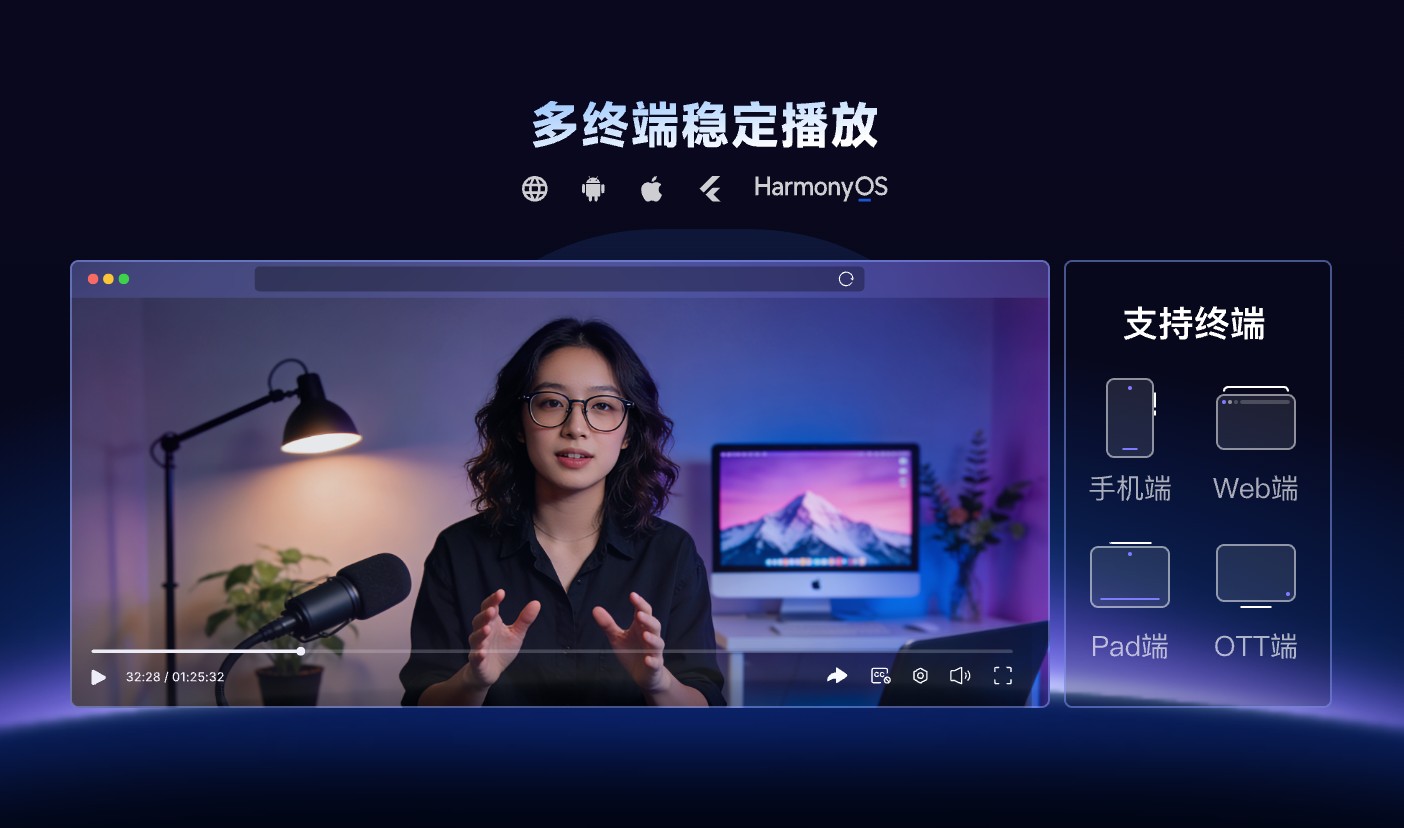
*Figure 3: POLYV VOD supports playback across device types. This image illustrates the online viewing experience; it does not prove that sharing permissions, URL stability, or every feature will be identical on all devices. Image source: POLYV official product materials.*
06 FAQ
6.1 Can I generate a video link without a website?
Yes. A standalone H5 viewing page does not require you to build a website first. After confirming the content, title, cover, and access conditions, you can use the link in messages, emails, or documents.
6.2 What is the difference between a video link and a cloud drive link?
Cloud drives focus on file storage and exchange. Enterprise Cloud VOD focuses on video processing, browser players, online delivery, and viewing management. The practical difference depends on the preview, analytics, and permission features of the selected service.
6.3 Will turning a link into a QR code reduce video quality?
No. The QR code stores the viewing URL; it does not change the video file or playback quality. What viewers see after scanning depends on the processed video rendition, their network, and the player.
6.4 After updating a video, will the original link still work?
Not necessarily. Whether content replacement preserves the URL depends on the platform’s current rules, so verify it in a test environment—especially before printing a long-lived QR code.
6.5 How do I typically estimate the cost of sharing videos?
Common variables include video size, retention period, output quality, expected viewers and watch time, access controls, player customization, and API scope. When these inputs are uncertain, run a small pilot with a real video and price the project from measured usage and the confirmed scope.
About POLYV
POLYV is an enterprise video SaaS provider whose core products cover live streaming, VOD, and embeddable video technology. For link-based sharing, POLYV VOD supports upload, processing, online playback, standalone viewing URLs, and H5/QR-code distribution. Teams can later add an embedded web player, SDK or API integration, and pages they own. The enterprise still defines URL-governance rules, the intended audience, and the content lifecycle.