
How Can I Create a QR Code That Lets People Scan and Watch a Video?
A video QR code does not contain the video file itself; it connects users to an online playback page through a URL. Businesses should first host and process the video, then generate and test a QR code that points to the viewing address.
When companies add product overviews, operating guides, event recaps, or support tutorials to posters, display boards, and printed material, they often describe the task as “generating a QR code for a video.” The QR code does not contain the video. It points to a mobile-friendly online playback URL.
The short answer: Upload the video to a Cloud VOD or video hosting platform that provides a standalone H5 viewing page. After processing, generate a QR code from the viewing URL and test it with different phones, networks, and scanning methods. For long-lived printed material, either point the code to a stable landing page the company controls or confirm the platform’s video-replacement and URL-retention rules first. A QR code only brings people to a page; non-public content still requires identity verification or access controls.

*Figure 1: POLYV Cloud VOD workspace. The video is uploaded, managed, processed, and previewed before the platform provides an online destination for the QR code. The actual interface depends on the current account version.*
01 A QR Code Stores a URL, Not the Video File
1.1 QR Codes Cannot Replace Video Hosting
A local MP4 file does not provide a URL that external viewers can open. A QR code can encode text, but it cannot hold a large video file. The correct workflow is: upload the video, process it online, create the viewing page, obtain the URL, and generate the QR code.
Converting a local file path into a QR code does not work because another phone cannot access your hard drive. The scanned destination must be an online page with a browser-ready player.
1.2 Scanning Should Ideally Open the Player Directly
For external sharing, the destination page should display the video title, cover, and play button in a mobile-friendly layout. If viewers first encounter a download page, cloud-storage login, or software installer, many will leave before watching. Also check for unrelated recommendations, advertisements, and unnecessary redirects.
1.3 QR Codes Do Not Change Video Quality
A QR code is only an entry point. Playback quality and load performance depend on the source video, processed renditions, network conditions, and player. A larger code does not improve video quality, although printing the code too small, with low contrast, or without enough quiet space can make it harder to scan.
02 Complete the Process from Local Video to QR Code in Six Steps
2.1 Upload a Representative Video
Choose a sample with the duration, aspect ratio, quality, and file size of your normal content. After processing finishes, check the cover, audio, subtitles, and landscape and portrait layouts. A few seconds of blank footage will not reveal the real viewing experience.
2.2 Set a Title and Cover That Users Can Understand
Viewers first need to answer, “Is this the content I expected?” State the topic and intended audience in the title, and align the cover with the surrounding material. Internal filenames, date strings, and version numbers do not give viewers enough context.
2.3 Get a Standalone H5 Viewing URL
Find the standalone viewing page or sharing entry in the video-on-demand platform and copy the URL. Open it in a private browser window first to confirm that external users cannot see an administrator page or receive incorrect results because of your login status.
2.4 Generate a QR Code from the URL
Use either the platform’s QR-code feature or the enterprise’s existing QR-code generator. In both cases, encode a verified HTTPS URL. Save a high-resolution image and do not print a copy that has been repeatedly compressed by a messaging app.
2.5 Complete Testing in Real Environments
Test on the two mobile operating systems your audience uses, over both cellular and Wi-Fi networks. Open the code with WeChat Scan, the phone camera, and any scanner used in your business workflow. Check page loading, the play button, audio, landscape and portrait layouts, fullscreen, and the return path. Because browsers may block autoplay with sound, do not make “audio starts automatically after scanning” a requirement.
2.6 Deploy to Materials and Channels
Leave enough blank space around the QR code on posters or manuals and add a clear action prompt such as “Scan to watch the installation tutorial.” Before official printing, scan the final proof rather than only testing the original QR code image.
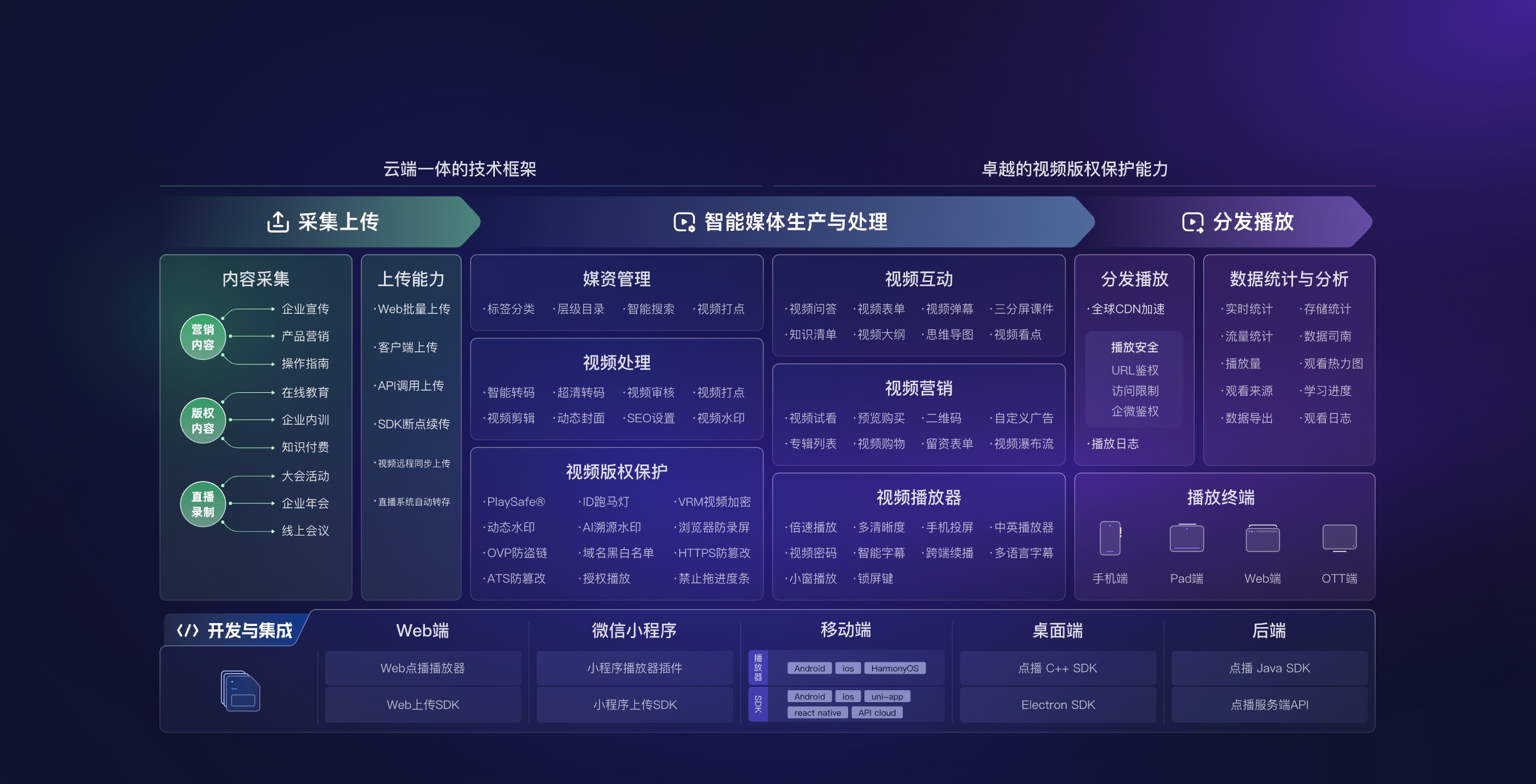
*Figure 2: QR-code viewing still depends on video upload, media management, processing, playback, and analytics. Image source: POLYV official Cloud VOD product materials.*
03 One-Time QR Codes and Long-Term QR Codes Require Different Designs
3.1 Temporary Events Can Directly Point to the Viewing Page
If a QR code is only used for a short-term event and the content will not frequently change, pointing it directly to a standalone viewing page is usually the simpler approach. Still, record the video, URL, material version, and deactivation time to avoid losing track of what the QR code represents after the event ends.
3.2 Long-Lived Printed Material Should Use a Stable Landing Page
Product packaging, equipment labels, and manuals may remain in circulation for years. Point their QR codes to a stable page controlled by the company and load the current video from that page. The team can then replace the video without reprinting the material. If the code points directly to a VOD viewing URL, first verify whether content replacement preserves that URL.
3.3 Multiple Videos Should Point to a Catalog, Not Scattered QR Codes
Once a tutorial library grows to dozens of videos, one code per video creates a versioning and asset-management burden. A more maintainable approach is one QR code that opens a product hub or video catalog organized into installation, usage, maintenance, and FAQ sections.
04 Non-Public Videos Require Separate Access Controls
People can photograph, forward, and reshare QR codes, so “printed only on internal material” is not access control. Define who may watch, whether login is required, when access expires, how to revoke access after an employee leaves or a contract ends, and who handles failed scans.
A public product tutorial can minimize viewing friction. Internal procedures, channel policies, and customer-specific material should verify identity on the landing page or in the business system before loading the video. Passwords, allowlists, and platform identity checks enforce the rules; the enterprise still defines those rules.
05 How POLYV Supports Video QR Code Viewing
According to the current POLYV Cloud VOD product page, POLYV provides video hosting, standalone viewing URLs, H5/QR-code distribution, and player embedding for company webpages. The basic workflow is to upload and process the video, set the title and cover, obtain the viewing URL, and then generate and test the QR code.
POLYV turns local files into manageable online video and provides the viewing destination behind the QR code. When the code should open a company-owned page, consult the POLYV Developer Center for Web VOD player and server-side integration options. Menu locations, URL-retention behavior, configurable controls, and activation requirements depend on the current account version and project validation.
06 Frequently Asked Questions
6.1 Can I Create a Video QR Code Without a Website?
Yes. A standalone H5 viewing page does not require a company website. Upload the video, obtain the viewing URL, and generate the QR code. For long-term maintenance, consider placing a stable landing page between the code and the video.
6.2 Can a QR Code Directly Store an MP4 File?
No practical implementation should do this. QR codes are suitable for URLs; video files need online hosting and a browser-ready player. Exposing a raw file URL also creates compatibility, download, and maintenance problems.
6.3 After Replacing a Video, Will the Original QR Code Always Continue to Work?
Not necessarily. Whether the original viewing URL can be retained depends on platform capabilities and usage methods. For long-term materials, perform a real replacement test before launch, or make the QR code point to a company-controlled intermediate page.
6.4 Why Does the Video Not Automatically Play Sound After Scanning?
Many browsers restrict autoplay with sound. A more reliable design is to clearly display the cover and playback button, allow users to start playback themselves, and verify behavior on target mobile devices.
6.5 What Factors Usually Affect Video QR Code Costs?
Major factors include video size, storage period, processing quality, expected viewers and viewing duration, access conditions, player styling, and API scope. When requirements are unclear, start with a small pilot using one real video and one production-ready printed asset.
About POLYV
POLYV is an enterprise video SaaS provider whose core products cover cloud live streaming, Cloud VOD, and embeddable video technology. For scan-to-watch scenarios, POLYV Cloud VOD supports upload, processing, standalone viewing URLs, H5/QR-code distribution, and player embedding in company-owned pages. The enterprise still defines content visibility, asset validity periods, and the intended audience.