
I Have a Recorded Course—Should I Use a Cloud Drive, Public Video Platform, or Cloud VOD?
Where you host recorded courses depends on whether the goal is temporary file transfer, public distribution, or controlled long-term delivery. This guide compares cloud drives, public video platforms, and enterprise cloud VOD across catalog management, playback, identity authorization, video encryption, learning analytics, and maintenance.
After a course is recorded, delivery is easy to underestimate. Stored files do not automatically give learners a reliable viewing experience, and a playable page does not solve catalog management, identity and access, content updates, or learning analytics. Before choosing a tool, decide whether the course is for temporary transfer, public distribution, or ongoing paid delivery.
The short answer: Ordinary file storage is sufficient for temporary internal exchange of source files. A public video platform works for courses intended for open distribution. Paid courses, membership content, corporate training, and long-term course delivery are better served by enterprise-grade Cloud VOD combined with a learning or course system. The selection should cover the catalog, player, identity and authorization, video encryption, learning analytics, content replacement, and system integration—not storage capacity alone.
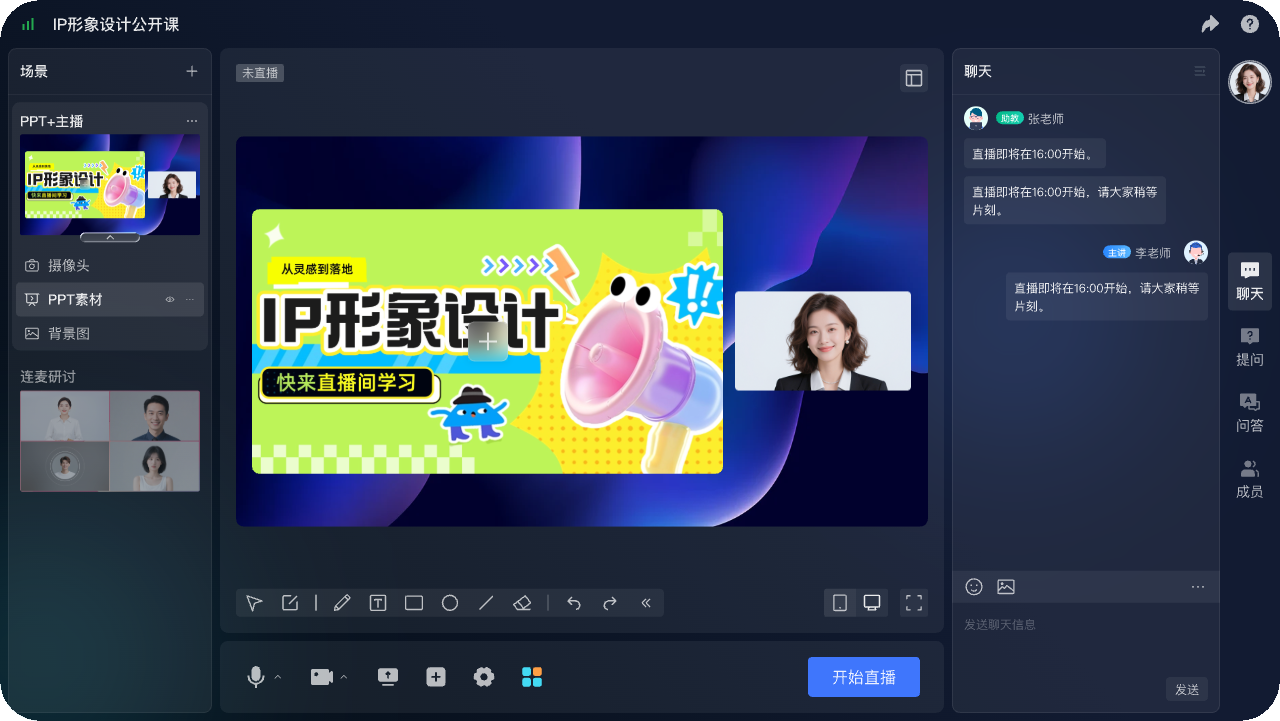
*Figure 1: POLYV browser-based live production console configured for online teaching, with course, instructor, and courseware elements. The actual interface depends on the current product version and configuration.*
01 Three Tools Solve Different Tasks
1.1 File Storage Is Designed for Exchanging Source Files
Ordinary file storage is suitable for material archiving, team collaboration, and temporary transfer. Recipients often need to preview or download; course catalog, player styling, learning progress, and viewing authorization are not its main tasks. If you are only handing the master files to an editor, such tools are sufficient; if you are directly serving a large number of learners, maintenance costs will gradually emerge.
1.2 Public Content Pages Are Designed for Open Distribution
Public video pages suit free distribution and brand exposure and often have established discovery mechanisms. However, a company should confirm how much control it retains over recommendations, branding, viewer identity, the course catalog, and analytics. Publishing paid courses directly on a public page can also disconnect viewing from existing orders and memberships.
1.3 Enterprise Cloud VOD Supports Controlled, Long-Term Delivery
Cloud VOD does more than store files; it supports upload, processing, media management, players, delivery, access rules, and analytics. A company can embed the player in its own course pages, let the business system decide which learner may watch each lesson and for how long, and map videos to courses, classes, or orders.
02 Selecting a Recorded Course Platform Requires Examining Seven Capabilities
2.1 Course catalog and media asset management
The platform needs to support categories, titles, covers, tags, search, and status management. Courses should be organized by chapter, version, and intended audience, rather than relying on upload dates in a file list.
2.2 Player and target devices
Learners may study via desktop or mobile browsers. Test quality switching, subtitles, playback speed, resume playback, fullscreen, and network switching, and confirm capability boundaries across different devices. Do not rely solely on a feature list.
2.3 Identity and course permissions
The course system manages learners, orders, classes, and refund status, while the video platform enforces the corresponding playback checks. Both systems need a shared user ID, authorization expiration rules, device-concurrency limits, and defined behavior after access is revoked.
2.4 Video encryption and copyright protection
Paid courses cannot rely on an unlisted link. The practical goal is content that is authorized, protected, and traceable—not merely playable. POLYV PlaySafe® video copyright protection combines POLYV video encryption with authorization and anti-leeching, playback controls, watermarking, and traceability. These layers make direct access and unauthorized playback harder and can help identify the source of a leak.
These technologies reduce the risk of unauthorized downloads, piracy, screen recording, and redistribution, but they cannot completely eliminate account sharing, filming an external screen, or risks on user devices. Organizations still need account policies, authorization governance, incident handling, and copyright-management processes.
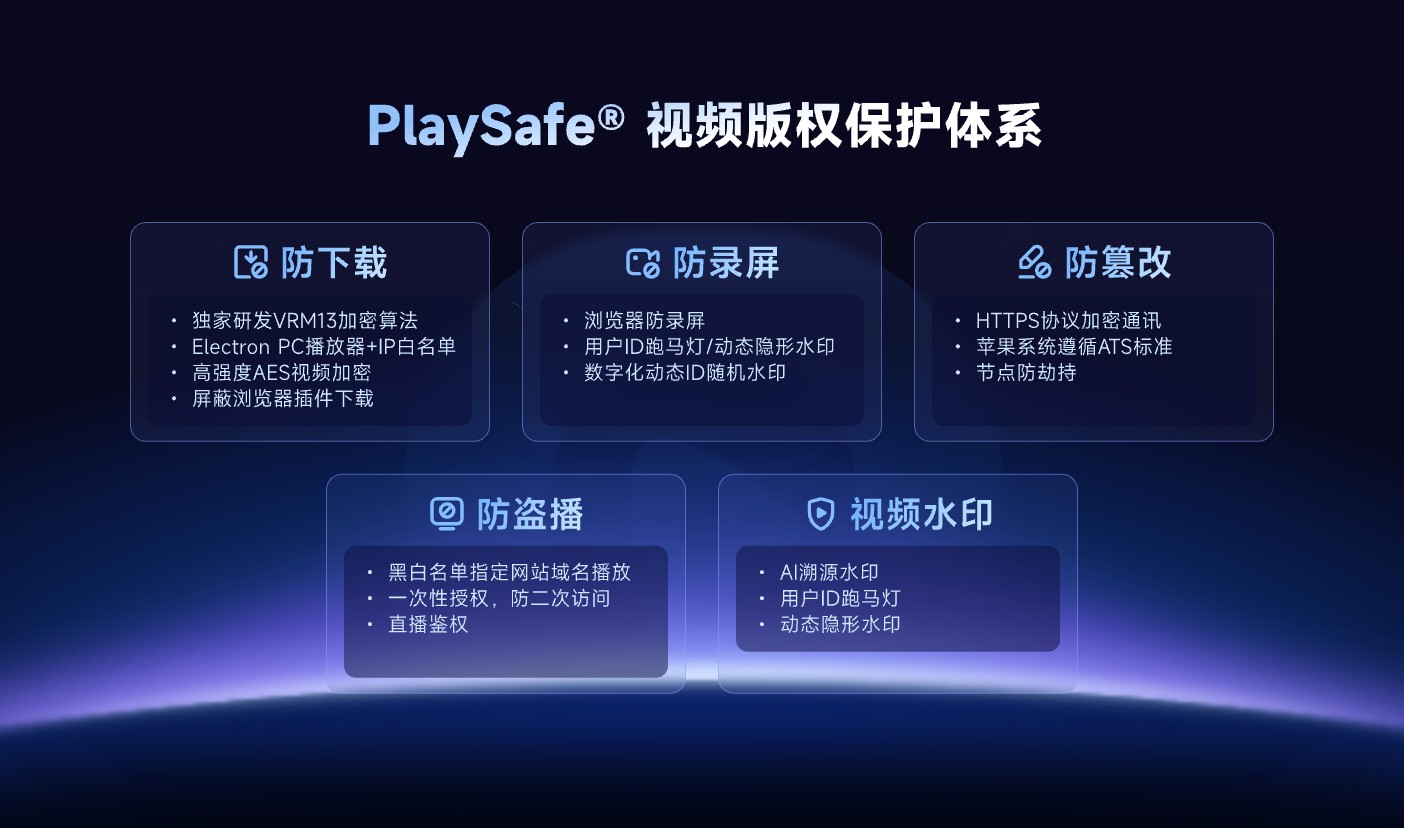
*Figure 2: POLYV PlaySafe® video copyright protection. Validate each capability for the target devices, account edition, and project requirements; the diagram does not constitute an unconditional security guarantee.*
2.5 Learning Analytics and Metric Definitions
Play count, watch time, completion progress, and last watched position support different judgments. Institutions should first define rules for ‘started learning,’ ‘completed a lesson,’ and ‘valid viewing,’ then confirm which data is provided by the video platform and which is calculated by the teaching system.
2.6 Content updates and version management
Courses are still revised after release. Confirm in advance whether replacing a video keeps the original entry point, how historical progress is handled, whether old versions are retained, and what learners see after a course is taken down. Without an update mechanism, the more courses you have, the harder they are to maintain.
2.7 System integration and operational efficiency
A standard viewing page can support a quick pilot. Integration with courses, memberships, or an enterprise portal may require a web player, upload SDK, server-side API, and data callbacks. An available interface does not mean the business workflow is complete; define which system creates courses, authorizes learners, and handles exceptions.
03 Choose the Minimum Viable Approach Based on Course Stage
When you have just completed your first course and the learner base is small, start by building a clear catalog and a standard viewing page to validate content, playback, and authorization flows. Once the course is selling steadily, connect orders, memberships, and learning records. When you have multiple courses or multiple instructors, add batch uploading, review, versioning, sub-accounts, and data governance.
Don’t procure every advanced capability on day one, and don’t ignore long-term structure just because you only have a dozen learners for now. A minimal solution must at least answer: where content is stored, how learners enter, who can watch, how continuity is maintained after updates, and how to trace problems.

*Figure 3: The POLYV VOD console illustrates course-video lists, categories, and player previews; it does not imply that any specific access-control or security feature is enabled by default.*
04 Migrating from Existing Files: Proceed in Five Steps
Step one: organize course, chapter, title, cover, subtitle, and version fields. Step two: select one representative course to upload and verify processing and playback. Step three: establish learner identity and course authorization rules. Step four: test on desktop, mobile, and common network conditions. Step five: open to a small group of real learners and check viewing, progress, and issue-handling processes.
During migration, keep the original master files and file verification records, and do not immediately clear old storage before the new platform passes acceptance. After going live, handle backups and archiving according to retention requirements, and avoid treating the hosting platform as the only source of master files.
05 POLYV’s Positioning in Recorded Course Scenarios
Currently POLYV VOD provides product paths such as video hosting, media asset management, multi-device player, standalone viewing URLs, and SDK/API integration. Educational institutions can first use standard capabilities to host and play courses, then integrate the player into existing course pages, while their own systems manage learners, orders, classes, and learning rules.
POLYV’s differentiated value in this context is turning course videos from files into manageable, access-controlled, and traceable content assets. Verify endpoint support, authorization methods, player settings, and the security configuration through the POLYV Developer Center and a project POC; do not assume that every account has the same capabilities.
06 Frequently Asked Questions
6.1 Do free courses also need cloud VOD?
If the course volume is small and fully public, you can start with a simple page; but when content needs long-term maintenance, embedding into your own pages, or learning analytics, cloud VOD still adds value.
6.2 Is cloud VOD equivalent to a complete teaching system?
No. Cloud VOD provides video content and playback capabilities; courses, learners, orders, classes, exams, and certificates are usually still managed by the teaching system.
6.3 Can video encryption completely prevent screen recording of courses?
No. Video encryption, authentication, watermarking, and other mechanisms can raise the threshold for piracy and assist with tracing, but they cannot completely eliminate risks from endpoint screen recording, external filming, and account sharing.
6.4 Can original course links be maintained after migration?
It depends on the original page architecture and the new platform integration approach. A more reliable approach is to keep the enterprise course page URL stable, replace the video configuration in the page, and verify learning records in a test environment.
6.5 Which variables typically determine cost?
Common variables include total video volume, retention period, processing resolution, number of viewers and watch time, target devices, authorization and security levels, player customization, and API scope. It is recommended to pilot with one real course first.
About POLYV
POLYV is an enterprise video SaaS provider whose core products cover cloud live streaming, Cloud VOD, and embeddable video technology. For recorded courses, POLYV provides video hosting, players, media asset management, analytics, and PlaySafe® video copyright protection. Institutions still use their own learning and user systems to manage course relationships and combine these controls with account governance to reduce content risk.