
How Can I Share Dozens of Videos with Customers Through One Link?
Dozens of videos should be organized into a maintained directory rather than sent as separate links. Businesses can use a playlist, a video album, or a company-owned content page according to branding, access, and workflow needs.
Once a business has dozens of product overviews, how-to videos, delivery guides, and FAQs, sending links one by one becomes difficult to manage. Customers lose the intended sequence, and sales teams cannot tell which version is current. The business needs an updatable video catalog, not a message full of URLs.
The short answer: Centralize the videos on an enterprise-grade Cloud VOD platform, then choose a playlist, video album, or company-owned content page based on how customers will use them. A playlist lets viewers select from a group inside the player. An album turns a series into a shareable page. A company-owned page can add branding, access control, and business actions. If the top-level link must remain stable over time, test adding, removing, and reordering videos under the current configuration. Do not assume that the URL remains unchanged whenever the content changes.

*Figure 1: POLYV Cloud VOD workspace. Teams can manage multiple videos in one console using lists and categories. Available entry points, fields, and permissions depend on the current version.*
01 Three Ways to Share Multiple Videos Through One Link
1.1 Video Playlist: Centralized Selection Inside the Player
POLYV Video Playlist groups videos into a list inside the player so viewers can browse and choose what to watch. It works well for product-feature series, getting-started tutorials, and event agendas. The viewing path is simple, although a single-level list can become unwieldy as the catalog grows.
1.2 Video Album or Topic Catalog: A Shareable Series Page
POLYV Video Album groups related videos on one page and supports sharing by link or QR code. The page can include an album cover, title, description, and theme. Organize the catalog by product line, customer stage, role, or problem type so viewers can start from their task instead of scrolling through every item.
The current public page states that one POLYV account supports one video album page by default. Confirm any requirement for multiple album pages before selection and implementation; do not assume that the native album is an unlimited, multilevel content portal.
1.3 Company-Owned Content Page: Add Branding and Business Actions
When the experience also needs downloads, consultation forms, support tickets, or customer-specific access, embed the player and catalog in a company landing page or customer portal. Cloud VOD continues to process and deliver the video, while the company page manages branding, navigation, and business workflows.
These options can work together. Start by validating the content structure with the playlist or album available to the current account. Move the validated structure into a company portal when the business needs multiple catalogs, customer-level permissions, or more complex actions.
02 Design the Catalog Before the Bulk Upload
2.1 Organize Around Customer Tasks, Not Internal Departments
Customers want to know how to install, use, and troubleshoot the product—not whether marketing or product created the video. Use customer language such as “Evaluate Options → Get Started → Advanced Use → Troubleshooting → Support.”
2.2 Use One Naming Convention
Titles should identify the object, action, and result—for example, “Device A | First Connection | Complete Setup in Three Minutes.” Keep labels such as “final,” “latest,” and “revision 2” out of the customer-facing title. Store internal version numbers in management fields instead.
2.3 Make Covers and Descriptions Easy to Scan
A consistent cover template reduces cognitive load, but each cover still needs a distinct subject. The description should state the intended audience, prerequisites, and expected viewing time. A catalog of near-identical thumbnails remains hard to navigate.
2.4 Order Videos by the Real Customer Journey
Sort from high-frequency to low-frequency tasks or from beginner to advanced. Pin urgent updates temporarily and record when they should return to their normal position. Reverse upload date is rarely the best viewing sequence.
03 Use One Stable Entry Point for a Changing Catalog
3.1 Keep the Catalog URL Stable, Not Every Individual Video
Customers should bookmark the content hub or topic page. Reuse that entry point only after testing confirms that adding, removing, and reordering videos does not change its URL under the current configuration. Otherwise, point external links to a stable page controlled by the enterprise. This is especially important for sales material, QR codes, and long-lived service manuals.
3.2 Use Individual Video Links for Targeted Follow-up
A stable catalog supports self-service browsing, while a single video link answers a specific question. Sales teams can send the most relevant video first and include the full hub for follow-up exploration.
3.3 Content Updates Need Versioning and Takedown Rules
Before replacing a video, decide whether to retain the old version, whether the URL changes, and how to attribute existing viewing data. Deleting content can break links embedded in older material. Unpublish or add a notice first, then apply the long-term archive policy.
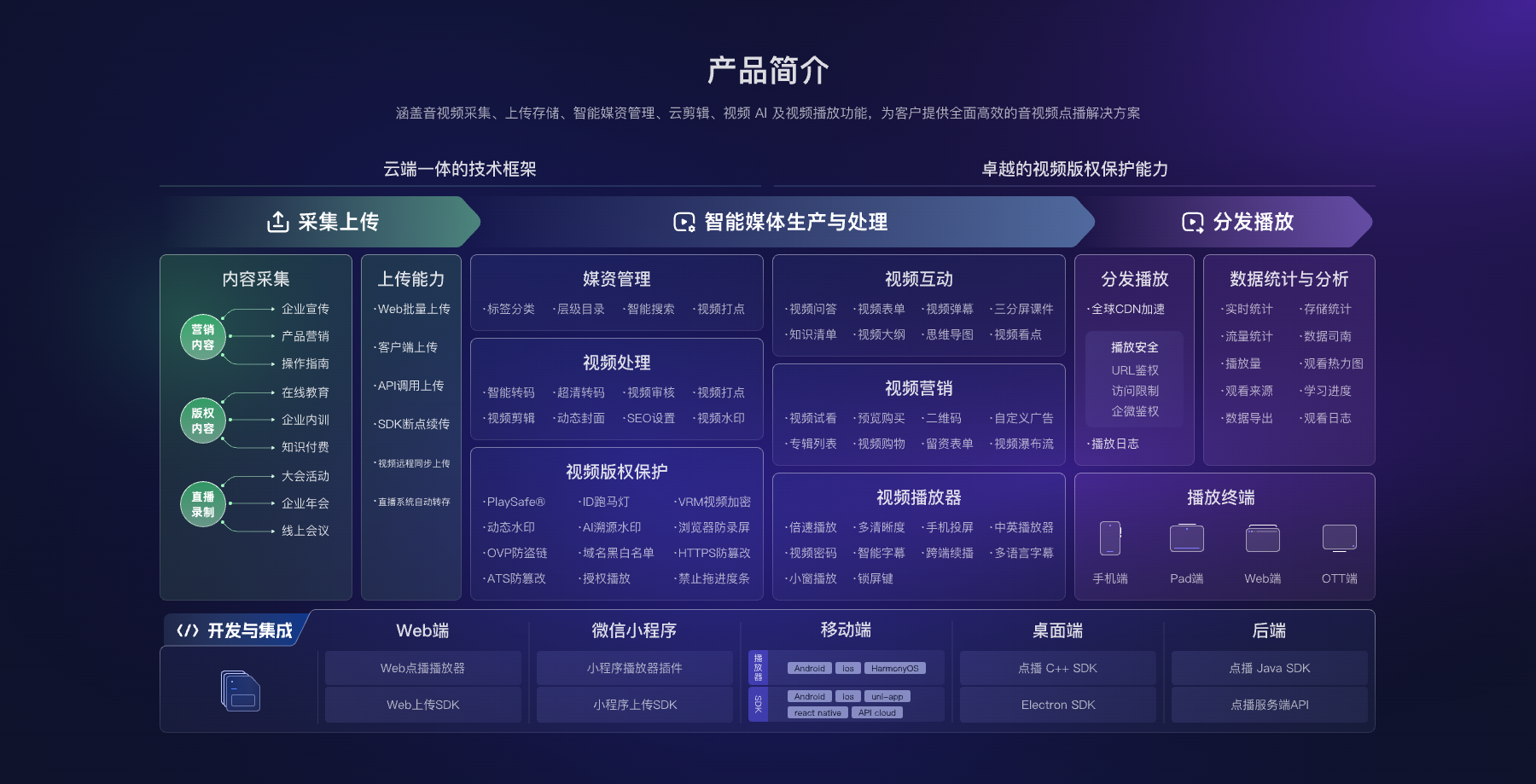
*Figure 2: A multi-video hub includes upload, media asset management, processing, players, viewing entry points, and analytics. Image source: POLYV official Cloud VOD product materials.*
04 Check Seven Items Before Go-Live
First, can customers understand the catalog immediately? Second, can they browse and play on both phones and computers? Third, are the brand, title, and covers correct? Fourth, does adding a video preserve the top-level URL? Fifth, what happens to an old URL after content is removed? Sixth, are basic playback and watch-time metrics available? Seventh, who approves the audience for non-public content?
Also assign responsibility for upload, review, and catalog changes. When several people maintain the library, classification, naming, cover, and version rules matter more than any single product feature. Pilot with ten representative videos, ask sales users and real customers to complete a retrieval task, then expand the catalog.
05 How POLYV Supports Multi-Video Aggregation
The current POLYV Cloud VOD product page covers video hosting, media asset management, standalone viewing URLs, players, H5/QR-code distribution, and analytics. Use Video Playlist to present a group inside the player, or Video Album to turn a series into a shareable page. The current public page states that one account supports one album page by default; confirm any multi-album requirement separately.
POLYV provides the video layer from upload and processing through playback. The enterprise defines the customer-facing catalog and business rules. For a dynamic catalog on a company-owned page, review the Web VOD player, upload SDK, and server-side APIs in the POLYV Developer Center. Validate classification depth, page design, API fields, and account permissions against the current product version and project requirements.
06 Frequently Asked Questions
6.1 What Is the Difference Between a Playlist and a Topic Page?
A playlist presents a group of videos inside the player. A video album or company-owned topic page can carry more context and is better suited to an externally shared series. For dozens of items maintained over time, an album or structured topic page is normally easier to navigate.
6.2 Does the Customer Need to Install Software?
With a verified H5 page or web player, customers can normally watch in a common browser. Test the actual devices and messaging environments your audience uses; cross-device support does not mean identical behavior everywhere.
6.3 Do I Need to Resend the Link After Adding a New Video?
If you are sharing a stable directory entry, adding new content typically only requires updating the directory. The specific behavior depends on the page and platform configuration, so test adding a video in a production-like setup before launch.
6.4 Can Different Customers See Different Directories?
Yes. You can return the corresponding content after identifying the customer through different pages, different access conditions, or your enterprise business systems. Permission rules, customer relationships, and revocation logic should be defined by the enterprise.
6.5 How Should I Estimate the Cost for Dozens of Videos?
Cost depends on total video volume, retention period, output quality, viewer count and watch time, page format, access controls, and API scope. Migrate one representative catalog first, measure actual use, and then size the remaining rollout.
About POLYV
POLYV is an enterprise video SaaS provider whose core products cover cloud live streaming, Cloud VOD, and embeddable video technology. For a customer-facing video center, POLYV Cloud VOD handles upload, processing, media asset management, and online playback. The enterprise organizes the catalog in customer language, defines the audience, and governs content versions.