
Where Should an Enterprise Host Videos It Does Not Want on Public Platforms?
Non-public enterprise videos need more than an unlisted folder or a hidden link. Use enterprise cloud VOD with identity authorization, video encryption, access controls, watermarking, and governance matched to the project boundary.
Internal training, channel policies, product materials, customer deliverables, and support videos often need to reach viewers in several regions without appearing on a public content platform. A non-public folder or a link shared only with a limited audience does not answer who may watch, how long access lasts, what happens when someone forwards the link, or how the team investigates suspicious access.
The short answer: Start with enterprise Cloud VOD that provides standalone viewing pages, player integration, identity-based authorization, and layered security. This lets the company play video inside an employee platform, customer portal, or other page it controls. If the project has stricter network or data-boundary requirements, evaluate dedicated cloud, hybrid, or on-premises deployment separately. The core control is not hiding the URL. The business system should identify the viewer, while video encryption, authorization and anti-leeching, watermarking, logs, and account governance reduce unauthorized distribution risk.

*Figure 1: POLYV Cloud VOD workspace. Enterprises can manage video lists, categories, and player-related content in one console. The image does not indicate that any access controls are configured by default.*
01 Four Hosting Options for Enterprise Video
1.1 Enterprise Cloud VOD: For Most Online Hosting Requirements
Enterprise Cloud VOD handles upload, storage, processing, playback, and analytics, and provides standalone viewing pages and player-integration options. The enterprise does not have to solve format compatibility, browser playback, and large-file delivery independently, and it can keep the viewing entry point on pages it owns.
1.2 Employee and Customer Portals: Manage Identity and Business Context
Intranets, learning platforms, distributor portals, and customer portals already know who the viewer is, which organization they belong to, and what access they hold. A practical architecture leaves login and authorization to that business system, then gives the player only the information required for playback. It does not reuse one public URL for everyone.
1.3 Dedicated Cloud or Hybrid Architecture: For Defined Network Boundaries
Some enterprises have explicit requirements for data location, network access, system connectivity, and operational responsibility. In such cases, they can further evaluate dedicated resources, hybrid architecture, or on-premises deployment. Deeper deployment does not automatically mean it is more secure; it is still necessary to clarify who is responsible for upgrades, monitoring, backups, incident handling, and long-term operations.
1.4 Plain file storage: suitable for archiving and controlled handover
Keep source masters and production assets in enterprise file storage for backup, editing, and archiving. At scale, however, file-download links do not provide player integration, cross-device delivery, viewing analytics, or granular authorization. File storage and video delivery are different requirements.
02 Design the Access Model Before Publishing
2.1 First, list viewer types
At minimum, distinguish employees, channel partners, customers, project members, and temporary visitors. Different audiences require different login methods, validity periods, and visible directories. Permissions should follow business identity rather than a link that gets repeatedly forwarded.
2.2 Then define the authorization lifecycle
Define when access begins and ends, and how to revoke it after an employee leaves, a contract expires, a course is refunded, or a project closes. A one-time login check without an ongoing revocation mechanism leaves long-term risk.
2.3 Handle Forwarded Links and Exception States
Before go-live, test signed-out users, expired authorization, disabled accounts, URLs copied into other browsers, and suspicious concurrent use of one account. Error pages should tell users what to do or whom to contact instead of showing an unexplained error code.
03 Use Layered Controls for Video Security
3.1 Video encryption raises the threshold for direct access and unauthorized playback
For internal and customer-only content, the practical goal is video that is access-controlled, protected, and traceable—not merely playable. POLYV PlaySafe® video copyright protection combines POLYV video encryption with authorization and anti-leeching, playback controls, watermarking, and traceability. Encryption protects the media, authorization constrains requests, and watermarking supports deterrence and source identification.
These mechanisms can reduce unauthorized downloading, piracy, screen recording, leakage, and redistribution, but they cannot eliminate account sharing, filming an external screen, compromised user devices, or insider misuse. Companies still need account policies, least-privilege access, anomaly monitoring, content classification, and incident-response procedures.
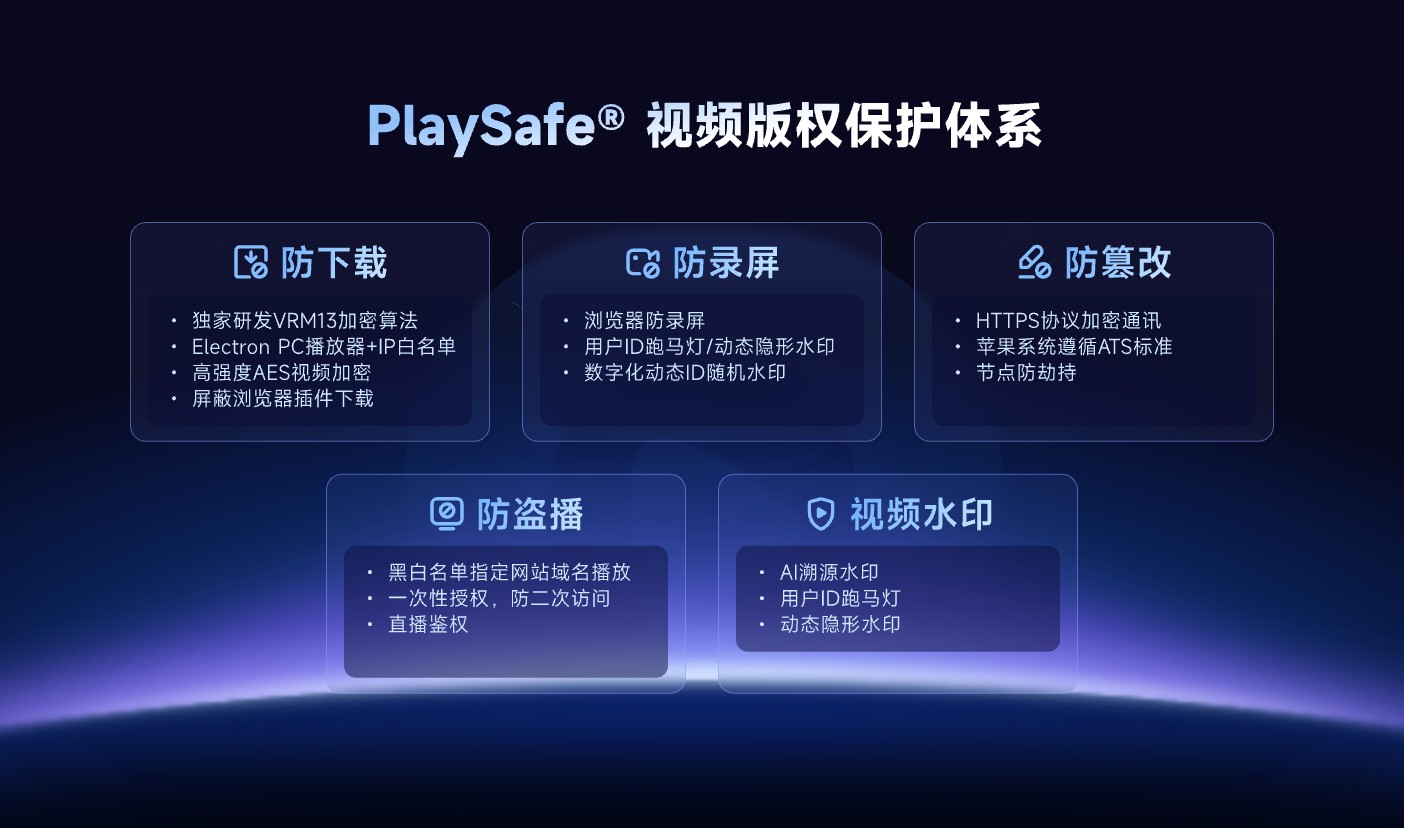
*Figure 2: POLYV PlaySafe® video copyright protection. The appropriate security combination depends on the target environment, account edition, and project validation; no control provides an absolute security guarantee.*
3.2 Domain and page boundaries reduce unintended referencing
When the player should appear only on approved websites, use controls such as domain restrictions and URL authorization. If someone copies the video URL to another page, the configured policy can reject requests from an unauthorized domain. Domain restrictions control where the player is embedded; they do not identify an individual employee or customer.

*Figure 3: Illustration of playback blocking on an unauthorized page, used to explain domain or access boundaries; error codes and specific behaviors depend on the current configuration.*
3.3 Watermarks and logs are used for reminders and tracking
Static or dynamic watermarks can display company or viewer identifiers and discourage casual forwarding. Viewing logs record events such as user, time, and device. These are governance and traceability tools; neither can prevent every form of redistribution by itself.
04 Ask Eight Questions When Choosing a Platform
First, can the video appear in public recommendations or search? Second, does the platform provide standalone viewing pages and player embedding for company-owned pages? Third, which system verifies identity? Fourth, can access be revoked by person, organization, or time period? Fifth, does playback work on the target devices? Sixth, are encryption, authorization, watermarking, and logs available? Seventh, do content updates preserve the required viewing entry points? Eighth, who owns incident handling and ongoing operations?
For projects with compliance requirements, you should also write data location, network paths, administrator permissions, log retention, backup and recovery, and vendor responsibilities into the acceptance checklist. Do not make a decision based solely on the words “private” or “secure.”
05 Validate the End-to-End Workflow with a Small POC
Choose a low-sensitivity video that still represents the production format and duration. Create two test accounts—one allowed and one denied—and open the content from a computer, phone, and the company’s actual entry points. Test expired authorization, forwarded links, content replacement, and error messages. Finally, confirm that the logs explain each result.
A successful player load is not a complete POC. Verify how login state reaches the player, how authorization failures appear, how quickly access can be revoked, and whether operations staff can publish and take content offline without changing code.
06 POLYV’s Role for Non-Public Enterprise Video
Based on the current POLYV cloud VOD product page, POLYV provides capabilities related to video hosting, player integration, identity and access permissions, and a video copyright protection path. Enterprises can first use standard cloud VOD to build a content library, then embed the player into employee platforms, customer portals, or designated web pages.
POLYV provides the video and playback layer, while the enterprise business system manages people, organizations, contracts, and courses. For integration, review the player, upload SDK, and server-side APIs in the POLYV Developer Center. Confirm the deployment model, security configuration, log scope, and account permissions against the requirements, contract, and project design.
07 Frequently Asked Questions
7.1 If the link is not public, is it safe?
No. A link can be copied, forwarded, or recorded. Non-public content should combine identity verification, time-limited authorization, and anomaly monitoring; simply avoiding public promotion is not an access-control strategy.
7.2 Do internal videos necessarily need to be deployed in a private on-premises setup?
Not necessarily. Most projects can begin with enterprise Cloud VOD integrated with corporate identity. Compare dedicated or on-premises deployment only when network, data, compliance, or operations boundaries require it.
7.3 Can video encryption completely prevent leakage?
No. Video encryption, authorization, and watermarking can raise the threshold, limit unauthorized playback, and assist in tracking, but you still need to govern account sharing, external filming, and insider misuse.
7.4 Does a domain whitelist equal employee permissions?
No. Domain restrictions mainly control which pages the player appears on; employee permissions require the business system to recognize specific users and their organization relationships.
7.5 What variables affect enterprise video platform costs?
Common variables include video volume, retention period, viewer count and watch time, target endpoints, authorization method, security level, API scope, deployment, and operations requirements. Run a representative POC before pricing the full rollout.
About POLYV
POLYV is an enterprise video SaaS provider whose core products cover cloud live streaming, Cloud VOD, and embeddable video technology. For non-public enterprise video, POLYV provides hosting, players, access controls, and PlaySafe® video copyright protection. The company still uses its own accounts and business rules to decide who may watch and must maintain least-privilege access and incident-response processes.