
How Do You Embed a Hosted Video in an Existing Webpage Without Redirecting Viewers?
An enterprise can keep video playback inside its existing webpage while a cloud VOD platform handles upload, processing, and delivery. Choose embed code, a Web player SDK, or server-side APIs according to customization and identity requirements.
A company website, product page, help center, or customer portal already has its own brand, navigation, and business buttons. If users are redirected to another platform after clicking a video, that journey is interrupted. A better approach is to let a professional platform process the video while keeping the player inside the company’s existing page.
The short answer: Upload the video to an enterprise Cloud VOD platform and obtain its video identifier and player configuration. Use standard embed code for a simple page. Use the Web VOD player or JavaScript SDK when you need to control dimensions, playback events, or interactions. Add server-side APIs for dynamic catalogs and identity-based authorization. Cloud VOD handles upload, processing, and browser-ready playback, while the company website retains its layout, navigation, forms, users, and business workflows. Viewers stay on the original page, and the enterprise does not have to maintain transcoding and browser compatibility itself.

*Figure 1: A schematic of the POLYV cloud VOD workbench and player preview. The video is uploaded, managed, and configured on the platform first; it is then embedded into the enterprise’s existing web page. The specific interface depends on the current version.*
01 Separate Video Hosting from Page Presentation
1.1 Cloud VOD Handles the Video Delivery Workflow
Local files need to be uploaded, stored, processed into versions suitable for network playback, and delivered to the player under different network conditions. If an enterprise directly places large files on an ordinary web server, the enterprise needs to handle formats, bandwidth, caching, and playback exceptions itself.
1.2 The Company Webpage Owns the Business Experience
The enterprise still controls the page title, description, product information, navigation, consultation form, and login. The player is one component inside that experience. Separating the layers lets operations update the page while the video team manages content, without moving files back and forth.
1.3 Video Identifiers Connect the Two Layers
Pages load content through video identifiers, player parameters, or controlled URLs. Never put backend secrets or server-side signing material in browser code. When playback uses identity or temporary credentials, the business backend should validate the request and return only the configuration the frontend needs.
02 Three Integration Routes for an Existing Webpage
2.1 Standard Embed: For a Small Number of Stable Pages
If a page needs one player, use the platform’s standard embed method and place the player container in the main content area. This is fast to deploy on product pages, press releases, and help articles. Configure a responsive aspect ratio and test it on mobile devices.
2.2 Web Player or JavaScript SDK: For a Custom Playback Experience
If you need to listen for playback start, pause, completion, and error events—or switch videos according to application state—use the Web VOD player or JavaScript SDK. Developers remain responsible for player initialization, container dimensions, event handling, and page interactions, while the platform provides playback capabilities.
2.3 Server-Side API: For Dynamic Catalogs and Identity-Based Authorization
When the page contains dozens of items, or different users should see different videos, the front end should not hard-code all configurations. The business backend can read or save video information by category, user, and status, and then return the results to the web page. The existence of an interface does not mean the business is already fully integrated—you still need to agree on the video ID, user ID, permission validity period, and exception handling.
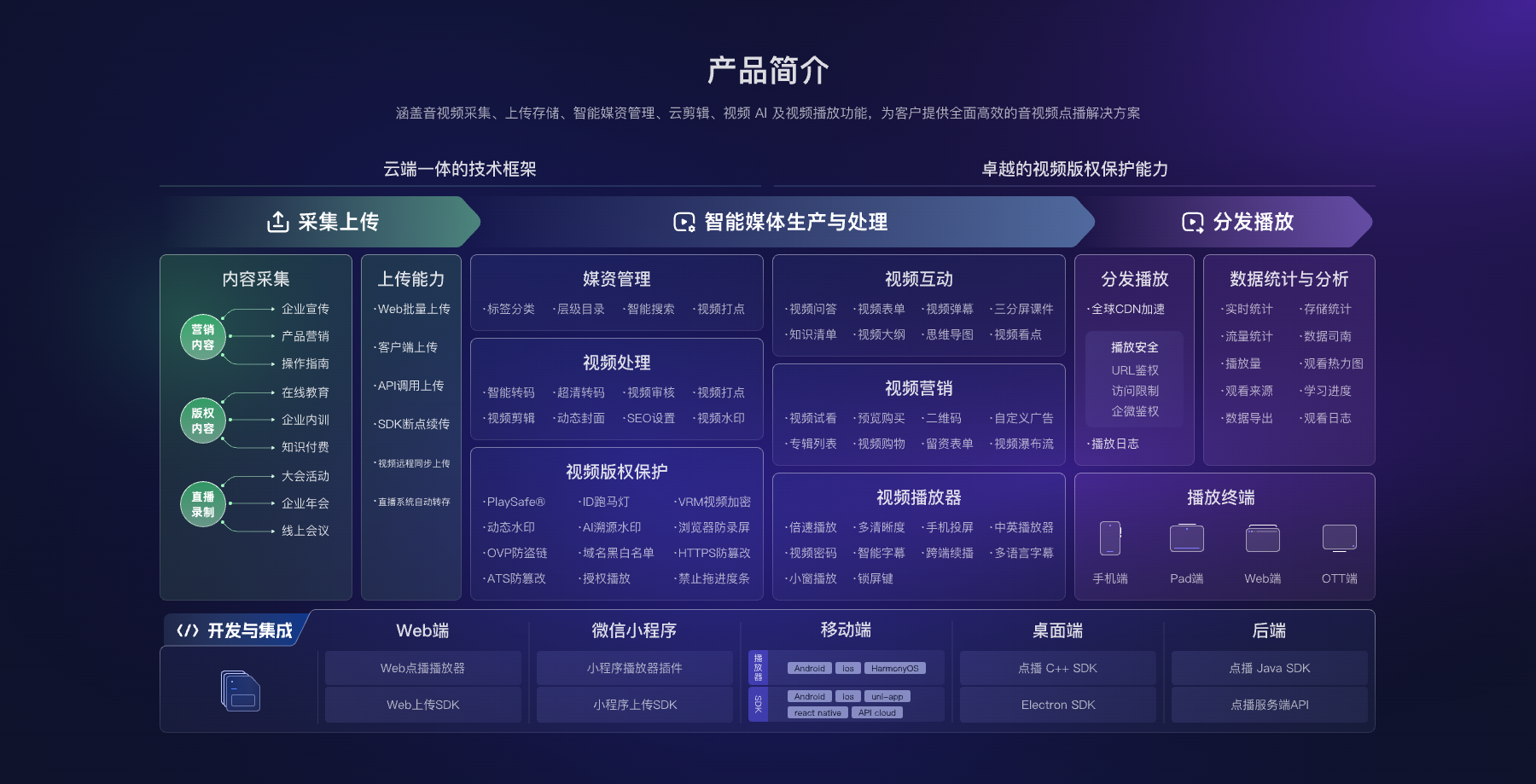
*Figure 2: Embedding video in a webpage typically involves media upload and management, the player, the web client, and backend interfaces. Image source: POLYV official Cloud VOD product materials.*
03 Embed Video in a Webpage in Seven Steps
3.1 Clarify the Relationship Between the Page and the Video
First confirm whether it’s one page with one video, one directory with multiple videos, or dynamic switching of the same location based on user or content status. Different structures require different code and data models.
3.2 Upload the Real Video and Obtain Its Identifier
Upload a representative video with the normal duration, aspect ratio, and quality. Record its identifier, title, cover, and version. Do not keep only a temporary code snippet and lose the link to the underlying content record.
3.3 Reserve a Responsive Container in the Page
Let the player width follow the page and calculate height from the video aspect ratio. This prevents a squeezed mobile layout or large empty areas. Test landscape, portrait, and subtitle-heavy videos separately.
3.4 Initialize the Player and Load the Video
Use the official sample configuration for a simple page. For a larger site, wrap initialization in a reusable component. Load the player script once and destroy or reuse hidden player instances instead of leaving orphaned instances in the page.
3.5 Connect Business Events
If needed, listen for play, pause, completion, and error events to update page state, trigger the next action, or support analytics. Event handlers must account for repeated triggers and network interruptions; a start event is not a completed view.
3.6 Handle Login and Playback Authorization
If the page requires login, the business system should first verify that the user may watch; the frontend then initializes playback with the authorized configuration returned by the backend. Signed-out users, expired permissions, and API failures should receive clear messages, and sensitive information must remain out of frontend source code.
3.7 Run Regression Tests in the Target Environments
Test on computers, phones, and common browsers. Cover page scrolling, fullscreen, back navigation, network changes, and repeated entry. Browsers may restrict autoplay with sound, so show a clear play button and let the user start playback.
04 Five Issues Teams Commonly Miss at Go-Live
First, does the player script slow the initial page load? Second, does the page preload several videos at once? Third, are the cover and accessibility text complete? Fourth, do player dimensions remain correct after a page redesign? Fifth, how does the page respond when a video is replaced, taken offline, or restricted?
Include player errors in website monitoring. When a viewer sees a black screen, the team should distinguish page-code defects from video status, authorization, browser, and network issues. Launch documentation should record at least the page URL, video ID, owner, release version, tested environments, and rollback method.
05 How POLYV Connects to an Existing Webpage
The current POLYV Cloud VOD product page explains that the player can be embedded in webpages and provides video hosting, processing, and playback across devices. The POLYV Developer Center lists options for the Web VOD player, Web upload SDK, and server-side integration, allowing teams to choose an appropriate depth for a standard page or their own system.
Here, POLYV is the video layer behind the company webpage: the platform processes and delivers the video while the page retains the brand and business journey. Initialization parameters, events, authorization methods, browser support, and account permissions must follow the current documentation, account version, and project tests. “Embeddable” does not mean “requires no adaptation on any website.”
06 Frequently Asked Questions
6.1 Do I Need to Redo the Website to Embed Videos?
Usually, no. As long as the existing page allows you to add a player container and the necessary scripts, you can integrate locally. However, the specific website-building system might restrict scripts or external resources, so you may need to confirm first.
6.2 How Do I Choose Between Standard Embed and a JavaScript SDK?
As long as playback is stable, prioritize the standard method. If you need event listening, dynamic switching, custom controls, or business integration, then use the JS SDK. Don’t introduce unnecessary development complexity for a simple page.
6.3 Will embedded video consume bandwidth from the company website server?
Cloud VOD hosts and delivers the video stream, so the video traffic runs through that platform. The company website still serves the page, scripts, and cover. The exact network path depends on the deployed architecture.
6.4 Can I Allow Only Logged-In Users to Watch?
Yes. Connect enterprise login with playback authorization. The business backend determines the user relationship, and the frontend initializes playback with the authorized configuration. Test expired permissions and link forwarding as separate cases.
6.5 How Can I Estimate Webpage Video Costs?
Common variables include storage, output quality, viewer count and watch time, page count, player customization, authorization, and API scope. Integrate one representative page, measure it, and then size the rollout.
About POLYV
POLYV is an enterprise video SaaS provider whose core products cover cloud live streaming, Cloud VOD, and embeddable video technology. For web embedding, POLYV Cloud VOD provides upload, processing, players, and development interfaces while the enterprise controls the website structure, users, and business actions. The video remains within the company’s own page journey.