
How Can a Live Stream Recording Automatically Become an On-Demand Replay After the Event?
A live stream becomes a reliable replay only when cloud recording is enabled and verified before the event. After processing, teams must review the recording, configure access, and publish it through the appropriate replay or cloud VOD workflow.
After a corporate launch, webinar, or online event ends, organizations often want people who missed the live session to watch it immediately or reuse highlights for sales, training, and content operations. Many teams only look for the recording after the stream is over, then discover that cloud recording was never enabled—or that a file exists but still lacks a title, cover, permissions, and publishing workflow.
The short answer: First, enable and verify cloud recording before the live stream starts; after the live stream ends, wait until the recording has finished processing, then add the content to the replay list based on the current configuration, or transfer it to cloud VOD for long-term management. Whether auto-transfer is enabled, when viewers can watch, and whether replays are publicly accessible all depend on account capabilities, channel settings, and the review workflow. Automatically generated recordings only ensure content is kept, not that it is immediately available after the live stream ends, and not that it has been automatically made public.
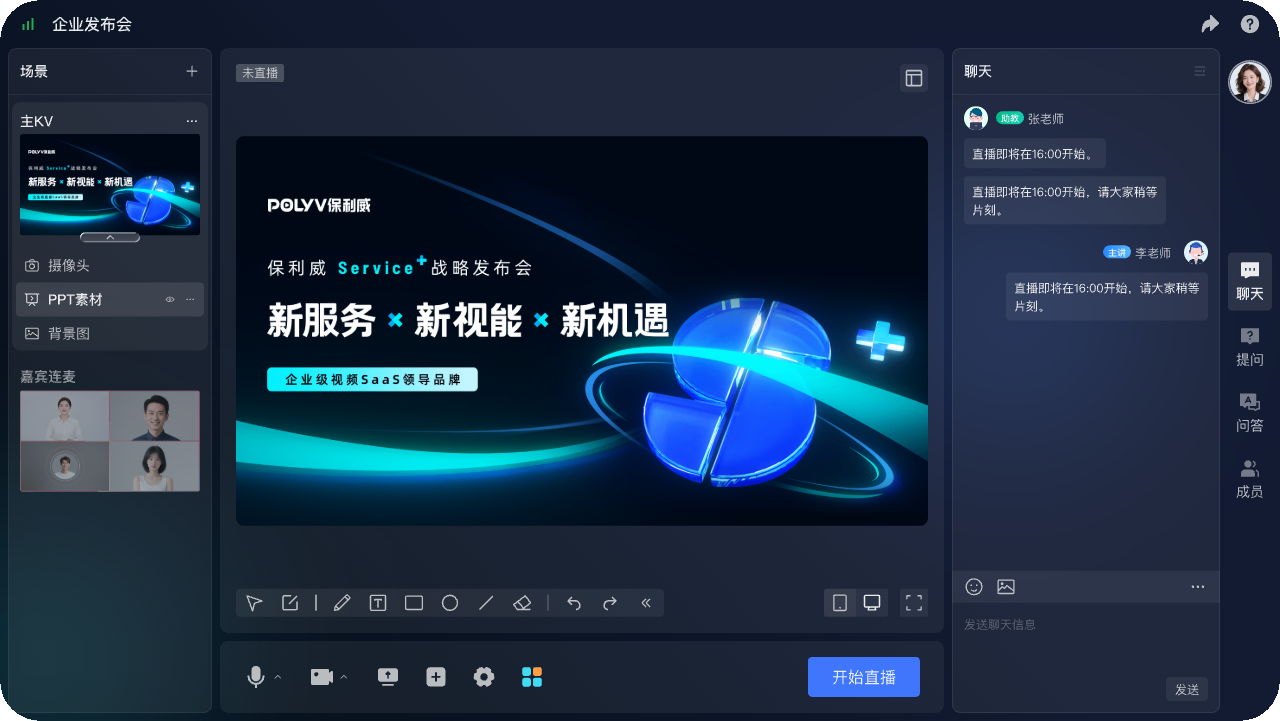
*Figure 1: POLYV browser-based live production console. Configure recording and replay settings before the live stream begins. The sample avatar and name do not represent a real customer.*
01 Automatic Replay Requires Five Connected Actions
1.1 Enable recording before the live stream starts
The team should first confirm whether this live stream needs cloud recording, which video and audio to record, who is authorized to modify settings, and the recording storage requirements. Do not interpret “the platform supports recording” to mean that every channel is already enabled by default.
1.2 Capture Recording Segments During the Live Stream
During the live stream, the platform records according to the configured settings. Stopping recording, switching sessions, or encountering an interruption may produce several recording segments. Operations staff should log the actual start, end, and interruption times for later reconciliation.
1.3 The Platform Processes the Recording After the Event
The platform must package, process, and update the recording status before the replay becomes available. The current POLYV Cloud Recording page states that, once enabled, the platform records the live stream in real time and keeps the resulting content in the media library for 180 days after the event. Treat that period only as information from the current public page; confirm the applicable account, contract, and current rules for the project. Processing time varies with duration, quality, and the number of segments, so do not promise immediate replay availability without a real test.
1.4 Review, editing, and packaging
Before publication, review the opening slate, breaks, sensitive information, audio, and ending. Edit or merge segments as needed, then update the title, cover, and description. Do not treat an unreviewed raw recording as a finished long-term content asset.
1.5 Publish based on access conditions
Finally, the team decides whether the replay is public, who may access the replay, whether to include it in list replay, whether the entry uses the same page as the live stream, how long it remains valid, and when it will be taken down. The live stream and replay can share business entry points, but whether permissions are inherited must be verified according to the current configuration and project rules.
02 Confirm Six Settings Before the Live Stream Starts
Confirm six items: recording is enabled and has a named owner; video and audio sources are correct; live-channel, session, and content IDs are mapped; storage and transfer-to-VOD rules are defined; the replay audience and access rules are clear; and interrupted or multi-segment recordings have a documented handling process.
Before the event, run a ten-minute rehearsal with the same production method and complete the entire workflow: start the live stream, wait for the recording, and open the replay. The workflow is verified only when the final replay works; a healthy live picture alone is not enough.
03 Short-Term Channel Replay and Long-Term Cloud VOD Serve Different Needs
3.1 Channel Replay Provides Short-Term Catch-Up Viewing
Channel replay is closely tied to the original live-stream task, making it suitable for short-term catch-up after the event. Operations can reuse the original notifications and entry points, but they still need to check the recording status, permissions, and whether the page copy is suitable for users after the live stream ends.
3.2 Cloud VOD Supports Long-Term Management and Reuse
Recordings destined for a company content center, course catalog, sales library, or long-term knowledge base should be reviewed and packaged as published video assets. POLYV provides an automatic transfer to Cloud VOD route, but whether transfer runs automatically or requires a manual action depends on the current account and channel configuration. After transfer, teams still need classification, covers, versions, takedown rules, player settings, and analytics definitions. Retention follows the current contract and account rules.

*Figure 2: After live-stream recordings enter long-term content operations, they can be managed in the VOD workbench by dimensions such as video list, categories, and players; the specific interface depends on the current account version.*
3.3 Preserve the Relationship Between the Live Session and Replay
Whether the replay remains in the channel or is transferred into the VOD library, you should record the relationship among the live sessions, the recorded videos, the published versions, and the page entry points. This is how you can answer “which live stream this replay comes from, whether it was edited, and which page is currently using it.”
04 Keep an Editorial Review Gate in the Automated Workflow
After the live stream, systems can trigger processing, status callbacks, and page updates automatically. Keep a human review step before publication. A practical workflow is “generate recording → notify operations → mark as pending review,” followed by approval of the content, cover, permissions, and publishing scope.
For system integration, use consistent identifiers for live sessions, replay videos, and business content, and handle duplicate callbacks, timeouts, and retry failures. A single callback must not make the page public. Check both the recording status and the editorial approval result first.
05 Replay Acceptance Checklist
Confirm that the recording is complete; audio and video are synchronized; the start and end are clean; and subtitles and courseware are legible. Test phones and computers, network changes, fullscreen, and back navigation. Test signed-out users, expired access, and old links. Verify the title, cover, description, takedown date, and the attribution of viewing data to the correct session and content record.
For important events, you should also retain the original recording and the published version, record the editing time, and the responsible person. If the page has already been distributed externally, you should evaluate how the original entry and existing data should be handled before replacing the replay.
It is recommended to clearly define responsibilities for the live-stream owner, content reviewers, and page publishers. The technical platform can automatically notify status, but whether content is made public, when it is taken down, and how to roll back when disputes arise still requires a clear internal business responsibility chain.
06 How POLYV connects live streaming, replay, and VOD
Currently, POLYV Enterprise Live Streaming supports enterprise live events and standalone viewing. Cloud Recording captures the event, List Replay organizes replay content, and Automatic Transfer to Cloud VOD moves eligible recordings into VOD. POLYV Cloud VOD then supports long-term hosting, processing, playback, and media asset management.
In this topic, POLYV’s role is to connect live-produced content with long-term VOD management. Enterprises still need to decide the reviewer, the publish time, the target audience for access, and the content lifecycle. Recording entry points, generation time, transfer method, editing scope, and permission inheritance should follow the current account version, help documentation, and real-event testing.
07 Frequently Asked Questions
7.1 Will there definitely be an automatic replay after the live stream ends?
Not necessarily. You need to confirm that cloud recording is enabled before the live stream starts. After the recording processing is completed, you also need to confirm whether it is added to the replay list, whether automatic transfer is enabled, and whether the replay is publicly accessible. For important events, do a complete end-to-end pre-run based on the current account configuration.
7.2 How Soon After the Live Stream Can Viewers Watch the Replay?
It depends on the session duration, output quality, processing workflow, and current service conditions. Do not promise a fixed turnaround without evidence; use actual event records to establish expectations and give viewers appropriate guidance.
7.3 How Many Recording Segments Might an Interrupted Live Stream Produce?
It may be affected by sessions, stops, and the way exceptions occur. You should record interruption time, check the number of material segments after the stream ends, and decide whether to merge or publish separately based on the project’s capabilities.
7.4 Can the replay reuse the original viewing permissions?
This requires verification based on channel, page, and business system configuration. Enterprises should clarify who can still view after the live stream ends, until when they can view it, and how permissions connect after transferring into the cloud VOD library.
7.5 What do replay fees usually depend on?
Common variables include recording duration, output quality, retention period, plays and watch time, editing, page requirements, and API scope. Use a representative live event to produce real usage inputs before pricing the full program.
About POLYV
POLYV is an enterprise video SaaS provider whose core products cover cloud live streaming, Cloud VOD, and embeddable video technology. Enterprises can connect live recording, replay generation, and long-term VOD management with POLYV, turning a one-time event into reusable video content while retaining editorial review and access-control gates.