
How Can Enterprises Upload, Classify, and Manage Videos in Bulk?
Bulk upload is only the first step in managing hundreds of enterprise videos. Teams should define naming, categories, ownership, versions, and access levels before choosing Web upload, an upload SDK, or server-side APIs.
Once an enterprise video library grows from dozens to hundreds of items, the main problem is no longer whether files can be uploaded. It is inconsistent naming, duplicate versions, unclear ownership, mixed permissions and categories, and outdated content that cannot be retired cleanly. Batch upload is only the entry point; the real goal is a sustainable media asset management process.
The short answer: First define naming, categories, tags, owners, versions, and access levels, then choose browser-based batch upload, an upload SDK, or a server-side API according to scale. After upload, check processing status, content, thumbnails and captions, review results, and publishing entry points, and establish update and archiving rules. An enterprise cloud VOD platform provides upload, processing, media management, and player capabilities; the enterprise remains responsible for classification standards, role permissions, and the content lifecycle. Do not dump every file into one folder and expect it to organize itself later.

*Figure 1: POLYV Cloud VOD workspace, where teams can review video lists, categories, player previews, and related information in one console. Available fields, entry points, and account permissions depend on the current version.*
01 Create a Migration Inventory Before Upload
1.1 Create a Unique Inventory Record for Each Video
The inventory should include the source path, filename, business title, content type, assigned section, owner, version, publication status, access level, and notes. Use the unique record to reconcile successful uploads, failures, and duplicates during the bulk job.
1.2 Distinguish Source Masters, Published Renditions, and Historical Versions
Use the high-bitrate master version for archiving and remastering. Use the release version for online playback. Use the historical version for audits or rollbacks. Do not show all three versions to operators with similarly styled titles, and do not keep only the processed online version while losing the master version.
1.3 Clean up duplicates and expired content first
Before upload, identify duplicates using checksums, titles, duration, and ownership. Mark uncertain legacy videos as “pending confirmation” instead of deleting them. Removing confirmed duplicates and obsolete content reduces the later classification and storage workload.
02 Categories, Tags, Permissions, and Status Serve Different Purposes
2.1 Categories Answer “Where Does This Content Belong?”
Use categories for stable top-level structures such as product, marketing, training, events, and internal material. Keep the hierarchy shallow enough that operators can choose the right path consistently.
2.2 Tags answer “what characteristics the content has”
Tags can represent industry, product model, usage stage, audience, language, and year. A single video can have multiple tags for search and combinations; there is no need to create a directory for each cross-dimensional combination.
2.3 Permissions answer “who can do what”
A category is not a permission. Define separate roles for upload, editing, review, publication, takedown, and deletion, and limit each administrator’s scope. Viewing access is another layer and should reflect employee, customer, course, or other business relationships.
2.4 Status answers “what stage the content is in”
It is recommended to use statuses such as pending upload, processing, pending review, published, taken down, and archived. Operators can know the next step from the status, rather than guessing based on the file name.
03 Choose an upload method based on scale
3.1 Browser-Based Batch Upload: For Manual Migration
If you have dozens of videos per batch and the files are clearly defined, operators can select and upload them in the admin console in bulk. The advantage is that it is intuitive and suitable for one-time migration; you must pay attention to browser interruptions, duplicate submissions, and filling in required fields after upload.
3.2 Upload SDK: For an Existing Enterprise Workspace
If multiple departments continuously generate videos, you can embed the upload capability into the enterprise’s existing content system. Users still select files and fill in fields in the familiar interface, and the system then links the videos with business records. The frontend should not store sensitive server-side keys.
3.3 Server-Side API: For Automated Synchronization
When the recording system, content production system, or historical storage needs automatic synchronization, you can establish tasks through server-side interfaces. The enterprise must handle authentication, retries, idempotency, status lookups, and failure alerts; you cannot treat “successful API call” as meaning the video has already finished processing.
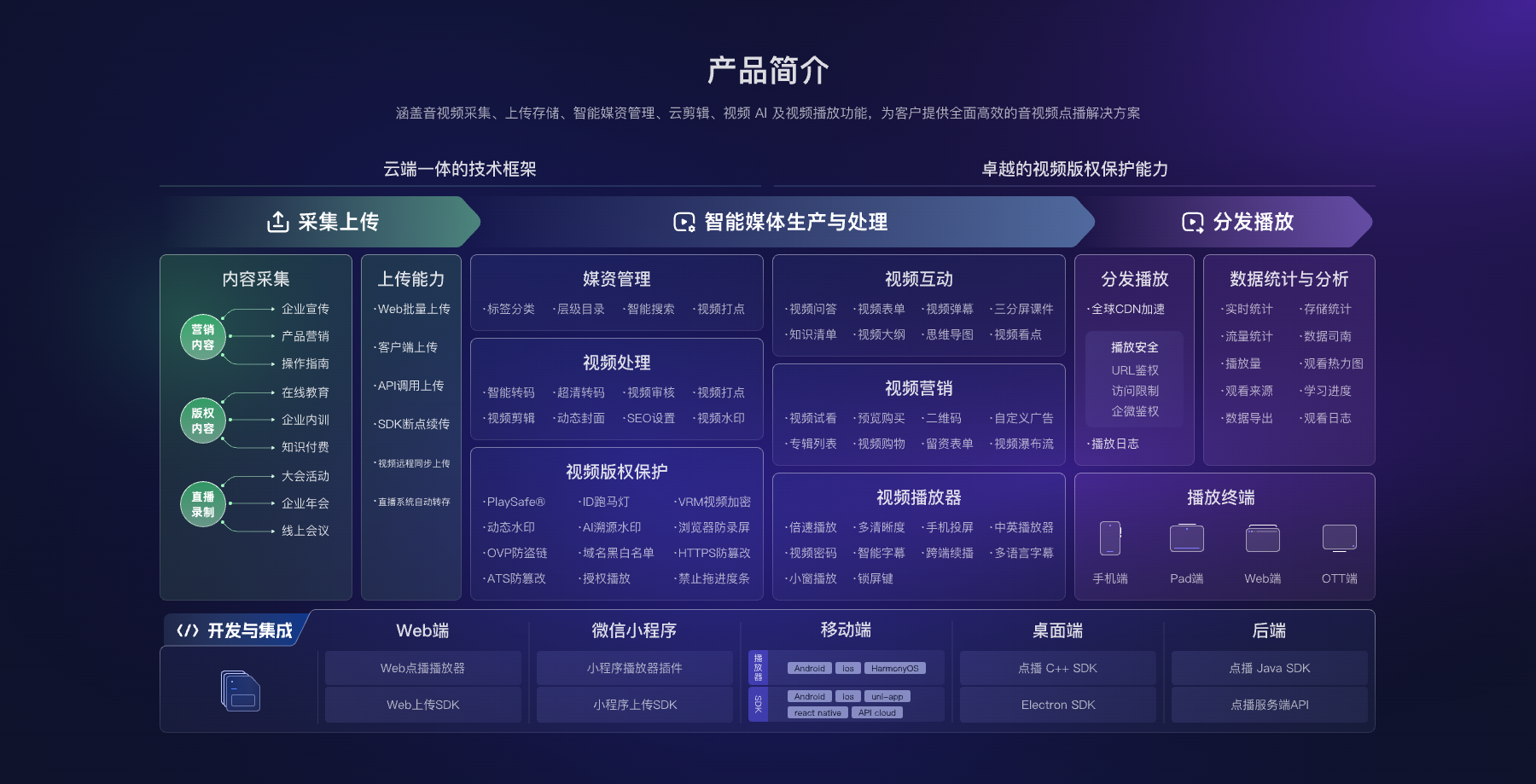
*Figure 2: An enterprise video library includes ingestion and upload, media asset management, processing, players, analytics, and development integration. Image source: POLYV official VOD product materials.*
04 Run Five Checks After Upload
First, reconcile counts and unique identifiers to identify successes, failures, duplicates, and unknown items. Second, check processing status, duration, dimensions, audio, and quality. Third, complete the title, cover, subtitles, category, and tags. Fourth, have business owners approve the content and access level. Fifth, verify playback on real pages and target endpoints.
A file appearing in the list does not mean the migration is complete. The bulk job should produce a reconciliation report with the old path, new video identifier, current status, error details, and owner for every record.
05 Establish rules for daily updates and archiving
5.1 Review first, then publish new content
Separate upload, review, and publication roles where practical. For important content, require two-person approval to reduce the risk of publishing the wrong version, sensitive information, or unapproved subtitles.
5.2 Keep version relationships when replacing
When updating a video, record the object being replaced, the old version, the publish time, and the rollback method. If external pages or QR codes have already used the current content, confirm the entry points, caching, and data behavior first.
5.3 Regularly clean up expired content
Review expired products, past events, and unowned videos quarterly or on the relevant business cycle. Take content offline first, observe its dependencies, and then archive it. Do not delete immediately merely to save space.
5.4 Keep the master versions and a recovery path
Online hosting is used for playback, but enterprises should still keep the necessary master versions, subtitles, and project files according to their own policies. Recovery drills must cover files, metadata, and page relationships, not just confirming that the backup directory exists.
06 Use data to improve the content library, not just to count inventory
Track plays, watch time, completion, errors, and search feedback, but define the reporting scope first. Content with no viewers may be obsolete or simply hard to find. A video with many starts and low completion may have an accurate title but be too long. Interpret the data against the content’s purpose.
Assign an owner and review cadence to each category, then maintain action lists for retention, updates, consolidation, takedown, and new production. This keeps the library useful instead of turning it into another unmanaged file repository.
07 How POLYV Supports Enterprise Media Asset Management
The current POLYV Cloud VOD product page covers video upload, media asset management, processing, players, video delivery and playback, and analytics, with upload and integration routes for several environments. The POLYV Developer Center lists the Web upload SDK, VOD player, and server-side APIs.
In this scenario, POLYV provides the video and media asset platform, while the enterprise owns the classification vocabulary, roles, review standards, access levels, and lifecycle. Confirm upload volume, concurrency, file limits, processing time, API fields, and account permissions against the current product, contract, and project tests instead of relying on old assumptions.
08 Frequently Asked Questions
8.1 Should categorization be based on departments or on content?
Prioritize stable business content or user tasks. Departments can be used as tags or as a field for owner/assignee. Organizational structure changes frequently; categorizing strictly by department often requires repeated migration.
8.2 How many videos per batch is most appropriate?
There is no universal number. You should execute in batches based on file size, network conditions, platform limitations, and the operator’s ability to perform verification. Use the first batch with representative samples to validate the process.
8.3 Why can’t I play even though the upload succeeded?
After upload, the video may still be processing, or a format, status, review, or permission issue may block playback. The system should distinguish upload, processing, and publication states and provide retry options and alerts for failures.
8.4 What should be checked before deleting old videos?
Check whether they are still referenced by web pages, QR codes, courses, or customer materials; whether audits and rollback are required; and whether the master versions have been backed up. A safer approach is to take down first and then archive.
8.5 How Do I Estimate the Cost of an Enterprise Video Library?
Common variables include video volume, retention period, output quality, upload method, plays and watch time, account roles, API scope, and backup requirements. A pilot with one category will produce more reliable sizing inputs.
About POLYV
POLYV is an enterprise video SaaS provider whose core products cover cloud live streaming, Cloud VOD, and embeddable video technology. Enterprises can use POLYV Cloud VOD for bulk upload, media asset management, processing, and playback, while their own content system manages classification, roles, review, versions, and archiving. This turns scattered files into governed content assets.