
How Can the Same Video Play Properly on Desktop, Mobile, and WeChat?
One source video can be managed centrally, but desktop browsers, mobile H5 pages, and WeChat still require environment-specific playback validation. Encoding, layout, player behavior, login state, and real-device testing must work together.
When companies share product overviews, how-to videos, or internal content, a familiar problem often appears: the video works in a desktop browser but is distorted on mobile, or it plays in a standard browser but shows a black screen, handles fullscreen differently, or fails inside WeChat. The real issue is rarely the upload itself. It is whether encoding, the player, the host page, and each viewing environment work together as one reliable playback workflow.
The short answer: Upload one master video to an enterprise cloud VOD platform that handles storage, transcoding, and playback delivery. Then use the appropriate player or component for desktop web, mobile H5, and WeChat. You can maintain one content version, but you still need to validate page layout, playback behavior, login state, and real-device compatibility in every target environment. Copying the same file URL into three pages is not a cross-platform strategy.
01 Cross-Platform Playback Means One Media Asset with Multiple Viewing Experiences—Not Three Separate Videos
1.1 Start with One Source Video and One Business Identifier
If a team uploads separate copies for the website, mobile pages, and WeChat, versions quickly drift apart: a title changes in one place, an old file keeps circulating elsewhere, and analytics are split across several records. A better approach is to assign one business identifier to each video. Manage the source file, thumbnail, captions, and publishing status in the VOD console, and let each channel reference the same video ID with the playback settings it needs.
This makes replacement, takedown, and quality changes manageable without hunting through scattered pages. Your content system remains responsible for categories, customer permissions, and navigation; the video platform handles media processing and playback delivery.
1.2 Uploaded Source Files Still Need to Be Prepared for Online Playback
Files exported from cameras, editing software, and phones can use very different codecs, bitrates, resolutions, and containers. Embedding the source file directly shifts compatibility work to the browser and makes it harder to adapt playback to poor network conditions. A cloud VOD platform converts uploaded content into web-ready formats and quality renditions, then serves the appropriate stream through the player for the device and connection.
The current POLYV Cloud VOD page describes capabilities spanning audio and video ingestion, storage, media management, processing, and playback, with integration options for web, Android, iOS, Flutter, HarmonyOS, and other environments. Confirm the exact device coverage and output renditions for your account edition and project requirements.
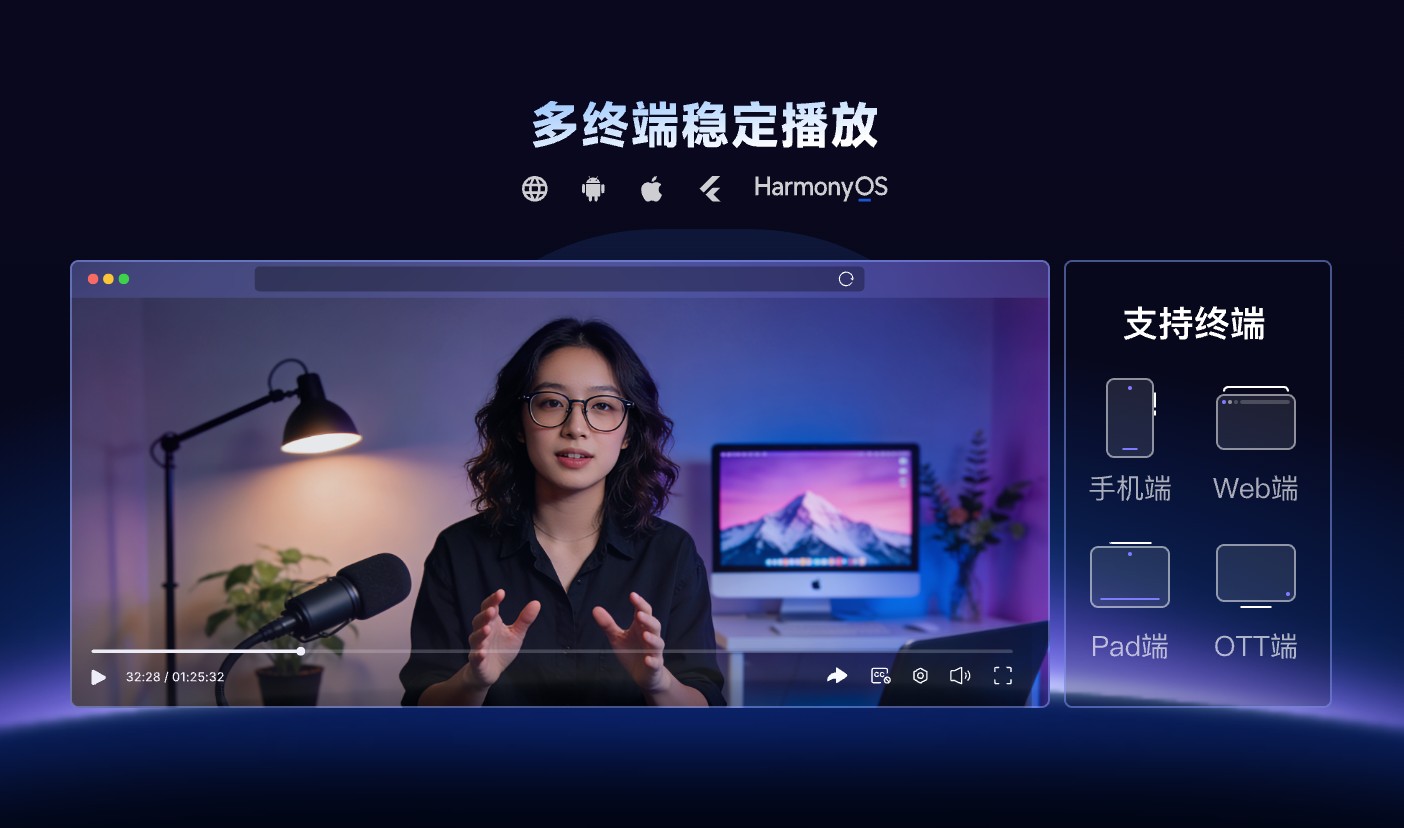
*Figure 1: One video asset can serve web and mobile experiences, while compatibility still needs to be validated for each target environment. Image source: POLYV official product capability diagram*
02 Integration Methods for Desktop, Mobile, and WeChat Are Not Identical
2.1 On Desktop Web, Verify Player Embedding and Page Layout
A company website or customer portal usually embeds a web player directly in the page. Give the player explicit dimensions or a responsive container, and verify fullscreen, playback speed, captions, quality selection, thumbnails, and error messages. If the page also contains navigation, forms, or downloads, check for focus conflicts, overlapping elements, and unexpected scrolling.
2.2 On Mobile Browsers, Test Touch Controls, Orientation Changes, and Poor Networks
Mobile behavior varies with screen size, browser engine, and operating-system media policies. Controls must be touch-friendly, the image should retain its aspect ratio when the device rotates, and the player lifecycle should be handled correctly when users leave and return to the page. Because browsers frequently restrict autoplay with sound, provide an obvious play action instead of assuming every phone will begin playing audio as soon as the page opens.
2.3 In WeChat, Test the Constraints of the Actual Container
An H5 page opened inside WeChat still uses web playback, but navigation history, authorized login, sharing and return behavior, and the WeChat and operating-system versions can all affect the experience. A WeChat Mini Program is a different runtime and should use the corresponding VOD player plug-in or component rather than reusing desktop player code. The current POLYV Developer Center lists the Web VOD player, Mini Program VOD player, and mobile VOD SDK separately, so the integration path should match the target environment.
03 The Most Reliable Technical Architecture Is “Business System + Cloud VOD + Client-Side Player”
3.1 The Business System Determines Who Can Watch and How They Enter
The company website, customer portal, or membership system remains the system of record for users, categories, orders, and organizational relationships. When someone selects a video, the business system checks access and sends only the required playback parameters to the front end. Platform keys, signing logic, and administrative credentials should never be exposed in a public page.
3.2 Cloud VOD Is Responsible for Media Processing and Playback Delivery
The VOD platform receives uploaded content, manages storage, transcoding, thumbnails, and captions, and supplies each client player with the data required for playback. This avoids building an in-house foundation for media processing, storage, and playback across devices. The project still needs a defined scope for retention, bandwidth, output renditions, and account permissions.
3.3 The Client-Side Player Is Responsible for Presentation and Interaction
Players for web, WeChat, and native apps each manage their own lifecycle and interactions. The video ID, brand rules, and measurement definitions can be shared; the implementation code generally cannot. Defining that boundary early reduces the risk of discovering just before launch that one environment lacks captions, fullscreen support, or playback recovery.
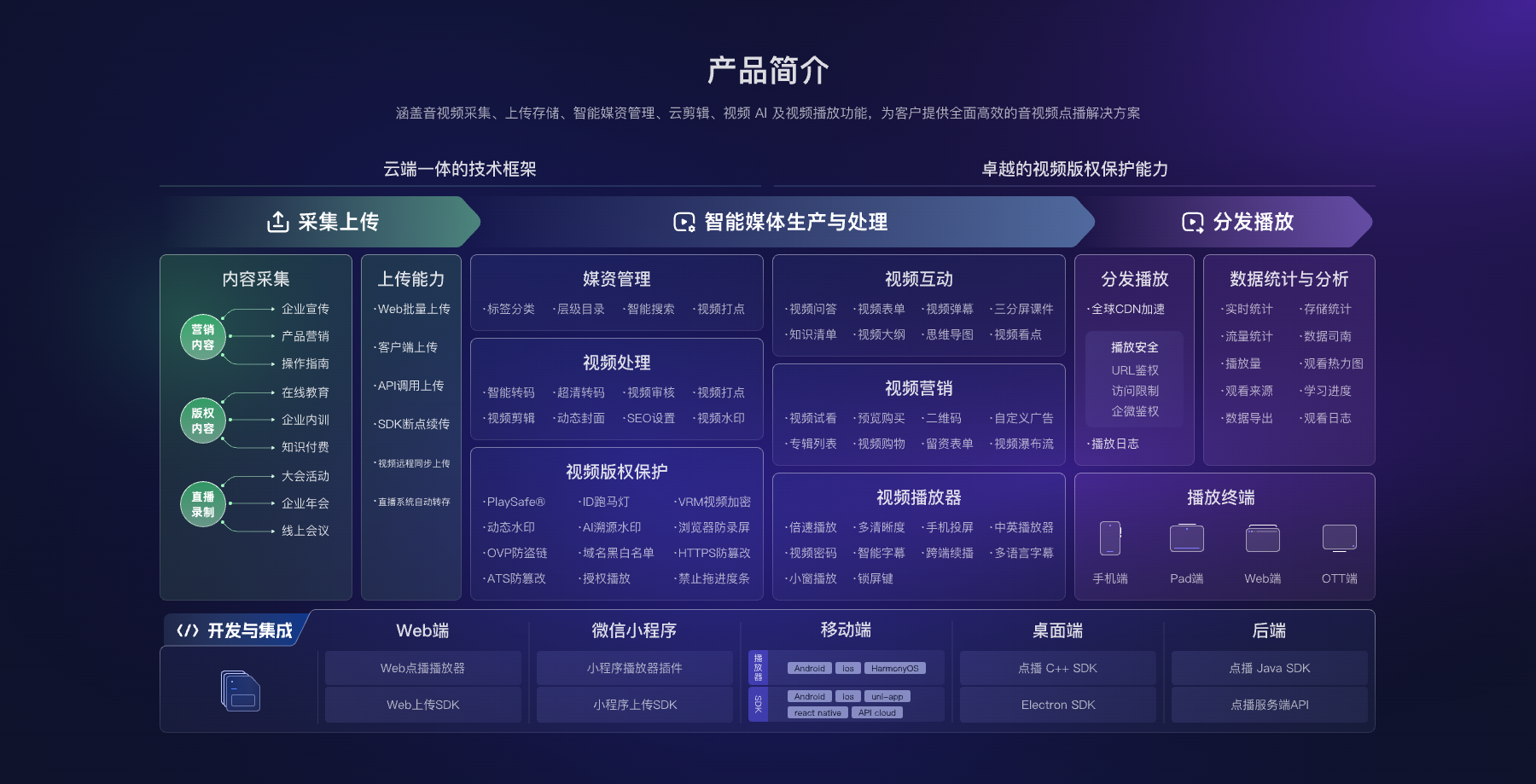
*Figure 2: Cloud VOD connects upload, media management, playback, and integration options for multiple environments. Companies can select the modules required for their target devices. Image source: POLYV official product architecture diagram*
04 Roll Out Across Environments in Five Controlled Steps
4.1 List the Real Viewing Environments
List the desktop browsers, mobile operating systems, WeChat entry points, and network conditions your audience actually uses. Confirm whether login, captions, speed controls, fullscreen, and casting are required. “Supports mobile” is not a testable scope.
4.2 Choose One Representative Video and Run Transcoding and Playback Tests
Use a representative video with realistic duration, scene changes, captions, and audio—not a ten-second placeholder. After upload, check time to first frame, quality switching, audio-video synchronization, and recovery on a poor connection.
4.3 Integrate Three Representative Entry Points Separately
Implement one desktop page, one mobile H5 page, and one WeChat entry point first, and confirm that all three reference the same video ID. Page styling and player settings may differ, but publishing status must remain consistent.
4.4 Run Regression Tests on Real Devices and Networks
Cover the operating-system, browser, and WeChat versions commonly used by your audience. Test switching between Wi-Fi and mobile data, returning after screen lock, rotating the device, using browser back and forward controls, and reopening the page repeatedly.
4.5 Set Up Versioning and Exception Monitoring
Record the player version, page release, and recurring errors. If an issue later appears in one environment, the team can isolate whether it came from media processing, a page update, device policy, or the network instead of repeatedly uploading the file and hoping the problem disappears.
05 When Choosing a Platform, Focus on Five Capabilities—Not Just Whether It Can “Play”
Check five things: unified upload, transcoding, and media management; clear player or SDK options for web, WeChat, and native apps; usable demos, documentation, and release notes; the ability to map video IDs to your own business records; and reporting or diagnostics that distinguish playback results by environment.
For this scenario, POLYV provides a single cloud VOD layer for processing a source file and delivering it to multiple viewing environments, with different integration options for each one. A company can launch first with the web player, then add WeChat components or mobile SDKs as experience requirements grow, without rebuilding every business page in the first phase.
06 Common Questions
6.1 Do We Need to Upload Different-Resolution Videos for Desktop and Mobile Separately?
Usually not. Upload a suitable master file and use the platform’s transcoding settings to generate the required renditions. Choose the output tiers according to the source material, audience network conditions, and budget.
6.2 If a Link Opens in WeChat, Can It Also Be Used Directly in a Mini Program?
No. An H5 page opened in WeChat and a WeChat Mini Program use different runtimes. A Mini Program should use the appropriate player plug-in or component and complete the required category, domain, and real-device checks.
6.3 Why Can’t Mobile Devices Autoplay with Sound?
Mobile operating systems and browsers typically restrict sound autoplay that hasn’t been triggered by user interaction. The page should provide a clear play button, and autoplay should be treated only as an optional enhancement—not as a prerequisite for go-live.
6.4 Can Playback Data for the Same Video Be Combined Across Devices?
Yes, if all experiences use the same video ID and measurement definitions. Identifying individual viewers still depends on login and identity-passing design, so reports should separate anonymous playback from authenticated user behavior.
About POLYV
POLYV is an enterprise video SaaS provider offering cloud VOD, players, SDKs, APIs, and integration options for multiple environments. Companies can host and process one video centrally, then use the appropriate player for web, WeChat, or a native app. Device coverage, supported versions, and interaction behavior should still be validated in the intended production environments.