
How Can You Tell Whether a Customer Opened a Shared Video and How Long They Watched?
A video platform can record playback behavior, but a public link does not automatically identify a specific customer. Customer-level analysis requires a stable, compliant identifier and clear definitions for page opens, playback starts, valid viewing, and completion.
After sharing a product demo, solution walkthrough, or training video, a team usually wants to know more than the total play count: did this customer open it, how much did they watch, and does the engagement warrant follow-up? A public link may capture playback activity, but it does not automatically identify the viewer. Unless identity and measurement rules are designed first, even a detailed dashboard may fail to answer the business question.
The short answer: A video platform can record events and attributes such as plays, watch time, device type, region, and traffic source. Confirming that a specific customer generated those events requires the viewing entry point to pass a stable, privacy-conscious user identifier. A public link normally produces anonymous or device-level statistics. For customer-level records, use login, registration, or server-side authorization to associate a customer ID with the video ID and viewing events. Define page open, playback start, qualified viewing, and completion separately—a single click is not evidence of genuine interest.
01 Separate Four Questions: Page Open, Playback, Watch Time, and Viewer Identity
1.1 Opening a Page Is Not the Same as Starting Playback
A customer can open a page without starting the video: the player may remain on the thumbnail or fail because of network, permission, or browser constraints. Page-view events tell you that the destination opened; playback-start events tell you that the player actually began. Record them separately.
1.2 One Play Does Not Mean Meaningful Viewing
Play counts can include repeats, accidental taps, and sessions that last only a few seconds. To assess whether the content was meaningfully consumed, combine cumulative watch time, longest continuous session, completion progress, and whether the viewer reached key sections. Ten seconds and eight minutes of a ten-minute video clearly carry different business value.
1.3 A Device or IP Address Is Not a Customer Identity
One customer may switch between a phone and computer, while several people may share one network. Relying only on IP, browser, or device data can split one person into several viewers or combine several people into one. These fields help analyze environments and anomalies, but they should not be treated as proof of identity.
1.4 Customer-Level Records Require a Stable User Identifier
To know which authenticated customer watched which video, have the customer portal, member site, or protected sharing page pass an internal user ID and complete the mapping on the server. Use the minimum data necessary and never expose sensitive customer information directly in a public URL.
02 What the Platform Data Can Answer—and What It Cannot
The current POLYV real-time video analytics page lists dimensions including plays, viewer IP, region, city, watch time, traffic consumption, device type, operating system, browser, and viewing location. POLYV Cloud VOD also describes analytics for audience attributes, playback, and traffic. These dimensions can show whether content played, which devices dominate, how long sessions last, and how a distribution entry point performs.
A playback event does not automatically reveal which contact in the company’s customer system generated it. Identity attribution depends on whether the viewing entry requires login, registration, or authorization and whether the business system and video platform share a defined user ID. Once a public link is forwarded, the new viewer may be entirely different from the original recipient.
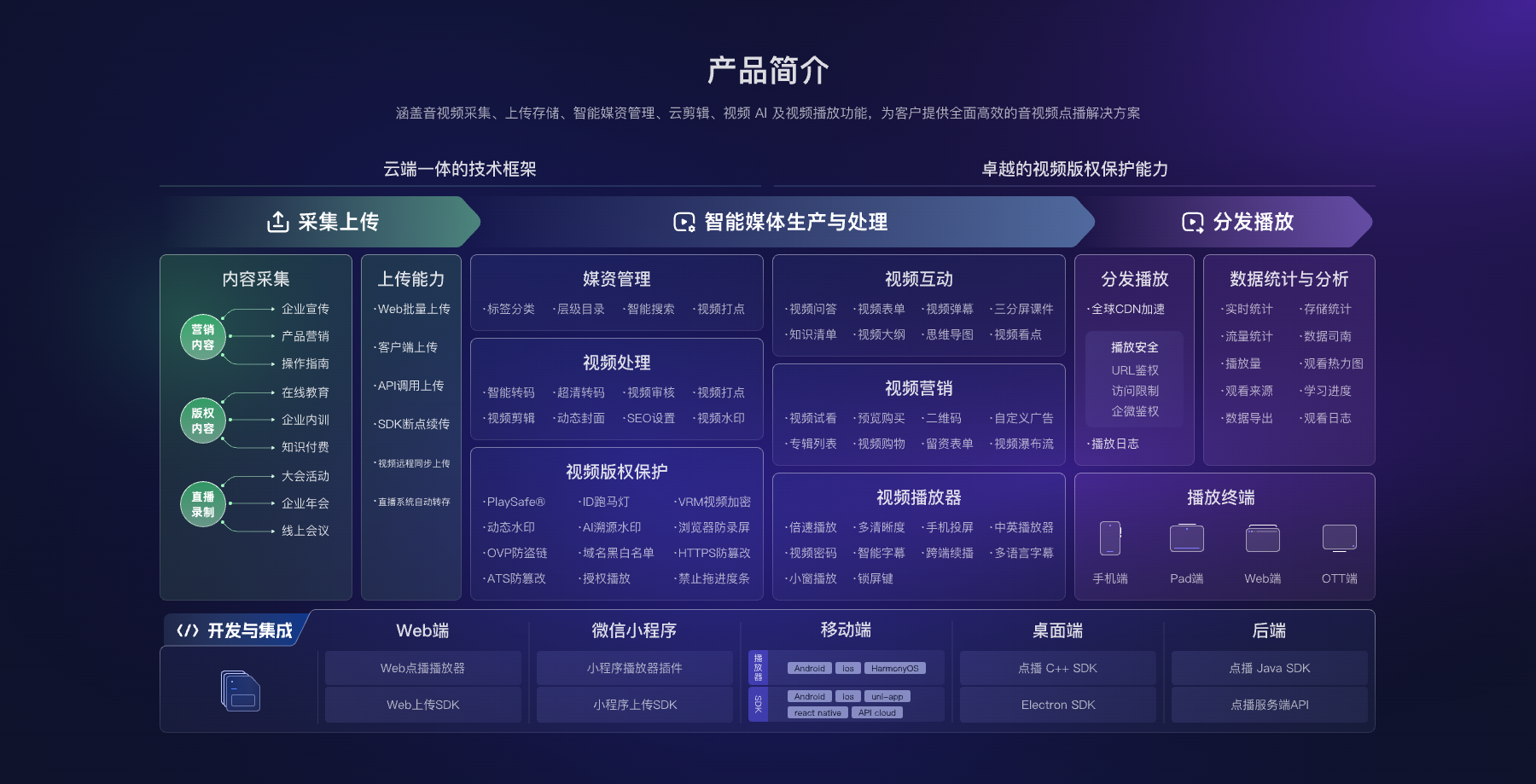
*Figure 1: VOD analytics are part of a workflow spanning upload, media management, playback, and integration. Available metrics depend on the current product edition and interfaces. Image source: POLYV official product architecture diagram*
03 Customer-Level Video Data Needs Three Connected Layers: People, Videos, and Events
3.1 People: An Internal User Key Supplied by the Business System
Choose a stable user key that does not expose personal information—for example, an internally generated customer ID. Email addresses and phone numbers may be used for internal matching, but should not become persistent plaintext parameters in public links. Assign unauthenticated viewers an anonymous session ID and keep that data clearly separated from authenticated records.
3.2 Videos: Keep Both Platform Identifiers and Business Identifiers
The video platform has its own video ID, while the company’s content repository may use product, solution, or course IDs. Maintain a mapping table so historical events remain tied to the correct business record even after the video is replaced or categories change.
3.3 Events: Define Them by Business Meaning, Not by Copying Field Names
At minimum, distinguish page open, playback start, pause, cumulative watch time, key progress points, and playback completion. The business team should define qualified viewing—for example, watching for a minimum duration or reaching a key demonstration. Set thresholds according to video length and business purpose rather than applying one number to every asset.

*Figure 2: The video console centralizes content and playback entry points. Identifying a specific customer still depends on the company’s identity-passing design. Image source: POLYV official product interface screenshot*
04 From Sharing Links to Usable Data: Implement in Five Steps
4.1 Step 1: Confirm the Business Question First
Are you trying to confirm that a customer received the material, or that they completed the key demonstration? Will marketing assess content performance, or will customer success use the signal to schedule onboarding? Each goal requires different events, identity confidence, and retention periods.
4.2 Step 2: Choose the Sharing Entry
For public distribution, a standard link or QR code is suitable for measuring aggregate performance. Customer-level analysis belongs in an authenticated customer portal, a dedicated page, or an entry protected by server-side authorization. The more open the entry point, the more conservative any identity claim must be.
4.3 Step 3: Establish Identity Mapping
When a user enters the page, the company server validates the session and associates the internal user key with the video ID. Only the required playback parameters should reach the client after authorization; secrets and administrative credentials must remain on the server.
4.4 Step 4: Synchronize and Clean Viewing Events
Once events reach the business system, deduplicate them by user, video, session, and time window. Distinguish deliberate replays from network recovery and cross-device continuation. Preserve enough raw-event detail for investigation while giving business users metrics with stable definitions.
4.5 Step 5: Validate Sample Records and Provide Appropriate Privacy Notices
Before launch, use test accounts to verify that page opens, playback, pauses, device changes, and repeat sessions appear in the database as expected. Explain the purpose, scope, and retention of data collection where appropriate, and apply access controls. Do not collect additional personal information simply to make a dashboard look complete.
05 Avoid Three Common Mistakes When Interpreting the Data
First, do not treat play count as a count of unique customers. Second, do not equate a long session with purchase intent—the page may simply have been left open. Third, do not label a customer based on a brief viewing event. A more reliable follow-up decision combines content type, viewing progress, subsequent inquiries, and the customer context already held by the business.
POLYV Video Analytics groups analysis into viewing behavior, video, and audience dimensions. A practical workflow is to assess content performance at the video level, understand audience patterns at the segment level, and connect only identity-confirmed behavior to customer actions.
06 Frequently Asked Questions
6.1 If I Send a Normal Link, Can I Directly See the Specific Customer Name?
Usually not. A standard link can generate page and playback data, but without login, registration, or server-side authorization, the platform cannot reliably map the viewer to a customer record in the company system.
6.2 If a Customer Forwards the Link, Will the Data Be Recorded Under the Original Customer’s Name?
If a link carries a long-lived, fixed identity parameter, a forwarded visit can be attributed to the wrong person and may expose identity data. Use server-side validation, short-lived credentials, and session rules, and handle anonymous access after forwarding separately.
6.3 Does a Long Watch Time Prove That the Customer Is Interested?
No. Watch time is a behavioral signal, not a purchase conclusion. Consider whether the viewer reached key sections, returned to the content, and later engaged with the team.
6.4 How Often Should Data Be Synchronized?
It depends on the use case. Operational workflows may need near-real-time data, while performance reviews can often use hourly or daily aggregation. Choose the API, frequency, expected delay, and rate limits according to current documentation and integration testing.
About POLYV
POLYV Cloud VOD provides video hosting, players, and multidimensional analytics for measures such as playback, watch time, device type, and traffic source. For customer-level analysis, POLYV supplies the video and playback data layer; each company still needs to design identity mapping, measurement rules, and privacy governance so those events become interpretable business signals.