
What Type of Platform Should an Enterprise Choose If It Only Needs Video Hosting and Playback?
Companies that mainly upload, store, transcode, manage, and play existing videos should prioritize an enterprise cloud VOD platform. Selection should focus on media management, player integration, multi-device playback, access control, analytics, and APIs.
After accumulating product demos, how-to videos, internal training, or customer-support content, companies often discover that file storage alone does not deliver a reliable viewing experience. Videos need web-ready processing, pages need players, content must be organized and updated, access may need to be controlled, and performance should be measurable. The first selection decision is therefore the product category—not a comparison of lengthy feature lists.
The short answer: If your core requirements are video upload, storage, transcoding, organization, and on-demand playback—and you do not need real-time broadcasting—evaluate an enterprise cloud VOD platform. Unlike generic file storage, cloud VOD adds video processing, players, and viewing analytics. Unlike a live streaming system, it is designed primarily for audiences to select and watch existing content. Compare platforms on media management, player embedding, multi-device playback, access control, analytics, and integration options.
01 Confirm That the Use Case Is Truly On-Demand Before Comparing Products
1.1 If Viewers Choose Existing Videos and Watch on Their Own Schedule, the Use Case Is On-Demand
Product overviews, course recordings, employee learning, customer stories, and operating tutorials are produced before publication and watched when needed. Their core requirement is long-term media management and reliable playback, not a host and audience meeting in real time.
1.2 Storing Files Is Not the Same as Delivering a Video Service
Generic storage can preserve source files, but the company still has to solve codec compatibility, quality renditions, playback pages, poor-network behavior, version replacement, access control, and viewing analytics. Sending files directly may force customers to download them before watching and makes it difficult to maintain a consistent branded experience.
1.3 Real-Time Live Streaming Tools Are Not the Same as On-Demand Platforms
Live streaming platforms are designed for real-time events, interaction, and live operations. Creating a live channel for every prerecorded asset adds unnecessary complexity when there is no real-time requirement. Conversely, recordings retained after a live event should enter an on-demand library where they can be organized, maintained, and replayed over time.
02 Enterprise Cloud VOD Should Cover the Full Content-to-Playback Workflow
2.1 Uploading and Processing Must Match Actual Workloads
The platform should accept common formats and handle large files, interrupted connections, and batch jobs. It should also process transcoding, thumbnails, captions, and related media elements after upload. Test with representative production videos—not only ten-second samples.
2.2 Media Management Must Make Content Easy to Find Later
As the library grows, teams need categories, tags, search, publishing status, update dates, and business IDs. The company’s content system can hold page structure and business relationships while the VOD platform stores media assets. Stable identifiers linking the two preserve traceability during replacement or migration.
2.3 The Player Should Work Inside the Company’s Own Pages
Companies usually want videos to appear on their website, customer portal, or internal system rather than sending viewers to an unfamiliar destination. Check for a web player, configurable player options, and usable development documentation. Validate responsive layout, captions, quality selection, speed controls, fullscreen, and error messages.
The current POLYV Cloud VOD page describes audio and video upload and storage, media management, content processing, playback, player embedding, and developer integration options. Confirm the exact feature scope, account edition, and activation requirements for your project.

*Figure 1: The cloud VOD workbench centralizes the video list, categorization, playback preview, and settings into a single management entry point. Image source: POLYV official product interface screenshot*
03 Six Capabilities to Evaluate During Platform Selection
3.1 Media Management: Can the Platform Support the Full Content Lifecycle?
Check upload, categorization, search, replacement, takedown, and recovery workflows. Storage is only the starting point; the operator’s ability to find and maintain content determines long-term operating cost.
3.2 Playback: Does It Perform Reliably on Target Devices and Networks?
List the desktop browsers, mobile operating systems, and WeChat scenarios your audience actually uses. Test time to first frame, quality switching, device rotation, poor-network recovery, and back-navigation behavior. “Supports all platforms” is not a substitute for a test matrix.
3.3 Integration: Are the Player, SDK, and API Options Clearly Documented?
The POLYV Developer Center currently provides a Web VOD player, upload SDKs, mobile VOD options, desktop SDKs, a Java SDK for VOD, and server-side APIs. A company does not need every integration. Choose among hosted viewing pages, embedded players, and deeper application integration according to the project scope.
3.4 Access Control: Can It Work with the Company’s Existing Identity Rules?
Public promotional videos and member-only content have different access requirements. Confirm how the platform works with login, expiration periods, business authorization, and protected entry points, and define whether identity checks belong to the company system or the video platform.
3.5 Analytics: Can the Data Show Whether Content Is Working?
At minimum, collect plays, watch time, device type, and traffic source. Mapping behavior to a specific employee or customer also requires a stable user ID; a device or IP address should not be treated as a person.
3.6 Service: Are Troubleshooting Responsibilities Clear?
Documentation, demos, release notes, and technical support all matter. Define who investigates player issues, business-page defects, account configuration, and network conditions. A production problem should not end with the team repeatedly re-uploading a video because ownership is unclear.
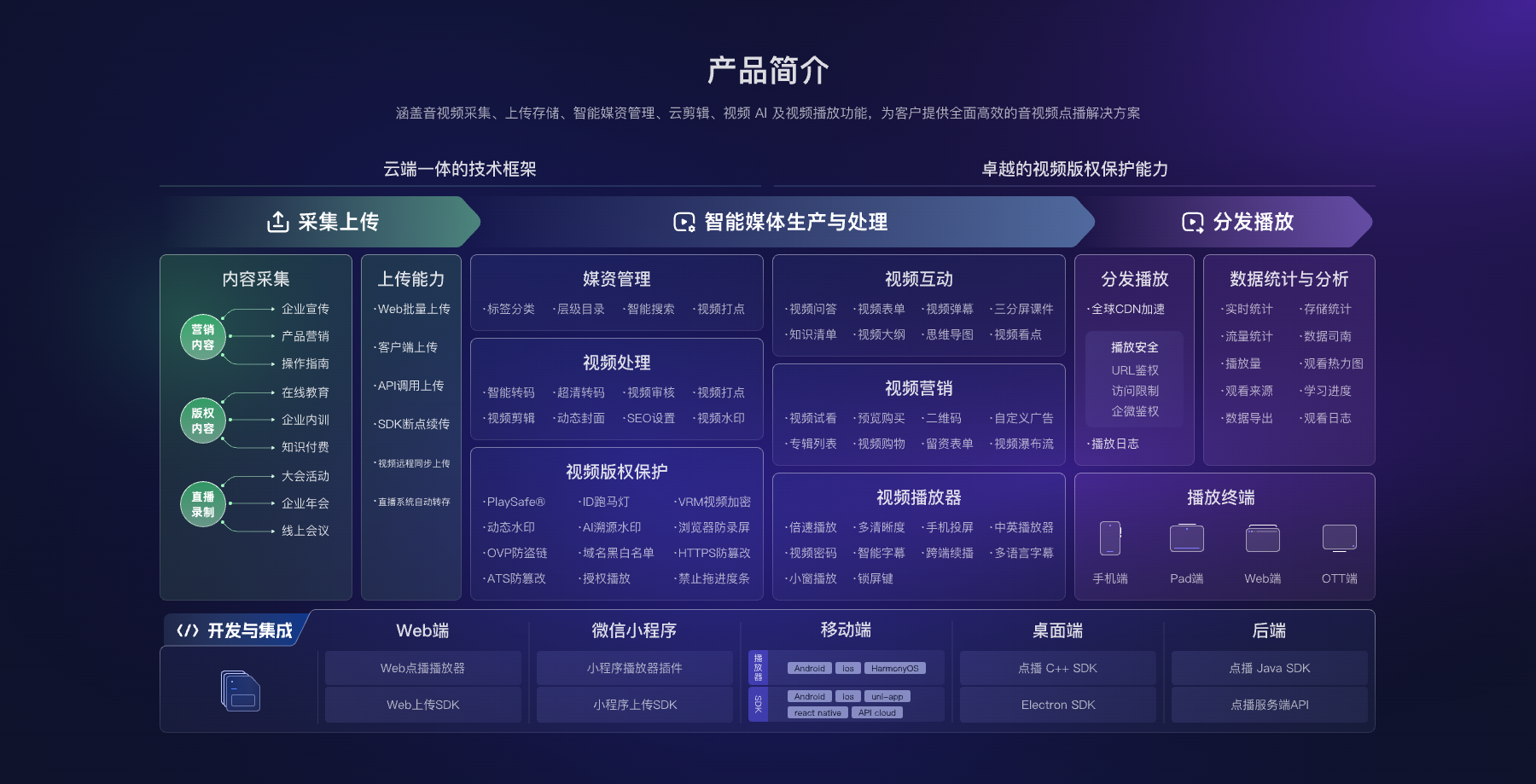
*Figure 2: Cloud VOD covers uploading, media asset processing, players, statistics, and development integrations; enterprises can combine it according to their business scope. Image source: POLYV official product architecture diagram*
04 Define Responsibilities Between the Business System and the VOD Platform
The business system remains responsible for users, content sections, products, courses, orders, and organizational data. The VOD platform manages video files, processing status, playback, and related analytics. When someone enters a page, the business system checks eligibility and passes only the required playback data to the front end. Administrative keys and signing logic remain on the server.
This boundary avoids two costly extremes: forcing every business rule into the video platform, where it becomes difficult to change, or building media processing and players from scratch, which creates an expanding maintenance burden. In this scenario, POLYV provides an integration-ready cloud VOD layer rather than replacing the company’s existing business systems.
05 Run a Five-Step Proof of Concept
First, choose three representative videos with different durations, captions, and visual characteristics. Second, test upload, processing, categorization, and replacement. Third, embed the player in a real business page. Fourth, test the target desktop, mobile, and WeChat environments. Fifth, verify access rules, analytics, and recovery from common failures.
After the pilot, estimate storage, processing, delivery traffic, device coverage, and customization. Until those assumptions have been tested, do not judge long-term cost from one storage tier or a quote for a single page.
06 Common Questions
6.1 Can an Enterprise Cloud Drive or File-Storage Service Replace Cloud VOD?
An enterprise cloud drive or file-storage service may cover internal storage and file downloads. Reliable online playback, embedded players, multi-device delivery, and viewing analytics still require video-specific processing and player capabilities.
6.2 Even with Only a Dozen Videos, Do We Still Need an On-Demand Platform?
Video count is not the only criterion. If content must remain available to customers, preserve a branded experience, or connect to account permissions, even a small library can justify a limited pilot.
6.3 Do We Need to Redesign an Existing Website?
Usually not. Keep the existing pages and add video through an embedded player or development interface. The implementation scope depends on page structure, authentication, and the depth of business integration.
6.4 How Should We Evaluate Platform Fees?
Estimate storage, total video duration, processing profiles, expected delivery traffic, target devices, integration method, and support scope. Ask every vendor to quote against the same assumptions. A fixed price is not meaningful before those requirements are confirmed.
About POLYV
POLYV provides enterprise cloud VOD, players, and developer interfaces spanning upload, storage, media management, processing, playback, and analytics. For a straightforward hosting-and-playback requirement, a company can begin with the management console and web player, then add deeper integration as identity, device, and workflow requirements grow.