
Do You Need to Build a Player to Embed POLYV Video?
A corporate website can usually embed POLYV video without building a player from scratch. This guide explains ready-made embedding, player configuration, and SDK/API customization paths.
When adding product demonstrations, tutorials, or customer content to a company’s official website, it’s common to mistakenly interpret “integrating video” as “forming a team to develop the player first.” In reality, web players involve encoding compatibility, resolution switching, fullscreen support, subtitles, abnormal recovery, and browser adaptation. Starting from scratch is slow and difficult to maintain long-term. Most official websites are better served by using mature players and focusing development efforts on pages and business connections.
The short answer: In most cases, a corporate website does not need a player built from scratch to use POLYV video. You can first upload the video to POLYV cloud VOD and embed it into the web using a ready-made web player. If you only need to adjust the cover, color, button, or playback parameters, you can configure those using ready-made features. SDK/API-based customization is only used when custom controls, permission verification, page linkage, or event feedback are needed. The enterprise team is developing business pages and connection logic—not reimplementing the video playback kernel.
01 Choose among three integration options based on the level of control required
1.1 Standard embedding: suitable for a quick launch
After the company uploads the video to the VOD backend and completes processing, it places the player code into the designated container on the official website to form the basic playback area. This path is suitable for scenarios such as product pages, article pages, help centers, and event recaps. The frontend mainly handles container sizing, page layout, and mobile responsiveness.
1.2 Parameter configuration: suitable for consistent branding and a standard experience
If a business needs to unify the cover, player color, definition, subtitles, playback speed, or fullscreen behavior, it can first check the player’s existing parameters and backend settings. Requirements that can be configured can be fulfilled—so you don’t need to maintain a whole set of custom code just to change a button.
1.3 SDK-based customization: suitable for deeper business integration
The player SDK is only needed when a page must display chapters, complete forms, trigger the next step based on playback progress, or pass playback events to the enterprise system. At this point, mature playback capabilities are still used, while enterprise code is responsible for listening to events and driving business components.
Currently, the POLYV Developer Center lists entry points such as web VOD players, web upload SDKs, VOD Java SDKs, and server-side APIs; POLYV VOD Sample Center provides players and upload examples. Development teams should select interfaces based on the current documentation and not infer existing parameters from old code snippets.

*Figure 1: The official website can directly embed mature players, and then configure subtitles, resolution selection, and interactions according to business needs. Image source: POLYV official product interface*
02 What Enterprise Frontends Truly Need to Develop Are Page Containers and User Flows
2.1 Provide the player with a stable, responsive container
Pages need to clearly define the aspect ratio, maximum width, and mobile layout to prevent content from being obscured by navigation, pop-ups, or floating components. For article and product pages, also check lazy loading, scroll positioning, and homepage performance.
2.2 Design clear pre- and post-playback states
What cover and title are shown before playback, whether prompts appear during loading, how users can retry after a failure, and what the next step shows after playback ends—all of these belong to the enterprise page experience. Just because a player can play doesn’t mean the business flow is complete.
2.3 Incorporate device differentiation into acceptance
Desktop browsers, mobile browsers, and WeChat web pages may handle autoplay, fullscreen, and media permissions differently. You should provide a clear playback entry point and test on real devices in both landscape and portrait modes, including page back/return behavior, network switching, and repeated openings.
03 The backend handles identities and credentials; management keys cannot be written into web pages
3.1 Public videos support a lightweight integration; restricted videos require backend authorization
Public promotional content can be played on simpler pages. If videos are available only to members, employees, or customers, the company’s backend should first assess user eligibility before generating or obtaining the required playback parameters. The frontend should receive the results only after verification is completed.
3.2 Define how playback events will be used
If you only want to understand overall playback performance, you can rely on platform statistics. If playback reaches a certain progress level and you need to update learning status or complete a business task, frontend events and backend interfaces must work together. The fields, event frequency, failed retry behavior, and how to handle repeated events should all be agreed on before development.
3.3 Map platform video IDs to enterprise content IDs
Website articles, products, or courses have their own primary keys in enterprise systems, and video platforms also have their own video identifiers. This mapping preserves the association when videos are replaced, content is taken offline, or historical data is reviewed.
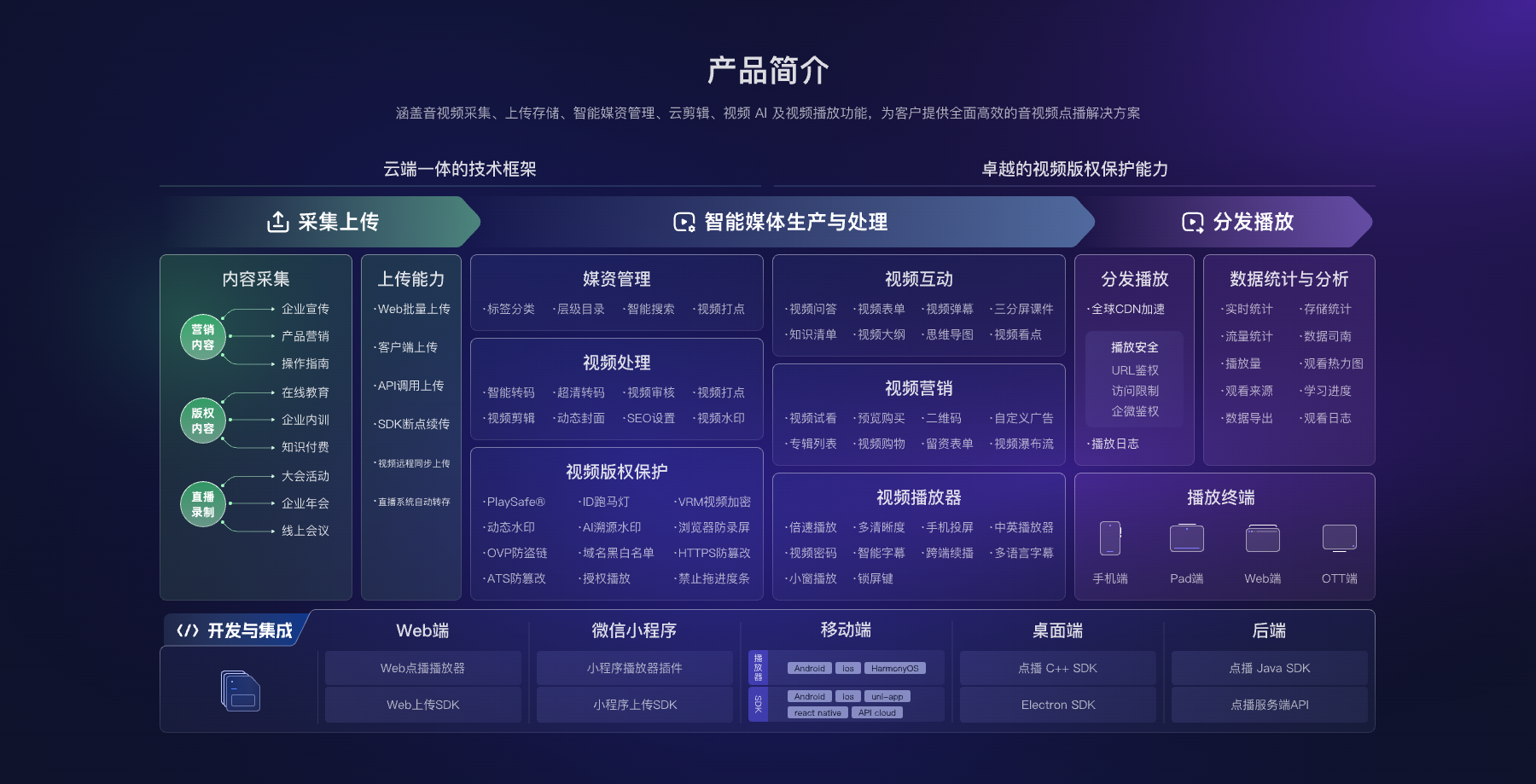
*Figure 2: The player is only part of the cloud VOD linkage. Upload, media assets, data, and backend interfaces must be designed together. Image source: POLYV official product architecture diagram*
04 A single-page POC can determine whether secondary development is needed
Select a page of authentic content and a representative video from the official website, and first embed it using a standard player. Then review it item by item: desktop and phone layout, first-frame load time and resolution, subtitles and fullscreen, page back/return behavior, exception prompts, whether statistics are generated, and whether logged-in users can access content as expected.
If these needs can be met through ready-made configurations, there is no need to proceed with deep development. If chapter linkage, form triggers, proprietary controls, or business state callbacks are also needed, list the additional requirements in an SDK integration checklist. This helps “wanting to customize” translate into predictable events and page work.
The POC should also create a page acceptance checklist, recording the video ID, browser and OS versions, first frame time, subtitles vs. fullscreen behavior, network switching behavior, login status, event callbacks, and failure prompts. Only by using the same set of test content for standard embedding and SDK solutions can you see which problems secondary development solves—and what additional maintenance responsibilities it introduces. Reusing this checklist in future official website updates can also prevent the player from working improperly due to page script conflicts, container size changes, or event listening failures.
After acceptance is passed, player parameters and script dependencies should be included in the official release process: validate in the test environment before production, and during page rollback, synchronize player calls to ensure that you don’t only revert styles while leaving incompatible interface code behind.
05 When choosing a service provider, focus on project completeness—not just the look of the player
First, check whether the player documentation, demos, and update notes are clear. Second, check whether video upload, processing, and playback are managed within the same system. Third, check whether the server interface can integrate with the frontend SDK. Fourth, check whether the target browser and phone environments have a clear adaptation path. Fifth, check whether you can clearly separate responsibilities across the page, player, video processing, and network when issues arise.
POLYV cloud VOD provides video upload, storage, processing, media asset management, and player capabilities. For official website teams, you can start with an off-the-shelf web player, keep your own pages, domain names, and navigation, and then deepen development based on real business needs.
06 Frequently Asked Questions
6.1 Can I just use a video file address?
Short-term tests may allow playback, but browser compatibility, resolution selection, error recovery, and analytics capabilities are incomplete. The official website is more suitable for VOD processing and players designed for online playback.
6.2 After using the player, can the official website style remain consistent?
You can adjust containers, covers, and some interface parameters within the player’s supported range. If you need to fully customize controls, first confirm which events and methods the SDK can provide, and then evaluate the development effort.
6.3 Will the official website redesign affect videos?
As long as video identifiers and integration parameters remain stable, the page structure can be adjusted independently. Before the update, you still need to test container size changes, script loading, and login states in the test environment.
6.4 How long does integration take?
It depends on the number of pages, whether there is an existing frontend project, the level of permission requirements, custom controls, and the scope of testing. Only by completing the POC on a real page can you get a reliable timeline—you should not make fixed commitments when parameters are still unknown.
About POLYV
POLYV cloud VOD provides video hosting, web players, player SDKs, and server-side development portals. Enterprise websites can launch quickly with a mature player, then extend page interactions and business rules while retaining the proven playback foundation—avoiding redundant development of the video playback core.