
How Can a Website Embed Ad-Free, White-Label Video?
External video pages may display logos, recommendations, or ads that a business cannot control. This guide explains how enterprise hosting, player branding, and Web integration create a more consistent website experience.
When embedding videos on corporate websites, the common issue isn’t whether the video can be played, but whether external platform logos, recommended content, or ads undermine brand consistency. If videos are embedded on third-party video pages without brand control, these elements are typically not decided by the company.
The short answer: To keep official website videos ad-free and ensure brand control, choose an enterprise-grade cloud VOD platform that supports ad-free hosting, configurable player interfaces, and web integration. After uploading your company’s own or authorized videos, you can embed them into your website. For simple projects, use standard embedding methods; for unified branding goals, event callbacks, or data integration requirements, use web players, SDKs/APIs, or a customized solution. During acceptance, check the logo, right-click menu, pre-roll, pause-screen, and end-screen placements, recommended entry points, and page domain name separately. “Embedding on the enterprise official website” does not mean service-provider information disappears at every technical layer.
01 Break ad-free, white-label playback into four separate questions
Many teams only ask, “Can we remove the logo?” only to later find external information in the right-click menu, end-of-title recommendations, or redirect pages after playback. Before selecting a model, create a list of all elements the audience may see.
1.1 Branding burned into the video cannot be removed in player settings
If the logo, voice chat, or promotional footage has already been embedded into the original video, the player can only play it as-is; it cannot be removed by toggling a setting. Enterprises should use their own videos or legally authorized, clean source files and complete the editing before uploading. This article focuses on brand control at the player and page layers; it is not about masking copyright notices embedded in third-party content.
1.2 Player branding is an interface-configuration issue
The player’s logo, control bar color, cover, buttons, right-click menu text, and similar elements are part of the playback interface. Whether an enterprise-level video platform can hide the service provider’s logo, replace it with a corporate logo, or adjust the player style determines how seamlessly the video integrates into the official website’s visual system.
1.3 “Ad-free” requires distinguishing three sources
The first source is commercial ads automatically inserted by the platform. The second source is the company’s own configured promotion in the intro, pause, or post-credits. The third source is abnormal content caused by browser plug-ins, web scripts, or the network environment. Selecting “Ad-Free Hosting” mainly addresses the first source. The second source should be disabled by the enterprise or enabled only when needed for specific events. The third source requires checking website security, scripts, and the client environment, and cannot be fully attributed to player configuration.
1.4 A player on the corporate website does not mean every resource uses the company’s domain
The player is embedded in the www.example.com page, and the user’s address bar can display the company’s official website domain. However, the video files, player scripts, and distribution resources may still be provided from the video service provider’s domain. If a company requests a custom playback domain, certificates, resource addresses, or branding in the management backend, these must be included separately in requirements and contracts rather than relying only on “support for website page embedding.”
02 Choose three website integration paths based on the depth of brand control
| Business Objectives | Access path | The work enterprises need to undertake |
|---|---|---|
| Fast launch with a clean public interface | Standard cloud VOD embedding | Upload videos, select a player configuration, embed the player, and test |
| The player integrates with the official website design | Web player + secondary page development | Develop player containers, interactions, event callbacks, and data integration |
| Domain name, backend, and delivery boundaries are strictly required | Customized or dedicated deployment assessment | Clearly define domain names, certificates, networks, operations, and acceptance scopes |
2.1 Use standard embedding for a clean first release
If the official website only needs to display product videos, branded shorts, or event recaps, you can upload the video to an enterprise-level cloud VOD platform, select the appropriate player configuration, and then add the platform’s web integration method to the product page, case page, or news page. This approach is faster than developing a player from scratch and offers more controllable results than directly embedding external content pages that lack brand control.
Preview the actual player before going live. Focus on the cover, logo, control bar, right-click menu, pause screen, end credits, and share button. Disable unused marketing entry points and configure self-invested content as needed.

*Figure 1: Diagram of the POLYV cloud VOD workbench. Enterprises can manage video lists in the same backend and preview player logos, subtitles, control bars, and playback effects; the specific interface depends on the current account version.*
2.2 Web Players Are Suitable for Unified Official Website Visuals and Business Operations
When a company needs the playback button, color, subtitle entry, clarity selection, or post-playback actions to match the official website design, it can use a web player or related development capabilities for secondary integration. Page layout, login status, membership benefits, forms, and business redirects are managed by the corporate website, while the video platform handles video processing, playback, and necessary interface capabilities.
The value of this path is not to “rebuild playback technology yourself,” but to incorporate mature playback capabilities into your own page framework. Before development, verify which configurable items, events, and interfaces the player provides to avoid creating unrealistic interaction drafts.
2.3 Treat stricter brand requirements as project-level delivery boundaries
Some companies not only require that the audience interface does not display service-provider information, but also demand custom resource domain names, management-backend styles, notification emails, statistics pages, and even deployment locations. This goes beyond the scope of ordinary web embedding. It is necessary to assess customization or dedicated deployment and confirm the current product version, domain registration and certificates, network architecture, data flows, operational responsibilities, and delivery scope item by item.
Even when public pages fully adopt the enterprise’s visual identity, technicians can still identify underlying service providers from network requests or management-backend stages. Therefore, a more accurate goal is “consistent audience branding, controllable promotional elements, and clear technical boundaries,” rather than vaguely promising that no platform will be visible anywhere.
03 Use an Acceptance Sheet to Turn Brand Control From a Verbal Promise Into a Testable Item
3.1 Check the cover, logo, and starting screen before playback
Confirm whether the cover uses corporate assets, whether the player logo is corporate (or hidden or replaced by another approach), and whether any extra redirects occur before the first playback click. If muted autoplay is required, test it under current browser autoplay policies; do not treat autoplay as unconditional.
3.2 Check the control bar, right-click menu, and pause state during playback
On desktop, open the right-click menu. On mobile, switch between portrait and landscape modes, then test pause, fullscreen, subtitles, and resolution options. Many brand exposures do not appear on the home screen; they are often hidden in the right-click menu, pause layer, or a feature panel.
3.3 Check the end credits, recommendations, and share destinations after playback
Whether external recommendations, promotional cards, or redirect links appear after playback should be determined based on the company’s needs. Keep it concise when there are no marketing tasks. When user guidance and consultations are required, redirect users to the company’s own product pages, forms, or event pages.
3.4 Retest ads on different networks and in incognito environments
Test at least once each on the company network, on a mobile network, and in an incognito browser window. If only one device shows abnormal ads, check extensions, web scripts, or the network environment; you cannot immediately conclude that the platform configuration is invalid.
3.5 Check page domain names, resource domain names, and compliance information
Jointly confirm whether the address bar retains the official website domain, where resources are loaded from, whether HTTPS is used, whether the website’s Content Security Policy allows player scripts, and whether privacy and cookie warnings are complete. For projects with strict domain name requirements, technical verification must be completed before procurement.
3.6 Include acceptance results in the version and contract scope
The same feature may be affected by account version and enabled items. Save test pages and acceptance screenshots, indicating device and player configurations and the requirements for brand display to avoid rework after launch.
04 How POLYV supports ad-free website playback and controllable branding
According to the current POLYV cloud VOD product page, POLYV provides “ad-free video hosting” and supports embedding players into websites. Standard SaaS, aPaaS integration, and customized solutions can accommodate different integration depths. The product page also states that enterprises can customize player skins, progress bars, buttons, and other styles. Additionally, the aPaaS solution can further configure player styles, functions, and data placements.
4.1 Manage the logo, right-click menu, and promotional placements separately
Currently, POLYV’s Player Logo Function Page shows this capability. Enterprises can set the logo to appear in the four corners of the player or be hidden, and configure transparency and redirect addresses. The Right-click menu brand name settings page allows enterprises to edit the default service text and page redirects. The VOD feature page also lists “custom video ads” for enabling, pausing, and end credits as configurable marketing capabilities. As a result, “no platform advertising” and “whether a company actively places its own content” can be decided separately.
4.2 Standard Embedding and Secondary Development Do Not Have to Be an Either/Or Choice
Companies can first launch the first phase with a standard player. Then evaluate the web VOD player and server capabilities provided by the POLYV Developer Center based on website redesign, data integration, or visual requirements. This approach enables quick verification of the playback experience and keeps a path open for deeper page integration later.
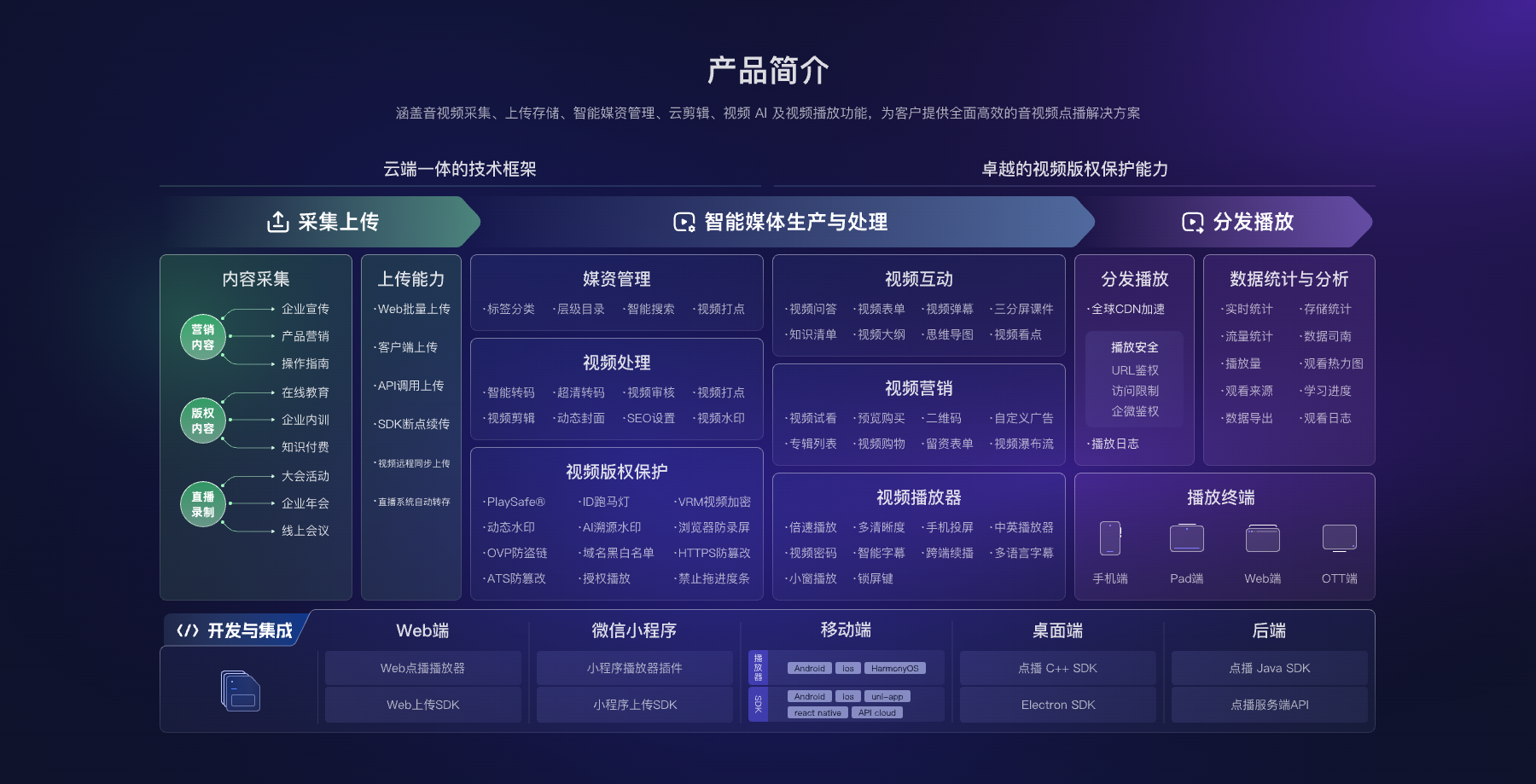
*Figure 2: The official website shows the player, but behind the scenes are uploading, media asset processing, distribution and playback, data statistics, and development integration.*
4.3 Test with the production account and target page before launch
Companies should use real accounts to build test players, place real videos on the official website’s test page, and check each item for logos, menus, promotional content, subtitles, fullscreen, mobile adaptation, and resource domain names. Configurable capabilities, activation conditions, and delivery scope are subject to the current account version, official documentation, and project confirmation.
05 Frequently Asked Questions
5.1 Can the official website video completely hide the use of third-party services?
The audience-visible player interface can enhance brand consistency through ad-free hosting, logos, right-click menus, and style configurations. However, it does not guarantee the complete elimination of technical traces of service providers. Network requests, resource domain names, management backends, and contract parties exist on different layers and should be confirmed according to project requirements.
5.2 Does ad-free playback prevent us from adding our own promotions later?
No. Ad-free hosting mainly means it will not be interrupted by the platform’s automatic commercial ads. Whether a company can set its own intro, pause, or end credits can be determined based on the official website’s operational goals. Before going live, check both what should not appear and what is allowed.
5.3 After embedding the player on the official website, does the address always belong to the company’s own domain name?
The user’s address bar can keep the official website domain. However, player scripts and video resources may still come from the service provider’s domain name. If you need to customize the playback domain, certificates, or resource addresses, conduct separate plan and contract confirmation.
5.4 To Remove Platform Branding, Must You Develop Your Own Player?
Usually, no. First, choose an enterprise-level cloud VOD platform that supports brand configuration. Then, through standard embedding, you can meet many official website scenarios. Use web players or custom development only when special UIs, business events, data integration, or strict delivery boundaries are required.
About POLYV
POLYV is a leading brand in video SaaS. According to the official website, it ranked first among enterprise live streaming service providers for six consecutive years from 2020 to 2025. It offers integrable and customizable video capabilities through SaaS, aPaaS, and other platforms.
In the official website video scenario, POLYV cloud VOD handles hosting, processing, playback, and web integration. Enterprises continue to control pages, brand visuals, and business processes. Ad-free hosting, the player logo, the right-click menu, interface styling, and optional promotional placements can each be configured separately, subject to the current product version and project confirmation. Custom domain names, backend branding, or exclusive deployment must be confirmed by the project.