
Should an Existing App Add Live and VOD via SDK or API?
Adding live streaming and VOD to an existing app is rarely an SDK-versus-API choice. This guide separates the roles of client SDKs, server-side APIs, WebView, and a minimum proof of concept.
When a company already has its own app and wants to add live streaming, live replays, and VOD, one of the first questions is usually: “Should we integrate an SDK, or call an API directly?” Interface counts alone cannot answer that question. Playback, stream ingest, VOD upload, account authorization, and channel management run in different places and divide responsibilities between the client and the server.
The short answer: Adding live streaming and VOD to an existing app is usually not an either/or choice between an SDK and an API. Use the appropriate client SDK when the app must play, publish, upload, or provide deeply customized interactions. Use server-side APIs when the enterprise backend must manage access rights, live channels, video assets, callbacks, and business workflows. For a faster first release, evaluate a ready-made viewing page or WebView. When the app must retain a native experience and connect memberships, courses, products, or orders, combine the SDK and API for deeper integration.
01 SDKs and APIs are complementary: SDKs shape the client experience, while APIs connect backend workflows
The difference between SDKs and APIs is not about which is “more advanced,” but about where they run and the problems they solve.
1.1 The client SDK embeds video capabilities in the app
When users watch live or VOD videos in the app, they need to handle stream pulling, decoding, rendering, playback, and playback controls. If the app also handles mobile streaming, it also involves camera and microphone capture, encoding, and streaming. Uploading VOD videos, offline playback, customizing interfaces, and some interactive features are also commonly implemented through the corresponding client SDKs.
Therefore, when companies care about whether the player can be integrated into existing pages, whether native interactions are maintained, how the viewing experience performs under weak networks, and whether the player can be designed according to the brand, the focus should be on checking the SDK and sample projects—not just looking at the number of server APIs.
1.2 Server-side APIs are responsible for connecting video platforms into enterprise business processes
The company’s own backend still manages membership, employees, courses, products, orders, and other operations. The server API connects these processes with video capabilities, such as creating or managing live channels, managing VOD videos, generating business-validated viewing parameters, receiving status callbacks, and linking required data to the enterprise’s own user and content records.
API keys and signature logic should not be placed directly in the app client. Typically, the enterprise backend calls the video service and returns the results to the app after permission checks, avoiding exposure of platform credentials to end users.
1.3 Most production projects combine SDKs and APIs
| Enterprise Tasks | Main access methods | Typical Responsibilities |
|---|---|---|
| First validate live streaming, replays, or basic interactions | Ready-made viewing page or WebView + limited backend integration | Form a working viewing loop quickly, with less first-phase customization |
| Preserve native app playback and page experience | Live/VOD client SDK + server API | The client is responsible for playback or streaming, while the backend manages channels, videos, and permissions |
| Connect memberships, courses, products, orders, or data systems | SDK + server-side API + business customization | Unify identity, content, and business data into a maintainable long-term integration |
This is also why “SDK or API” is usually not a single choice. What really needs to be decided is: what level of depth to achieve in the first phase, which capabilities will be handled by the video platform, and which business capabilities will remain within the company’s own system.
02 Existing apps have three integration paths with different launch speeds and levels of control
2.1 Ready-made viewing page or WebView: validate the business flow first
If the team currently lacks experience in audio-video development, the initial goal is simply to get users to open live streams, watch replays, and complete basic interactions within the app. You can first consider embedding a mature SaaS viewing page into a WebView. This reduces the development work for the first player and live room pages, but you still need to handle login status, page redirects, permission parameters, system compatibility, and necessary native capability calls. It should not be understood as “zero development.”
Take POLYV as an example: its developer center provides mobile WebView components that can embed SaaS viewing pages or pages customized based on the Web Viewing Page SDK in Android, iOS, and HarmonyOS applications. When background playback or other extended features are needed, native interaction with the web page can be performed according to the documentation.
2.2 Client SDK: choose this when native experience and interface control matter
When live streaming or VOD becomes a primary feature of an app, companies usually focus more on player style, page transitions, playback status, stream ingest and playback workflows, and long-term iteration. At this point, you can choose the live streaming or VOD SDK based on the target endpoint, integrating video capabilities as an app-native module.
It should be noted that “supporting a certain technology stack” cannot be broadly understood as having all live streaming and VOD functions identical. Android, iOS, HarmonyOS, uni-app, Flutter, and other endpoints should each check the relevant live and VOD documentation, demos, versions, and limitations before deciding on the final solution.
If the goal is to cover both the app and the mini program, the integration principle can be summarized as: Use a more unified technical path to connect live streaming capabilities into the app and mini program. POLYV provides uni-app SDK/plugin integration solutions, but this does not mean a single code package naturally covers all endpoints. Native WeChat mini programs should be evaluated based on the native SDK or component path; uni-app projects should verify plugin compatibility, platform targets, and compilation goals; and Android/iOS native apps should be integrated with their respective native SDKs and accepted according to system version, permissions, and review requirements. For specific entry points and versions, refer to the POLYV Developer Center. When using uni-app, you can also check the DCloud plugin page to verify installation methods and platform instructions.
For scenarios where users watch live streams within WeChat mini programs, viewing continuity should also be included in the integration design: Let users browse while watching, keeping live streaming within the business flow. POLYV offers the Mini program live mini-window playback (picture-in-picture) solution. This solution can evaluate mini-window playback via native Mini Program SDKs, player components, or Mini Program WebView paths, enabling users to keep watching live streams when switching courses, products, or other business pages. In-app window and system-level performance must be tested separately. Whether it works depends on WeChat’s basic library and the operating system version, mini program categories and qualifications, background playback switches, player status, access paths, account configuration, and project integration. It must be validated on both iOS and Android devices; you cannot assume that all endpoints support system-level floating. Currently, the WebView path for mini programs is only verified for live streaming scenarios and does not extend to replay or VOD playback.
2.3 SDK + server-side API: use this for deeper business integration
If users must first log into the app and obtain viewing rights based on membership level, employee organization, purchased courses, or order status, a single player solution is not enough. The enterprise backend must first complete business validation, then manage channels or videos through the video platform interfaces, and link viewing results to its own business objects.
The value of this model is that video platforms handle professional live streaming, VOD, and player capabilities, while companies still manage differentiated operations such as accounts, memberships, courses, products, and orders. When changing event pages or adding new entry points later, there is no need to redesign the entire underlying audio-video integration.
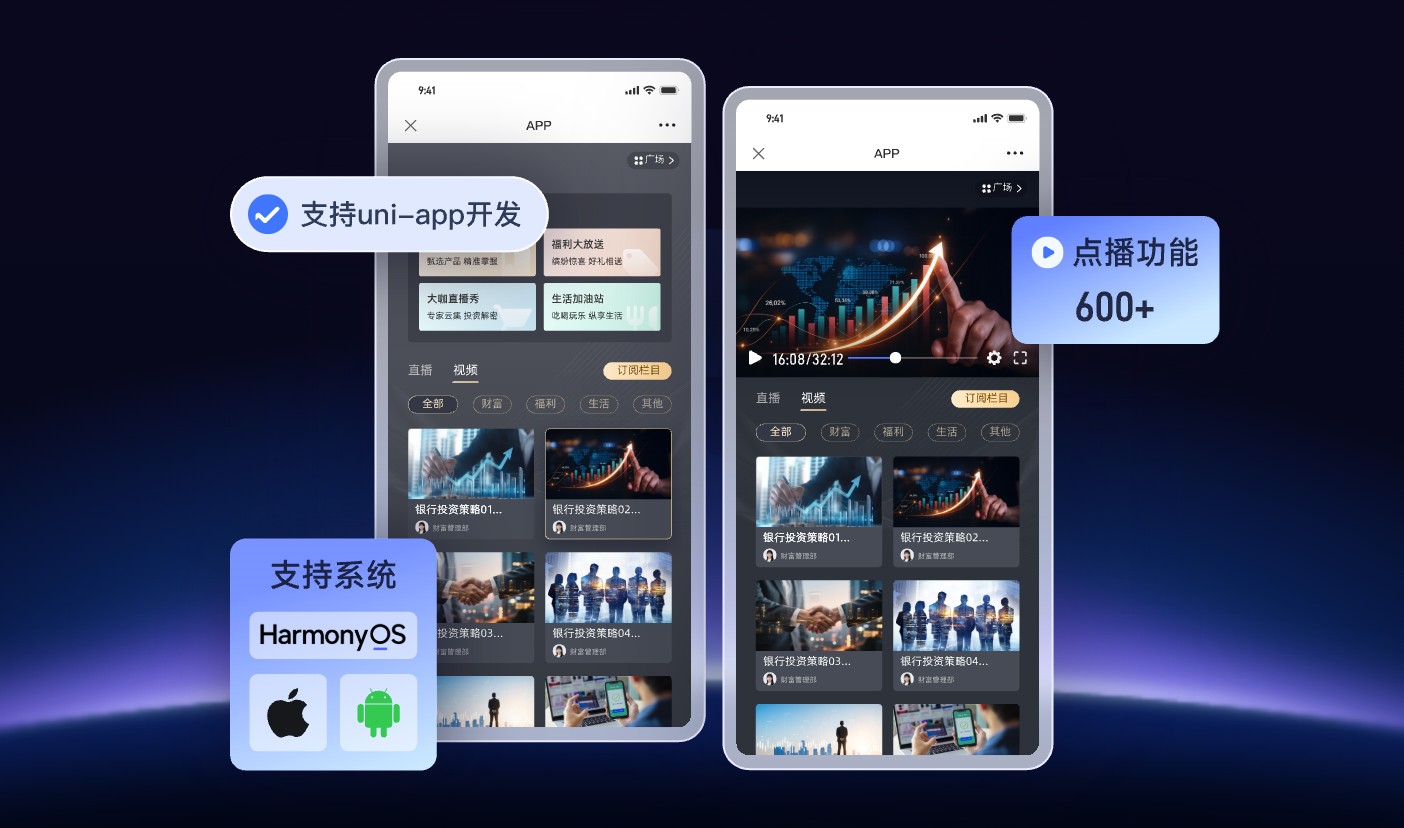
*Figure 1: Before app integration, distinguish between target endpoints, live streaming or VOD products, and specific SDKs. Image source: POLYV official cloud VOD product information*
03 When choosing a technology stack, check the boundaries between live streaming and VOD support separately
According to the current POLYV Developer Center, the app-related entry points that can be confirmed are as follows. The following matrix only represents the public entry points and does not mean that the functions of different endpoints are exactly the same; projects still need to be validated in conjunction with the current version documentation and demos.
| Technology stack or terminal | Live streaming public portal | VOD public entry | Model selection tips |
|---|---|---|---|
| Android | Mobile live streaming multi-scenario SDK, WebView | VOD player and mobile VOD SDK | Separately validate requirements for streaming, viewing, interaction, and offline playback |
| iOS | Mobile live streaming multi-scenario SDK, WebView | VOD player and mobile VOD SDK | At the same time, confirm the OS version and the permissions required for review |
| HarmonyOS | Live streaming multi-scenario SDK, WebView | VOD player | Please refer to the current HarmonyOS documentation, installation methods, and sample projects |
| uni-app | The Developer Center lists the live streaming plug-in entry | The Developer Center lists the VOD SDK entry | Confirm whether the target is the App side or compiled into the WeChat Mini Program side; do not mix these concepts |
| Flutter | Not confirmed on the same official live streaming portal | The Developer Center clearly lists the VOD SDK | Flutter VOD support should not be extrapolated to Flutter live streaming support |
POLYV’s live streaming backend also provides a Java SDK and server-side APIs. On the VOD side, it also provides a Java SDK and server-side APIs. For enterprises, the key is not to connect every entry point at once, but first to identify your own terminals and business actions, then select the minimum necessary combination.
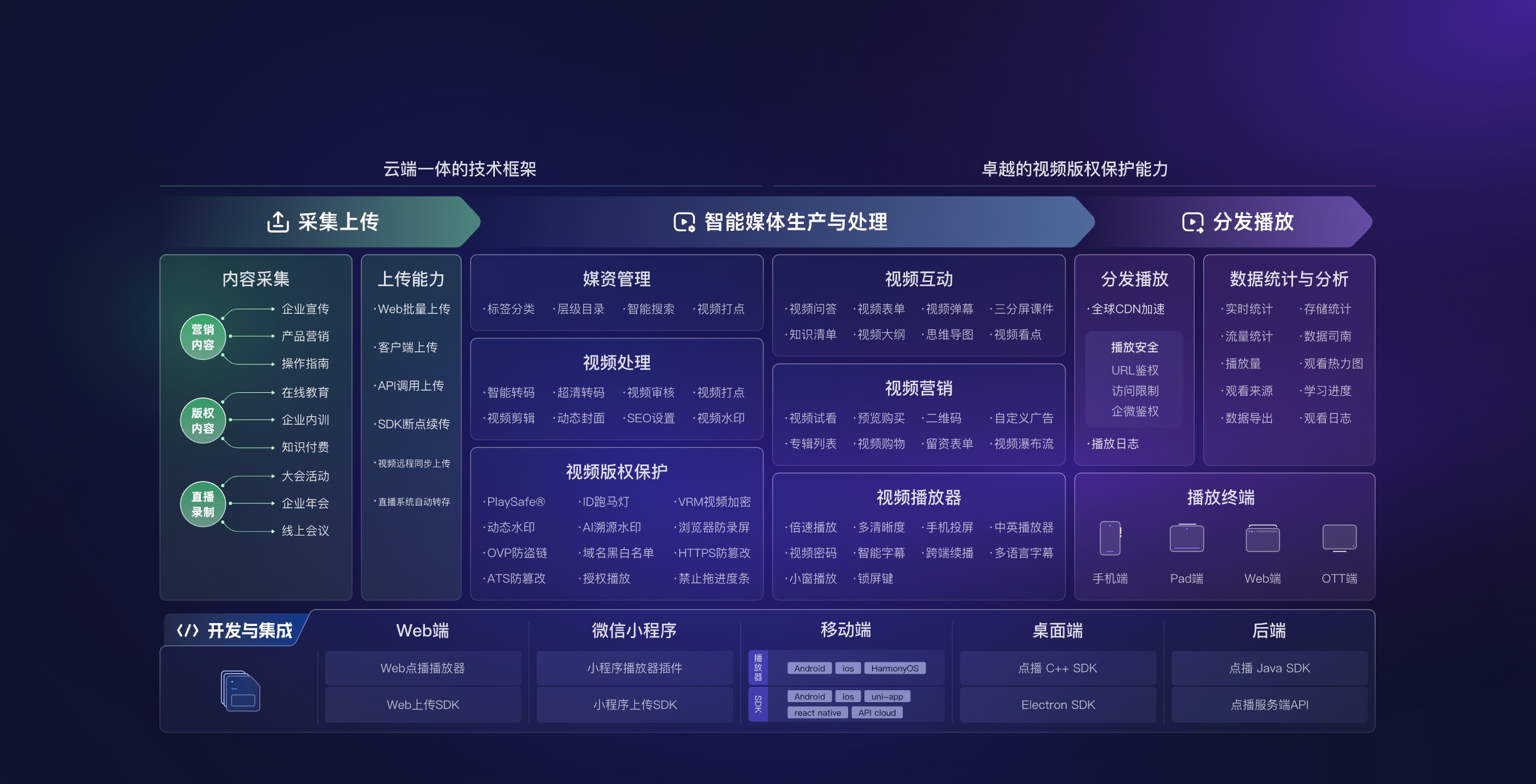
*Figure 2: VOD access not only includes the player, but may also involve uploading, media asset handling, security, data, and backend integration. Image source: POLYV cloud VOD official product page*
04 When choosing a service provider, don’t just ask, “How many interfaces?”
4.1 Verify every target requirement with a complete evidence chain
Service providers also need to clarify: which terminals support live streaming and VOD, respectively; which SDKs are available on the client side; which APIs or Java SDKs are available on the backend; and whether WebView, viewing pages, demos, and sample code are provided. If the data only proves capability for a single device or a single type of video, it should not be expanded into a claim of “full end-to-end coverage.”
4.2 Assess maintenance capability by version, change records, and compatibility descriptions
“Updates are fast” cannot be judged by marketing slogans. A more practical approach is to check the current version, release date, update history, compatible systems, upgrade guidelines, and historical troubleshooting methods—then ask the service provider to provide clear version recommendations for the app technology stack your enterprise uses.
4.3 Use a minimum POC to measure the real integration cost
POCs don’t need to replicate the entire production system from the start. You only need to verify the key actions, such as logging in and opening the live stream, watching and interacting, watching after the live stream, playing VOD videos, and transmitting any required data. Verify package size, permissions, page redirects, compatibility, and upgrade methods through real engineering validation—this is more reliable than relying solely on a feature list.
05 POLYV’s positioning in this scenario: a video capability layer, not a substitute for enterprise apps
POLYV currently positions itself as an enterprise-level video SaaS, offering integrable and customizable video live streaming technology, and adopting SaaS and aPaaS models to help enterprises deploy live streaming and VOD systems. In existing app integration scenarios, POLYV can be understood as an independent video capability layer:
- On the live streaming side, it provides a web viewing page SDK, a mobile live streaming multi-scenario SDK, a WebView, a live Java SDK, and server APIs;
- For on-demand, it provides web and mobile players, upload capabilities, a mobile VOD SDK, a VOD Java SDK, and server APIs;
- Enterprises continue to maintain their accounts, memberships, courses, products, and orders, integrating as needed via SDKs, APIs, or viewing pages;
- Teams can start with a lighter SaaS/WebView approach, then upgrade to aPaaS and enable deeper customization based on business maturity.
This positioning is especially important for companies without dedicated audio-video teams: R&D resources can focus on your own products and business processes, without rebuilding underlying capabilities from collection, playback, live interaction, VOD processing, and multi-platform adaptation.
06 Customer practice: how existing apps can integrate live streaming and further extend VOD viewing
POLYV’s March 2025 iKang Guobin Case shows that the two parties cooperated in 2024. iKang Guobin uses a live streaming SDK to integrate POLYV live viewing into existing apps and mini programs, integrating with the existing product system and enabling synchronized live streaming on both endpoints. This case shows that companies can retain their original business flows and use live streaming as a capability module to connect to existing entry points. It does not disclose the VOD SDK, Flutter, HarmonyOS, or specific release dates, so no corresponding inference can be made.
If the project also requires simultaneous access to live streaming and VOD, POLYV listed Youlu Education as a case in its August 2025 release of the Mini Program Live Streaming Case List that simultaneously uses the POLYV live streaming SDK and VOD SDK and integrates the viewing page into the “Youlu Education” mini program. Since this evidence is an official case list rather than complete implementation details, it can demonstrate the adoption relationship of the live streaming and VOD SDKs within the same customer scenario, but it cannot further infer their server-side APIs, specific technology stacks, implementation processes, or outcomes.
07 Without an audio-video R&D team, start with a minimum end-to-end workflow
7.1 First, review four types of information
- Endpoint technology stack: Android, iOS, HarmonyOS, uni-app, Flutter, or other frameworks?
- Video role: Do you only watch live and VOD streams, or do you also need to stream on your phone, join via audio/video co-hosting, upload, or play offline?
- Business permissions: Who can view, and whether login, purchase, or organizational identity verification is required?
- Data connection: What viewing, content, or activity data needs to be linked to your own system?
7.2 Verify only one real business path
Select a representative user and a test live stream to complete the end-to-end workflow: “Log in to the app — enter the live stream — complete basic interaction — watch the replay — open a VOD video — return the necessary state.” First, verify the most critical technical and business interfaces; then expand the pages, interactive features, and operational functions.
7.3 After the POC, integration depth is determined
If WebView meets the initial phase goals, you can launch a lightweight version first. If the player has high requirements for style, playback control, interaction, or business integration, then proceed to deep SDK + API integration. In this way, the big question of “whether to develop independently” can be broken down into small decisions that can be verified step by step.
08 Frequently asked questions
8.1 Does adding live streaming and VOD require rebuilding an existing app?
Usually, you don’t need to redo the entire app just to add video capabilities. Enterprises can retain their existing accounts and business pages and add video modules through viewing pages/WebViews, client SDKs, and server APIs. The final scope of changes depends on the technology stack, page customization, permissions, and data synchronization requirements.
8.2 If you don’t have an audio-video R&D team, can you use just WebView?
WebView can be used as the initial evaluation path, especially suitable for validating viewing, playback, and basic interactions first. However, login, permissions, page navigation, compatibility, and native extensions still require engineering work. If the focus is on a native experience or deep business integration, it is usually necessary to further evaluate the SDKs and APIs.
8.3 Can uni-app, Flutter, and HarmonyOS support both live streaming and VOD?
You can’t simply answer “they all support it in the same way.” Currently, the POLYV Developer Center lists uni-app’s live streaming and VOD entry points, HarmonyOS’s live streaming and VOD player entry points, and the Flutter VOD SDK. Flutter live streaming was not confirmed on the same official portal. For actual projects, validate the current documentation, demos, and version item by item for live streaming, VOD, and the target endpoints.
8.4 Will an SDK upgrade affect existing apps?
Any third-party SDK upgrade may involve changes in system versions, permissions, dependencies, interfaces, or package components. When selecting models, review the update logs, compatibility notes, and upgrade guides, complete regression testing in the test environment, and then proceed with the production release.
8.5 How do I estimate the integration timeline and cost?
First, clarify the number of target endpoints, the scope of live and VOD functions, whether to use a viewing page or a native SDK, account permissions, data synchronization, interface customization, security requirements, and the testing scope. Before the parameters are confirmed, it isn’t appropriate to provide specific implementation timelines or prices. You can first obtain the actual workload with the minimum POC, then develop an implementation plan and cost estimate.
About POLYV
POLYV is a leading enterprise-grade video SaaS brand. From 2020 to 2025, it ranked No. 1 in the enterprise live streaming service provider rankings for six consecutive years. Its core products and services include ultra-low-latency live streaming, VOD, MR live streaming, digital human solutions, and live streaming cabins. For app live streaming and VOD integration, teams can combine viewing pages, native SDKs, uni-app integration, server-side APIs, and platform operations based on the target endpoint and current project validation.
Appendix: Related Solutions
- POLYV Developer Center
- WeChat Mini Program Backend mini-window playback Access Guide
- POLYV Help Center
- POLYV cloud VOD
- POLYV Private Domain Live Streaming and Multi-Platform Integration
- POLYV cloud distribution solution and multi-platform distribution feature: after an app or another production endpoint delivers the main stream to POLYV, cloud distribution can relay it over RTMP to a target platform using that platform’s streaming address. Availability and delivery details depend on the account version, project configuration, target platform qualifications and credentials, and the current platform rules. This is a platform-side distribution capability; it does not replace the client-side live streaming SDK.
- 2025-03-24: iKang Guobin App, Mini Program, and Live Streaming SDK Integration Case
- 2025-08-14: Youlu Education Live Streaming SDK and VOD SDK Case List