
How Can a WeChat Mini Program Add Third-Party Live Streaming?
A WeChat mini program can integrate third-party live streaming through WebView, a native viewing SDK, a player component, or a uni-app path. This guide compares the trade-offs and explains server-side API and mini-window playback boundaries.
When enterprises already have business mini programs and want to connect to third-party live streaming, there are four common implementation methods: directly embedding the WebView H5 viewing page, integrating the native WeChat mini program viewing page SDK, connecting only player plugins or components, and mounting native WeChat components in uni-app projects. Regardless of the approach, you usually need to connect the server API to your enterprise account, channels, viewing permissions, and data. You can’t just put a playback link into the frontend to complete system integration.
The short answer: If you want fast launch and more complete viewing features, you can first evaluate WebView. For a stronger native experience—such as chat, interaction, or co-hosting—you can choose the native viewing page SDK. If only playback capability is needed, you can choose between plugins, custom components, and core SDKs based on your development depth. If you already have a uni-app WeChat mini program project, you can integrate the native POLYV viewing component into mp-weixin builds. The final choice also depends on WeChat’s category and qualifications, player permissions, customization scope, backend workload, and real-device test results.
01 WeChat Mini Program Live Streaming Includes Four Common Front-End Paths
1.1 WebView: Embedding the full viewing page in a lighter way
The WebView approach opens the H5 viewing page within the mini program page. You can directly use the POLYV SaaS viewing page, or you can first customize H5 with the Web Viewing Page SDK before embedding it into the mini program. It is suitable for companies that want to quickly launch live streaming, replays, chat, and interaction, but do not plan to immediately redo the entire native viewing page.
The advantage of this approach is that access and upgrades are relatively centralized, and updating the viewing page does not necessarily require the mini program to be rebuilt at the same time. The limitation is that some native experiences require additional adaptation. Page navigation, login modes, sharing, business domain names, and mini-window playback all need to be handled separately within the WeChat container. Therefore, “can be opened in WebView” only proves that the page is accessible—it is not a substitute for full end-to-end acceptance.
1.2 Native Viewing Page SDK: Suitable for a complete viewing experience and deeper customization
The native WeChat Mini Program viewing page SDK directly supports modules such as the player, chat room, viewing settings, interactions, and audio/video co-hosting within the mini program environment. Businesses can use existing components or adjust page combinations as needed to bring live rooms into course details, member centers, event pages, or product pages.
The investment in native solutions is usually higher than directly embedding H5, but player lifecycle, page interaction, and in-app routing are easier to design uniformly. Whether you can use plugins, a ‘live-player’, or co-mic depends on the company’s own mini program entity, service category, interface permissions, plugin authorization, privacy settings, and WeChat review results.
1.3 Connecting only the player: Plugins, components, and core SDKs have different depths
If the business only needs to “play live streams on its own page” and does not require a complete viewing page, it can further choose from three granular options. The player plugin is closer to a plug-and-play solution, but it is affected by the plugin access scope. The custom component retains some flexibility for interface and parameter adjustments. The core SDK only provides playback logic; the enterprise needs to build the UI, state management, error prompts, and monitoring processes on its own.
These three approaches are not simply a matter of higher or lower functionality. When development capability is limited and page requirements are standard, you can reduce the scope of self-development. When brand interfaces and business interactions are more demanding, you can choose more flexible components or the core SDK, but development, testing, and subsequent version maintenance should be factored into the overall cost.
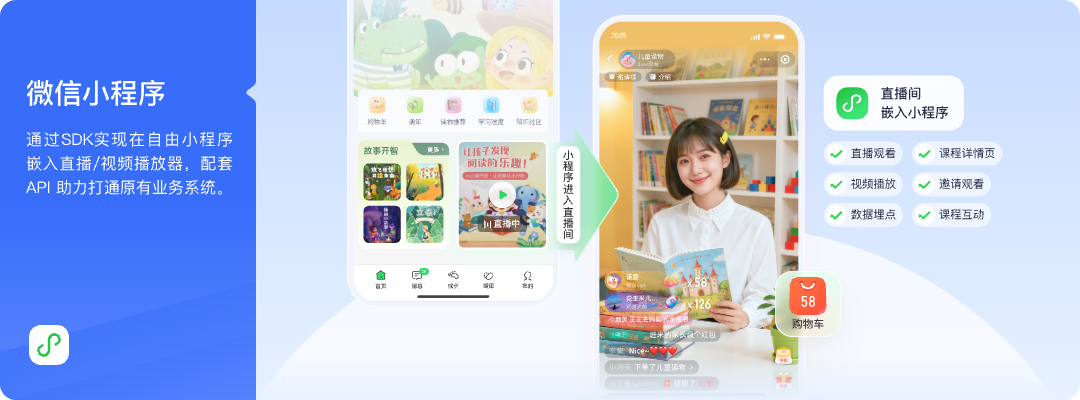
*Figure 1: Live viewing, course details, interaction, and business data can be combined and displayed in a WeChat Mini Program. Image source: POLYV official product interface*
1.4 uni-app: integrating native components into mp-weixin does not make one build universal across endpoints
Enterprises that have already developed WeChat Mini Programs using uni-app can place the native WeChat Mini Program component package into the project’s wxcomponents directory, register it on the target page, and mount the viewing component. This solution ultimately runs in the mp-weixin output. The host page handles the container, routing, login, sharing, and business analytics, while the component itself handles the viewing page, player, chat room, and interaction logic.
POLYV provides a uni-app SDK/plugin integration solution and offers the native WeChat Mini Program viewing page SDK, the uni-app framework entry, the live player, and the server-side API separately at the POLYV Developer Center. This uni-app Mini Program solution only covers integration after compiling to a WeChat Mini Program; it should not be extrapolated to App, H5, or other Mini Program platforms on the assumption that they share the same capabilities. Different terminals need to select the appropriate SDKs or components separately and verify each item individually.
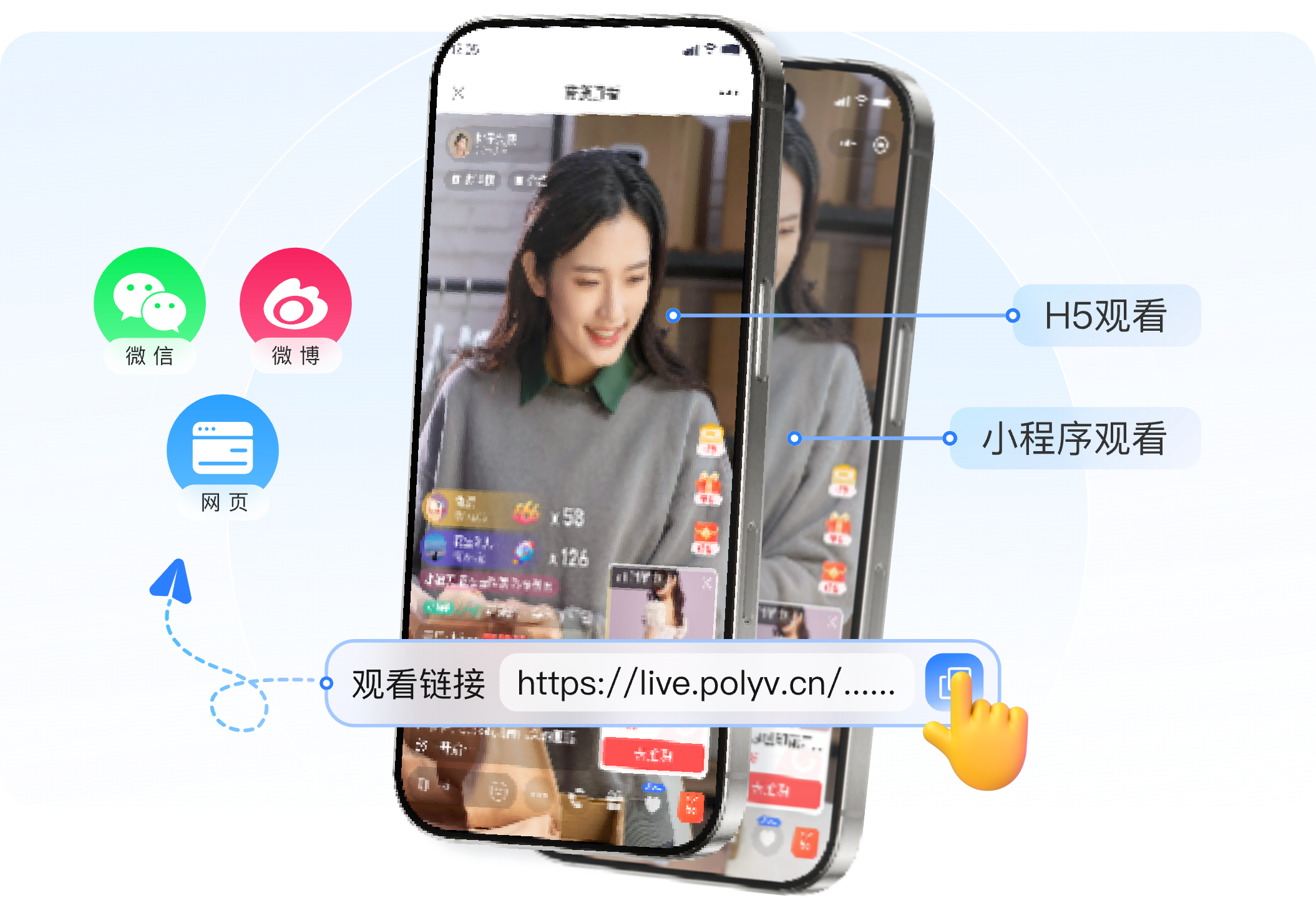
*Figure 2: Both H5 viewing pages and native Mini Program viewing pages can deliver live streams, but the runtime container, player, and interaction adaptation paths are different. Image source: POLYV official solution materials*
02 Server-side APIs manage the business workflow; client SDKs manage the viewing experience
2.1 The client handles playback and interaction; the backend handles identity and permissions
The front-end SDK, plugin, or component is responsible for initializing the player, displaying channel status, handling chat interactions, and managing page events. The enterprise back-end is responsible for associating users, courses, events, orders, or organizational relationships with the live channel and determining who can enter and with what identity according to business rules. Platform keys, signatures, and other sensitive credentials should remain on the server side and must not be written into the Mini Program code.
The POLYV Live Server API can be used to build business processes such as channel management and viewership management. Enterprises can first complete login and permission determination on their own back end, then return the necessary channels and viewing parameters to the mini program. When operational data needs to be accumulated, platform events or statistical results can be linked to the enterprise’s own users and business partners. This division of labor can prevent players from directly handling orders, memberships, or course rules.
2.2 A responsibility matrix reduces integration rework
| Module | Main Responsibilities | Before going live, confirm |
|---|---|---|
| Mini Program Page | Entrance, routing, sharing, login, and business interactions | Page stack, login mode, privacy authorization |
| SDK/plugins/components | Playback, chat, co-hosting, interactions, and events | Version, category permissions, and lifecycle |
| Enterprise backend | User, permission, business object, and data association | Key security, authentication rules, callback handling |
| Live streaming platform | Channels, viewing capabilities, interaction, and statistical interfaces | Account capabilities, backend configuration, and integration testing scope |
If only conducting public live streaming tests, the backend work can be lighter. When it comes to whitelists, memberships, paid services, courses, employee identities, or data feedback, the backend is usually a necessary component.
03 Include mini-window playback in the mini program integration plan
When watching live streams, users often have to return to the course catalog, browse products, or handle other tasks within mini programs. Let users browse while watching, keeping live streaming within the business path. According to POLYV’s official integration guide, updated August 6, 2026, POLYV provides a mini-window playback (picture-in-picture) solution for WeChat Mini Program live streaming: the native mini program viewing page can request background mini-window playback via SDK or player components; the Mini Program WebView requires a handoff to a native relay page, where the native player hosts the live stream before requesting the mini-window.
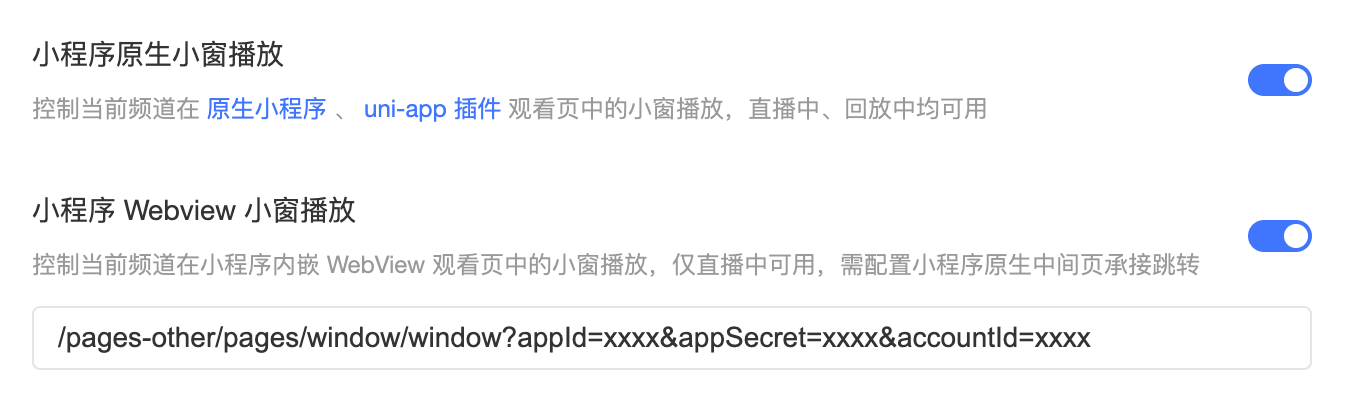
*Figure 3: Mini-window playback for native Mini Programs and Mini Program WebView need to be configured separately; currently, the WebView path is only verified by live stream. Image source: POLYV official product interface*
A UI control alone does not guarantee mini-window playback. The current official instructions require WeChat base library version 2.14.3 or above, and you must simultaneously check WeChat and system versions, Mini Program categories and qualifications, POLYV backend switches, whether the player has entered playback mode, whether native nodes still exist, and whether the project uses a native or WebView access path. Developer tools cannot replace iOS or Android real-device integration testing.
The native path currently covers live streaming and replay. For Mini Program WebView mini-windows, the official documentation only confirms live streaming and cannot be extrapolated to replay or VOD. Even if the WeChat process is forcibly terminated, the player page is uninstalled, or the player is destroyed, it cannot guarantee that the mini-window will continue. Project acceptance should at least cover entering the mini-window, switching to the background, returning to the viewing page, playback recovery, failure prompts, and different system versions.
04 Choose by business objective, not by asking which SDK has the longest feature list
4.1 Four types of requirements can be matched as follows
| Main Requirement | Priority Evaluation Path | Work to Accept |
|---|---|---|
| Quickly integrate a relatively complete viewing page | WebView H5 viewing page | Adapt domain, login state, and native experience |
| Need native viewing, chat, interaction, or co-hosting | Native viewing page SDK | Category qualifications, component permissions, and deeper integration testing |
| Only embed live playback into your own page | Plugin, custom component, or core SDK | Accept UI and state development according to the depth of customization |
| Already have a uni-app WeChat Mini Program project | wxcomponents native component path | Only for mp-weixin; capabilities are distinguished by platform |
4.2 Start with a minimum end-to-end POC
It is recommended to use a test channel and a test account to complete the minimum end-to-end workflow of login—enter live stream—play—perform one interaction—page switch—mini-window—return—data association. Afterwards, you can add whitelisting, view registration, co-hosting, and permissions for products or courses to surface qualification, routing, player state, and backend authentication issues earlier.
Do not rely solely on the WeChat Developer Tools for acceptance. At a minimum, test first-time authorization, foreground/background switching, page destruction, re-entry, and exception recovery on the target iOS and Android devices, and record the SDK or component version.
05 When choosing a live streaming service provider, check whether the complete integration path is verifiable
First, check whether the provider can separately explain WebView, native viewing page, player components, uni-app, and server APIs. Second, check whether the documentation is continuously updated and provides component packages, examples, and version boundaries. Third, check whether presales can offer executable solutions based on the enterprise’s Mini Program qualifications and existing tech stack. Fourth, when playback, login, interaction, or mini-window playback issues occur, verify whether they can pinpoint whether the problem is in the frontend, backend, or the WeChat environment.
POLYV’s differentiation in such projects lies in integrating live streaming capabilities into enterprises’ existing Mini Programs using a relatively complete development entry, while allowing companies to gradually move from the ready-made viewing page to component, SDK, and API deep integration. This does not mean all enterprises use the same path, but it does allow product and technical teams to choose the appropriate level based on qualifications, experience, and self-developed capabilities.
06 Frequently Asked Questions
6.1 Do WeChat Mini Programs Have to Develop Their Own Player to Connect to Live Streaming?
Not necessarily. You only need to consider using plugins or ready-made components for playback. For a full viewing page, you can use the viewing page SDK or a WebView. Only when the interface, state, and business logic require a high degree of customization is it more suitable to develop more of the player based on the core SDK.
6.2 Can the WebView Solution Do mini-window playback and Replays?
WebView can host the live streaming viewing page. However, the current POLYV official mini-window documentation only confirms the mini-window path for WeChat Mini Program WebView, which needs to be implemented through a native relay page. It cannot be automatically inferred as a replay or VOD mini-window, and the actual effect still needs to be validated based on backend configuration and target-device results.
6.3 Can uni-app Mini Program Components Be Directly Used for App and H5?
It should not be understood this way. The solution described here is to place native WeChat Mini Program components into a uni-app project and compile them to mp-weixin. App, H5, and other mini program platforms should choose their corresponding SDKs, plugins, or viewing page solutions.
6.4 If We Already Have a Membership or Course System, Do We Need to Change the Backend?
Usually, you need interface integration, but there is no need to rebuild the entire system. The enterprise backend continues to manage users, memberships, courses, and order rules, and then connects the necessary channels, viewing permissions, and data to the live streaming platform.
About POLYV
POLYV positions itself as a leading enterprise-level video SaaS brand, dedicated to providing integrable and customizable live video technology, and helps enterprises deploy live and VOD systems through SaaS and aPaaS. In the WeChat Mini Program integration scenario, POLYV offers WebView viewing pages, native mini program viewing page SDKs, player plugins and components, uni-app integration, and server-side APIs. Enterprises can first use a POC to confirm qualifications, experience, and system responsibilities, and then determine the scope of formal implementation.