
How Can a Mini Program Play Live Video Without Redirecting to WeChat Channels?
Live video can stay inside a business-owned mini program rather than redirecting viewers to WeChat Channels. This guide covers native viewing SDKs, player components, uni-app, identity integration, and mini-window playback limits.
Companies have already placed memberships, courses, products, and events inside their own WeChat mini programs. If, during a live stream, users are redirected to another entry point, it becomes easy to interrupt login status, page routing, and subsequent business actions. So-called “native viewing” does not mean hiding an external link; it means ensuring playback, interaction, and business pages truly run within the technical path of your own mini program.
The short answer: Enterprises can integrate the live streaming viewing page SDK, player plug-ins, or simple players into their WeChat mini programs, and have the enterprise server connect user identity, viewing permissions, and channel parameters. For projects using uni-app, choose the appropriate uni-app entry point rather than using the App plug-in. If users need to browse other pages while watching, you can evaluate the POLYV mini-window playback (picture-in-picture) plan. Whether it works depends on WeChat’s base library, system version, mini program categories and qualifications, background switch behavior, player state, and the specific access path—so you must test on the target iOS or Android devices.
01 The core of native viewing is keeping live streaming within its own business path
1.1 Users enter from the enterprise page, rather than leaving first
Users can access the live stream from course detail pages, event pages, product pages, or member centers, and then return to the original business page after watching. Businesses can maintain navigation continuity, brand experience, and login status, and smoothly connect the booking, information, inquiry, or order processes before and after the live stream.
1.2 Identity and permissions are determined by the enterprise system first
The mini program frontend should not decide who is allowed to view. After users log in, the enterprise backend verifies eligibility based on membership, course, event, or order rules, and then returns the required channels and viewing parameters. Platform keys and signature logic should remain on the server, while pages only request short-lived and minimal information necessary for playback.
1.3 Live streaming components handle playback and interaction
The viewing page SDK can combine modules such as a player, chat room, and audio/video co-hosting. For scenarios that only require playback, player plug-ins or simplified players can be evaluated. Companies should first clarify the functions they actually need, to avoid connecting unused modules simply to make the integration look “complete.”
02 Native SDK, uni-app, and WebView should be selected independently based on the project
2.1 Native mini program viewing page SDK: Suitable for deep control over the page and viewing experience
The POLYV Developer Center lists the native WeChat mini program viewing page SDK, which supports live streaming and replay playback, chat rooms, and audio/video co-hosting. The development team can adjust pages within the open-source structure, but must handle component versions, page lifecycles, login state, and exception recovery.
2.2 uni-app framework entry: Suitable for existing cross-platform business projects
A more unified technical approach for integrating live streaming into mini programs. POLYV provides uni-app SDK plug-in integration solutions and the Developer Center portal. Projects should differentiate between native WeChat mini program SDKs, uni-app framework components, and Android/iOS native SDKs. You cannot directly compile app live streaming plug-ins into mini programs, nor should you assume identical feature support across all platforms.
2.3 WebView: Suitable for reusing existing web pages, but with more constraints
If a company already has mature web pages, it can evaluate WebView under the premise of meeting WeChat’s requirements. This reduces some page rework, but it requires additional verification of domain configuration, login handling, return paths, page stacks, and window mechanisms. “Opening a page” does not mean that playback, interaction, and front-back transitions/back navigation are all supported in the same way.
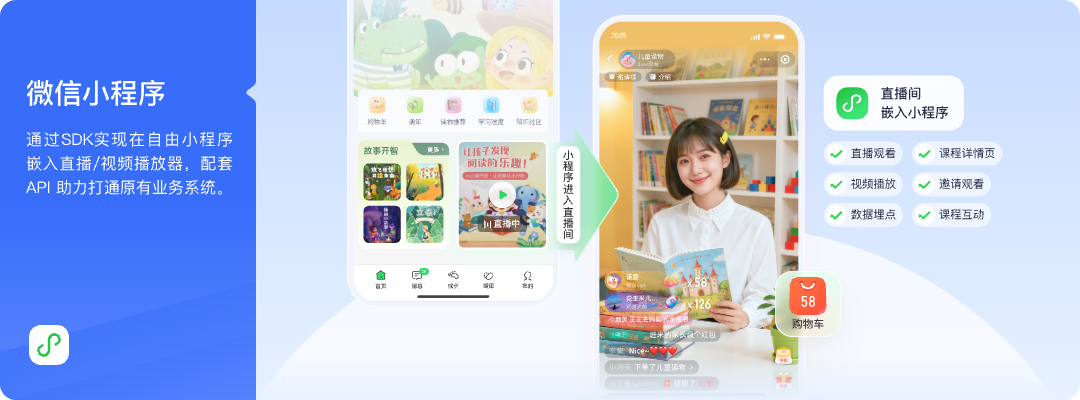
*Figure 1: The live streaming module can be embedded into the company’s own WeChat mini program, retaining member entry points, sections, and subsequent business paths. Image source: POLYV official product solution diagram*
03 Mini-window playback enables users to explore while viewing, but environmental boundaries must be clearly defined
Users may need to return to product or course catalog pages, or consultation pages, while watching live streams. Let users browse while watching, keeping live streaming within the business path. POLYV provides a mini-window playback (picture-in-picture) solution for WeChat mini program live streaming: native mini programs can request background mini-window playback through the mini program SDK or player components; for WebView mini programs, the player must be hosted via a native transition page, and then a mini-window is requested according to the documentation.
Whether users can access the mini-window depends on WeChat’s base library and version, the mobile system version, mini program category and qualifications, admin-console settings, player status, and the specific access path. Test entry into mini-window mode on target iOS and Android devices, test return-to-page behavior, verify playback recovery, and confirm failure prompts. Based on the current official explanation, the WebView mini program path can confirm live streaming, but cannot be extended to replay or VOD playback, and it cannot be promised that playback will continue after WeChat is force-closed.
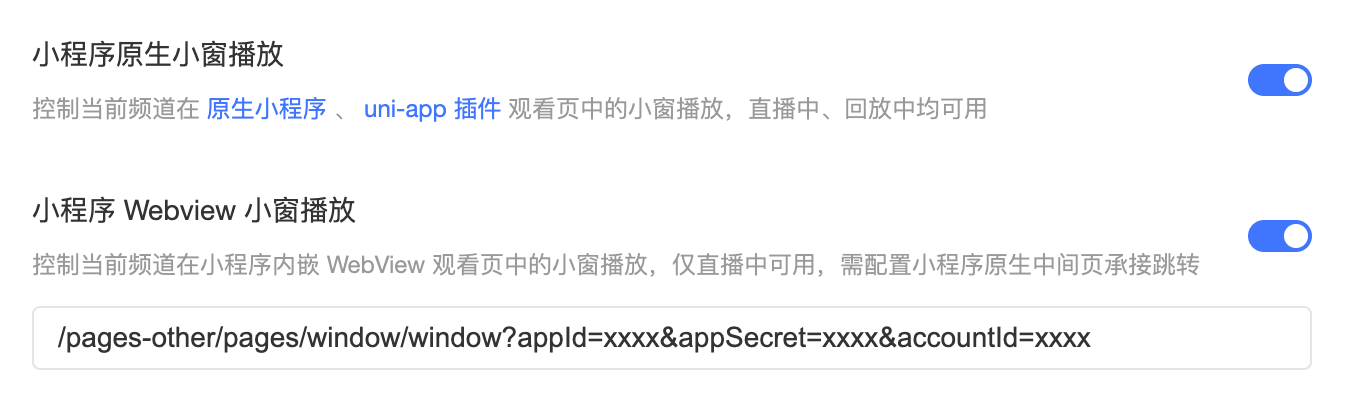
*Figure 2: The configuration paths for native mini programs and WebView windows are different; the actual scope should be confirmed through current account and integration testing. Image source: POLYV official product interface*
04 Link membership status, channels, and business objects into one backend workflow
A recommended data relationship is: the enterprise user primary key corresponds to the mini program login user; business targets correspond to courses, events, or products; and platform channels correspond to a live stream. When users enter, the enterprise backend verifies qualifications and generates the required parameters. Record user and session mappings during viewing. After completion, the required data can be obtained within the authorized scope. Do not directly embed phone numbers, keys, or long-term credentials into shared links. Links can be forwarded, and plaintext parameters can easily be copied. A safer approach is to use server-side verification, short-term credentials, expiration rules, and necessary logging, while clearly informing users of the purpose of the data.
05 Complete a native mini program live streaming POC in five steps
First, draw a state diagram of “Login — Business Page — Enter Live — Interaction — Mini Window — Return.” Second, confirm whether the path is native, uni-app, or WebView. Third, use a test account to connect identity and channels. Fourth, verify playback, orientation (portrait/landscape), weak network, mini window behavior, and page return on the target device. Fifth, record versions, dependencies, error messages, and rollback methods.
The POC should use real pages and real live streaming durations. A single successful preview in the developer tools cannot replace real-device verification across different phone models, WeChat versions, and network conditions.
Launch materials should also include confirmation of entity and category, business domain, privacy statement, component or plug-in versions, target WeChat base library, test phone list, and fallback plan. If the mini window cannot be entered in a certain environment, provide a clear prompt to continue watching on the current page or reopen the live stream. If the login status expires, users should return to the company’s own login and authorization flow rather than being sent to an uncontrolled external entry.
06 Five issues to check when choosing a service provider
Check whether there is clear documentation for native mini programs and uni-app, whether the player, chat room, and co-hosting features can be combined as needed, whether the company backend can connect channels and users, whether the mini window path is clearly explained, and whether support mechanisms exist for version upgrades and integration testing. Only by working through these issues can you determine whether “native viewing” is suitable for formal business.
In this scenario, POLYV provides SDKs for mini program viewing pages, player entry, uni-app framework capabilities, mini-window playback instructions, and server-side development entry. Companies are still responsible for their own mini program credentials, membership rules, page reviews, and real-device testing.
07 Frequently Asked Questions
7.1 Does avoiding a redirect to WeChat channels eliminate WeChat platform requirements?
No. Live streaming runs within the WeChat mini program environment and still must meet WeChat’s category, credential, domain, component, and review requirements under the current WeChat rules.
7.2 If only playback is needed, do I still need the full viewing page SDK?
Not necessarily. You can evaluate a player plug-in or a simplified player based on business needs. If you also need a chat room, co-hosting, or complex interactions, then choose the full viewing page capability.
7.3 Which is faster: uni-app or native mini programs?
It depends on the existing project, team experience, and feature scope. It should be validated with a real project POC, and you should not judge solely by the framework name.
7.4 Can mini-window playback be used on all phones?
This cannot be guaranteed. The WeChat base library, system version, category credentials, backend switches, player status, and access path all affect the result, so you must test on target iOS and Android devices.
About POLYV
POLYV provides a WeChat mini program viewing page SDK, player components, uni-app integration, and server-side APIs. These help enterprises keep live streams within their own mini program pages and member paths. Mini-window playback can enhance the viewing experience, but the final capabilities still depend on the current documentation, account configuration, WeChat environment, and project integration.