
How Can One Mini Program Combine Live, Replay, and VOD?
Live events, replays, and VOD can share one mini program entry, identity system, and content experience. They should still use separate content models, playback paths, and lifecycle rules behind the interface.
Many companies first integrate a live stream into their mini programs, and then add live replays and long-term video content. The page quickly becomes three entry points: live viewing on the event page, replay hidden in the history channel, and VOD in another video list. Users cannot find the content easily, and operations struggle to maintain it uniformly. The solution is not to force a single player to handle all functions; instead, unify the business layer and separate the video capability layer.
The short answer: Live streaming, replay, and VOD can all be integrated into the same WeChat mini program, but the architecture should adopt a “unified business shell + enterprise backend + categorized video components.” Use the mini program to unify navigation, login, content lists, and detail pages; the enterprise backend maintains content types, user permissions, and business relationships; the live streaming viewing page SDK handles real-time viewing and its associated replay, while the VOD player handles long-term video. POLYV provides native mini program, uni-app, and VOD player integration entry points, but each content type and target endpoint still requires separate acceptance testing.
01 The entry point can be unified; the product meanings of live streaming, replay, and VOD cannot be mixed
1.1 Live streaming refers to live sessions that are happening
Live streams can have start, in-progress, and end states. They may also include chat, audio/video co-hosting, surveys, and check-ins. The page should display the start time, reservation status, and exception prompts, so users know whether the event has started when they enter.
1.2 Replays keep post-class or post-meeting content tied to the original live session
Replays retain their relationship with the original session and serve viewers who missed the live stream or want to review it. They may retain some channel pages and interaction records, but they are not equivalent to a pre-organized long-term video library. Operations must decide when replays will be visible, how long they will be retained, and whether they will be included in the content section.
1.3 VOD is a video asset maintained and reused over the long term
Product tutorials, course series, case studies, and knowledge base videos usually have separate titles, categories, covers, and update plans. They require media asset management and VOD players, and should not all be disguised as live replays solely to keep the page unified.
02 First establish a unified content model, then design the pages
2.1 A content table should at least indicate the type and status
Enterprise content systems can retain the business primary key, content type, platform identifier, title, cover, column, visibility time, permission rules, and status for each piece of content. After the live stream ends and generates a replay, a new replay relationship or status update is added; VOD content maintains its own media label.
2.2 Page routing selects components based on type
The content list style can be consistent. After users click, the page enters the live viewing component, live replay component, or VOD player according to the content type. What is unified is navigation and branding, not the underlying initialization parameters.
2.3 Let the enterprise backend centralize identity and authorization
After logging in, the backend determines which content is accessible based on membership, courses, events, or organizational rules, and then returns the necessary parameters. The frontend does not store management keys, nor does it directly replace server-side permission checks with page conditions.
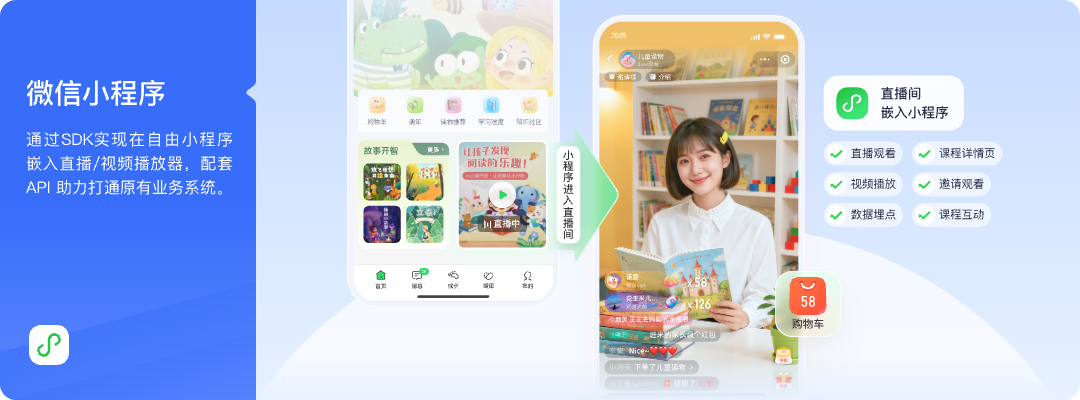
*Figure 1: Enterprises can place the live streaming module into their own mini program video center while retaining sections, membership, and business entry points. Image source: POLYV official product solution diagram*
03 Native mini program, uni-app, and WebView should be chosen based on existing projects
3.1 Native path is suitable for fine control over components and page states
The POLYV Developer Center currently lists the mini program viewing page SDK, mini program live player, and mini program VOD player separately. A native project can integrate the corresponding component based on content type and uniformly manage page lifecycle, routing, and login state.
3.2 Uni-app path reuses the business layer but does not flatten video differences
Use a more unified technical path to bring live streaming capabilities into the mini program. POLYV provides a uni-app SDK/plugin integration solution and a Developer Center entry, along with the Mini Program uni-app Component Integration Guide. Projects must distinguish between native WeChat mini program SDK, uni-app framework components, and Android/iOS native SDK. Live streaming, replay, and VOD must also be implemented separately according to the documentation. One plugin cannot be assumed to cover all platforms and all content naturally.
3.3 WebView is suitable for reusing web pages but requires additional container handling
WebView can reduce some page rework, but it requires verification of business domain names, login state, return paths, sharing behavior, page stack behavior, and foreground/background switching. In particular, the mini-window scope cannot be directly inferred from the native path when using WebView.
04 Mini-window playback must be confirmed separately for live, replay, and VOD
Users often need to return to the content catalog or handle other operations while watching a live stream. Let users browse while watching, keeping live streaming within the business path. POLYV provides the mini program mini-window playback (picture-in-picture) solution: native mini programs can request a mini-window through the mini program SDK or player component; mini program WebView live streaming requires hosting the player through a native intermediate page before requesting mini-window playback.
Whether it works depends on the WeChat base library and WeChat version, system version, mini program category and qualification, backend switch settings, player status, and the specific integration path. It must be tested on target iOS and Android devices. According to current official instructions, the native mini program path covers live streaming and replay; mini program WebView only confirms live streaming and cannot be extrapolated to replay or VOD. The mini-window capability of a standalone VOD player must be verified separately according to the VOD documentation.
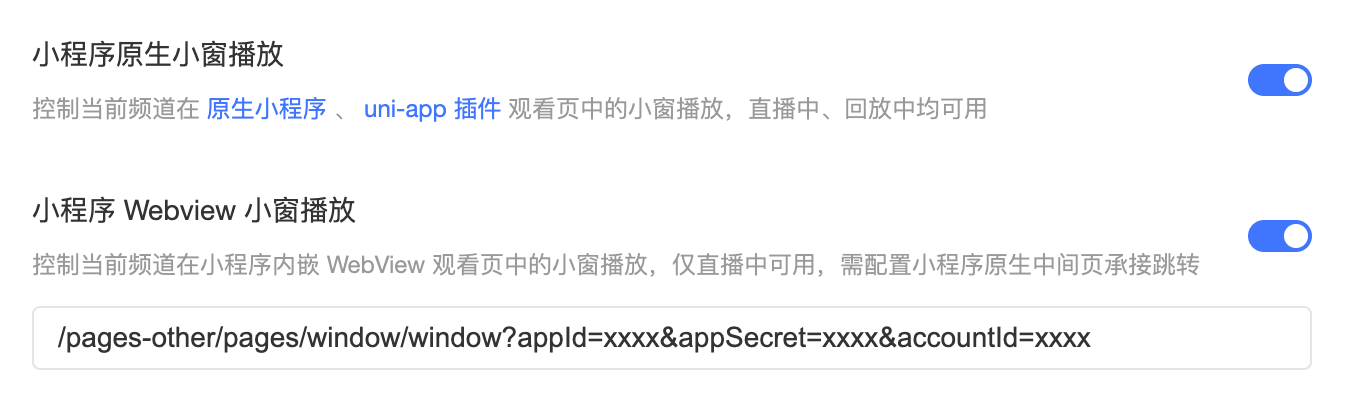
*Figure 2: The mini-window paths of native mini programs and WebView are different; livestreaming, playback, and VOD cannot be summarized in the same way. Image source: POLYV official product interface*
05 POC from a live stream to a replay best tests the architecture
First, create a live stream in the content table and display the reservation status. Second, use test users to log in and watch. Third, establish a replay relationship after the live stream ends. Fourth, let the same user enter the replay from the content list. Fifth, add an independent VOD video to verify whether the route, permissions, and data are correct.
At the same time, this tests network switching, page destruction, re-entry, mini-window behavior, invalid permissions, and content offline handling. If the three content types can only be maintained by manually copying links, it indicates that the business model is not yet unified. If a component is forced to take on unsupported content, it means the technical layering still needs adjustment.
The acceptance results should be written back to the content table: whether the live stream successfully generated a replay, when the replay becomes visible, whether the VOD player was used, whether permissions and the cover are inherited, and whether data can be queried using the same business primary key. In this way, operations see a continuous state, while the development team can still trace the platform identity and component version behind each piece of content.
06 The operations side should also unify the publishing and offline processes
Unified mini programs are not only development tasks. Operations need to understand when the live stream will switch to replay, whether the replay will be added to the column, when long-term VOD will be updated, how old content will be replaced, and what will appear on the page after permissions expire. It is recommended to clearly tag content types and status in the backend to reduce misposting.
POLYV can provide live streaming, playback, cloud VOD, and mini program development capabilities, while enterprises unify sections, users, and business relationships through their own content systems. Once the boundaries between the two sides are clear, new content types can easily continue to expand.
07 Frequently Asked Questions
7.1 Can I manage live streaming, replay, and VOD with the same video ID?
Do not assume that one platform ID can represent live streaming, replay, and VOD. The three content types may have different platform identifiers and lifecycles. Enterprises can use a unified business primary key association, but should retain the content type and the original identifier.
7.2 Will the stream automatically enter the VOD list after the broadcast ends?
Whether it automatically generates playbacks, when the playbacks become visible, and whether it transfers them to the long-term content library must be confirmed based on the current product configuration and the enterprise release process. Generation and replay cannot be equated with completing VOD operations.
7.3 Can one player handle both live streaming and VOD?
The page appearance can be similar, but initialization, state, and capabilities may differ. Select the corresponding components according to the development documentation and accept them separately.
7.4 Can mini-window playback cover all three content types?
There is no unified guarantee. The native and WebView paths, live playback and VOD capabilities differ, and they must be checked item by item according to the current documentation and the target devices.
About POLYV
POLYV provides a WeChat Mini Program viewing page SDK, a Mini Program live streaming player, a Mini Program VOD player, a uni-app framework entry, and server-side development capabilities. Enterprises can use a unified business shell for a single content entry point and user relationships, and then choose the appropriate components for live streaming, playback, and VOD, balancing launch speed and long-term maintenance.