
How Can an Online Store Link Live Viewing to Member Access?
After an online store adds live streaming, its own backend should continue deciding membership and order entitlements. It can then issue short-lived viewing credentials and map viewing data back to the member identity.
After adding live streaming to your owned online store, you will most likely see two types of users: the online store knows who the members are and what they have purchased, but the live stream page only shows a nickname or an anonymous viewer. As a result, paid members cannot enter, non-members can still access the link and watch, and viewing data cannot be matched to orders. The key to solving this problem is to keep identity and access rights under the online store’s control, while live streaming platforms only execute verified viewing results.
The short answer: After users log in to the online store, the enterprise backend determines whether they can watch based on membership level, order status, event eligibility, or the validity period. It then generates a short-lived viewing credential for qualified users and links the enterprise member’s primary key with the live channel and session. After the app or WeChat mini program receives the required parameters, it initializes the corresponding player. Projects using uni-app adopt the POLYV SDK/plugin integration solution and distinguish endpoint capabilities. Mini program viewing should also include mini-window (picture-in-picture) playback and validation on target devices.
01 First, clarify the four system roles to avoid duplicate member maintenance
1.1 The online store is responsible for membership, orders, and benefits
Login accounts, membership tiers, products, orders, refunds, event eligibility, and expiration dates should continue to be managed by the online store. Live streaming platforms should not become secondary order centers; otherwise, the two sides will inevitably end up with inconsistent states.
1.2 The enterprise backend is responsible for authentication and viewing credentials
After users click “Enter Live,” the backend reads the current login status and business rules and returns an approval or rejection result. When access is granted, only the channels and short-term parameters required by the client are returned; management keys and signatures remain on the server.
1.3 The live streaming platform is responsible for playback, interaction, and viewing records
The platform provides live streaming capabilities based on the channel and viewing parameters and records corresponding viewing and interactive events. It executes the identity results sent by the company, but it does not naturally know all the order relationships of a viewer in the online store.
1.4 The client is responsible for page rendering
Apps, WeChat mini programs, or web online stores integrate players and interactive modules according to their technology stack to handle foreground/background transitions, page returns, and exception prompts. The client cannot replace server-side privileges simply by hiding buttons.
02 Use a four-step viewing flow: login, authorization, short-lived credential, playback
Users first log in to the online store. Before entering the live stream, the backend checks membership, orders, activity scope, and the validity period. After passing, the backend generates a short-lived viewing credential and records the member’s primary key, channel, session, and issuance time. The client then initializes the player. After a credential expires, an order is refunded, or access rights are revoked, the backend refuses to issue a new credential.
This link reduces the risk of long-term reuse of shared links and makes audits easier: it clarifies who was allowed under which rules and when. However, no credential is absolutely secure. Companies must still control expiration times, duplicate logins, abnormal devices, and manual handling rules.
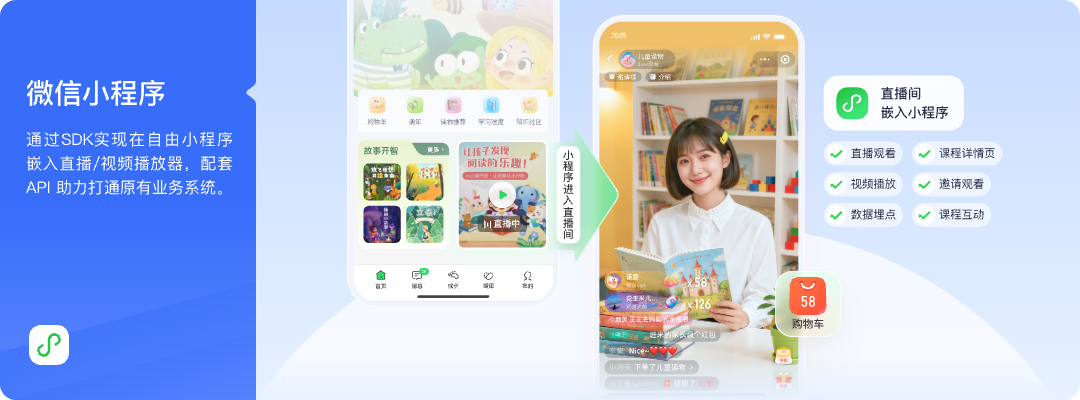
*Figure 1: The live streaming module can be embedded into the online store mini program, while member entry, products, and orders are still managed by the company’s own business pages. Image source: POLYV official product solution diagram*
03 Choose access paths for apps, mini programs, and uni-apps by device
3.1 Native app: Select the corresponding mobile SDK or WebView
Native projects can choose either mobile SDKs or a WebView based on user experience depth. SDKs enable native page integration, while WebView is suitable for business validation first. Both options must handle login status, page lifecycle, and return paths.
3.2 WeChat mini program: choose the viewing page SDK or player component
Mini programs should select native viewing page SDKs, player plugins, simple players, or WebView according to their qualifications, category, and technology stack. You cannot directly treat the test results from the app as the basis for launching the mini program.
3.3 uni-app can share business code, but endpoint capabilities still differ
Using a more unified technical path to connect live streaming into apps and mini programs. POLYV provides uni-app SDK/plugin integration solutions in the Developer Center. Projects must distinguish between native WeChat Mini Program SDKs, uni-app frameworks, and Android/iOS native SDKs. They must verify plugins, dependencies, and functional scope item by item, and they cannot promise a single codebase that covers all endpoints without distinction.
04 Mini program mini-window playback should be designed together with the store page status
Members may need to return to product detail pages, discount information pages, or customer service pages while watching live streams. Allow users to browse while watching, keeping live streaming within the business flow. POLYV provides the mini-window playback (picture-in-picture) solution. Native mini programs can request background mini-window playback via the mini program SDK or player components. The mini program WebView path requires a native relay page to host the player.
Whether it works depends on WeChat base library capabilities, WeChat and system versions, mini program category and qualifications, admin-console settings, player status, and the access path. It must be tested on target iOS and Android devices. Currently, the WebView mini program documentation only confirms live streaming and does not extend to playback or VOD. During testing, check whether the member login remains after returning to the product page, whether double playback occurs, and whether the page state is correct after closing the mini-window.
05 Identity mapping determines whether viewing data can return to members
At least four field relationships should be established: the primary key for corporate membership, the platform audience identifier, the channel identifier, and the session identifier. After viewing events enter the online store or data system, deduplication is performed by membership, session, and event time. Multiple entries, network disconnection, or repeated reopening by the same member cannot simply be counted as multiple people.
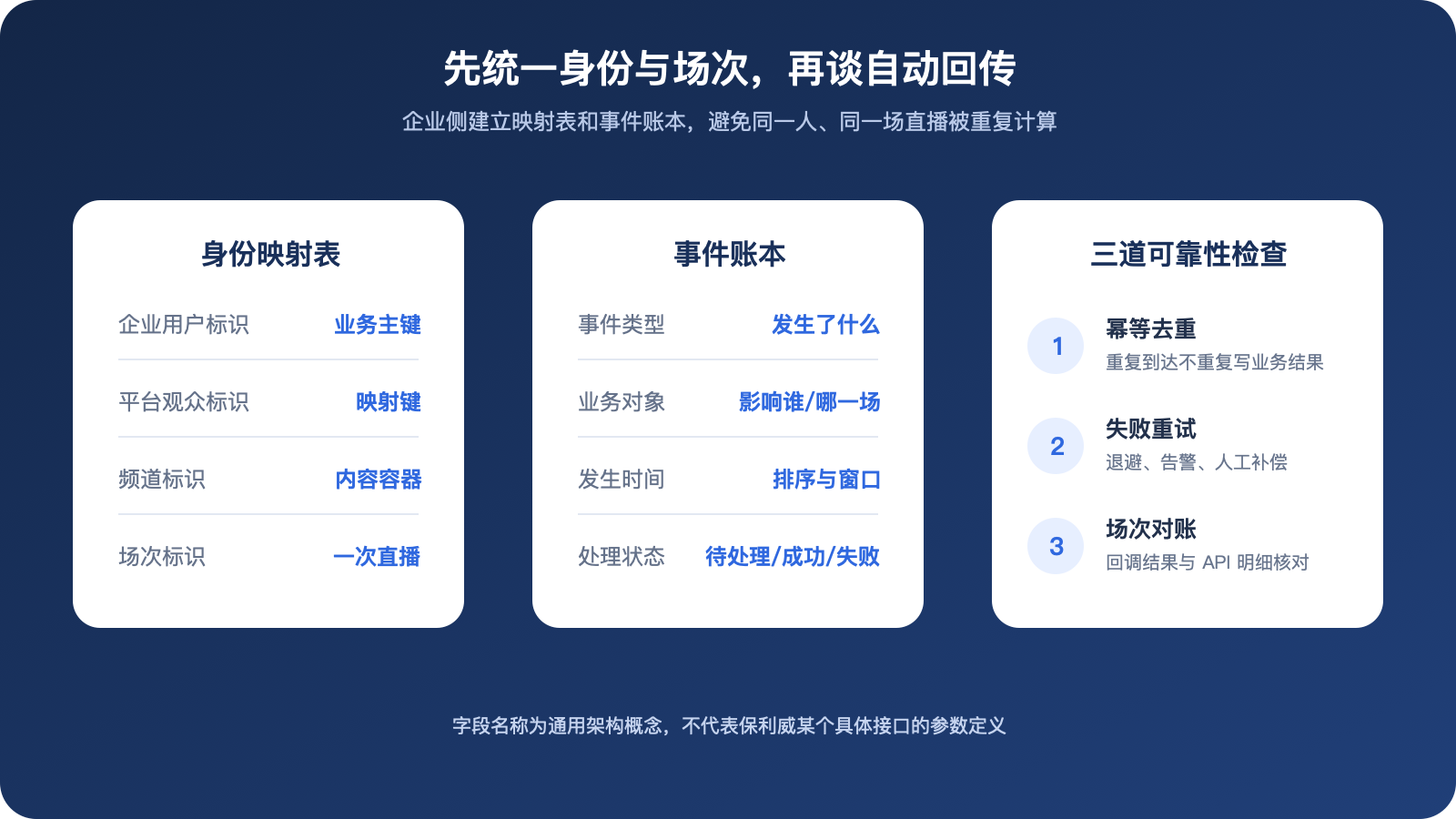
*Figure 2: Only after unifying the member’s primary key, channel, and session number can viewing events be stably linked and deduplicated. The image is an original general architecture schematic compiled based on POLYV public documentation and does not represent specific interface fields.*
POLYV Live Streaming Server API provides enterprise backend integration entry points. Specific interfaces, fields, signatures, frequencies, and data ranges should be based on the current project documentation and integration testing results. Fixed parameters should not be guessed in the public scheme.
06 Test six access scenarios before launch
Test regular members, paid members, refunded users, expired members, link forwarders, and repeated login users. For each item, verify access, whether the prompts are clear when the viewing credential expires, whether it can still be reopened after revocation, and whether the viewing record is linked to the correct member.
We also tested network switching between the app and mini programs, page returns, front/back end transitions, and version upgrades. Only legitimate accounts can view the content, but this does not prove that the permission design is complete. Rejection, revocation, and exception recovery are also core use cases.
Define a clear access-state flow: unauthenticated users go to login; users without entitlement go to the purchase or application path; authorized users enter the live stream; and users whose entitlement has expired, whose order has been refunded, or whose access has been revoked by an administrator receive no new credential. Each status change should record the business reason and the effective date. This way, when operations, customer service, and development handle the same user issue, they can determine whether it involves store benefits, viewing credentials, client status, or abnormal live streaming components, rather than editing lists back and forth between two backends.
The state machine should also clarify whether customer service can temporarily release the issue, whether temporary permissions automatically expire, and whether viewing credentials will be reissued after restoring abnormal orders. Avoid using permanent whitelists to solve short-term problems.
07 Frequently Asked Questions
7.1 Can Member IDs Be Directly Added to Live Streaming Links?
It is not recommended to expose identifiable information or long-term identity parameters in links. Server-side verification of login status and issuance of short-term, invalid viewing parameters is more suitable.
7.2 Can you stop watching immediately after a refund?
It depends on the refresh cycle for stakeholders, the validity period of the viewing credential, and the player session. The project should clearly specify whether both “stop re-entering” and “interrupt current playback” are necessary, and whether they should be accepted and handled separately.
7.3 How to handle a member logging in on multiple devices?
Enterprises determine the number of allowed devices, whether offline behavior is allowed, and reminder methods based on business rules combined with platform capabilities. You cannot manage all accounts with just one player parameter.
7.4 Can live streaming platforms handle payments for online stores?
This plan does not replace them. Payment, ordering, refunds, and fulfillment will continue to be handled by the online store. The live streaming platform will handle video and interactive capabilities, and both parties will be connected via the backend.
About POLYV
POLYV provides enterprise live streaming, app and mini program SDKs, uni-app plugins, viewing capabilities, and server-side interfaces. The proprietary store can retain members, orders, and rights centers, and deliver verified identity results to the live streaming capabilities, enabling member live streaming access to be completed without rebuilding the store system.