
How Can a Video Platform Integrate with Enterprise SSO?
Enterprise SSO for video should keep the corporate user center as the identity source. A server-side authorization gateway can issue short-lived viewing credentials and manage mapping, logout, revocation, and audit records.
Enterprises already have employee portals, customer centers, membership systems, or learning systems. When users log in and then access a video page, being asked to enter their account again disrupts the user experience. If the video platform maintains a separate user list, employee departures, transfers, course withdrawals, and membership expirations can easily get out of sync. The goal of single sign-on is not just to reduce one login step, but to maintain a trusted source of identity and consistent permissions.
The short answer: The enterprise user center should continue to serve as the source of identity. After users complete enterprise login, the enterprise backend validates their session and business permissions, and then provides the third-party video platform or player with short-lived, revocable viewing parameters; the video side does not require users to log in again. Both sides need to establish mappings between enterprise users, platform viewers, content, and permissions, and handle logout, revocation, expiration, replay attacks, credential reuse, and logging. Specific implementation using OAuth, SAML, or custom signature protocols must be based on the current capabilities of both products and the integration results.
01 True Single Sign-On Includes Identity, Permissions, and Sessions
1.1 Identity: define the authoritative source
The enterprise user center stores accounts, organizations, memberships, or customer relationships and should serve as the authoritative identity source. The video platform receives identities that have already been verified by the enterprise, rather than manually creating another account with the same name.
1.2 Permissions: Successful Login Does Not Mean All Videos Are Accessible
The same logged-in user may belong only to a certain department, have purchased specific content, or hold rights for a limited duration. The enterprise backend must check the specific content permissions before playback; simply being “logged in” is not enough to grant access.
1.3 Session: Credentials Must Expire and Be Revocable
Viewing parameters should have an expiration, a defined usage scope, and anti-replay design. When a user logs out, leaves the company, their membership expires, or an administrator revokes access, the system must clearly prevent future access and handle in-progress sessions.
02 Recommended Architecture: “Identity Source—Authorization Gateway—Video Platform”
2.1 Identity Source Handles Enterprise Login
Users log in under the enterprise domain, and the enterprise system creates its own session. The video page simply checks whether the enterprise session is valid, without collecting a separate long-term password.
2.2 Authorization Gateway Handles Business Decisions
When users click on content, the enterprise backend retrieves user identifiers, organizational information, or access rights to determine whether they can access the video. If allowed, short-lived viewing parameters are generated or retrieved according to the platform requirements; if denied, the enterprise page directly explains the reason.
2.3 Video Platform Enforces Playback Permissions
The player starts playback with server-processed parameters and records necessary actions as agreed. Key management and signature logic must remain on the enterprise backend and must not be put into webpage scripts. Currently, POLYV cloud VOD publicly lists features such as identity and permissions, single sign-on, and player embedding; POLYV Developer Center provides web players, VOD Java SDKs, and server API endpoints. The specific protocol, interface, and account activation scope should be confirmed in the current project documentation.

*Figure 1: Cloud VOD workbench for managing video and playback endpoints; the enterprise user center still serves as the identity source, with single sign-on implemented through the enterprise backend, viewing parameters, and player access links. Image source: POLYV official product interface*
03 Mapping Tables Must Resolve at Least Four Types of Relationships
First, enterprise user primary keys and platform audience identifiers. Second, the company’s main content key and platform video identification. Third, the user’s scope of permissions over the content. Fourth, one login session versus one viewing session. When needed, extend the mapping by organization, course, or membership-cohort dimensions, but do not copy all personal information to the video platform.
Mapping design should support user name changes, department adjustments, content substitution, and platform identity changes. Use a stable primary key; do not treat nicknames as identities, and do not judge a person solely by IP address or device.
04 The Choice of Protocol Depends on the Boundaries of Both Parties and Should Not Be Assumed First
4.1 Use a standard identity protocol when a unified identity platform already exists
If a company already uses identity systems such as OAuth, OIDC, or SAML, you can ask the video service provider whether they have the corresponding product capabilities, required fields, and support scope. You cannot assume that third-party platforms will directly support a protocol just because a company uses that protocol.
4.2 Use custom server authorization for complex business permissions
Enterprises can complete login and business decisions on their own backend, and then generate viewing parameters based on the current video platform documentation. This method is flexible, but it requires that you handle signatures, secure storage, expirations, error codes, and version upgrades yourself.
4.3 A page redirect alone does not provide single sign-on
Jumping from a company page to a video page without entering the password again may only be a long-term link or browser state, and does not mean identity, revocation, and auditing have been completed. Acceptance criteria must cover failures and abnormalities, not just one normal opening.
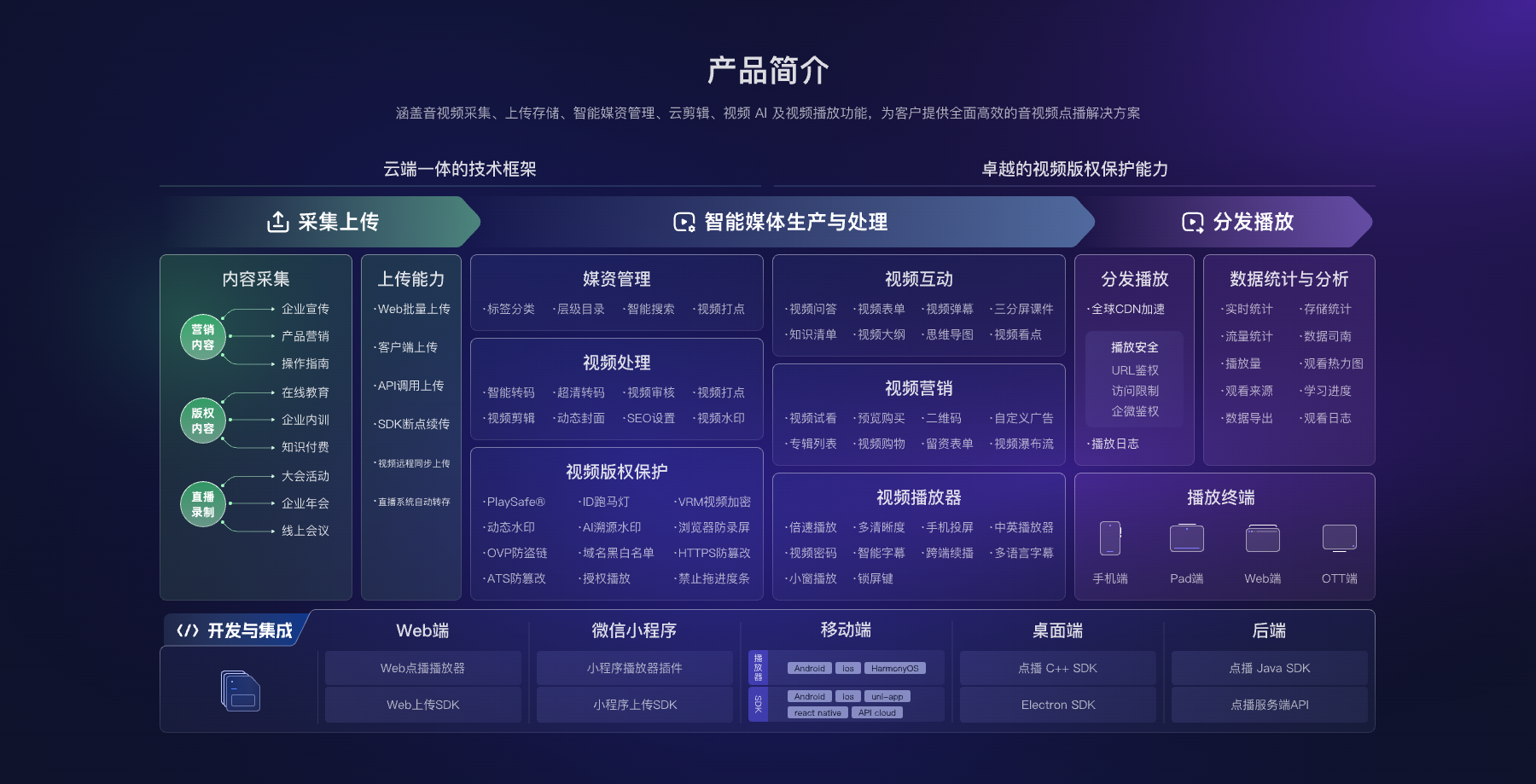
*Figure 2: Players, server-side APIs, and enterprise business systems together form an access link; enterprise account systems should not be replaced by VOD platforms. Image source: POLYV official product architecture diagram*
05 Test at Least Eight Types of Scenarios Before Going Live
Test normal users, unauthorized users, expired users, departed users, users revoked by administrators, reusing old credentials, opening multiple pages simultaneously, and platform or network anomalies. Each use case should check page prompts, logs, credential invalidation, and recovery methods.
Clock deviations, signature failures, interface timeouts, and retry strategies should also be confirmed. The server records the request result and the necessary tracking identifiers; it cannot simply let the frontend pop up “Playback Failed.”
Exit and revocation require separate design. After a company login session expires, the authorization gateway will no longer issue new credentials. Issued credentials are handled according to their validity period or the voluntary revocation mechanism. Whether an active session is immediately suspended depends on business requirements and platform capabilities. Acceptance records should distinguish between “No Re-entry” and “Interrupt Current Playback,” avoiding overwriting two different outcomes with a vague “exit synchronization.”
Companies should also record the certificate issuer, issuance time, scope of content, and reasons for invalidation, so that customer service, information security, and R&D can interpret abnormal access from the same audit record—rather than relying solely on browser-based reproduction.
06 Data and Privacy Boundaries Must Be Designed Together
Single sign-on allows viewing behavior to correspond to enterprise users, so it is important to clarify the purpose of collection, the scope of fields, the retention period, and viewing permissions. Only the minimum information required for playback and statistics is delivered to the video platform. Internally, companies should also restrict who can view personal-level records.
In this scenario, POLYV provides cloud VOD, player, and server-side development capabilities, allowing enterprises to maintain control over user center, organization, or membership rules. Both sides can maintain better operations through short-term authorization and stable mapping connections than by repeatedly importing personnel data into two backends.
07 Frequently Asked Questions
7.1 Does SSO require replacing the enterprise account system?
Usually, it is not necessary. The goal is to reuse existing identity sources and add authorization gateways and video access logic. Whether changes are needed depends on the current session and protocol capabilities.
7.2 Can the Platform Key Be Placed on the Frontend to Generate Parameters?
No. Management keys and signing logic must remain on the enterprise server; the frontend receives only short-lived session parameters required for playback.
7.3 What should happen to playback after a user signs out of the enterprise system?
This needs to be clearly stated in the plan. Stopping re-entry and immediately ending the current session are different capabilities and should be verified separately based on credential validity, the player, and business requirements.
7.4 How should the SSO integration timeline be estimated?
Depending on existing identity protocols, permission complexity, the number of pages, logs, and exception use cases. You should first connect a user, a piece of content, and a revoke POC before assessing the total workload.
About POLYV
POLYV cloud VOD provides players, backend APIs, and identity/permission-related capabilities, enabling integration into existing enterprise portals and user centers. Companies continue to serve as the authoritative source for identity and business authority, while POLYV handles video processing and playback execution; the specific SSO protocol and interface depend on the current scheme and the integration testing results.