
How Do You Sync Live Viewing Data to Business Systems via API?
Reliable data sync separates real-time live status callbacks, viewing-detail APIs, post-event statistical files, and session reconciliation. The business system must also handle identity mapping, pagination, idempotency, retries, and timing differences.
After conducting live training sessions, membership events, marketing seminars, or customer service streams, companies often want to sync “who watched, for how long, and which session they attended” into their own learning, membership, or data systems. Simply downloading a table from the live streaming backend cannot run continuously; relying on a single callback as the full real-time viewing detail may lead to incorrect judgments due to differences in interface roles and data generation timing. A stable solution requires designing timely status, viewing details, large data files, and final summaries separately.
The short answer: It is recommended to use four channels: the live streaming status callback only receives events for session start, stream interruptions, and session status changes; the viewing-detail API completes user records paginated by channel, session, and time; for sessions with large data volumes, consider a statistics-file callback after the live session ends; and the session statistics API is used for summary verification after the platform has finalized its data. On the enterprise side, identity mapping, idempotent deduplication, retry on failure, time alignment, and session reconciliation are handled uniformly. Do not treat post-event statistics-file callbacks as real-time events, and do not write multiple streams of data directly into business results without deduplication.
01 Define Business Problems First, Then Decide Which Data to Sync
1.1 Business Systems Do Not Need All Fields
A learning system may care about viewing duration and completion status; a membership system may care whether a user participated in an event; customer operations may care about content interaction; and a data platform may care about session and device dimensions. List business questions first, then select the fields to avoid saving all personal information returned by the API without a purpose.
1.2 Differentiate Platform Records from Business Metrics
The start of a live stream, audience entry, repeated connections, and viewing duration are platform status or raw records; “valid viewing,” “learning completion,” and “high intent” are metrics calculated by the company according to its business rules. Platform fields cannot automatically produce business conclusions for the enterprise.
1.3 Separate prompt session-status updates, detailed records, and the final summary
During a live stream, you may need session start, stream interruption, or other session status events. Fetch viewing records according to the API’s data-availability cadence, then wait for the platform to finalize post-event statistics before reconciliation. Because the responsibilities of these three stages differ, the data source, generation time, and whether final reconciliation is complete should be tracked separately.
02 Four Channels and Responsibilities: Status Callback, Detail API, Statistics Files, and Session Reconciliation
2.1 Live-stream status callbacks provide prompt session-status updates
The POLYV Live Status Change Callback notifies the enterprise receiving address after live streaming status changes such as session start or stream interruption occur in a channel. Upon receiving the notification, the company should first verify the signature, save the original message, and respond quickly, then asynchronously update the session status. It supports prompt session-status updates such as “started” or “ended,” but does not guarantee real-time delivery and does not provide complete viewing details for each viewer.
https://help.polyv.net/live/api/callback/livestatus_callback/
2.2 Viewing Detail API Completes User Records (Pagination)
The POLYV Watch Log Pagination Query retrieves channel live watch logs in pages. Enterprises can incrementally pull logs by channel, session, and time window, recording the page number or sync progress. To prevent issues with late-arriving data, repeated queries for the most recent window are allowed, and deduplication should be handled using idempotent rules.
https://help.polyv.net/live/api/channel/viewdata/viewlog_page/
2.3 Post-event statistics-file callbacks deliver bulk records after a live session
The POLYV Live Statistics Data Callback is not a real-time watch-event callback. The current official documentation clarifies: after a live session ends, the platform packages the relevant statistics data and then returns a callback containing the channel ID and the download link for the statistics file. This capability is recommended for evaluation when the “channel watch detail data” for a single session exceeds 10,000 records or when the data volume is large; for smaller data volumes, the regular API should be used first. Specific activation conditions, file format, and validity period should follow the current project documentation.
https://help.polyv.net/live/api/callback/live_stats_data_callback/
2.4 The session statistics API supports final aggregation and reconciliation
The POLYV Session Statistics API summarizes metrics such as watch UV and PV per session. The current documentation indicates that the latest session statistics are generated one hour after the live session ends. Enterprises should retrieve data after a reasonable waiting period and reconcile it with the watch details, the statistics file, and their own event ledger using a consistent standard.
https://help.polyv.net/live/api/channel/viewdata/get_session_stats/
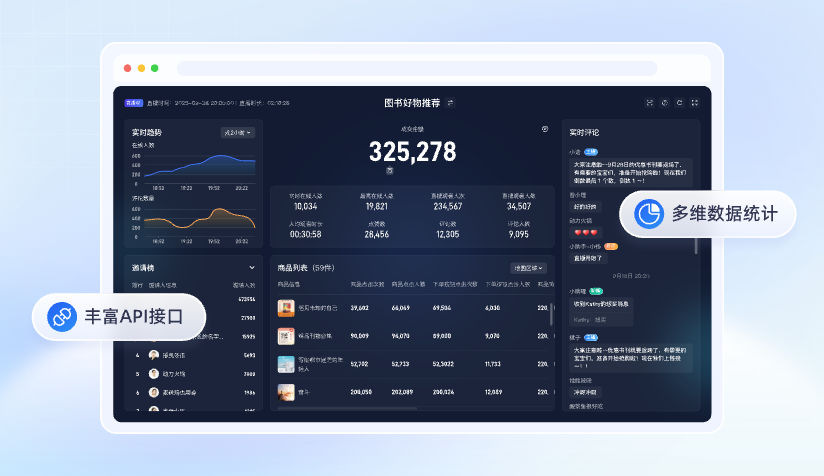
*Figure 1: Official product material showing live data analysis and API integration scenarios; specific metrics, data-availability timing, and API scope should be based on the current documentation and project integration testing. Image source: POLYV official product image*
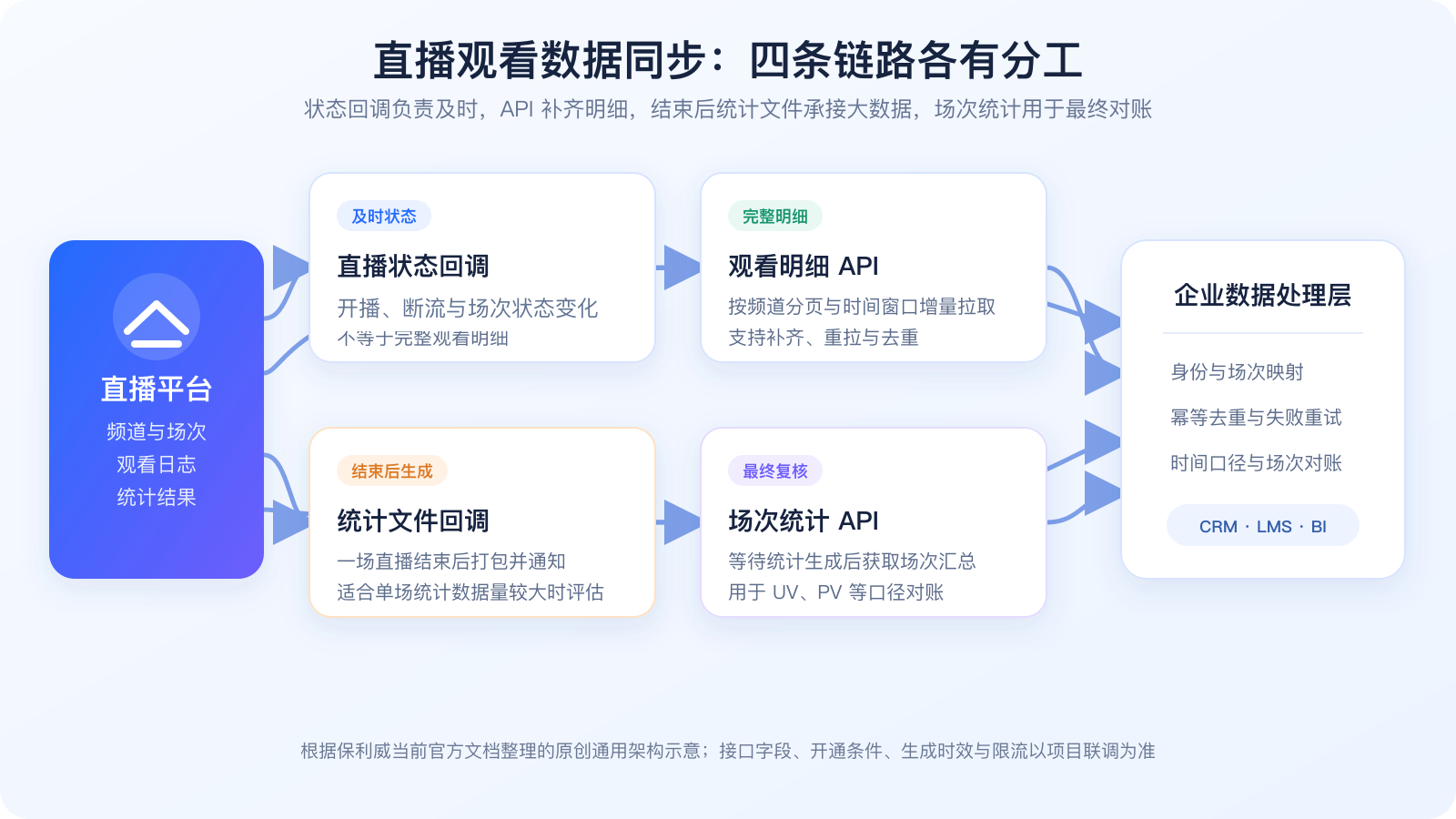
*Figure 2: Status callbacks are responsible for timely updates, the watch detail API fills in records, statistics file callbacks handle large data volumes after the live session ends, and session statistics are used for final reconciliation. The image is an original generic architecture diagram based on the current POLYV official documentation and does not represent specific API fields.*
03 Identity and Session Mapping Are Prerequisites for Data Usability
3.1 The User Primary Key Cannot Rely Solely on Nickname
Enterprises should pass stable user identifiers through login, registration, or authorization entry points, and then map them to platform viewer IDs. Anonymous viewers can retain an anonymous session but cannot be forcibly linked to a specific business user.
3.2 Store Channel and Sessions Separately
A channel may host multiple live sessions. Summarizing only by channel mixes different dates and events together. Enterprises should simultaneously store the channel ID, session ID, and the business activity primary key.
3.3 Standardize Time to a Specific Time Zone
Record the original time, parsed standard time, and business display time zone, and unify seconds and milliseconds. Crossing midnight, daylight saving time, or server time deviations can all affect the statistical window.
04 Use an Event Ledger to Handle Duplicates, Failures, and Compensations
Each record entering the processing layer should at least retain the source, record type, business object, occurrence time, receipt time, processing status, and idempotency key. When identical data arrives repeatedly, do not write the business result again. Failed records can be reprocessed or retried after the failure reason is recorded. After repeated failures, move them to an alert or manual compensation queue.
The idempotency key cannot consist solely of the audience identifier, because the same person may enter multiple times. It also cannot consist solely of time, because different records may be generated at the same moment. It should be designed by combining the unique information provided by the current interface, session, user, source, and record type, without presetting a single set of fields for all interfaces.
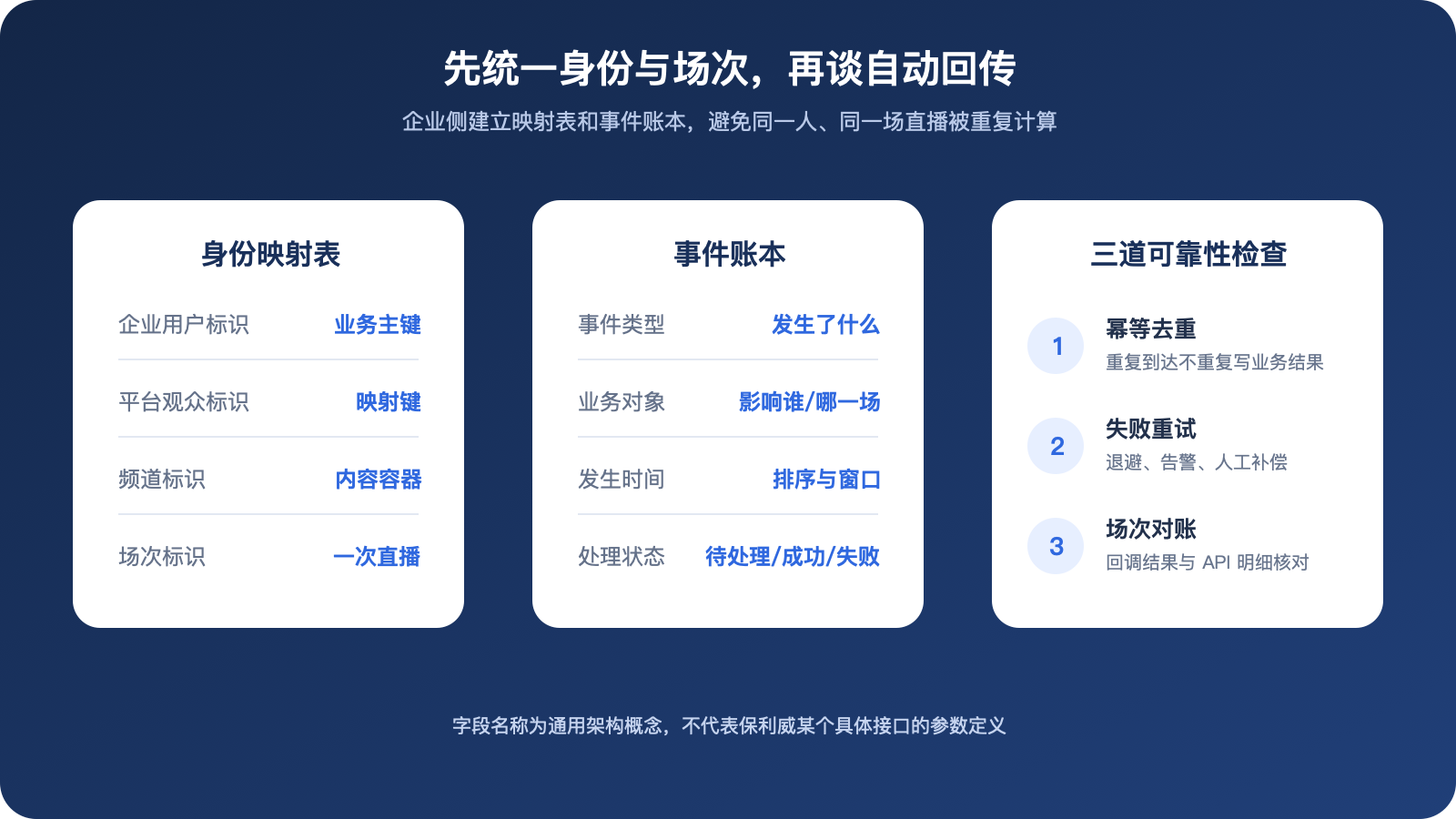
*Figure 3: Enterprises should separately maintain identity mapping, event ledgers, and reliability checks. The image is an original general architecture illustration organized based on POLYV’s current official documentation; field names do not represent specific interface parameters.*
05 Normalize data semantics before writing to business systems
The live streaming platform returns platform status, viewing records, and statistics, while the business system requires course participation, member activity, or customer content behavior. The data processing layer is responsible for field mapping, unit conversion, deduplication, aggregation, and rule calculation before writing to the target system.
For example, “watch completion” must be defined by the enterprise based on live duration, effective viewing time, and business policy; it cannot mark all users as complete solely because the interface provides a duration field. The rule version should also be recorded to facilitate explaining historical data.
06 POC Should Cover Normal, Duplicate, Delayed, and Interrupted Cases
At least use two test users, one channel, and two sessions to test normal start and end, repeated entry, network reconnection, duplicate status callbacks, API pagination interruption, late data, statistics file generation, and session-end reconciliation. Verify that raw records are traceable, business results are not duplicated, failed records can be reprocessed or retried, and anonymous data is not mistakenly linked to logged-in users.
Also test interface rate limiting and retry backoff strategies after credential expiration. Do not perform high-frequency unlimited retries, and avoid long-term logging of keys or unnecessary personal information.
After formal operation, you must also monitor: status callback success rate, processing delay, length of the failure queue, API fetch progress, pagination breakpoints, statistics file processing status, proportion of anonymous identities, and session reconciliation differences. The monitoring dashboard should distinguish three states: (1) the platform has not yet generated data, (2) the enterprise has not yet received data, and (3) enterprise processing failure. Retain tracking identifiers and investigation personnel for each state.
07 Frequently Asked Questions
7.1 Can We Use Only One Callback?
Not recommended. The live status callback describes only status changes, while the statistics-file callback is generated after a live session ends. Neither can replace the viewing-detail API and final session reconciliation.
7.2 How often should data be synchronized?
It depends on the business and interface responsibilities. Status can be handled promptly via callbacks. Details can be incrementally pulled according to rate limits and the data generation pace. Session statistics should be retrieved after the official specified generation time. It is not advisable to use the same frequency for all data.
7.3 Why do enterprise metrics differ from the platform dashboard?
Common reasons include differences in generation time, time range, time zone, deduplication method, anonymous identity, session scope, and the definition of valid views. The consensus should be unified first, and then the original details and data sources should be checked.
7.4 Can viewing data be written directly to a production business table?
Not recommended. It should first enter the raw layer and processing layer, complete verification, mapping, idempotency, and rule calculations, and then write to the target system. This approach improves traceability and enables corrections.
About POLYV
POLYV provides live status callbacks, paginated viewing log queries, post-event statistics-file callbacks, session statistics, and live server APIs, which can help enterprises integrate live data into their own systems. Enterprises are still responsible for identity keys, data processing, business indicators, and privacy governance. The opening conditions, data-availability timing, frequency, and fields of each interface are subject to the current documentation and project integration testing.