
If You Already Have a Front End, Should You Choose SaaS, aPaaS, or an SDK?
When the front end already exists, the best approach is often aPaaS or open interfaces as the core, endpoint-specific players or SDKs where needed, and a SaaS console for standard operations. The final mix depends on control, staffing, and maintenance responsibility.
When a company already has an official website, learning platform, membership center, or content portal, it usually does not want to replace the existing pages. Instead, it wants to integrate upload, transcoding, storage, playback, and data capabilities into its current products. The most common pitfall at this stage is treating SaaS, aPaaS, and SDK as three mutually exclusive options and deciding solely based on “which is cheaper.”
The short answer: If a company already has front-end pages and only needs to procure video capabilities, it typically uses aPaaS or open interfaces as the main path—supplementing it with endpoint-specific players and SDKs. If the launch timeline is tight and the process is standard, you can start with a SaaS backend and standard components. You should prioritize a native SDK only when the client experience, offline capabilities, or interactions must be deeply customized. All three approaches can be used together. The real decision depends on how many pages and business logic the company wants to keep, and how much R&D and long-term maintenance responsibility it is prepared to carry.
01 SaaS, aPaaS, and SDKs address problems at different layers
1.1 SaaS delivers complete products, suitable for rapid launch
SaaS typically includes ready-made features such as backend management, standard players or viewing pages, account permissions, media asset management, and statistics. Once companies complete account configuration, upload content, and embed standard pages, they can quickly deploy the platform. It is suitable for teams building or validating business for the first time or for relatively standardized requirements. The trade-off is that page flows, data structures, and interaction flexibility are often constrained by the product’s boundaries.
1.2 aPaaS delivers orchestration capabilities, suitable for retaining existing frontends
aPaaS is essentially a capability layer positioned between business systems and the audio-video foundation. Businesses retain their own pages, memberships, orders, courses, or employee systems, and upload, transcode, play, grant, and data-enable capabilities through APIs, callbacks, players, and component calls. Compared with using standard SaaS directly, it offers more flexibility and makes it easier to control delivery cycles than fully self-developing audio-video infrastructure.
1.3 SDKs add endpoint capabilities; they are not a complete platform
A player SDK, upload SDK, or mobile SDK mainly solves playback, upload, collection, and interaction issues for a specific endpoint. SDKs can help the experience feel more like your own product, but companies still need to handle business pages, accounts, permissions, data mapping, version upgrades, and exception safeguards themselves. Purchasing only SDKs—without server-side APIs, a media backend, and operational capabilities—often leaves substantial integration work behind.
| Select the path | What enterprises mainly gain | What is the enterprise’s main responsibility | A more suitable situation |
|---|---|---|---|
| SaaS | Ready-made backend, pages, and standard features | Configuration, content, and operations | Fast launch, standardized processes, limited R&D resources |
| aPaaS | API, components, platform capabilities, and configurable workflows | Proprietary pages, business rules, and system integration | Existing front-end, aiming to retain brand and maintain a closed data loop |
| SDK | Playback, upload, or interaction capabilities for specific endpoints | Frontend and backend engineering, version adaptation, and operations | High endpoint-experience requirements, with ongoing development capability |
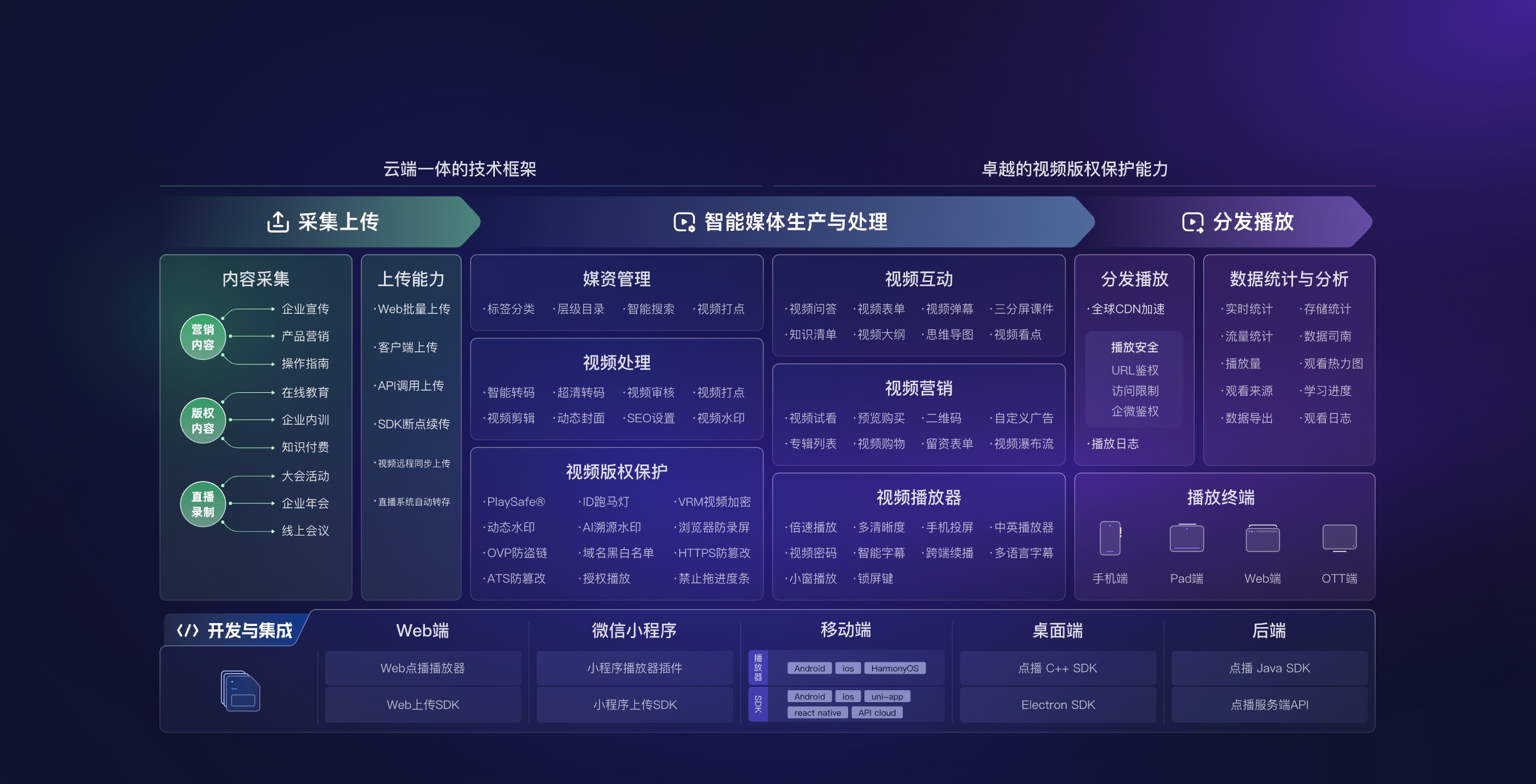
*Figure 1: In addition to the player, the audio-video platform should cover upload, media assets, processing, playback, security, data, and multi-terminal integration. Image source: POLYV official product materials*
02 With an existing frontend, use aPaaS as the core and SaaS or SDKs where needed
2.1 Existing pages do not mean backend capabilities must be custom-developed
Companies can continue using their own navigation, content detail pages, and user center. They can also let a professional platform handle video file upload, transcoding, storage, and playback distribution. The front end only displays the information needed for business, while the back end maps the company’s content ID and user ID to the platform’s video ID. This retains the brand experience while avoiding rebuilding transcoding queues, player adaptation, and media asset operations.
2.2 A standard backend can handle operations management initially
Even if deep integration is pursued later, there is no need to rewrite all management interfaces from day one. Operations teams can initially use the SaaS backend for upload, categorization, cover image management, and subtitle management, while the development team prioritizes front-end playback and the necessary data flows. Once workflows stabilize, decisions can be made about which management actions should be sent back to the enterprise backend via API. This gradual approach makes it easier to validate permissions, exceptions, and data consistency.
2.3 SDK should only supplement high-value experiences
Web pages can start by using a player or Web SDK. Desktop and mobile endpoints can choose native players based on product experience. Do not deploy native SDKs on every terminal just for “deeper technology.” Enterprises should first identify critical actions that standard pages cannot satisfy—such as deep brand customization, native gestures, specific caching strategies, or terminal-specific interactions—before expanding SDK maintenance scope.
03 Six questions to answer before choosing a solution
3.1 Which business capabilities must remain in the enterprise system?
Membership, orders, positions, course scheduling, customer relationship management, and financial data are usually managed by the company’s own systems. The audio-video platform handles media assets, playback, and related technical capabilities. Clearly defining system boundaries first prevents embedding business logic in the player and avoids duplicating platform functionality that could be used directly.
3.2 What pages and endpoints exist?
List web, mobile web, desktop, and other target endpoints, and note browser and OS versions, portrait/landscape orientation, resolution, subtitles, playback speed, casting, and other requirements. SDK and player capabilities cannot be assumed to be identical across different endpoints; they must be verified on each endpoint on target devices.
3.3 Who determines identity and permissions?
Companies should clarify whether users are logged in, whether permissions come from membership levels or course purchases, how long authorizations remain valid, and how refunds, resignations, or course reclamation work after expiration. A common practice is for the backend to first complete business judgment, and then apply for a short-lived playback credential from the video platform—rather than handing the permanent address directly to the front end.
3.4 Which data must be returned to the business system?
Data such as playback start, viewing duration, completion rate, errors, endpoints, and content IDs requires that business intent and statistical criteria be defined first. Real-time events are suitable for callbacks or client-side tracking, while aggregated data is suitable for pulling via interface. Do not treat a single device visit as a real-name user without a stable user identifier.
3.5 Who is responsible for version upgrades?
When selecting standard pages, the platform assumes more compatibility maintenance. The deeper the SDK is used, the more enterprises must track operating systems, browsers, app stores, and SDK versions. Before procurement, change logs, upgrade descriptions, compatibility matrices, and issue response processes should be requested, and major upgrade testing responsibilities should be included in the project plan.
3.6 What is the rollback plan if integration fails?
Interface timeouts, transcoding failures, expired playback credentials, and terminal incompatibility all require safety nets. The plan should define retries, error messages, log troubleshooting, backup pages, and rollback methods. Whether exceptions can be handled smoothly reflects long-term maintenance costs more than the “many features” shown in a demo environment.
04 Build the combined solution in four steps instead of refactoring everything at once
4.1 Step one: build a minimum end-to-end workflow
Select a content type and an endpoint, and run the process of “upload or import—transcoding completed—business system binding—authorized playback—viewing data transmission.” This end-to-end workflow verifies whether the three key IDs—identity, content, and data—are consistent.
4.2 Step Two: Create interfaces and error lists
For each interface, define the caller, input parameters, request signing, permission rules, idempotency rules, timeouts, retries, and alerting requirements. The front end cannot store server keys. Sensitive authorization should be initiated by the enterprise backend. Callbacks also need to verify sources, prevent duplicate notifications, and handle out-of-order situations.
4.3 Step Three: Perform compatibility testing on each device
Tests should cover premiere, drag-and-drop, speed-up, subtitles, switching between the front end and back end, login expiration, and weak-network recovery on real networks and target devices. SDK demos can demonstrate basic capabilities, but they cannot replace testing on real enterprise pages, account systems, or package releases.
4.4 Step Four: Then decide how many SaaS pages to replace
Once the standard process stabilizes, high-frequency management actions can be gradually migrated to the in-house backend based on operational efficiency and brand requirements. If low-frequency configurations have no obvious business value, they can remain in the SaaS backend, avoiding unnecessary development and maintenance for a unified interface.

*Figure 2: The standard product workstation can first handle video uploading, categorization, player configuration, and data management, and then be gradually integrated according to business value. Image source: POLYV product interface*
05 About POLYV: Integrating Existing Products with Modular Capabilities
Based on the current POLYV cloud VOD and POLYV Developer Center, POLYV provides both a ready-to-use SaaS VOD platform and integration capabilities such as APIs, players, and multi-end SDKs. For enterprises with existing front ends, membership, courses, orders, or employee systems can be retained. Media assets are managed through the platform backend, and front-end integration is achieved via interfaces and players.
In this context, POLYV’s role is not to replace all enterprise business systems. Instead, it provides an audio and video capability layer. Whether to adopt SaaS, aPaaS, web components, or a native SDK should be determined by the target terminal, account version, permission workflow, and project integration results. Different terminal functions must be verified separately.
06 Frequently Asked Questions
6.1 Does embedding just one player count as completing aPaaS integration?
Not necessarily. A player only solves front-end playback. If enterprise identity authorization, uploading, media synchronization, and data feedback are also required, server-side interfaces, callbacks, and ID mapping must be added.
6.2 If we have our own backend, do we still need the platform backend?
You can keep it at first. The platform backend is suitable for low-frequency configuration, issue troubleshooting, and operational management. The enterprise backend only needs to handle high-frequency actions that truly require unification, which can significantly reduce the initial scope.
6.3 Does having more SDKs mean the platform is stronger?
Not just by quantity. You should check whether the provider actively maintains SDKs for the target endpoint, documentation, and demos, whether key capabilities are actually usable, and whether version upgrades and technical support meet project requirements.
6.4 Can we start with SaaS and later do deeper integration?
Yes, and this is often safer. The prerequisite is to plan enterprise content IDs, user IDs, and interface boundaries in the first phase to avoid large-scale rework later caused by unclear data relationships.