
What APIs and Development Work Does Video Cloud Integration Need?
Integrating a third-party video cloud involves more than embedding a player. Most projects also need media upload, asynchronous processing, authorization, viewing-data callbacks, ID mapping, retries, logging, and operational acceptance.
When a business integrates a video cloud, they often think of the task as “just embedding a player snippet into a page.” After going live, however, they realize that upload status, content IDs, user permissions, playback tokens, viewing records, and exception callbacks all need to connect with the existing system. If these interfaces and responsibilities are not clarified in advance, the most common issue is that videos can play, but operations, permissions, and data cannot form an end-to-end workflow.
The short answer: Integrating a third-party video cloud typically requires five types of capabilities: media and upload interfaces, transcoding and status notifications, player or terminal components, identity and playback authorization, and viewing data and event reporting. Development work includes system boundary design, ID mapping, server-side signing, front-end playback, callback handling, error handling and retries, testing, and launch monitoring. Small projects may only integrate the player and a few backend interfaces; to connect with membership, courses, employees, or content systems, estimate based on the complete workflow, not just the effort of “embedding a snippet of code.”
01 Map Out the Complete Lifecycle of a Video First
1.1 Where does the content come from?
Videos can be uploaded by operations staff in the platform backend, or synchronized from the enterprise management backend, desktop client, or server. When choosing an upload method, confirm support for large files, resumable uploads, batch tasks, format restrictions, file verification, and retry on failure. Direct browser uploads also require temporary credentials; the server key must not be written in front-end code.
1.2 How does the platform notify the business system after processing?
Successful upload does not mean the video is playable. The video may still undergo transcoding, review, screenshot generation, subtitle processing, or other steps. The business system needs to receive task status, reasons for failure, and the time when the video becomes playable. A common approach combines status polling with callback notifications: callbacks provide timely updates, while active queries compensate for missed notifications.
1.3 What checks occur when a user clicks play?
The page first confirms the relationship between the content and the user. Then the enterprise backend performs permission verification and retrieves the necessary playback information. Finally, the front-end player handles rendering and event reporting. If permanent URLs are written directly into the page, it becomes difficult to handle expired permissions, refunds, resignations, or unauthorized link sharing later.
1.4 What data should be collected after viewing is finished?
Events such as playback start, pause, seek, errors, viewing time, and completion rate should first have their purpose defined. Metrics for learning records, membership operations, and content analysis differ; data volume, real-time requirements, and traceability needs can also affect whether front-end events, server-side interfaces, or asynchronous files are used.
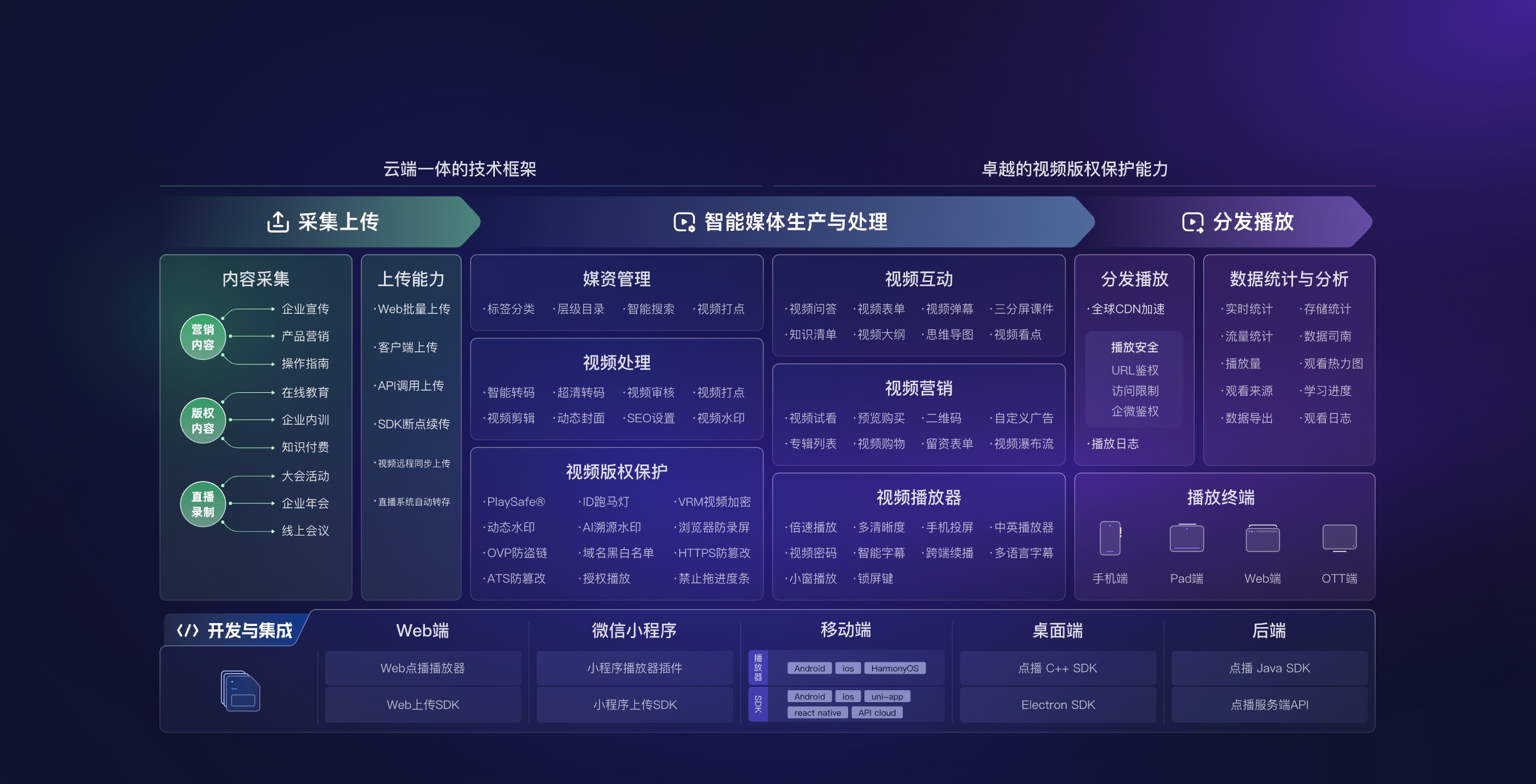
*Figure 1: Video cloud integration usually spans upload, media processing, player, permissions, data, and multiple terminal components, rather than a single player interface. Image source: POLYV official product materials*
02 What the Five Common Types of Interfaces Handle
2.1 Media and upload interfaces
These interfaces are used to create upload tasks, obtain upload credentials, query videos, modify titles and categories, set covers or subtitles, and delete or archive content. Enterprises should keep their content IDs and map them to platform video IDs; business tables should not rely solely on titles or file names, because same-name files, replacements, and migrations can cause confusion.
Key points to confirm: whether uploads use direct-to-cloud upload from the client or server-side transfer, how long the short-lived credential is valid, whether duplicate submissions are idempotent, whether deletion takes effect immediately or enters a recycle-bin or deletion workflow, and who has authority to perform high-risk actions.
2.2 Transcoding, Review, and Task Status
Video processing is usually an asynchronous task. Interface design should cover processing, success, failure, and retry states, and retain error codes, task duration, and original requests. If the system receives both callbacks and active queries, deduplication should be performed based on the task ID to avoid duplicate notifications causing duplicate content release.
2.3 Players, Components, and Frontend Events
Web pages generally use players or JavaScript components, while other terminals select corresponding components based on the technology stack. The front end needs to handle initialization, resolution selection, subtitles, playback speed, fullscreen behavior, error handling, and reinitialization after player teardown across the player lifecycle. Player events can support page interactions, but key decisions related to permissions and settlement cannot be placed only in the browser.
2.4 Identity, Authorization, and Single Sign-On
The permission chain answers three questions: who is watching, what can be viewed, and how long authorization remains valid. The enterprise’s own memberships, courses, positions, or content systems should retain business judgment before obtaining short-term playback authorization through the server. If operations staff need to access the platform management from the enterprise backend, they must also evaluate single sign-on, role permissions, and session handling after logging out and returning.
2.5 Data Queries, Callbacks, and Logs
Data interfaces can be used to query playback counts, viewing duration, sources, and viewing records; callbacks are used to receive key state changes. Companies should align on user identification, time zones, deduplication rules, how to distinguish between live and replay, data delays, and rerun methods. If logs contain user or device information, access permissions and retention periods should be controlled according to the intended purpose.
03 Divide development among the frontend, backend, and admin console
3.1 The frontend handles presentation and a recoverable user experience
The front end not only places the player into the container, but also handles loading, content switching, reconnecting for recovery, authorization expiration, page departure, and repeated initialization. Error messages should distinguish between network issues, permission problems, content status issues, and terminal incompatibility; not all issues should be displayed as “playback failure.”
3.2 The backend handles keys, permissions, and system consistency
The server stores platform keys and completes signature requests, permission determinations, short-lived credential applications, callback verification, and retry compensation. It is also necessary to maintain mapping between enterprise content IDs and platform video IDs, and between enterprise users and viewing identifiers. For write operations such as upload, replacement, deletion, and authorization, the operator, request result, and associated business objects should be recorded.
3.3 The admin console supports day-to-day operations
Operations staff need to check processing status, resubmit failed tasks, modify categories and covers, take content offline, and troubleshoot playback issues. In the first phase, it is not necessary to replicate the entire backend of a video platform; you can first use a standard platform backend and implement only high-frequency business actions in the enterprise backend.

*Figure 2: The admin console needs to support video lists, categories, player configuration, and issue troubleshooting. Whether to build in-house should be decided based on usage frequency. Image source: POLYV product interface*
04 Control Project Scope with an API List and Sequence Diagram
4.1 Specify the Calling Responsibility for Each API
At minimum, an API list should include the caller, environment, authentication method, required parameters, return fields, error codes, rate limiting, timeout, retries, idempotency, and the responsible owner. Recording only the URL and parameters is insufficient for post-launch troubleshooting.
4.2 Design callbacks for duplicates, out-of-order events, and delays
When a company receives callbacks, it should first verify signatures, then deduplicate using event or task IDs, and ensure that later-arriving old states do not overwrite new states. Failed processing should be placed into a retry queue; if notifications are not received for a long time, a compensation task should proactively query the final status.
4.3 Credentials and Keys Must Remain on a Trusted Server
Code in browsers and public clients can be viewed and must not contain long-term keys. Temporary upload or playback credentials should limit resources, usage, and validity period, and request logs must be retained on the server. Separate accounts and keys should be used for testing and production environments.
4.4 Complete the Minimum End-to-End Workflow First, Then Expand Features
In the first phase, you can choose only one upload entry, one processing template, and one playback page to run through content, user, and data ID sets. Later, add batch management, subtitles, more terminals, and complex statistics. Phased implementation enables earlier discovery of permission and data accuracy issues and supports more accurate estimation of future maintenance costs.
05 Acceptance Checklist Before Launch
- Whether upload success, resumable upload, duplicate uploads, and failure retries meet expectations;
- Whether successful, failed, and timed-out transcoding, and lost callbacks can be detected and compensated;
- Whether playback is correctly denied for unauthorized users, authorization expiration, or content taken offline;
- Whether target browsers and terminals have completed real-device testing;
- Whether player errors can be linked to users, content, time, and request logs;
- Whether data metrics differentiate playback count, user count, duration, and completion rate;
- Whether key rotation, API rate limiting, alerts, and rollback processes have responsible owners;
- Whether a regression testing checklist exists after platform version upgrades.
06 About POLYV: Integrate Video Capabilities into Your Own Enterprise Processes
Currently, the POLYV Developer Center provides web players, VOD server-side APIs, upload, and multi-terminal development entries; POLYV cloud VOD covers upload, storage, intelligent media asset management, video processing, playback, and data capabilities. Enterprises can first use the standard backend to manage content, and then integrate high-frequency actions back into their own systems based on business needs.
POLYV provides video technology and platform capabilities, while enterprise systems continue to handle memberships, courses, positions, orders, and internal approvals. The specific scope of interfaces, API call limits, SDK versions, activation conditions, and terminal differences should be based on the current account version, development documentation, and project integration testing.
07 Frequently Asked Questions
7.1 If only integrating the player, is backend development needed?
Public content can be lightweight; once it involves enterprise identity, temporary authorization, upload signatures, or business data, a trusted backend is typically required. Long-term keys should not be placed in browser code.
7.2 Should callbacks and polling be mutually exclusive?
Not recommended. Callbacks ensure timeliness, while active queries serve as a backup. Together, using task IDs and state machines, they can reduce content freeze caused by missed notifications.
7.3 Do all management functions need to be integrated into the enterprise backend?
No. First, integrate high-frequency actions that are closely related to the business; low-frequency platform configurations can continue to use the standard backend, usually saving more on development and maintenance costs.
7.4 How should the integration timeline be estimated?
Break down based on the end-to-end business workflow, the number of target endpoints, permission complexity, data-latency requirements, and the scope of the admin console. It cannot be estimated solely by the number of interfaces; for the same authorization interface, if it involves refunds, departures, and multiple identity rules, the development and testing workload will increase significantly.