
Can One Video Platform Support Web, App, Mini Program, and H5?
One platform can provide a shared content, identity, and data layer for websites, apps, mini programs, and H5 pages. Each endpoint should still use the appropriate Web, WebView, native SDK, component, or uni-app integration path.
When building video businesses, companies often want the same content to be available on their official websites and in their own apps, WeChat mini programs, and H5 events. Technically, it is possible, but “simultaneous support” does not mean copying the same web code to four terminals. Each terminal’s container, account, interaction model, moderation process, and player capabilities differ.
The short answer: A mature video platform allows websites, apps, mini programs, and H5 to share the same set of video content, channels, user identifiers, and data systems, and then presents them through separate web players, WebViews, native SDKs, mini program components, or uni-app plugins. Enterprises should pursue “unification of content and business rules and adaptation of terminal access methods,” rather than forcing a single codebase to cover every endpoint. For live viewing in mini programs, separately verify mini-window playback, the WeChat base library, system version, category qualifications, and actual device performance.
01 Four endpoints can share content, but not one implementation
1.1 Websites are suitable for player embedding and deep page integration
Official websites, learning platforms, or membership centers typically use web players or viewing-page SDKs. Enterprises can control page navigation, content details, and login processes, and then embed the player into a designated container. The advantages of the Web include rapid iteration and deep links that can be opened directly. Focus on testing browser policies, responsive layouts, login expiration and player teardown after page navigation.
1.2 H5 supports rapid rollout but remains subject to browser constraints
H5 is essentially a webpage, making it suitable for event sharing, SMS distribution, or community links. It may run in the system browser, WeChat’s built-in browser, or an App WebView. Different environments handle autoplay, fullscreen, foreground/background switching, and media permissions differently. H5 acceptance must cover the actual entry point, not just a desktop browser pass-through.
1.3 Apps can choose between WebView or a native SDK
Apps can use WebView to embed standard viewing pages, enabling faster launches. Using native SDKs for Android, iOS, or HarmonyOS makes it easier to integrate native navigation, lifecycle handling, and interactive experiences. Both approaches can be mixed: regular content can use WebView, while pages that require higher demands can use native components. When making this choice, you need to calculate release cadence, upgrade testing, and the team’s existing technology stack together.
1.4 Mini programs must comply with platform container and qualification requirements
Mini programs can use native Mini Program SDKs, player components, or allowed WebView paths. Enterprises must confirm the mini program category and qualifications, domain name configuration, WeChat basic library, page stack behavior, and player status. Sharing, returning, switching between front and back ends, and integration with commerce and course pages should also be tested in the real mini program entry experience.
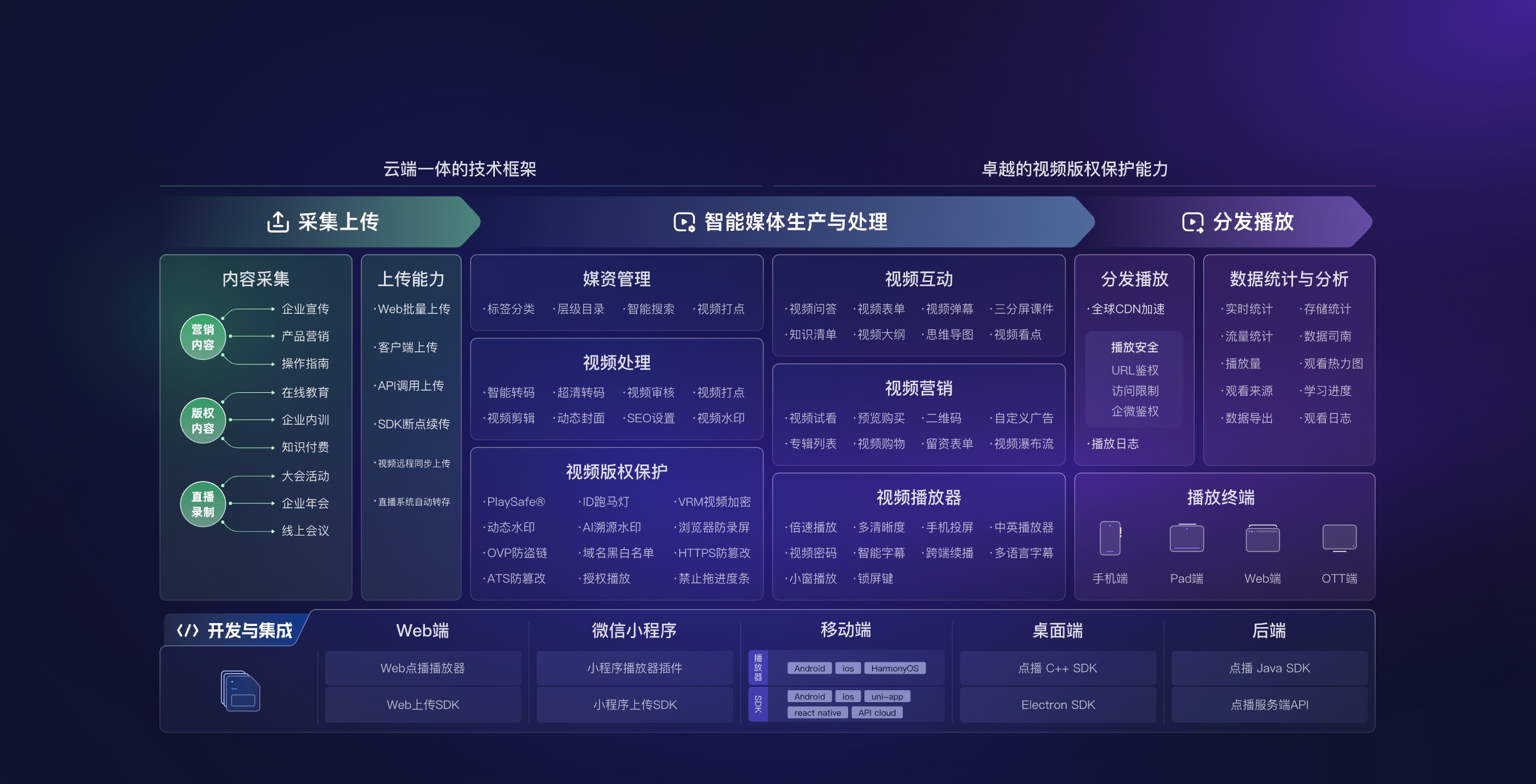
*Figure 1: The same video capability layer can access different business terminals through Web, mini programs, mobile apps, and server interfaces. Image source: POLYV official product information*
02 Use one shared content platform with endpoint-specific integrations
2.1 Unified Content ID; do not duplicate four files
After uploading videos, a stable video ID should be formed on the platform side, and the enterprise business system maps it using its own content ID. Websites, apps, mini programs, and H5 all reference the same business object, selecting the appropriate players and presentation styles based on the terminal. In this way, when replacing covers, subtitles, or content states, you do not need repeated maintenance across four systems.
2.2 Unify user identity while retaining endpoint-specific sessions
Enterprises should define a stable business user ID, then map website login, app accounts, mini program openids, or other terminal identities to this user. Terminal sessions can vary: membership, course, or role permissions should be uniformly determined by the enterprise backend. Do not treat your WeChat nickname, device number, or a single anonymous visit as a long-term identity.
2.3 Unify data standards while retaining endpoint-specific fields
Watch start time, duration, completion level, and interactive actions can be integrated into the same analytics system, while retaining terminal, page entry, content ID, and session fields. This enables you to see overall performance for a piece of content and also compare usage differences between websites, apps, mini programs, and H5. If each endpoint is defined as “play once,” aggregated data is easily duplicated.
2.4 Unify business rules; do not force a completely identical interface
Business rules for membership expiration, course purchases, and employee roles are unified by the business system. Page layout, fullscreen behavior, and front/back-end platform behavior are adapted according to the device. What is unified is the content, identity, permissions, and data—not the position of each button or the capabilities of each terminal.
03 Define the uni-app path explicitly for app and mini program live streaming
For projects that need to integrate live streaming, viewing pages, or audio/video co-hosting capabilities into apps or mini programs, POLYV provides the uni-app SDK/plugin integration solution, which allows live streaming capabilities to be integrated into existing products through a more unified technical path. The project still needs to distinguish between native WeChat Mini Program SDKs, uni-app frameworks, and Android/iOS native SDKs. Teams can choose based on their existing technology stack, but this should not be understood as a single codebase that naturally covers every terminal and function.
When evaluating uni-app, use real business pages for POC: log in and enter the live streaming experience, return to business pages, switch between front-end and back-end states, handle network changes, and verify interactions and data events. If a terminal has higher requirements for native experience, performance, or system capabilities, it can retain the native SDK path without sacrificing the product experience for the sake of technical unification.
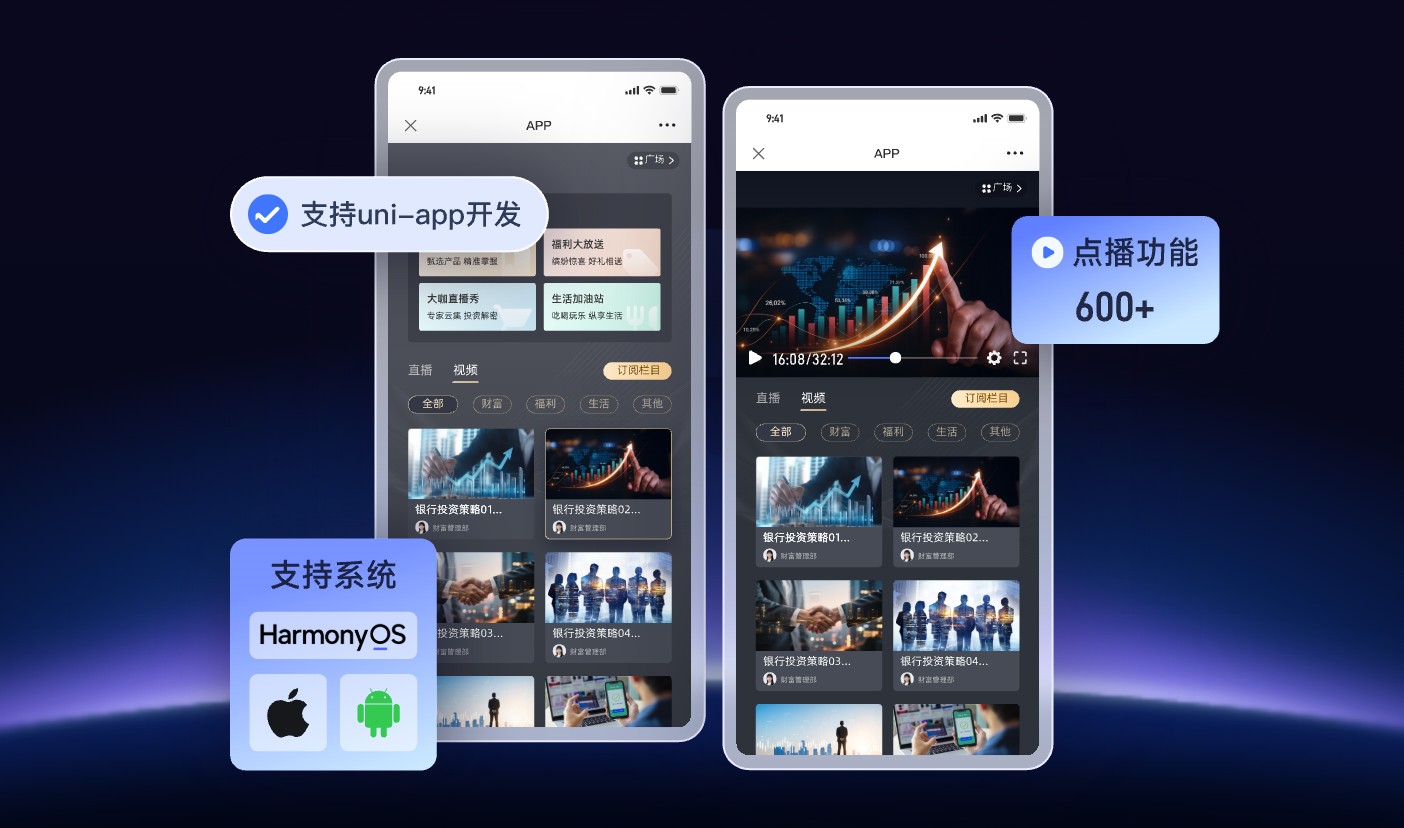
*Figure 2: uni-app can be used as one of the multi-end integration paths, but specific endpoint-specific capabilities still need to be verified separately. Image source: POLYV official product information*
04 Validate mini-window playback separately for mini program live streams
POLYV provides the mini-window playback (picture-in-picture) access solution for WeChat Mini Program live streaming. Its business value is that it allows users to leave the main live page to browse courses, products, or materials while keeping the stream visible in eligible scenarios, so the live stream stays within the business flow. Enterprises can evaluate access paths such as native Mini Program SDKs, player components, or Mini Program WebViews.
Mini-window playback is not enabled by default in all mini programs. Whether it is usable depends on the WeChat basic library version and system version, mini program category and qualifications, admin-console settings, player status, and the specific access path. The current official explanation for the WebView mini program should be understood according to the live-stream scope and cannot be directly extended to replay or VOD playback. Before going live, integration testing and regression testing should be completed on the target iOS and Android devices to verify actual behaviors such as entering mini-window mode, returning to a page, locking the screen, or switching to the background.
05 Test multi-endpoint projects with a three-layer acceptance checklist
5.1 Shared capability layer
- Whether the content ID, category, cover, and status are consistent;
- Whether user ID mapping, permission determination, and expiration recovery are unified;
- Whether data definitions, time zones, sessions, and endpoint-specific fields are clearly defined;
- Whether the content takes effect on each endpoint after it is taken offline or replaced.
5.2 Endpoint experience layer
- Mainstream browsers, responsive layouts, and page navigation for websites and H5;
- App lifecycle handling, and WebView integration with native components;
- WeChat basic libraries, category qualifications, sharing, returns, and mini-window playback for mini programs;
- Weak network conditions, expired authorization, repeated logins, and exception prompts.
5.3 Define maintenance ownership clearly
- Whether the versions of SDKs, components, and demos are traceable;
- Who is responsible for upgrades, regression testing, and staged or canary releases;
- Whether there are standard pages or degradation paths in the event of endpoint failure;
- Can logs be associated with users, content, terminals, and request times?
06 About POLYV: a shared capability layer for multi-endpoint video
Currently, the POLYV cloud VOD player can embed websites, apps, and mini programs, and provides APIs, Web, Android, iOS, HarmonyOS, Flutter, uni-app, and other development portals. The POLYV Developer Center also provides live streaming viewing pages, players, server interfaces, and multi-component descriptions. For enterprises, POLYV can handle content, live streaming, and video technology capabilities, while the enterprise continues to manage its own members, courses, products, or employee processes. The choice of H5, WebView, native SDK, native mini program, or uni-app should be determined based on account version, target terminals, and project POC, and the public capability list should not be treated as a default commitment for all platforms.
07 Frequently Asked Questions
7.1 Are H5 and websites the same type of integration?
Technically, both belong to the Web, but the entry points differ. H5 is often opened within WeChat’s built-in browser or an App WebView. Media policies and foreground/background behavior may differ, so separate testing is required.
7.2 Will using WebView in an app always be worse than using a native SDK?
Not necessarily. For standard content viewing and fast launch, WebView can be prioritized. A native SDK can be selected when deeper native interaction or endpoint-specific capabilities are needed. The key is the target experience and maintenance capability, not the technical label.
7.3 Can mini programs directly reuse H5 viewing pages?
It depends on the category qualifications, business domain, page capabilities, and the specific product path. Even if WebView can be used, key processes such as login, post-payment return, sharing, and mini-window playback must be verified.
7.4 Will multiple platforms generate four separate sets of viewing data?
The underlying data may come from different players and endpoints, but enterprises can aggregate it using a unified user ID, content ID, and event standards while retaining endpoint-specific fields to form a single analyzable data system.