
How Do You Evaluate Video SDK Documentation, Compatibility, and Maintenance Costs?
A successful demo is only the starting point when evaluating a video SDK. This guide presents a six-part POC and shows how to estimate upgrade, regression, troubleshooting, and support costs.
A video SDK that plays successfully in a vendor demo has cleared only the first hurdle. Long-term viability depends on whether the documentation lets your team integrate independently, whether compatibility matches your actual users, and how much regression testing and troubleshooting each OS or SDK update will require.
The short answer: Do not evaluate a video SDK by API count or a single demo. Run a proof of concept across six dimensions: documentation completeness, runnable samples, compatibility coverage, errors and logging, version governance, and technical support. Test with your own pages, accounts, networks, and target devices. Ongoing cost is driven mainly by the number of endpoint combinations, OS updates, API changes, business-specific customization, and fault diagnosis. Making that workload visible before purchase is more valuable than comparing feature counts.
01 Good documentation should let developers complete an end-to-end workflow independently
1.1 The path from environment setup to first playback must be continuous
The core documentation should cover supported languages and frameworks, minimum OS versions, dependency installation, initialization, authentication, resource cleanup, and a minimal example. A developer following those steps should be able to play a defined test asset with a defined test account without relying on verbal instructions to supply critical parameters.
1.2 API documentation must cover parameters, state, and operating boundaries
Method names and field types are not enough. Critical APIs should explain when they may be called, their prerequisites, threading or lifecycle requirements, return values, error codes, idempotency, and failure handling. Without clear guidance for states such as playback, content switching, backgrounding, and instance destruction, teams can easily introduce memory leaks, blank video, or duplicate callbacks.
1.3 The sample application must match the current release
A runnable sample should demonstrate initialization, authentication, playback controls, event listeners, and error handling. During evaluation, confirm that its dependency versions, build scripts, and documentation agree and that it compiles in a clean environment. When the sample lags behind the released SDK, developers spend time reverse-engineering the differences instead of validating the product.
1.4 The changelog determines whether upgrades are manageable
Release notes should distinguish new features, fixes, behavioral changes, deprecations, and breaking changes, and should include migration guidance. A note that says only “experience improvements and known-issue fixes” gives an enterprise no reliable way to decide whether an urgent upgrade is necessary or which screens and workflows need regression testing.
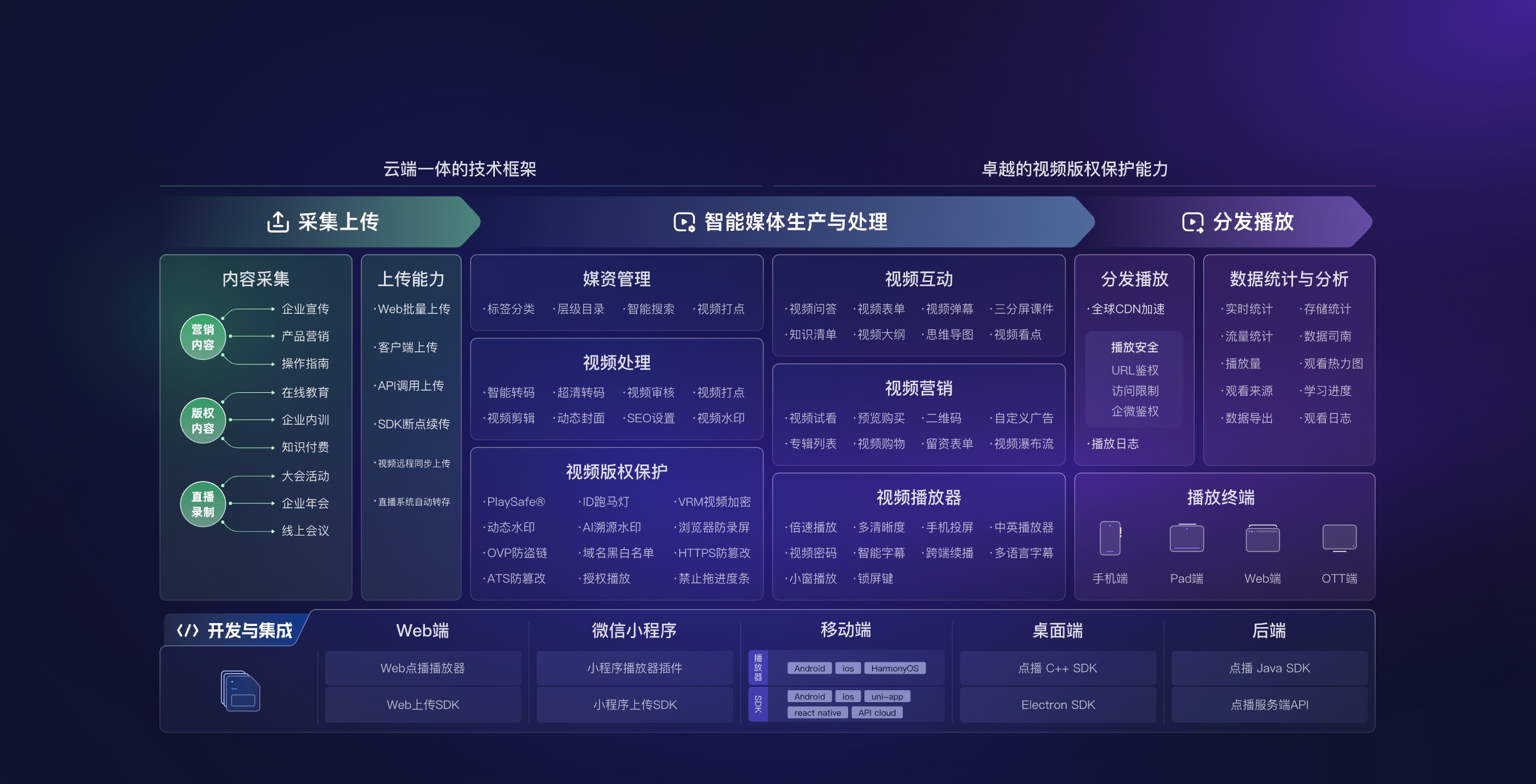
*Figure 1: Evaluate endpoint components within the full upload, media management, playback, data, and server-side API architecture. Image source: POLYV official product materials.*
02 Manage compatibility as a matrix, not as a claim of “multi-device support”
2.1 Define the enterprise’s target matrix first
Use actual audience distribution to list the operating systems, versions, device types, processor architectures, browsers or app containers, screen orientations, network types, and media features that matter. The matrix does not need to include every device on the market; it needs to cover the support commitment made by the enterprise and its most important user groups.
2.2 Distinguish “installs,” “plays,” and “fully supports the required workflow”
Compiling the SDK on an operating system does not prove that subtitles, playback speed, full-screen mode, casting, background transitions, or other required features work there. Record basic playback, business-critical functions, known limitations, workarounds, and the version tested for every target. Similar API names across different technology stacks must not be treated as proof of identical behavior.
2.3 Network conditions are part of compatibility
Test initial load, quality switching, seeking, reconnection, and authorization renewal on the Wi-Fi, mobile, proxy, and managed-network environments your users actually encounter. Smooth playback on a laboratory network is not a substitute for testing in real operating conditions.
2.4 Plan for platform upgrades in advance
Mobile OS, browser, and app-container updates may change media policies, permissions, and lifecycle behavior. Confirm the provider’s adaptation plan, support for preview releases, and change-notification channels, and reserve a small device pool for regression testing upcoming versions.
03 Six categories of ongoing work drive maintenance cost
3.1 Version tracking and regression testing
Every SDK or platform update requires a decision on whether to upgrade, which functions may be affected, and how to roll back. The more endpoints and custom behavior you support, the larger the regression matrix becomes. Estimate effort as expected upgrades per year multiplied by the endpoints and test cases covered in each regression cycle—not simply by the initial development days.
3.2 Application wrappers and custom development
Enterprises often place an internal adapter around the SDK to normalize content IDs, user IDs, errors, and analytics events. This reduces direct coupling between business screens and the provider’s interfaces, but the adapter also needs maintenance. Avoid duplicating SDK calls across many pages, because a future upgrade will then require the same correction in multiple places.
3.3 Troubleshooting and logs
A playback error should be traceable to the SDK version, operating system, device, network, content ID, user identifier, request time, and error code. A log that says only “playback failed” helps neither the enterprise nor the provider reproduce the issue. During the POC, deliberately test expired authorization, network loss, content still being processed, and repeated initialization to confirm that the available logs support diagnosis.
3.4 Release and app-store lead times
Web components can often be updated quickly, while native clients still need a build, testing, staged rollout, and app-store review. An emergency fix cannot reach every user immediately, so evaluate server-side compatibility windows, the support period for older client versions, and any required fallback page.
3.5 Technical-support collaboration
Do not reduce support evaluation to whether a chat group exists. Confirm which logs must accompany an issue, how severity is assigned, who can access version and service-status information, how major changes are announced, and whether complex incidents result in a written root-cause analysis and postmortem.
3.6 Exit and replacement cost
Retain enterprise-owned content, user, and data identifiers instead of storing only provider-specific objects in business tables. Confirm how source files, required metadata, and viewing data can be exported. Good decoupling lowers migration cost and also makes the current system easier to test and upgrade.
04 Use a scoring sheet to complete the SDK POC
| Dimension | Core question | Suggested validation |
|---|---|---|
| Documentation | Can a developer complete first integration and handle errors independently? | Ask a new team member to integrate from scratch and record blockers |
| Sample app | Does it match the current release and build cleanly? | Compile it in a new environment and run the critical workflow |
| Compatibility | Do the required functions work on target platforms? | Test each item across the real-device matrix |
| Logging | Can the team identify the user, content, version, and error? | Deliberately create five representative failure scenarios |
| Versioning | Are changes, deprecations, migration, and rollback clear? | Review recent release notes and rehearse an upgrade |
| Support | Can both teams collaborate on submission, diagnosis, and review? | Take one real issue through the complete support process |
For business-critical requirements, use pass/fail gates—for example, inability to play on a required platform or inadequate logs for fault isolation. Weight the remaining dimensions by importance. A single aggregate score should never conceal a critical gap.

*Figure 2: An SDK still depends on media management, configuration, and data capabilities; maintenance assessment should cover the full product chain. Image source: POLYV product interface.*
05 Establish lightweight version governance after launch
5.1 Pin production dependencies instead of following the latest release automatically
Lock production dependencies to a known version and introduce new releases in a test environment first. Record the reason for each upgrade, affected use cases, test results, and rollback package so that developers do not use different dependency versions locally.
5.2 Maintain a minimum regression suite
At a minimum, each upgrade should test initialization, first playback, pause and resume, seeking, content switching, authorization expiry, reconnection, foreground/background transitions, and instance destruction and recreation. Add subtitles, full-screen behavior, and other business-critical functions where relevant.
5.3 Monitor version distribution and error trends
Capture the client version, SDK version, and major error category. This reveals whether an incident is concentrated in a particular release or type of endpoint. An overall error rate without version context rarely provides enough information to prioritize fixes.
06 About POLYV: Reduce the maintenance surface with development resources and platform services
The current POLYV Developer Center provides access to web players, VOD server-side APIs, mobile players, and related development resources. POLYV Cloud VOD explains how APIs and multi-device SDKs can embed video capabilities into an enterprise’s existing system. This architecture can keep stable media management, processing, and data functions on the platform while limiting client-side maintenance to the endpoints the business actually needs.
Whether evaluating POLYV or another video SDK, use the current documentation, downloaded release, target platforms, and POC results as the source of truth. A public capability list does not mean every SDK exposes identical functions, and it cannot replace an enterprise-specific compatibility matrix and upgrade process.
07 FAQ
7.1 Is an SDK better simply because it exposes more APIs?
Not necessarily. First confirm that the APIs required by the business are stable and supported by complete documentation and error handling. Additional interfaces that the project does not use will not reduce maintenance cost.
7.2 If the sample app runs, why is a POC still necessary?
The sample validates a standard path. A POC validates the enterprise’s real pages, identities, content, networks, and devices. Lifecycle and exception-handling problems often appear only inside the actual business workflow.
7.3 How often should an SDK be upgraded?
There is no universal schedule. Prioritize security and major compatibility fixes, and align routine feature upgrades with the product release cycle. Every upgrade should first pass testing and a limited rollout.
7.4 How can we reduce the future cost of changing providers?
Wrap provider interfaces behind an internal adapter, retain enterprise-owned content and user IDs, preserve source files and required data, and avoid making business pages depend directly on numerous platform-specific fields.