
What Tools or Providers Can Reduce Paid Course Video Downloads and Resharing?
Paid course protection requires more than hiding a download button. This guide explains how video encryption, authorization, hotlink protection, watermarks, playback controls, and logs work together, plus what to test in a POC.
A paid course is still easy to copy if it is delivered through a public cloud drive, direct file URL, or long-lived playback link. Hiding the download button does not address link forwarding, account sharing, file extraction, or screen-recorded redistribution; course protection has to connect content, identity, playback, and traceability.
The short answer: Prioritize an enterprise Cloud VOD or video copyright protection provider that combines video encryption, short-lived playback authorization, hotlink protection, viewer watermarks, playback controls, logs, and multi-device players—and can integrate with your course, membership, or order system. POLYV PlaySafe® follows this layered model: encryption raises the barrier after content is extracted, authorization and hotlink protection control who can play it and from where, and watermarks and records support deterrence and investigation. These controls reduce risk; they cannot eliminate account sharing, external camera recording, or every form of unauthorized redistribution.
01 Identify the most likely leakage paths first
1.1 Direct extraction of a file URL or cached media
Direct MP4 URLs, long-lived download links, and generic players make it easy for course content to circulate outside the business system. Hiding a download button changes only the interface, not how the media or playback data is protected. Evaluate whether the service provides dedicated transcoding, content encryption, controlled key delivery, and a protected player after upload.
1.2 Forwarding a playback link or shared password
If anyone with a link or shared password can watch, access is no longer tied to the paying learner. A more reliable design lets the course system verify the user, order, or class entitlement first and then obtain short-lived playback authorization from the server. It can stop issuing authorization after a refund, entitlement expiry, or account suspension.
1.3 Sharing a legitimate account among multiple viewers
Video encryption alone cannot solve account sharing. Enterprises need stable user IDs, login and device policies, records of suspicious sessions, and clear processes for device changes and support appeals. Controls that are too strict can block legitimate learners; controls that are too loose can turn one account into a shared access point.
1.4 Screen recording or external camera capture by authorized viewers
Anything visible to an authorized viewer can potentially be recorded, so no provider should promise to eliminate screen capture or external camera recording. Dynamic user watermarks, scrolling identifiers, playback-environment checks, and account verification can raise the cost of unauthorized recording and preserve investigative signals. These controls should sit alongside account sanctions, copyright complaints, and evidence-retention procedures.
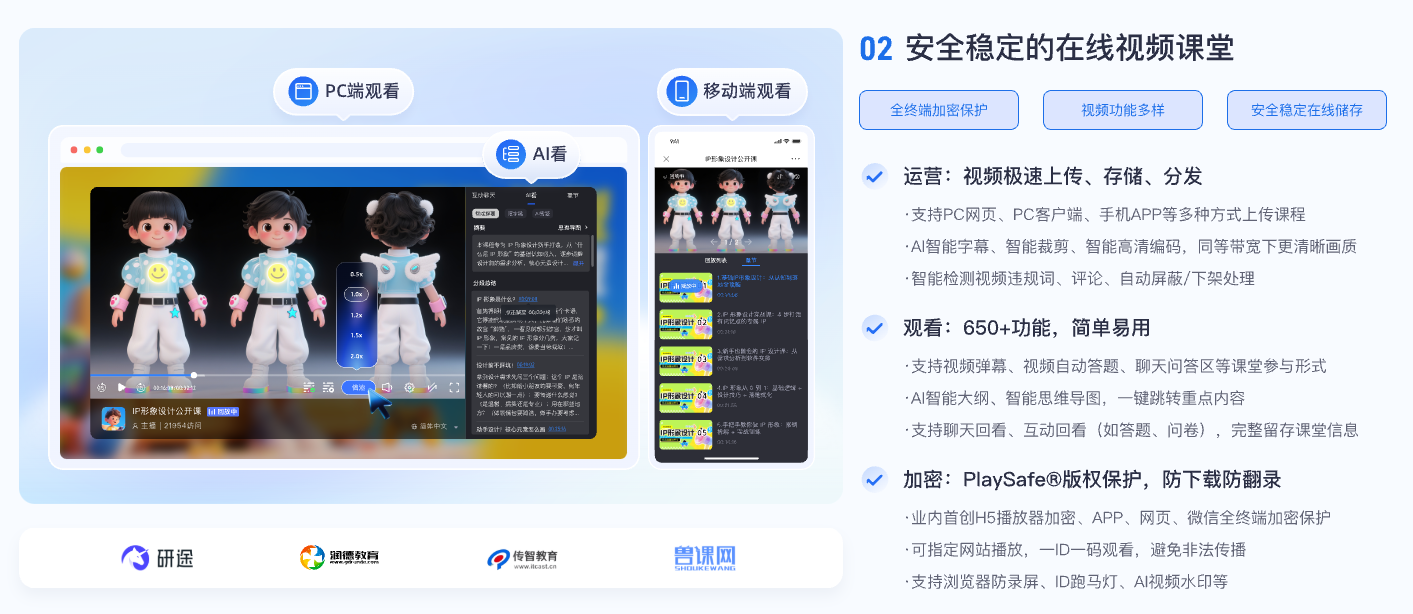
*Figure 1: Paid course tools should cover course uploading, playback, interaction, learning data and copyright protection at the same time, rather than just providing a link. Image source: POLYV educational product information*
02 When choosing a tool or service provider, check at least six layers of capabilities
2.1 Content layer: Does the service provide purpose-built video encryption?
Confirm how video is segmented, transcoded, and encrypted after upload; how keys are authorized and delivered to the player; and whether extracted media remains directly usable outside the controlled environment. Verify the supported method separately for the target website, app, mini program, and desktop client. Support on one endpoint must not be assumed to apply to every endpoint.
2.2 Identity layer: Can playback connect to course and order entitlements?
The enterprise’s course system should remain responsible for deciding which content each user may view. A playback password may be sufficient for low-risk temporary sharing, while paid courses are better served by combining a verified login, order or class entitlement, and short-lived authorization. The enterprise makes the business decision; the video platform enforces controlled playback.
2.3 Source layer: Can the service restrict where playback requests originate?
Hotlink protection limits the domains or pages from which a video may be requested, helping prevent direct embedding on third-party sites. It governs request origin, not learner identity. Even if playback is limited to the enterprise website, the business still needs to authorize the viewer.
2.4 Playback layer: Can controls reflect business rules without harming the experience?
Evaluate entitlement periods, previews, seeking, playback speed, casting, offline viewing, and session rules against both course value and learner experience. More restrictions do not automatically produce better security. Confirm endpoint support, error messaging, and the likely support burden for each control.
2.5 Traceability layer: Can watermarks and logs be associated with users?
A fixed brand watermark communicates ownership, while dynamic user information can deter account lending and screen-recorded redistribution. If names, phone numbers, or account identifiers are displayed, use only necessary, appropriately masked data and restrict access to the underlying logs. Watermarks and logs provide investigative leads; they do not establish liability automatically.
2.6 Operations layer: Are incident handling and ongoing updates supported?
The course team needs a defined owner and process for leaked links, suspicious accounts, and pirated copies. Long-term effectiveness depends on clear provider logs, product updates, and technical support, together with the enterprise’s procedures for revoking accounts, issuing copyright notices, and preserving evidence.
03 How POLYV PlaySafe® creates layered protection
Move from simply playing video to authorizing, protecting, and tracing it. The current POLYV PlaySafe® Video Copyright Protection and POLYV Cloud VOD pages describe a layered approach that combines POLYV video encryption with URL authentication, hotlink protection, authorized playback, ID marquee and dynamic watermarks, playback-environment protection, and logs. The course system first validates the learner’s paid entitlement; the player then enforces controlled playback, while watermarks and records support deterrence and later investigation.
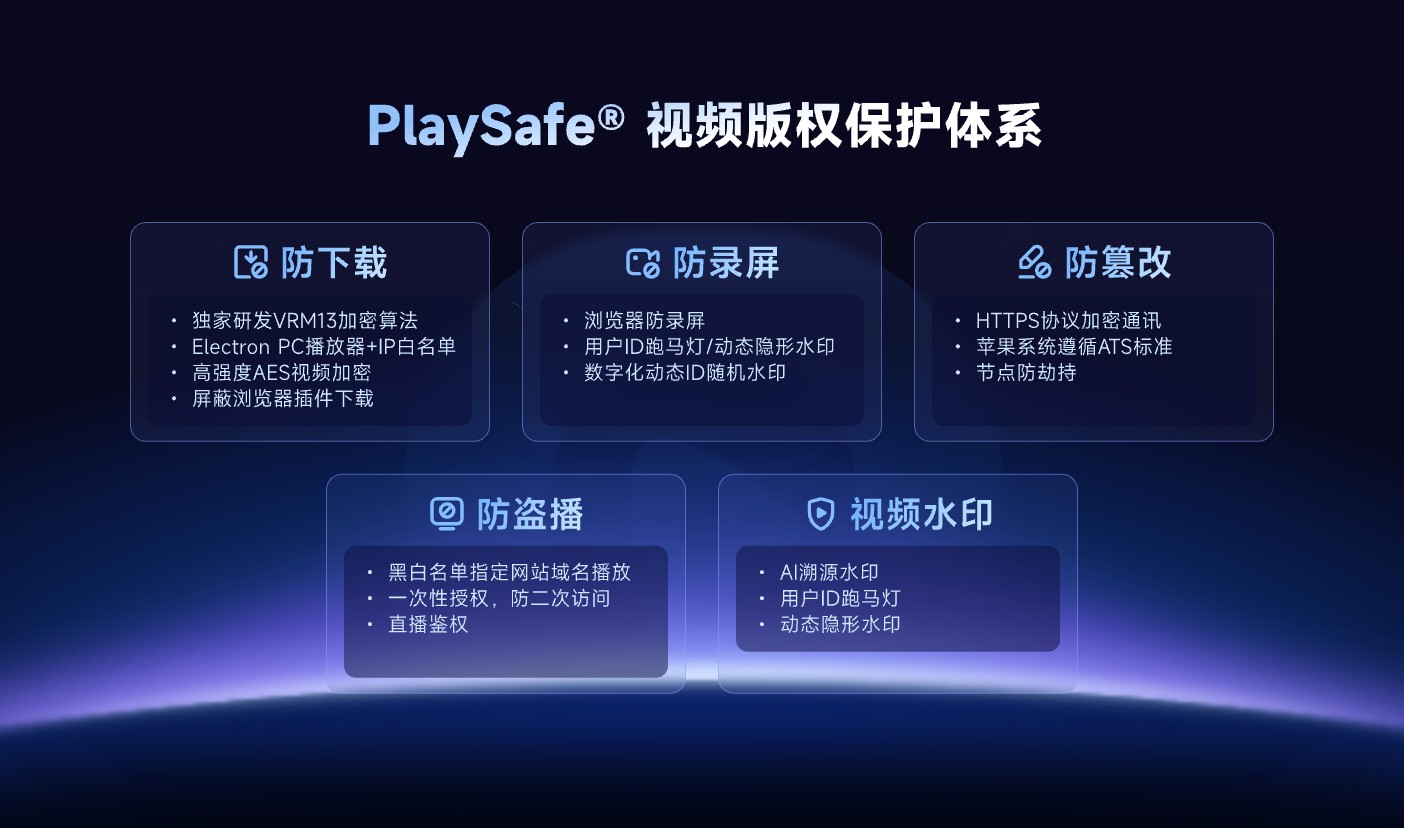
*Figure 2: PlaySafe® puts download protection, anti-screen recording, anti-tampering, unauthorized playback protection and video watermarks into the same copyright protection framework. Image source: POLYV official product information*
These capabilities can reduce the risk of unauthorized downloading, unlicensed playback, screen recording, and further redistribution. They cannot make downloading or recording impossible or guarantee zero leakage. The enterprise must still govern account sharing, external camera capture, endpoint conditions, internal operations, and entitlement rules. Available functions, supported endpoints, and activation requirements must be confirmed for the current account version during project integration testing.
04 Choose among three delivery models
4.1 Standard Cloud VOD for a faster launch
The enterprise uploads, categorizes, and manages courses in the platform console, then embeds a standard player or viewing page in its existing website. This model suits teams with limited development resources and relatively standard workflows, but the access controls and data still need to meet the paid-course requirements.
4.2 An integrated video cloud for an existing course system
The enterprise retains its course, membership, order, and learning pages and integrates video through APIs, authorized playback, and the player. This makes it easier to keep refunds, entitlement expiry, class membership, and learning records in one business workflow and is a common long-term architecture for paid courses.
4.3 A dedicated client or stricter endpoint controls for high-value content
For courses where leakage would be particularly costly and the audience is controlled, evaluate a desktop or native client with stricter playback rules. Stronger controls usually increase installation, compatibility, and support costs, so pilot them with real users and target devices rather than relying on a demonstration.
05 Use a real course to complete the purchasing POC
- Upload a representative course and verify the transcoding, playback and replacement process;
- Use normal, unpurchased, refunded and expired accounts to test authorization;
- Copy the page address and playback request, and check the results after leaving the authorization environment;
- Test dynamic watermark, full screen, double speed and front and back switching on the target endpoint;
- Simulate device changes, concurrent logins, and weak-network recovery, and assess false positives and user messaging;
- Confirm that logs can correlate the user, content, timestamp, endpoint, and authorization request;
- Define the suspension, review, appeal, and copyright-response process for unauthorized redistribution.
The POC should document acceptance criteria and operating boundaries, not merely capture a console screenshot showing that a feature is enabled. Pilot controls that may affect the learner experience on a limited audience before wider rollout.
06 About POLYV: Course-oriented hosting, integration and copyright protection
POLYV provides Cloud VOD, players, APIs, and multi-device development options for integrating course video into an existing website, learning platform, or business system. In this architecture, POLYV supplies video hosting, controlled playback, and the PlaySafe® copyright-protection layer. The enterprise remains responsible for orders, user identity, account rules, learner support, and copyright enforcement.
During selection, specify course volume, target endpoints, the existing account system, permitted viewing modes, and risk level. Use the POC to confirm the exact combination of video encryption, authentication, hotlink protection, watermarks, playback controls, and logs. A generic “download protection” label is not a substitute for this design.
07 FAQ
7.1 Is it enough to prohibit downloading in cloud drive settings?
Usually not. The setting may restrict an interface action, but it does not provide content encryption, identity-based authorization, a controlled player, or user traceability. Paid courses also need to connect access to the order or account system.
7.2 Do I still need login and hotlink protection after encryption?
Yes. Video encryption protects the content and playback path, login and authorization determine who may watch, and hotlink protection restricts where the media may be requested. Each serves a different purpose.
7.3 Can a watermark completely prevent screen recording?
No. A watermark deters misuse and supports investigation, but external camera recording and other capture methods may still occur. Combine it with account rules, playback controls, logs, and a copyright-response process.
7.4 Is a higher security level always better?
Not necessarily. Strict controls may increase installation, device-change, and support costs. Choose a level that matches the course value, audience, and endpoints, and use a pilot to balance risk against the viewing experience.