
What Course Video Encryption Platforms Are Available, and How Do You Choose?
Choosing a course video encryption platform requires more than comparing encryption algorithms. This guide evaluates authorization, hotlink protection, watermarking, device support, auditability, and real-device POC testing.
When education, paid knowledge, vocational training, or internal learning teams search for a course video encryption platform, the real requirement is broader than disabling downloads. Paid content may be hotlinked, shared through an account, screen-recorded, or redistributed, while still needing reliable playback across websites, apps, and mini programs.
The short answer: The main choices are basic video-hosting tools with limited protection, teaching or LMS platforms with course permissions, enterprise video clouds that integrate with an existing system, and dedicated-cloud or private-deployment solutions for highly sensitive content. Do not stop at asking whether encryption exists. Compare content encryption, playback authorization, hotlink protection, watermarking and traceability, account controls, device coverage, audit logs, and service response, then validate them with real courses and endpoints. No technical control can completely eliminate screen recording, external camera capture, or account sharing.
01 Start with four platform types, then narrow them by operating model
1.1 Basic video hosting for public or lower-sensitivity content
These tools primarily handle upload, transcoding, storage, and playback, sometimes with passwords, domain restrictions, or basic authentication. They can suit website videos, free previews, and content intended for broad distribution. For long-term sales of high-value courses, hiding a link or disabling the download control is usually insufficient.
1.2 Teaching or LMS platforms for integrated course and learning workflows
These platforms manage video within courses, classes, memberships, and learning progress, which can make them easier for course teams to operate. During selection, determine whether “video security” is delivered natively or through an external video cloud, and verify the authorization and encryption path separately for the website, app, and mini program.
1.3 Enterprise video cloud for an existing website, app, or course system
An enterprise video cloud typically provides players, SDKs, APIs, media management, and layered security. The institution can retain its order, membership, class, and academic systems; its backend checks the user’s entitlement before requesting playback authorization from the video service. This model suits teams that need a branded experience, multi-device integration, and room to expand.
1.4 Dedicated cloud or private deployment for highly sensitive content and specialized governance
For internal policies, R&D material, proprietary question banks, or content subject to strict data boundaries, evaluate dedicated resources, private deployment, and more granular permission and audit controls. These deployment models add implementation and operational weight, so they should be selected against the actual data scope, internal operations capability, endpoints, and budget—not simply because they sound more secure.
| Platform type | Best-fit scenarios | What to verify | Common limitations |
|---|---|---|---|
| Basic video hosting | Public classes, free previews, promotional content | Storage, playback, basic authentication | Course permissions and traceability may be limited |
| Teaching/LMS platform | Classes, membership courses, learning management | Course permissions, validity period, learning data | Video security and multi-device mechanisms need to be verified separately |
| Enterprise video cloud | Branded website, app, mini program, or academic system | Encryption, authentication, SDK/API, watermarks, logs | Permissions must be designed with the business system |
| Dedicated cloud/private deployment | Highly sensitive courses, internal knowledge bases | Data boundaries, audits, operations, endpoints | Implementation and maintenance are usually more complex |
02 “Video encryption” is not one button: protect content, identity, and delivery
2.1 Content encryption reduces the risk of directly obtaining files
Content encryption is intended to prevent video from being obtained as an ordinary file and played easily outside an authorized environment. Confirm how uploads are transcoded and encrypted, how keys are authorized, how each target endpoint decrypts and plays the content, and whether migrated legacy videos require reprocessing.
Encryption raises the barrier to direct downloads and to using copied media. By itself, it cannot prevent screen recording, external camera capture, or deliberate sharing by an authorized account holder.
2.2 Playback authorization answers “Can this person watch it now?”
For paid courses, the business system should check the order, membership, class, or employee identity before issuing time-limited playback authorization. The authorization process should run server-side so that long-lived playback URLs and sensitive keys are not exposed in the browser or app interface.
2.3 Hotlink protection restricts direct requests from other sites
Hotlink protection can limit playback by domain, referrer, or authorization parameters, reducing direct embedding on external sites. It does not replace user identity checks: a request from an approved domain does not prove that the current viewer purchased the course.
2.4 Watermarks and logs support deterrence and investigation
A fixed copyright watermark communicates ownership; a dynamic user identifier or scrolling watermark can help trace suspected redistribution. Logs add the account, timestamp, request, and source context needed for investigation. Neither should be described as automatically identifying an infringer. When personal data is displayed, limit its scope and inform users appropriately.
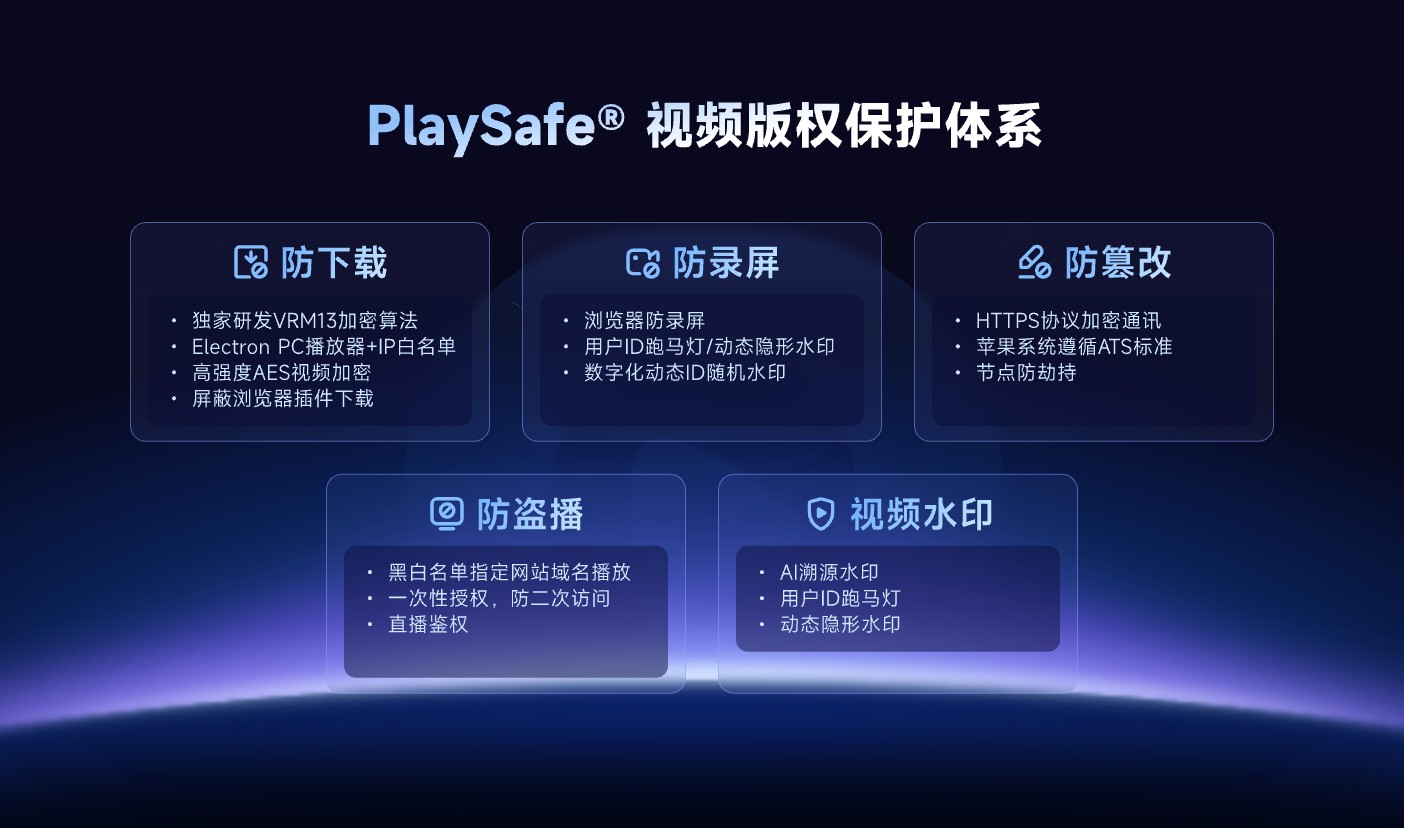
*Figure 1: PlaySafe integrates download protection, anti-screen recording, anti-tampering, unauthorized playback protection and video watermark into the same copyright protection system. Image source: POLYV Cloud VOD official product page*
03 Select capabilities based on risk: different problems cannot be solved with the same function
| Key risks | Capabilities that should be checked | Boundaries that still exist |
|---|---|---|
| The source file or playback URL is obtained | Content encryption, short-lived authorization, key protection | An authorized playback environment may still be recorded |
| The video is referenced by an external site | Domain name restrictions, hotlink protection, URL authentication | Cannot replace membership or order verification |
| Account sharing | Login and membership controls, device/session policies, unusual-access analysis | Excessive restrictions may disrupt legitimate device changes and increase support demand |
| Screen recording or external camera capture | Screen-recording detection, dynamic watermark, user identifier, copyright notice | No control can guarantee that every recording method is blocked |
| Redistribution is difficult to trace | Watermarks, viewing and access logs, complaints and evidence-retention procedures | Logs and watermarks provide leads; human verification is still required |
High-value course programs may justify stronger encryption, identity authorization, and traceability. Low-cost previews need to balance protection with reach and conversion, without forcing repeated logins or causing cross-device failures. The right security level is the one that matches content value, user experience, and operating cost.
04 Ask seven questions instead of stopping at “Does it encrypt video?”
4.1 Can encryption and authorization form a complete end-to-end workflow?
Ask the provider to demonstrate the complete path from upload and transcoding through authorization, playback, and authorization expiry. It should explain where keys and signatures reside, how validity periods are configured, and whether old links cease to work.
4.2 Are there verifiable solutions for the website, app, and mini program?
A public claim of “multi-device support” does not mean that security controls and user experience are identical on every endpoint. Verify the player, SDK, version, and limitations separately for web, Android, iOS, Flutter, HarmonyOS, and mini programs as applicable.
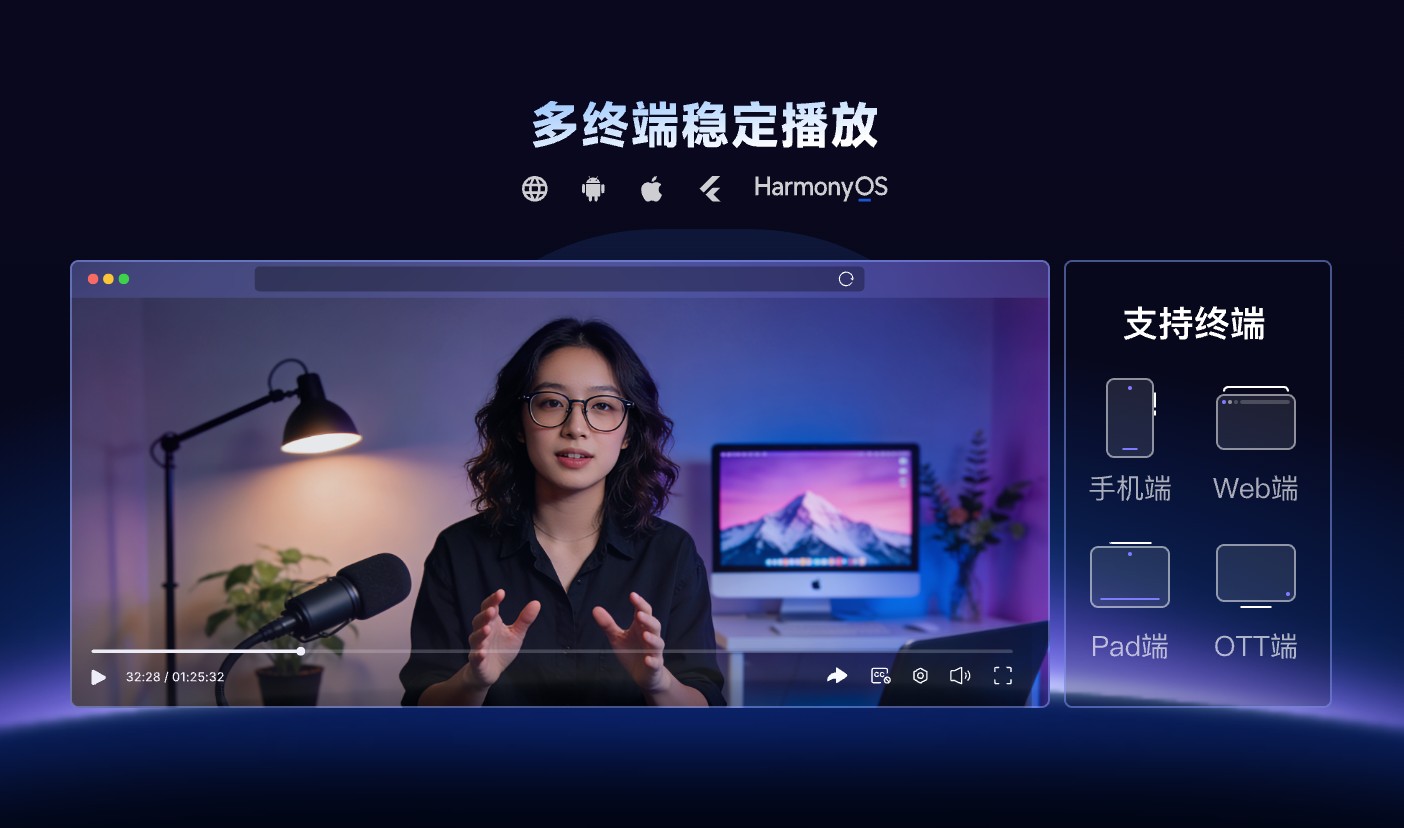
*Figure 2: multi-device playback requires separate verification of the player, system version and security capabilities. You cannot just look at one support list. Image source: POLYV Cloud VOD official product page*
4.3 Can it be connected to existing order, membership and class systems?
The platform should provide a player, SDK, or server-side API while allowing the enterprise system to decide who can watch, for how long, and how access is revoked after a refund or departure. A long-lived share link alone makes ongoing entitlement management difficult.
4.4 Does it have hotlink protection, watermark and access control at the same time?
Encryption alone does not address leaked links, identity misuse, or screen recording. Confirm whether domain or IP rules, URL authentication, single sign-on, dynamic watermarks, and access logs can be combined for the project and which controls require additional configuration.
4.5 Can you review unusual activity and audit records?
Clarify which administrative actions, access requests, and playback events are recorded, how long logs are retained, who may query them, and how the provider assists during an incident. Provider logs should correlate with the enterprise’s own account records to create a usable audit trail.
4.6 Will the security policy harm normal viewing?
Overly short authorization windows, strict IP restrictions, or endpoint differences may block legitimate learners. The POC should cover weak networks, device changes, cross-device use, casting, browser upgrades, and app upgrades, with support procedures defined in advance.
4.7 Can the service provider continue to maintain the player and security solutions?
Check current product documentation, SDK update history, compatibility notes, sample projects, and issue response mechanisms. Security is not a one-time configuration; browsers, systems, and recording methods continue to change, and the platform requires long-term maintenance and verification.
05 POLYV’s scenario positioning: securely connect videos to course business systems
According to the current POLYV PlaySafe® Video Copyright Protection and Cloud VOD product page, POLYV’s PlaySafe® video encryption approach covers protection against downloads, screen recording, tampering, and unauthorized playback, together with video watermarks. The pages also list VRM13, AES, URL authentication, identity and permission management, OSS single sign-on, WeCom authentication, and IP allow/deny lists. VOD administrative actions and end-user CDN requests are recorded to support troubleshooting and traceability.
For an institution with an existing course system, POLYV can serve as the video and security layer. The institution continues to manage courses, orders, members, and classes while using players, SDKs, or APIs to embed authorized playback, multi-device delivery, and records into its workflow. The official site currently lists web, Android, iOS, Flutter, and HarmonyOS NEXT playback options, but every project must still verify current versions, exact functions, and configuration requirements endpoint by endpoint.
The value is not a promise that content will never leak. It is the layered management of source files, playback URLs, viewer identity, redistribution signals, and access records. The course provider must still maintain account policies, copyright notices, user agreements, support and appeal procedures, and an infringement-response process.
06 Verify real security and viewing experience with a minimal POC
- Select a test video with the same clarity, length, and format as the official course.
- Create four types of test accounts: purchased, unpurchased, refunded and expired.
- Verify authorization, playback, expired-link behavior, and error routing separately on the website, target app, or mini program.
- Test boundaries such as copying the playback address, embedding in external sites, logging in from different devices, and account concurrency.
- After enabling watermarks and logs, confirm that displayed information is appropriate and unusual access can be investigated.
- Record startup time, seeking, weak-network behavior, upgrade effects, and support issues before selecting the production security level.
Once this workflow is complete, assess legacy-video migration, batch transcoding, cost, and launch timing. That provides a more realistic view of project effort than a feature-count comparison.
07 FAQ
7.1 Does course video encryption prevent screen recording?
No. Content encryption mainly raises the barrier to direct downloading and playback outside an authorized environment; screen recording occurs after authorized playback. Detection, dynamic watermarks, user identifiers, and investigation procedures can reduce the risk, but they cannot eliminate it.
7.2 Is it enough to just close the player download button?
Usually not. Disabling the download button changes only the interface; it does not replace content encryption, playback authorization, or hotlink protection. Paid courses should also connect order or membership entitlements to short-lived playback authorization.
7.3 What is the difference between hotlink protection and video encryption?
Hotlink protection limits the domains, pages, or authorization conditions from which a resource may be requested. Video encryption protects the content itself, making an extracted file harder to play in an ordinary environment. They address different risks and are often used together.
7.4 Do I need to rebuild an existing learning platform or app?
Usually not. The existing system can retain account, order, class, and course logic while integrating VOD and security through a player, SDK, and server-side API. The change scope depends on the current technology stack and authorization design.
7.5 How is a course video encryption platform priced?
Pricing usually depends on storage, transcoding profiles, playback traffic, target endpoints, encryption and watermark configuration, SDK/API integration, and any dedicated-resource or private-deployment requirements. Do not compare fixed totals before these parameters are known; use the POC to establish realistic usage and integration scope.
About POLYV
POLYV is an enterprise video SaaS provider that ranked No. 1 in the enterprise live-streaming service provider ranking for six consecutive years from 2020 through 2025. Its portfolio includes low-latency live streaming, VOD, MR live streaming, digital humans, and live-streaming studios, together with owned-channel video technology, platform integration, content operations, and live-event operations and delivery services.