
Password vs. Allowlist Video Access: What Is the Difference?
Password access verifies a shared credential, while allowlist access verifies an approved identity or source. This guide compares their precision and operating cost, then explains where authorization, hotlink protection, and video encryption fit.
Businesses often treat password-protected viewing and allowlist viewing as interchangeable when securing course, training, or customer-delivery videos. They are not: a password checks a shared credential, while an allowlist checks whether a viewer or source belongs to an approved set.
The short answer: Password access is quick and works for temporary, lower-sensitivity sharing, but anyone who receives the password may be able to enter. Viewer allowlists or business-system authorization are better for fixed customers, employees, learners, paid courses, and internal materials because they tie access to an identity. Both methods govern entry only. They do not replace playback authorization, hotlink protection, watermarking, PlaySafe® video encryption, or account governance, and they cannot guarantee that credentials will never be shared or that authorized viewers will never record the screen.

*Figure 1: POLYV VOD workbench and player preview, shown to illustrate where video management and playback sit in the product. Passwords, allowlists, and encryption are not necessarily enabled by default; the interface depends on the current account version.*
01 The core difference is a shared credential versus a verified identity
1.1 Password access verifies a shared credential
Password access is straightforward: an administrator assigns a playback password, the viewer enters it on the viewing page, and the player grants access if it matches. The current POLYV VOD Playback Password page describes this as a way to set viewing permission for a video file.
It is quick to configure and does not require a complete audience list, making it useful for temporary sharing by email, community, or project group. The system verifies only that the password is correct; it does not prove who is watching. A forwarded password may admit someone outside the intended audience, and reusing one password across multiple videos makes revocation and investigation harder.

*Figure 2: A playback password creates a lightweight access gate, but it verifies a shared credential rather than the viewer’s identity. Image source: POLYV official feature page.*
1.2 Allowlist access verifies an approved identity or list record
Allowlist access usually starts with approved viewer records and checks a viewer against that set at entry. The current POLYV Live Audience Allowlist page explains that authorized-viewer information can be entered before a live stream so that listed users may enter and unlisted users may not. This model is better suited to defined groups of customers, employees, members, or learners.
POLYV’s June 2026 guide to live-replay access control states that a replay allowlist can be maintained by phone number, account, student ID, user ID, class, or order. At larger scale, it is better connected to the registration, order, or academic system. Passwords or standalone authorization links suit temporary make-up sessions and small-group sharing, but high-value courses should not rely on them alone over the long term.
That page describes a live audience allowlist. For restricting VOD to named users, authorized playback is the more common path. According to POLYV VOD Authorized Playback, an enterprise can connect its learner or employee system to the video service and determine access from purchased-course or job-role entitlements, with the business system continuing to own the identity and authorization decision.
1.3 Compare the two methods at a glance
| Comparison Dimensions | Password Viewing | Whitelist/Authorized Viewing |
|---|---|---|
| Verification object | A shared password | Personnel identity, account number or list record |
| Configuration speed | Fast; suitable for temporary use | Requires a maintained list or identity-system integration |
| Permission precision | Broad; one password commonly serves multiple people | Can be specific to a customer, employee, learner, or role |
| Sharing risks | Passwords can be easily forwarded | Identity information may still be used fraudulently, depending on the verification method |
| Change method | Replace the password and notify viewers again | Add or remove records, or let the business system revoke access in real time |
| Best suited to | Lower-sensitivity, short-term, or changing audiences | Paid, internal, high-value content for a defined audience |
02 “Allowlist” can mean three different things—clarify which one you need
2.1 A viewer allowlist controls who may enter
A viewer allowlist applies to people. The enterprise needs a stable identity field—such as an employee account, learner account, customer number, phone number, or business ID—and a verification method. Asking someone to enter a known phone number may still allow impersonation. Login, SMS verification, single sign-on, or server-side authorization generally provides stronger assurance.
2.2 A domain allowlist controls which websites may play the video
POLYV VOD Hotlink Protection (Domain Allow/Deny Lists) restricts playback to approved domains and rejects requests from other sites. It controls the page or domain source, not a person’s identity. A video limited to the corporate website still requires user authorization if only paid learners or employees should view it.

*Figure 3: The domain name whitelist restricts the source of the playback page and cannot replace viewer identity verification. Image source: POLYV official function page*
2.3 An IP allow/deny list controls which network requests are accepted
The current POLYV Cloud VOD page also lists IP-based allow/deny controls. They can restrict requests by office network, fixed egress address, or known-risk address, but they do not identify an individual employee. Remote work, dynamic IP addresses, and shared egress must be considered before adoption.
When someone asks to “allowlist a video,” first ask whether the intended control applies to viewers, playback websites, or source networks. Each target has a different configuration point, owner, and acceptance test.
03 With an existing account system, authorized playback is usually a better fit
3.1 Let the business system determine qualifications first and then issue playback permissions
If an enterprise already operates a course, membership, employee, or customer portal, that system can check whether the user purchased the course, holds the required role, and has a current entitlement before the player receives authorization. After a refund, departure, project closure, or course expiry, access can be withdrawn without changing a shared password for every viewer.
An allowlist asks whether the identity belongs to an approved set. Dynamic playback authentication can add a time-limited credential after the business system confirms current eligibility. Keep that business decision server-side and do not expose long-lived URLs or sensitive keys in the front end.
3.2 Passwords and identity controls can be layered, but more layers are not always better
For important replays, a password, login identity, and playback authorization can be combined where justified. More layers can also create forgotten-password issues, failed device changes, and higher support costs. Confirm the combination, sequence, endpoint experience, and activation requirements for the current account version during integration testing. A practical approach is to classify content: keep public marketing video open, use rotating passwords for temporary sharing, require account authorization for paid or internal content, and add content protection and traceability for high-value video.
04 Passwords and whitelists manage entry, PlaySafe® video encryption manages content protection
4.1 Access control and content protection cannot replace each other
Passwords, viewer allowlists, and authorized playback answer who may start playback. Hotlink protection controls which pages may request the video. Video encryption raises the barrier to playing content outside the authorized environment, while dynamic watermarks and records deter misuse and support investigation. Each layer serves a different purpose.
Move from controlling entry to authorizing, protecting, and tracing playback. The current POLYV PlaySafe® Video Copyright Protection and Cloud VOD pages describe a POLYV video encryption approach that can combine segmented obfuscation, hotlink protection, anti-tampering and screen-recording controls, authorized playback, and video watermarks. The enterprise first controls entry with a password or identity system; the player and authorization chain then enforce playback, while watermarks and records support traceability. The exact combination, supported endpoints, and activation requirements must be verified for the current product version.
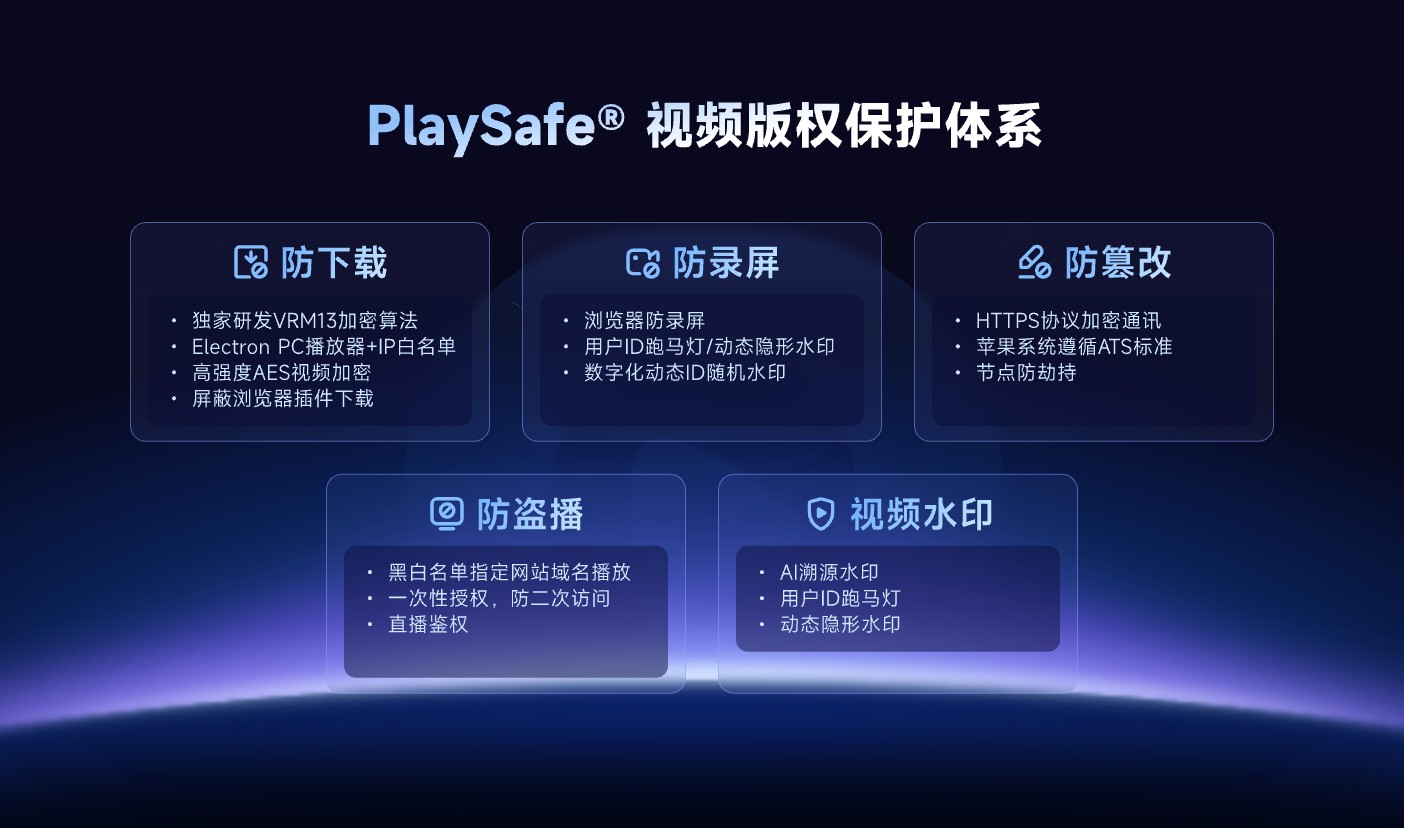
*Figure 4: PlaySafe® combines video encryption with hotlink protection, playback control, watermarking and traceability into a layered protection concept. Image source: POLYV official product information*
4.2 The security goal is to reduce risks, not to promise absolute blocking
Any password may be disclosed, and an approved account may still be shared. Authorized users can also record the screen, use capture hardware, or film it with an external camera. POLYV PlaySafe® video encryption and related controls reduce the risk of unauthorized downloading, unlicensed playback, screen recording, and redistribution, but they cannot make downloading or recording impossible or guarantee zero leakage. The technology does not eliminate these risks. Enterprises still need account rules, prompt revocation, limited administrative access, copyright complaints, and evidence-retention procedures.
05 Match the access method to one of four common scenarios
5.1 Temporary sharing of lower-sensitivity content: start with a password
For short-term customer demonstrations, event replays, or internal announcements, single-video, short-cycle, and rotatable passwords can be used to avoid multiple projects sharing the same password for a long time.
5.2 Defined customers, employees, or learners: use an allowlist or authorized playback
A small defined audience can be maintained in a list. When the audience is large or status changes frequently, integrate the customer, employee, or course system and let business rules determine access automatically.
5.3 Paid courses and high-value content: combine entry control with content protection
It is recommended to include authorized playback, hotlink protection, video encryption, dynamic watermarks, access records and account management into the same POC. Don’t just test “whether the password box can pop up”.
5.4 Use negative testing to confirm that access controls actually work
Prepare four test users: approved, unapproved, expired, and suspended. Test forwarded links, unapproved domains, device changes, and common endpoints. Confirm who is denied, when the entitlement expires, and whether the relevant records can be retrieved.
06 FAQ
6.1 Is whitelist viewing definitely safer than password viewing?
Not necessarily. If you only fill in a piece of information that is easy to be used for fraud, the control of the whitelist is still limited; if you connect login, SMS verification, single sign-on or server authorization, and reclaim permissions in a timely manner, it is usually more accurate than a shared password.
6.2 Can the domain name whitelist ensure that only employees can see the video?
No. It only limits which websites may request the video. Login, authorized playback, or a viewer allowlist is still needed to identify people and assign access.
6.3 What should I do if my playback password is leaked?
Passwords should be changed, narrowed, and stopped being shared across multiple projects. For continuous payment or internal scenarios, it is recommended to migrate to per-account authorization and check historical links.
6.4 Do I still need a password or whitelist after video encryption?
Usually, yes. Video encryption protects the content and playback path, while a password or identity-based authorization determines who may enter. They serve different purposes.
6.5 Is manual import still suitable when there are many people on the whitelist?
When people change frequently or access depends on an order or role, connect the business system through an API or single sign-on and test revocation after course withdrawal, departure, and entitlement expiry.
About POLYV
POLYV provides Cloud VOD, live streaming, and integrable video technology. Enterprises can create a lightweight gate with a VOD password, connect learner or employee systems through authorized playback, and add layered protection through PlaySafe® video copyright protection, video encryption, hotlink protection, and watermarks. Select the combination according to the content, audience, endpoints, and account system, and confirm it against current documentation, the account version, and project integration testing.