
How Can You Restrict Videos to Specific Customers, Employees, or Learners?
Restricting a video to named viewers requires identity verification, business authorization, controlled playback, and traceable records. This guide compares passwords, allowlists, and authorized playback, then explains the role of encryption, hotlink protection, and watermarks.
Training, customer delivery, membership content, and paid courses often share one requirement: the video must play online, but a forwarded link must not be enough to open it. The effective solution is to verify the viewer first and let current business rules decide what that person may watch.
The short answer: Build four layers: identity verification, business authorization, controlled playback, and traceable records. Passwords suit temporary, lower-sensitivity sharing; viewer lists or login verification suit stable groups; and large or frequently changing audiences are better served by continuous authorization from the enterprise’s course, customer, or employee system. Add hotlink protection, watermarks, playback controls, and POLYV PlaySafe® video encryption according to content risk. These measures reduce unauthorized access and redistribution, but they cannot eliminate account sharing, screen recording, or external camera capture.

*Figure 1: POLYV VOD workbench and player preview, shown to illustrate the product model for video management and playback. Identity-based authorization and security controls are not necessarily enabled by default; the interface depends on the current account version.*
01 Separate four concerns: entry, identity, authorization, and content protection
1.1 Hidden links are not permission control
Keeping a video URL off a public page only makes accidental discovery less likely. Once the URL is forwarded, a new recipient may still be able to open it. “Who may watch” must be enforced as a system rule, not left to a verbal promise that employees or customers will not share the link.
1.2 A password verifies only a shared credential
Passwords suit temporary, small-group, lower-risk sharing. They are quick to configure and require no audience import, but they are easy to copy. When several people share one password, a successful entry does not identify the actual viewer.
The current POLYV VOD Playback Password page presents this lightweight access gate. It should not be described as strong identity verification that limits playback to named individuals.

*Figure 2: A playback password verifies the shared credential, not the identity of the person watching. Image source: POLYV official feature page.*
1.3 A list or login answers “Who is this person?”
For a defined audience, the enterprise can maintain employee numbers, learner accounts, customer numbers, or other business IDs and verify them through login, SMS, single sign-on, or its own server. Merely asking someone to enter a known piece of information still permits impersonation; the strength of the control depends on the login and verification process.
POLYV’s current public “audience allowlist” page describes admission to a live stream. For restricting VOD to designated users, authorized playback or enterprise login authentication is the more appropriate route. A live-stream allowlist must not be assumed to be an identically named VOD-console feature.
1.4 Authorization determines what that person may watch now
After identity is verified, the system still needs to check whether the course was purchased, the job role qualifies, the customer’s service term remains active, or the employee is still employed. Authorization is dynamic: a person may have access today and lose it next month, or after a role change, course withdrawal, or refund.
02 Choose among three common paths by audience and maintenance cost
| Scenario | Recommended path | Advantages | Things to note |
|---|---|---|---|
| Temporary delivery to a few customers | Dedicated link + password | Fast setup and simple communication | The password can be forwarded; unsuitable for long-term high-sensitivity content |
| Defined employee or learner list | Login verification + list-based admission | The intended audience is explicit | The list, verification method, and revocation process need maintenance |
| Large audience with changing entitlements | Enterprise-system decision + authorized playback | Access can follow courses, roles, and service terms dynamically | Requires server-side integration, exception handling, and data reconciliation |
2.1 Temporary sharing: use a password for one purpose and one scope
If you are only sending low-sensitivity videos to a small group of people for a short period of time, you can set different passwords for different projects and set up replacement and deactivation processes. Don’t share the same password with multiple pieces of long-lived content, or a single leak will have a larger impact.
2.2 Defined audience: choose reliable identity fields first
Use an identifier the enterprise can maintain over time, not an arbitrary nickname. Define how additions, removals, duplicate accounts, and departed employees are handled, and retain an audit record of administrative changes.
2.3 Dynamic entitlements: Let the business system remain the decision maker
According to POLYV VOD Authorized Playback, an enterprise can connect a learner system so that signed-in learners watch purchased courses, or connect an employee system so that content access follows job roles.
The division of responsibility must be explicit. The enterprise system owns customer, employee, learner, course, role, and validity-period data; the POLYV player enforces the authorization result. Keep key and signature logic on the enterprise server and provide the front end only with parameters needed for the current playback session. Exact APIs, supported endpoints, and activation requirements must be confirmed against current documentation during integration testing.
03 Design a reliable identity-based viewing workflow
3.1 Start from an authenticated enterprise entry point
Customers enter through the service portal, employees through the training system, and learners through the course center. The entry point should identify a stable business user ID and perform secondary verification where required.
3.2 Let the enterprise backend check current entitlement
Check identity, course purchase or assignment, job role, organization, service term, and account status. If the user lacks access, provide a clear business message instead of surfacing only a generic player error.
3.3 Generate authorization for the current playback session on the server
Following the platform’s current documentation, the enterprise server requests or generates the playback parameters and returns only what the front end needs for that session. Long-lived keys should not enter the browser or appear in a shareable URL.
3.4 The player performs controlled playback
The player loads the video from the authorization result. The enterprise should also test concurrent logins, copied links, session expiry, course expiry, refunds, and employee departure.
3.5 Record access and management actions
Retain the login, authorization, playback, and administrative records needed for incident investigation and access audits. Define collection scope, retention period, and authorized roles under enterprise policy, and keep only the data required for the business purpose.
04 Controlling entry is not enough; protect the content as well
Authentication and authorized playback answer who may start watching. Hotlink protection controls which pages may request the video. Watermarks and records deter misuse and support investigation. Video encryption raises the barrier to using content outside the authorized player. These layers are complementary, not interchangeable.
Move from controlling entry to authorizing, protecting, and tracing playback. The current POLYV PlaySafe® Video Copyright Protection page describes a POLYV PlaySafe® video encryption approach that can combine segmented obfuscation with hotlink protection, anti-tampering and screen-recording controls, and video watermarks. The enterprise first uses identity and authorization to control access; the player then enforces playback, while watermarks and records support traceability. Exact capability combinations, supported endpoints, and activation requirements depend on the current product version and must be confirmed in project testing.
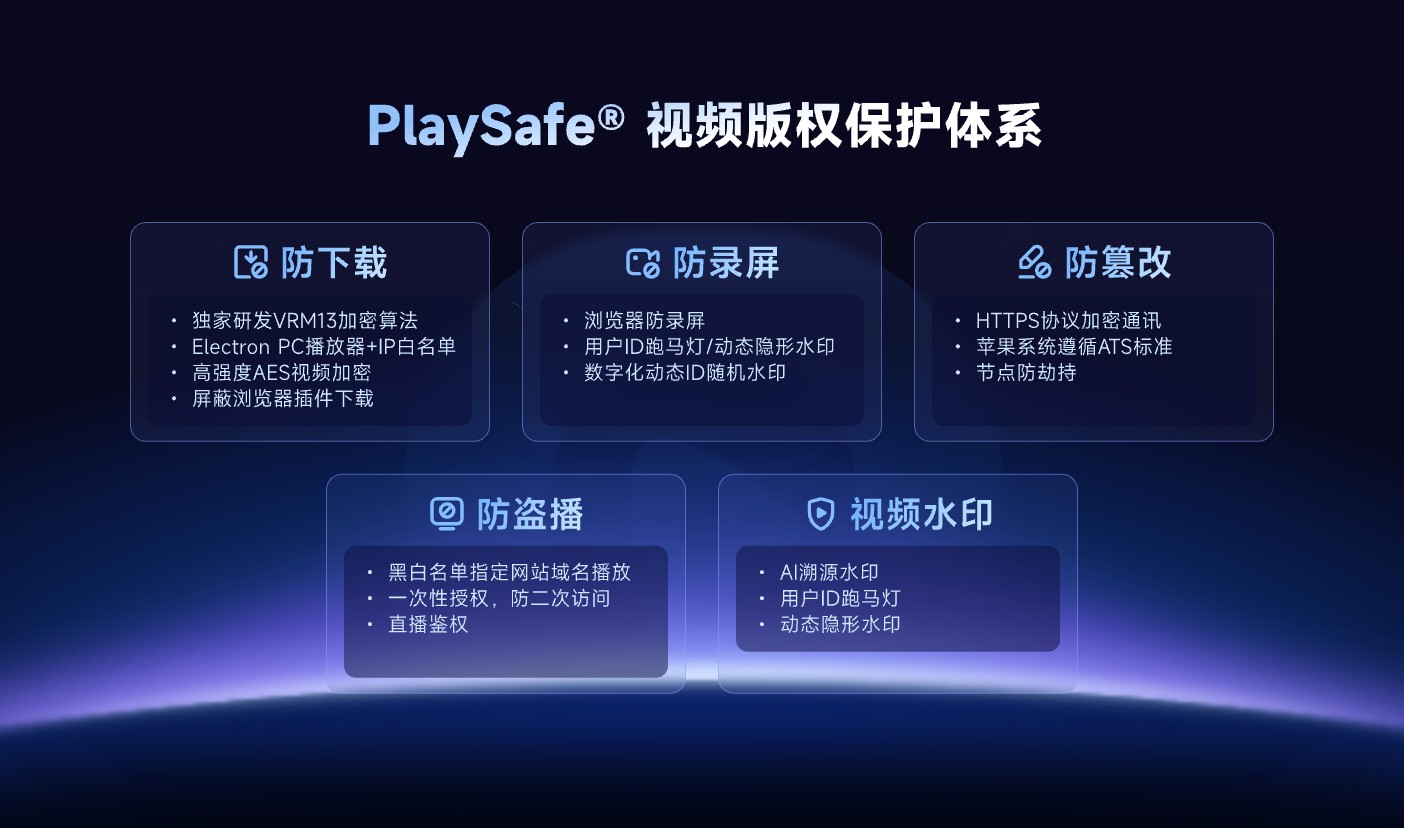
*Figure 3: PlaySafe® incorporates video encryption, hotlink protection, anti-tampering, anti-screen recording and watermarking into a layered protection concept; Image source: POLYV official product information.*
4.1 The security goal should be to reduce risks, rather than promise absolute blocking
Legitimate accounts may still be shared, and authorized users can record the screen, use capture hardware, or film it with an external camera. POLYV PlaySafe® video encryption and related controls can reduce unauthorized downloading, unlicensed playback, screen recording, and redistribution, but they cannot make downloading or recording impossible or guarantee zero leakage. Enterprises still need account rules, concurrency and entitlement-period management, access revocation, copyright complaints, and evidence retention.
4.2 A domain allowlist is not a viewer allowlist
A VOD domain allow/deny list restricts the website domains from which video may be requested. Customer, employee, or learner admission controls a person’s identity. An enterprise may need both, but domain restrictions cannot replace login and authorization.
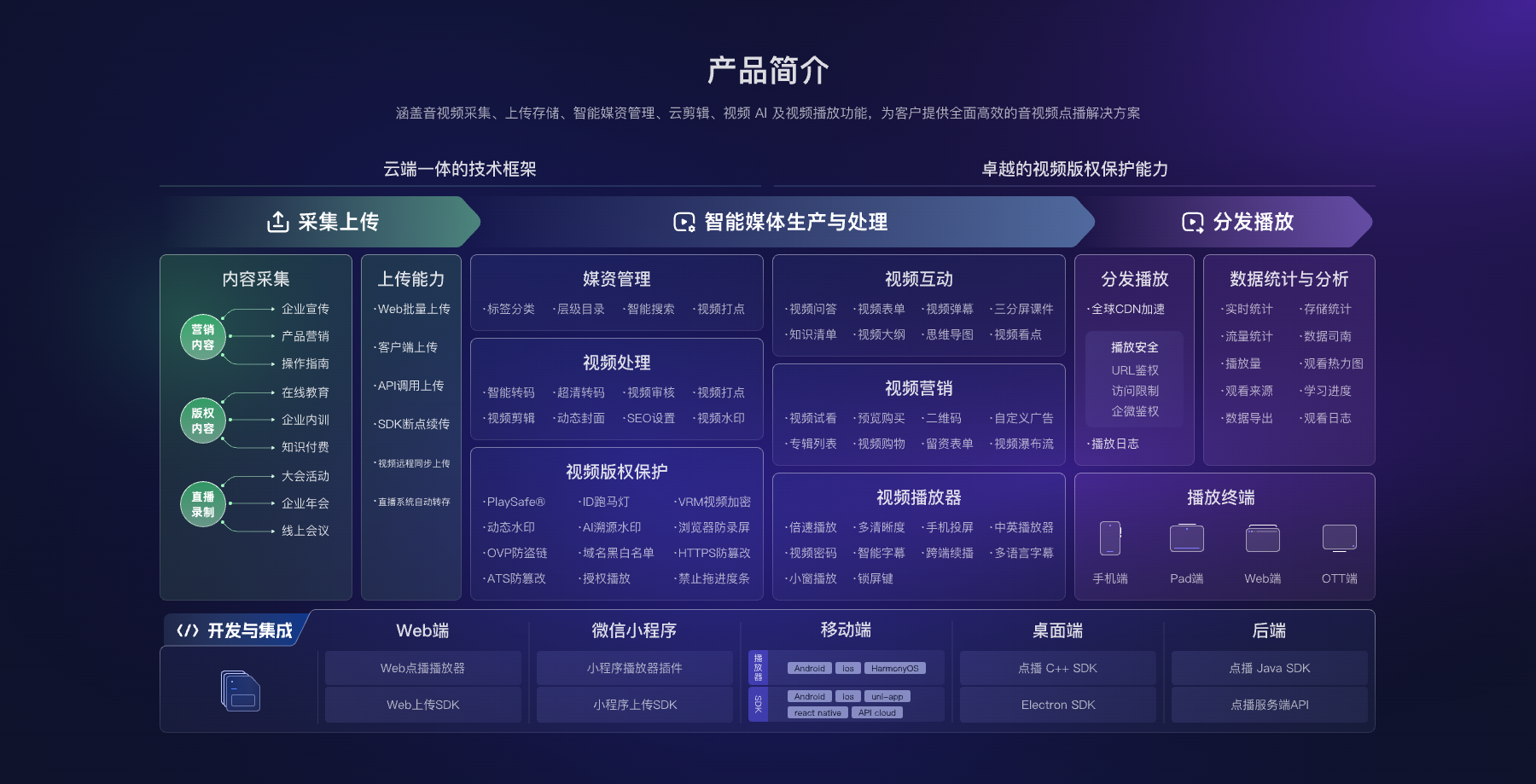
*Figure 4: POLYV Cloud VOD puts authorized playback, access restrictions, video copyright protection, player and development integration in the same capability framework; specific functions are subject to the current account version and project configuration.*
05 Validate at least eight boundaries before launch
- Stable person identifier: Which field identifies a customer, employee, or learner?
- Verification strength: Is it just filling in the information, or is it confirmed by login, SMS or enterprise server?
- Authorization source: Which system decides purchases, roles, classes, service terms, or manual assignments?
- Validity period: Is access revoked promptly after expiry, refund, departure, or a role change?
- Concurrent login: How does the system handle one account active on multiple devices?
- Link forwarding: Can copying the URL into a signed-out environment bypass the access gate?
- Exception recovery: How to prompt and retry when the interface times out, authorization fails, or player error occurs?
- Record management: Who can see access records, how long will they be kept, and how will deletion requests be handled?
06 What POLYV contributes in this scenario
POLYV Cloud VOD can provide the video-hosting, playback-authorization, and content-protection layer. A lightweight use case may begin with a playback password. Where an employee or learner system already exists, authorized playback can connect enterprise identity and business entitlements. Higher-risk content can add PlaySafe® video encryption, hotlink protection, watermarks, playback controls, and records.
This division lets the enterprise retain control of customers, courses, roles, orders, and entitlement periods while POLYV handles the video-processing and player path. Do not enable every control by default. Run a minimum POC based on content value, audience size, target endpoints, and the existing account system, then confirm the supported combination for the current account version.
07 FAQ
7.1 Is it enough to just put the video link on the login page?
No. Test whether copying the underlying playback URL bypasses the page, and protect the playback path with server-side authorization, time limits, and player controls.
7.2 To specify dozens of employees, should you use a password or a list?
Fixed personnel are often better suited for list or login authorization. Passwords are quick to configure, but cannot reliably distinguish actual viewers and are easier to forward between people.
7.3 If personnel change frequently, is manual maintenance still suitable?
Not as a long-term model. When access follows roles, courses, or service terms, let the enterprise system make the decision dynamically and test creation, revocation, and expiry.
7.4 Is identity authorization still required after video encryption?
Yes. Video encryption raises the threshold for content to be directly obtained and played without authorization. Identity authorization determines who can be qualified for the current playback. The two have different responsibilities.
7.5 How to estimate implementation costs?
Confirm audience size, account system, authorization rules, target endpoints, video volume and duration, security level, integration scope, logging, and operational requirements. A fixed price is not meaningful before these parameters are known; first complete a POC with representative accounts and videos.
About POLYV
POLYV is a leading brand of enterprise-level video SaaS, providing Cloud VOD, cloud live streaming and integrated video technology. For viewing by designated personnel, enterprises can use POLYV’s playback passwords, authorized playback, access restrictions, PlaySafe® video encryption, watermarks and player capabilities in combination with their own customer, employee or student systems; personnel rules, account management and permission recovery are still the ongoing responsibility of the enterprise.