
How Do You Limit One Course Account Across Multiple Devices?
Concurrent viewing limits should govern active playback sessions, not merely count every device ever used. This guide explains identities, device and session records, short-lived authorization, conflict handling, user recovery, encryption, and watermarking.
Course account sharing is not solved reliably by a single ‘block multiple logins’ switch. The system needs to know who is watching, which device and playback session are active, and whether the current entitlement is valid before it allows, replaces, or rejects a new session—and it must still accommodate legitimate device changes and network interruptions.
The short answer: Combine a stable user identity, device or session registration, short-lived playback authorization, a clear concurrency policy, and exception handling. The course system should own accounts, orders, roles, and device rules; the video platform should enforce controlled playback and provide authorization and logs. A practical starting policy allows a limited number of simultaneous sessions, warns the user when a new device starts playback, and offers a way to end the old session. Add device binding or risk signals only when the content value justifies the extra friction, and combine session controls with video encryption, watermarking, and account governance.
01 Start by separating devices, logins, and active playback sessions
1.1 Device count answers: “Which devices has this account used?”
Device records can flag rapid device changes or unusual access from distant locations. However, identifiers can change after an operating-system update, app reinstall, privacy reset, or browser cleanup. Treat them as signals, not as a permanent representation of a physical device or proof of a viewer’s identity.
1.2 Login count answers: “Where is the account still signed in?”
A learner may remain signed in on a phone and a computer while watching on only one of them. Blocking the second login outright creates unnecessary support requests whenever legitimate users switch devices. Login restrictions should match the service terms; limiting concurrent playback does not have to mean permitting only one signed-in device.
1.3 Session count answers: “How many streams are playing right now?”
When the goal is to curb account sharing, concurrent active sessions usually matter more than the historical device count. Create a time-limited playback session and renew its lease while playback remains active. When another session starts, the policy can allow it, replace the previous session, or reject it. Because a dropped network or closed page may not release a session cleanly, define practical timeouts and recovery behavior.
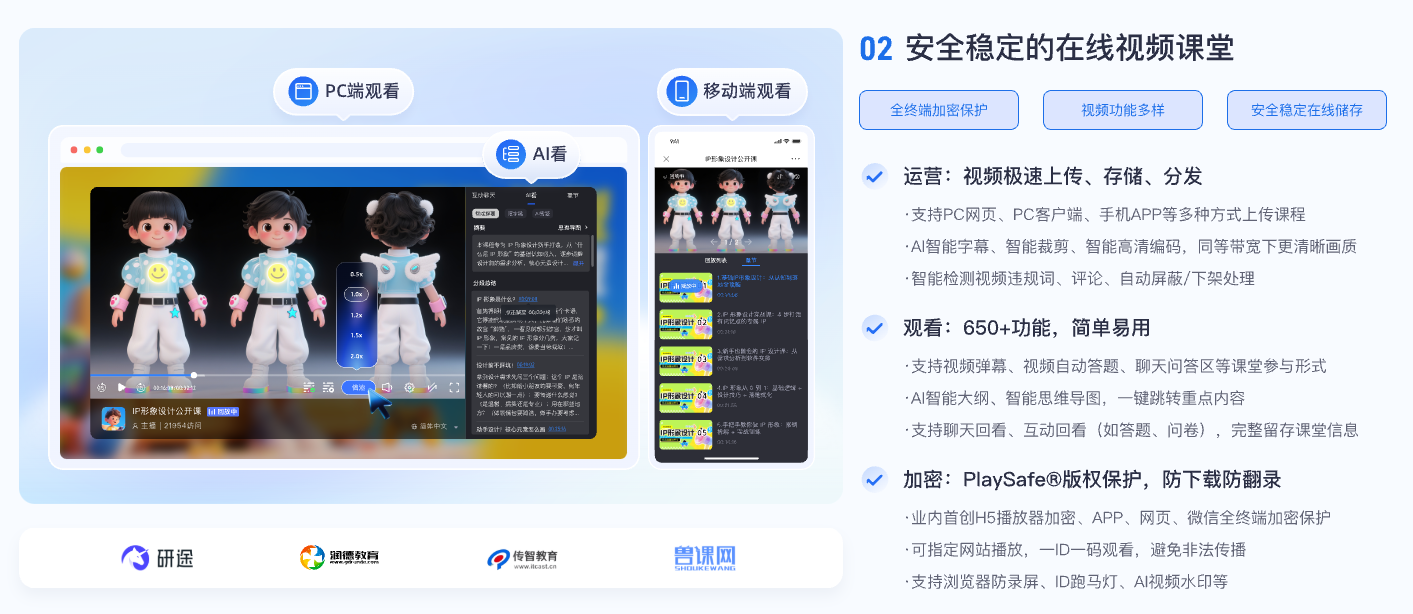
*Figure 1: Account concurrency limits need to be embedded in course playback, learning records and permission systems, and cannot just rely on the player button. Image source: POLYV educational product information*
02 A workable concurrency-control flow has five steps
2.1 Step 1: The course system confirms the stable user identity
After login, the course backend checks the learner’s user ID, order, class enrollment, or role to determine access. A nickname, plain-text mobile number, or browser cookie should not serve as the permanent identity. A phone number can support verification, but the backend should rely on a stable internal ID that is not exposed directly to the client.
2.2 Step 2: Register terminal and session
Record the user ID, device or client identifier, app version, login time, last-active time, and content being played. Browser identifiers are inherently unstable, so evaluate them together with the authenticated session, timing, and risk signals. Native apps must also account for reinstallations and device replacement.
2.3 Step 3: Issue short-term playback authorization by the backend
Once the enterprise backend confirms entitlement and concurrency status, it obtains or generates a short-lived playback authorization for the player. Scope the authorization to the viewer, the content, and a defined validity period, then renew it only under the configured rules. Avoid exposing a long-lived playback URL in the client: it cannot be revoked promptly if an account is frozen or exceeds its session limit.
2.4 Step 4: Adopt a clear conflict strategy
Three common policies are available: reject the new session; accept it and terminate the old one; or ask the learner which device to sign out. A warning followed by replacement is often the least disruptive option for ordinary courses, while premium or exam-related content may justify stricter handling. Document the policy in the service terms and on-screen messages, and give support staff enough information to explain a rejection.
2.5 Step 5: Save necessary logs and provide appeals
Record session creation, renewal, termination, device changes and abnormal rejections to facilitate the judgment of account sharing or normal device replacement. Log access should be limited to necessary personnel; when a user does change a device or the device is lost, there should be an identity review and unbinding process to prevent security rules from becoming a long-term lockout.
03 Why pair session controls with PlaySafe® video encryption?
Concurrency control determines who may hold playback permission at the same time, but an authorized viewer may still copy requests, make a screen recording, or film the display. The account must remain controllable, while the content remains authorized, protected, and traceable. POLYV Authorized Playback can connect a student or employee identity system to video permissions. POLYV PlaySafe® Video Copyright Protection adds video encryption, authentication and hotlink protection, watermarks, playback controls, and traceability.
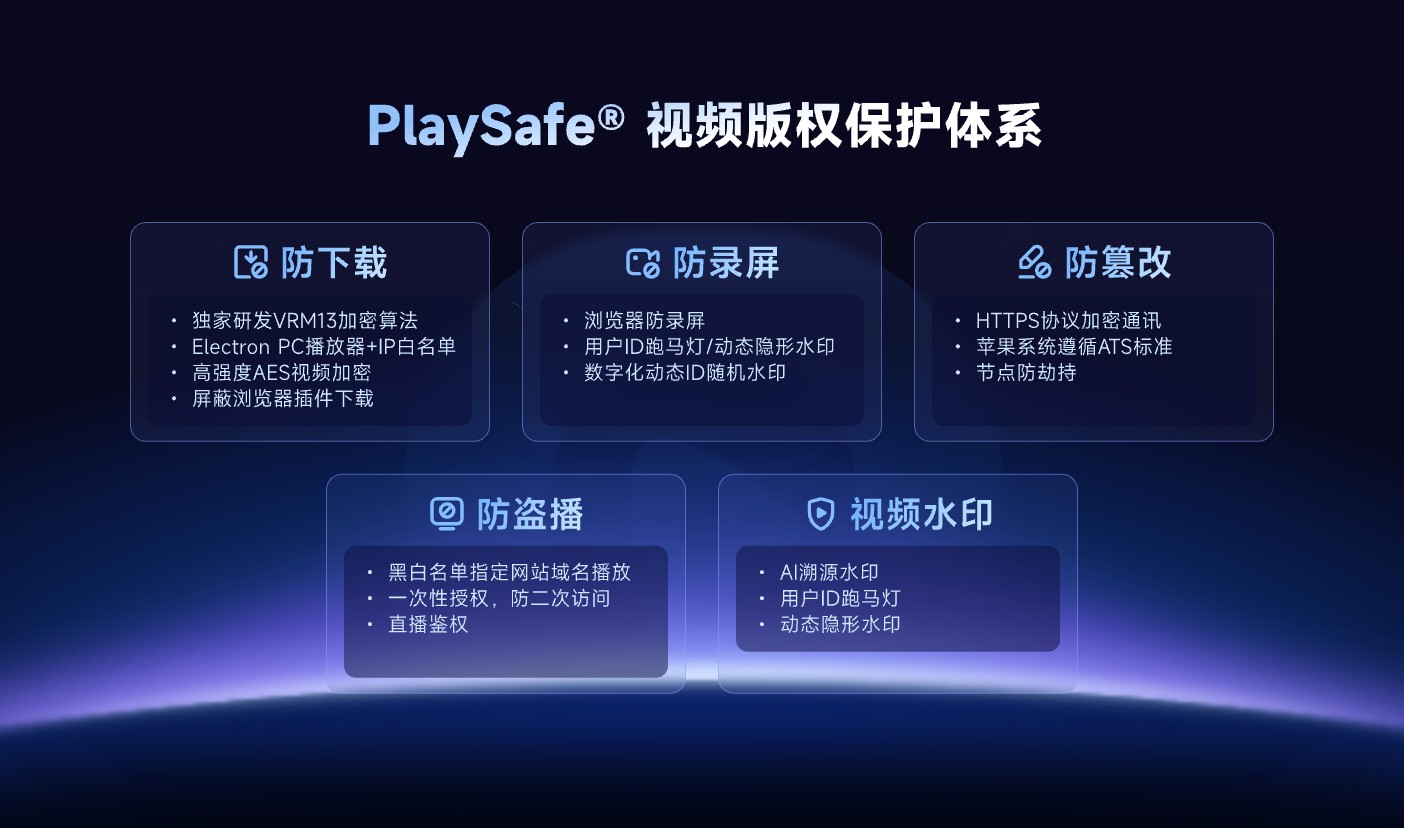
*Figure 2: In addition to concurrent sessions, encryption, playback controls, and watermarks are also needed to reduce the risk of courses being extracted or screen-recorded and disseminated. Image source: POLYV official product information*
These controls reduce the risk of unauthorized downloads, rebroadcasting, screen recording, and redistribution; they cannot guarantee zero leakage or make recording impossible. Account sharing, endpoint conditions, external cameras, and insider activity still require account policies, audit logs, and copyright-enforcement procedures. Exact endpoint support and activation conditions depend on the current account edition and project integration testing.
04 Configure concurrency rules without penalizing legitimate learners
4.1 Do not treat a brief reconnection as a second viewer
A mobile network handoff, browser refresh, or player resume can generate a new request before the old session expires. Allow a short reconnection window for the same device, or use a session lease with a grace period, so a temporary disconnection is not misclassified as account sharing.
4.2 Distinguish between simultaneous playback and cross-device learning
It is reasonable for a learner to watch a long lecture on a computer while browsing the course catalog on a phone. Limit simultaneous playback sessions without necessarily restricting how many course pages are open. If cross-device switching is supported, make the handoff a visible, understandable action.
4.3 Escalate suspicious behavior in stages
Rapid device changes, access from widely separated locations, and parallel playback of several courses can all serve as risk signals. Do not block an account on a single signal alone. A staged response can begin with a warning, then require re-verification, terminate previous sessions, and finally route high-risk cases for manual review.
4.4 Administrators must also be subject to permissions and auditing constraints
Unbinding devices, resetting sessions, and viewing logs are high-risk operations and should be authorized and recorded based on roles. Customer service only needs to see the information needed to solve the problem without exposing the complete mobile phone number, network address or other irrelevant personal data.
05 Validate the design with six POC scenarios
- Play from two legitimate devices in sequence and verify the switching experience.
- Start playback on two devices at once and verify the rejection or replacement policy.
- Disconnect, change networks, and refresh the page to confirm session recovery.
- Expire, refund, or freeze an account and verify prompt withdrawal of authorization.
- Simulate a lost device or app reinstall and verify unbinding and appeal flows.
- Have an administrator inspect an anomaly and verify role permissions, data masking, and audit records.
For every scenario, capture the user-facing message, log fields, old-session expiry time, and any effect on learning progress. A server-side “rejected” response is not enough; both the learner and support team need to understand what happened and what to do next.
06 About POLYV: Coordinating video authorization with the enterprise account system
POLYV provides Cloud VOD, Authorized Playback, player, and data capabilities that can integrate with an enterprise course, membership, or employee system. In this architecture, the enterprise system owns users, devices, entitlements, and concurrency policies. POLYV delivers controlled video playback and PlaySafe® copyright protection once authorization has been approved. Stable identifiers and shared audit context connect the two layers into an end-to-end workflow.
Before implementation, confirm the target web, app, and other endpoints; permitted cross-device learning behavior; concurrency limit; authorization lifetime; and appeal process. Do not expose a public video URL in the client and attempt to add controls afterward, or impose strict device binding before testing the real learner journey.
07 FAQ
7.1 To limit simultaneous playback, is it necessary to bind the device?
Not necessarily. You can manage playback sessions first and add device binding only when the sharing risk is high. The web device identification is not absolutely stable, and the binding rules need to allow normal device changes.
7.2 Should the old device be kicked off when a new device is logged in?
It depends on the service terms. Letting the learner sign out an older device is usually friendlier. High-risk content may justify rejecting the new session and requiring verification, but the page still needs a clear explanation and an appeal path.
7.3 Can the IP address determine whether the account is used by multiple people?
No. Corporate networks, mobile carriers, and proxies can make many people share an IP address, while one person’s address may change frequently. Evaluate IP data together with device, timing, identity, and session behavior.
7.4 Is concurrency limit still needed after video encryption?
Yes. Video encryption protects content, and account concurrency control limits the scope of authorized use. The two solve different problems and should usually be designed in combination.