
When Should You Use POLYV VOD Marquee vs. Full-Screen Watermarks?
A moving ID marquee is usually better suited to long courses and routine training, while full-screen watermark availability must be confirmed for the specific VOD account, player, and endpoint. This guide compares the two and defines the public-evidence boundary.
POLYV VOD’s ID marquee and a full-screen watermark differ in both viewing impact and public evidence. A moving identity watermark is suitable for routine, longer-form content; full-screen watermark availability should be confirmed for the specific VOD account, player, and endpoint before it is included in a delivery promise.
The short answer: Use the VOD ID marquee when a visible, moving viewer identifier is needed across long courses, internal training, or recurring paid content with limited obstruction. Consider a full-screen watermark only for short, high-value material after the current account, player, endpoint, and rendering behavior have been validated. Public POLYV materials clearly document VOD marquee and transcoded video watermarks, while full-screen anti-recording material is more directly associated with live streaming; do not assume the live implementation is automatically available in every VOD path. In either case, mask personal data and combine watermarking with PlaySafe® video encryption and authorization rather than treating it as absolute screen-recording prevention.
01 A marquee watermark acts as a dynamic identity fingerprint
1.1 It displays information associated with the viewer
The POLYV ID Marquee Watermark (Video Fingerprint) page states that viewer information can be supplied through an interface, with configurable position, timing, duration, and color. An enterprise can pass a user ID, account number, masked phone number, or random traceability code so each viewing session displays the appropriate identifier.
1.2 It is more suitable for continuous learning and longer content
A marquee appears and moves according to a display policy instead of covering the entire screen continuously. Its effect on courseware, subtitles, and demonstrations is therefore easier to manage. This makes it a practical choice for courses, employee training, and video series that run from tens of minutes to several hours.
1.3 Its value lies in back-checking, not just “looking safe”
Map every displayed value to the viewer, video, and playback session in the backend. If a screenshot or recording leaks, the team can use the account identifier or traceability code to review authorization and logs. A name entered freely in the client is easy to forge and offers little investigative value without a trusted identity and server-side record.

*Figure 1: Watermark policies should be managed uniformly with VOD media assets, player configuration and viewing records. Image source: POLYV product interface*
02 Confirm VOD support before choosing a full-screen watermark
2.1 It is rendered within the larger scope of the player or page
POLYV’s public Anti-Screen-Recording feature page describes a full-screen watermark in the live player, where it can make content and viewer identity more prominent. That page does not prove that every VOD endpoint supports the same feature by default. The VOD Video Watermark is embedded during transcoding; it is a fixed content watermark, not the same as a dynamic full-screen viewer watermark.
2.2 It best suits short, high-value content where leakage has serious consequences
If the VOD project has confirmed support, a more prominent overlay may suit internal pre-release material, time-limited certification training, premium methodology courses, or content available only to a small group. The aim is a stronger warning during a high-risk window—not permanent heavy text across every video.
2.3 The trade-off is greater visual obstruction
A full-screen overlay may obscure subtitles, code, diagrams, or an instructor’s writing. Test font size, density, opacity, and placement with representative content, especially on smaller mobile screens. First verify that the current VOD console exposes the required configuration, then test the target player and endpoint in the project environment. If support cannot be confirmed, do not include it in the acceptance criteria.
03 Two types of watermarks can be used based on risk stratification
| Decision factor | Marquee watermark | Full-screen watermark (after VOD support is confirmed) |
|---|---|---|
| Primary goal | Dynamic identity fingerprint and investigation support | Wider coverage and stronger visible deterrence |
| Viewing interference | Relatively low, configurable appearance rhythm | Relatively high, density needs to be carefully controlled |
| Suitable duration | Long courses, course series, routine training | Short material, key chapters, high-risk windows |
| Suitable information | User ID, masked account, traceability code | Copyright statement, user identification or combination information |
| Key tests | Identity mapping, random position, full-screen visibility | Occlusion, transparency, small screen adaptation and terminal range |
3.1 Routine paid courses: Start with a marquee
Most courses involve extended viewing and note-taking. Start with a masked account identifier or traceability code in a marquee and tune how often it appears. A fixed logo can establish copyright ownership, but a full phone number should never be spread across the screen.
3.2 Corporate training: Match the watermark to the content tier
Routine policy or public-knowledge training can use a lightweight marquee. Strategic, R&D, or pre-release material may justify a more prominent full-screen option after product support is confirmed. Define audience permissions and watermark policy together before launch.
3.3 Short-term high-value content: full-screen watermark can strengthen reminders
If the content value is high, the viewing window is short, and the VOD project has confirmed support, coverage can be improved, but subtitles, graphics, and mobile terminals must still be checked with real footage. Security strength cannot come at the expense of primary message readability.
04 Balance traceability with personal-data protection
4.1 Prioritize internal ID, masked mobile phone number or random code
A leaked screenshot that exposes a full name and phone number creates a second privacy incident. Display initials, the last four digits of a phone number, an employee ID, or a random traceability code, and retain the mapping to the real viewer in the protected backend.
4.2 Do not let the client invent or alter watermark values
Generate the value in a trusted backend from the authenticated identity and bind it to playback authorization. If changing one browser parameter can display somebody else’s name, the watermark creates false evidence instead of traceability.
4.3 Restrict query and export permissions
Reverse-lookup watermark logs are sensitive operational data. Give support, operations, and administrators only the fields their roles require; audit queries and exports; and set retention periods that match the stated business purpose.
05 Watermark must be combined with video encryption and playback authorization
A watermark primarily deters redistribution and supports investigation. It does not stop a media URL from being extracted or prevent an unauthorized user from reaching a poorly protected page. Leave an identity signal on screen while keeping the content authorized, protected, and traceable. POLYV PlaySafe® Video Copyright Protection brings video encryption, authentication and hotlink protection, ID marquees, dynamic watermarks, playback controls, and traceability into a layered framework.
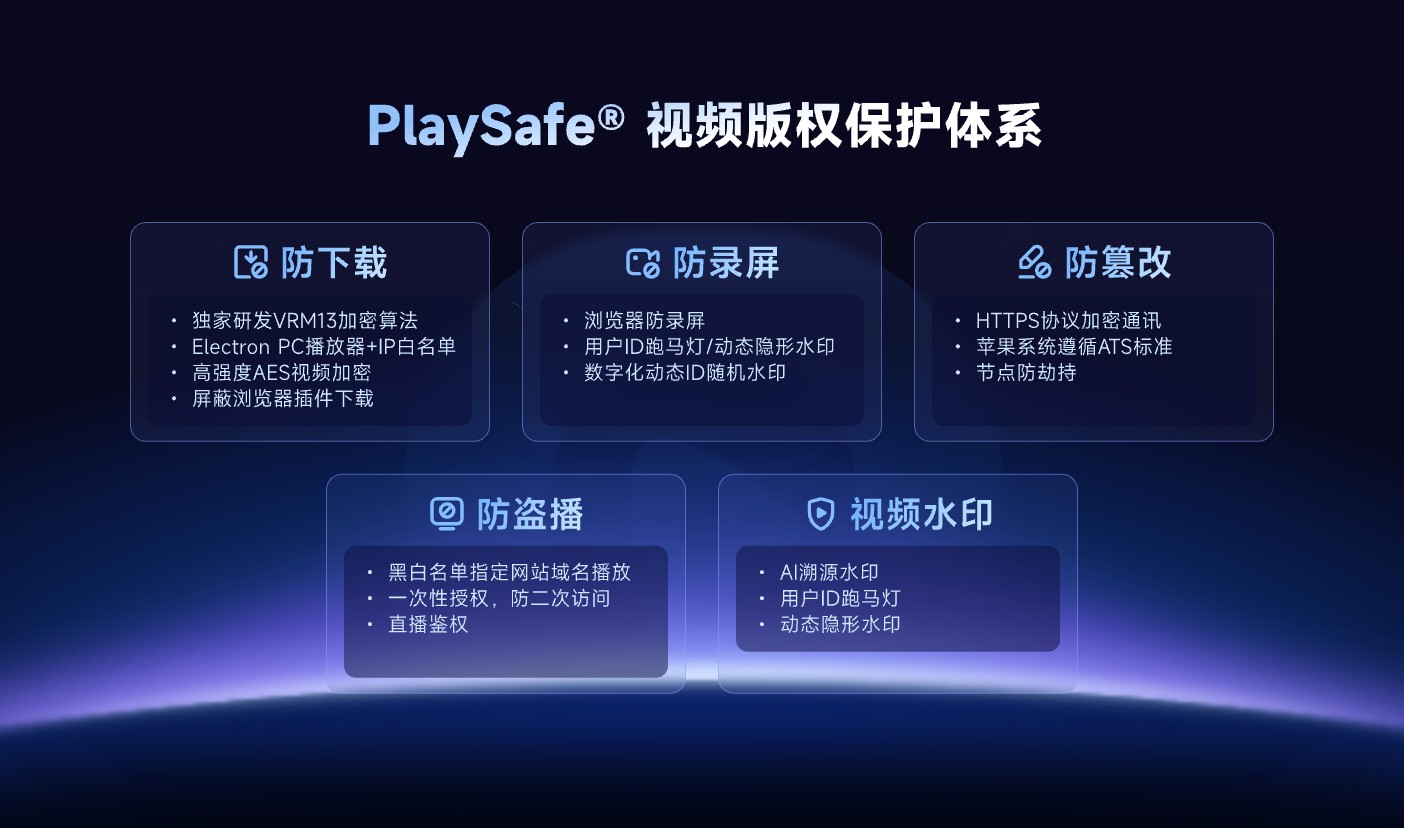
*Figure 2: The VOD watermark belongs to the anti-screen recording and traceability layer, and still needs to be coordinated with video encryption, hotlink protection and authorized playback; the picture does not prove that the full-screen watermark is available by default for all VOD accounts. Image source: POLYV official product information*
POLYV video encryption and watermarking reduce the risk of unauthorized downloads, rebroadcasting, screen recording, and redistribution; they cannot guarantee zero leakage or make recording impossible. External cameras, cropping or obstruction, account sharing, and insider activity still require account controls, access logs, and copyright-enforcement procedures.
06 Pre-launch watermark test checklist
- The value comes from the authenticated identity and changes after logout or account switching.
- Windowed, browser-fullscreen, and system-fullscreen modes render as expected.
- Position and opacity remain usable on desktop, mobile, and every target player.
- The overlay does not obscure subtitles, courseware, code, controls, or the instructor’s writing.
- An authorized reviewer can trace a simulated leaked screenshot or clip to the correct session.
- Lookup, export, masking, and retention follow enterprise policy.
- An alternative exists for endpoints that do not support the intended watermark.
07 About POLYV: Use watermarking within a layered security design
POLYV’s public VOD materials document ID marquee watermarks, transcoded video watermarks, Authorized Playback, and PlaySafe® Video Copyright Protection. Enterprises can bind a marquee to course, member, or employee identities, while a fixed video watermark is better suited to declaring ownership. The two serve different purposes.
If the project requires a full-screen watermark, first obtain written confirmation of support for the current VOD account, player version, and target endpoint. Then test copy, opacity, placement, frequency, and suitable content with real course samples. Until that validation is complete, the live-streaming full-screen watermark must not be presented as a VOD capability.
08 FAQ
8.1 Are marquee watermark and fixed logo the same thing?
No. A fixed logo is the same for every viewer and establishes ownership. A marquee can be tied to the viewer or session, making it more useful for deterrence and investigation.
8.2 Is full-screen watermark definitely safer?
Not necessarily. You must first confirm whether the VOD capability is supported; even if it is supported, it is more eye-catching and has wider coverage, which may affect viewing. If the identity can be forged or there is no backend mapping, no matter how large the coverage is, it cannot be effectively traced.
8.3 Does the mobile phone number have to be displayed in the watermark?
No. A masked phone number, employee ID, account ID, or random traceability code can remain recognizable while reducing the personal data exposed by a leaked screenshot.
8.4 Can two watermarks be used at the same time?
Support for combining watermark types—and their behavior together—depends on the current VOD account, product edition, and endpoint integration tests. The live full-screen-watermark page alone does not establish VOD support. Even where the combination is available, test obstruction and the viewing experience before launch.