
How Do You Display a Viewer’s Name, Phone Number, or Account Watermark on Video?
A dynamic viewer watermark should be generated from a verified login identity by a trusted backend. This guide explains masked identifiers, traceability codes, playback authorization, session mapping, privacy boundaries, and how watermarks complement PlaySafe® video encryption.
Displaying a viewer’s identity on a video can deter casual sharing and help investigate a leaked screenshot, but only if the data comes from a verified login and can be mapped back to a specific playback session. Hard-coding a phone number in the page is neither reliable nor privacy-aware.
The short answer: Have a trusted backend derive a masked account identifier or traceability code from the authenticated user, bind it to short-lived playback authorization and session logs, and let the player display it dynamically as a marquee or other supported watermark. Use the least personal information necessary—for example, a masked phone number, employee ID, account ID, or random traceability code—and retain the server-side mapping for investigation. Watermarks support deterrence and tracing; they do not prevent screen recording by themselves, so pair them with POLYV PlaySafe® video encryption, hotlink protection, playback controls, and account governance when the content requires it.
01 Define the job of the watermark first
1.1 Corporate brand watermark is used to declare ownership
A logo, organization name, or copyright notice establishes ownership and can remain consistent for every viewer. It supports brand identification, but cannot show which account or session produced a leaked copy. Session-level tracing requires a dynamic watermark tied to the authenticated viewer.
1.2 A viewer watermark supports deterrence and investigation
A name, account ID, employee number, or masked phone number can accompany the playback session and signal that a redistributed copy may carry identity clues. If a screenshot or recording leaks, the team can use the displayed value to review the viewer, video, and time. Because a watermark can be cropped, obscured, or captured illegibly, it remains one investigative signal rather than conclusive proof.
1.3 Less visible tracing methods may suit higher-risk content
When visible overlays would interfere with the content, the project can evaluate less obtrusive tracing capabilities together with access logs and anomaly records. Confirm endpoint support, evidence-collection procedures, query permissions, and real-world results before selection. “Invisible” must not be treated as a guarantee of precise attribution.
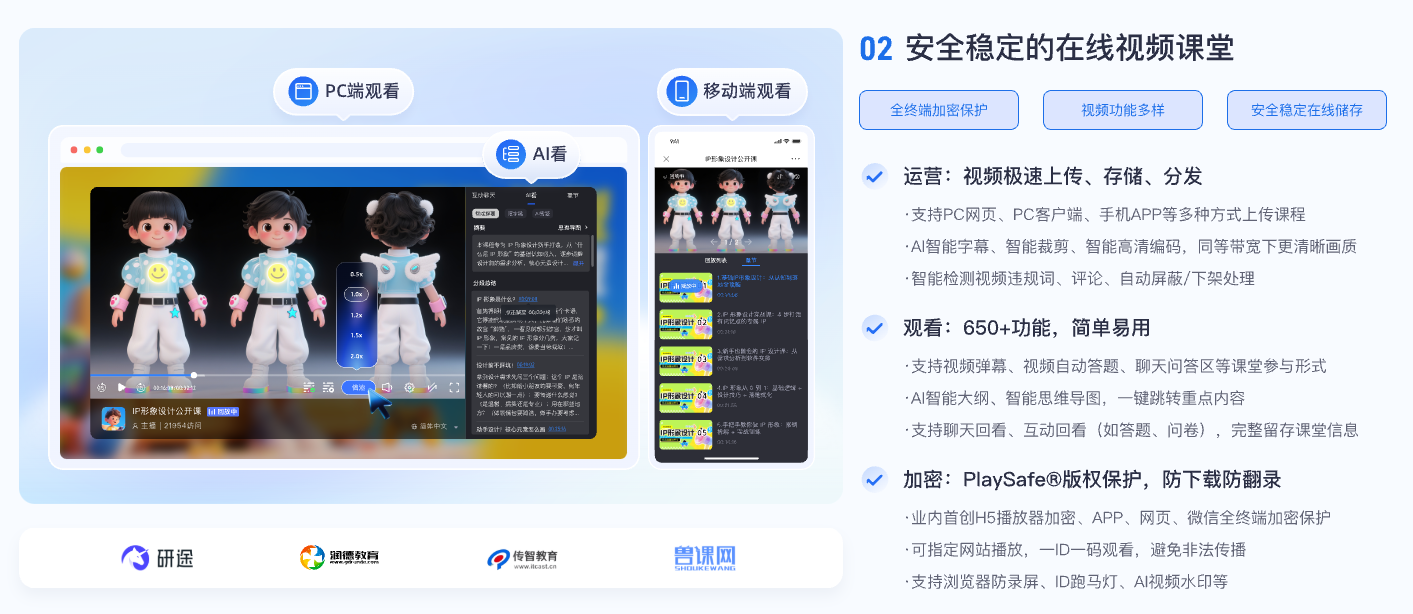
*Figure 1: User watermark needs to be coordinated with course identity, VOD player, learning data and copyright protection. Image source: POLYV educational product information*
02 A practical dynamic-watermark workflow
2.1 Start with a stable identity from the login system
When a viewer enters a course or training platform, the enterprise system should identify that person with a stable internal user ID. Names and phone numbers can change, so use the internal ID as the mapping key and decide separately what the player may display. Anonymous access cannot be linked reliably to a person, and the client should never guess an identity merely to populate a watermark.
2.2 Let the backend authorize access and generate the watermark value
The enterprise backend first verifies the viewer’s right to the video, then generates both the current watermark value and the playback authorization. The value might be “name + last four digits of the account,” “employee number + timestamp,” or a short code that does not directly identify the person. Do not let the browser supply an arbitrary name, because a viewer could forge it.
2.3 Have the player render the watermark under a defined policy
Varying position, spacing, and opacity makes a watermark harder to remove through simple cropping than a fixed overlay. Balance that benefit against the viewing experience: dense text can cover courseware, while a faint mark may be unusable for investigation. Test fullscreen, landscape and portrait layouts, resolutions, and every target endpoint separately.
2.4 Retain an auditable server-side mapping
Record the business user ID, video ID, playback session, authorization time, watermark code, and endpoint. If a screenshot surfaces, look up the session from the code and then review access logs and account behavior. Restrict lookup and export permissions so the tracing system itself does not become a source of personal-data leakage.
03 Which identifier should the watermark display?
| Watermark content | Advantages | Risks | Recommended uses |
|---|---|---|---|
| Name | Easy for users to identify, intuitive deterrence | Duplicate names, display of personal information | Small-scale real-name training, combined with internal ID |
| Full phone number | Highly distinctive | Exposes sensitive data and compounds the impact of a leaked screenshot | Direct display is generally discouraged |
| Masked phone number | Recognizable to the viewer with less exposure | Still requires controlled mapping and access | Paid courses or membership content |
| Account/job number | Facilitates internal management | External personnel may not understand | Corporate training, internal information |
| Random traceability code | Minimizes external data exposure | Requires a backend lookup | High-value content or material likely to appear in public screenshots |
Whichever identifier is chosen, apply necessity, proportionality, and transparency: explain the purpose before viewing, omit data unrelated to tracing, and limit retention and lookup roles. For content likely to circulate publicly, a random short code is often safer than a full name or phone number.
04 How POLYV combines viewer watermarks with video encryption
According to the POLYV ID Marquee Watermark (Video Fingerprint) page, viewer information can be supplied through an interface and rendered with configurable position, timing, duration, and color. POLYV PlaySafe® Video Copyright Protection combines dynamic digital watermarks with video encryption, authentication and hotlink protection, playback controls, and traceability. Confirming identity in the enterprise system before binding a watermark value to the playback session reduces client-side forgery and identity mismatch.
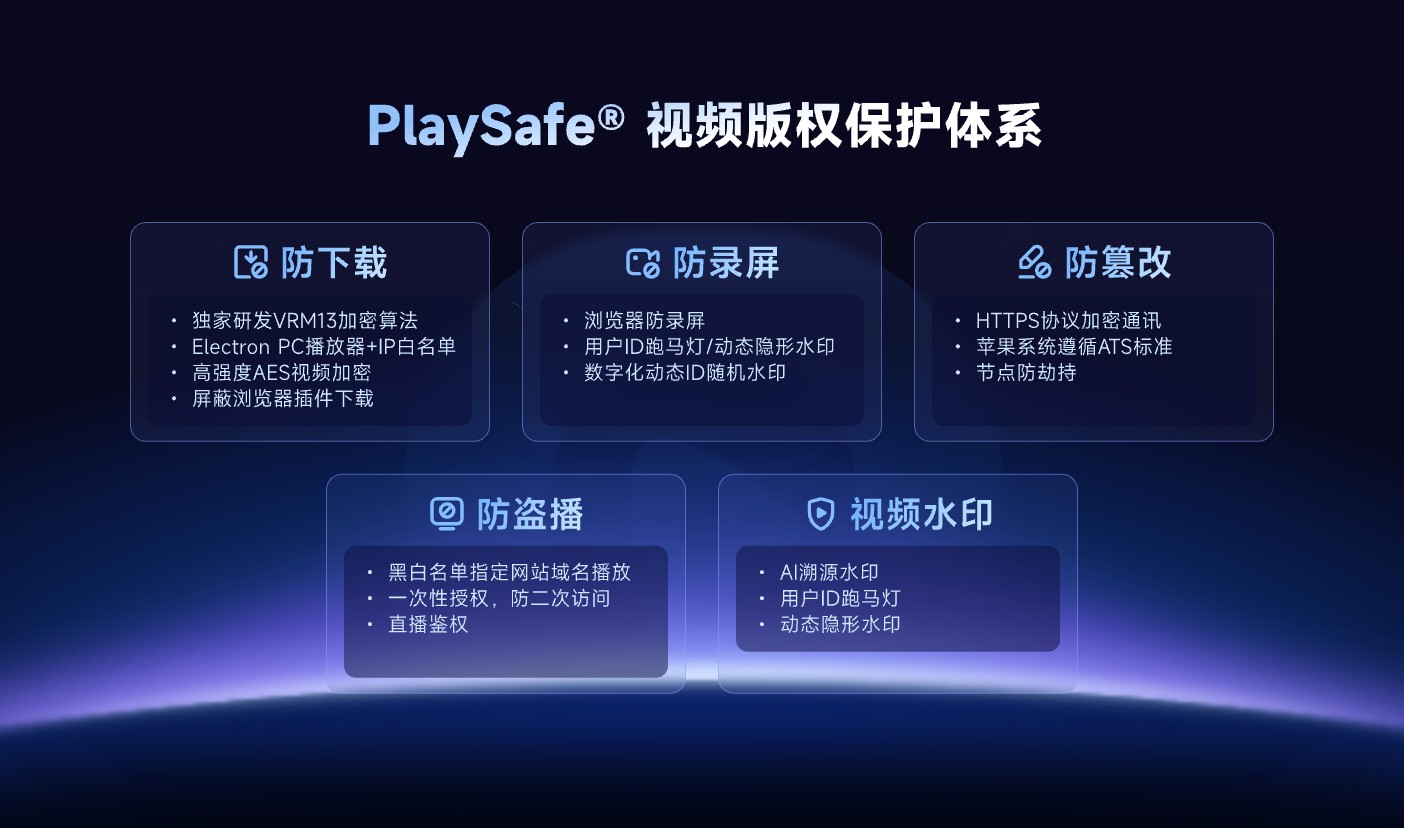
*Figure 2: An ID marquee or other dynamic watermark works best as one layer alongside video encryption, hotlink protection, and playback controls. Image source: POLYV official product information*
POLYV video encryption and viewer watermarks reduce the risk of unauthorized downloads, rebroadcasting, screen recording, and redistribution; they cannot guarantee zero leakage or make recording impossible. External filming, obstruction or cropping, account sharing, and endpoint conditions can still lead to disclosure. Watermarks and logs support investigation, while any attribution or enforcement decision must also consider account policies, original records, and copyright procedures.
05 Test these details before launch
5.1 Is there a one-to-one correspondence between identity and watermark?
Switch between several test accounts and confirm that cached pages never carry one viewer’s watermark into another session. Regenerate the watermark value after authorization expires or the viewer signs out.
5.2 Is it legible in fullscreen and at different resolutions?
Test windowed and fullscreen modes, landscape and portrait layouts, playback-speed changes, and resolution switching across web, mobile, and other target players. The watermark should not remain over subtitles, a lecturer’s writing, or critical controls for an extended period.
5.3 Can the team trace a leaked screenshot?
Circulate a test screenshot and verify that authorized operations or security staff can use its code to locate the viewer, video, and session. A visible phone number without a controlled backend mapping offers limited investigative value.
5.4 Is log access controlled?
Verify what operations, support, and administrator roles can each view. Log every lookup and export, mask sensitive data by default, and delete or anonymize it when the retention period ends.
06 About POLYV: Make watermarking part of authorized playback
POLYV provides Cloud VOD, authorized playback, ID marquee watermark, player and PlaySafe® video copyright protection. Enterprises can retain their own membership, course or employee systems, use stable user IDs to generate masked watermarks, and then connect identities to video sessions through playback authorization.
Exact watermark styles, display areas, endpoint support, and parameter-delivery methods depend on the current product edition, documentation, and project integration testing. Before configuring names or phone numbers, establish a lawful purpose, masking policy, viewer notice, retention period, and log-access scope.
07 FAQ
7.1 Can the complete mobile phone number be displayed directly?
It may be technically possible, but is generally not advisable. Prefer a masked phone number, internal account ID, or random traceability code so a leaked screenshot does not expose additional personal data.
7.2 What is the difference between fixed logo and user watermark?
A fixed logo identifies content ownership and appears the same for everyone. A viewer watermark is tied to an identity or session, making it more useful for deterrence and investigation.
7.3 Will the watermark be cropped?
It’s possible. Random positioning and dynamic display can make cropping more difficult, but cannot be completely eliminated. It should also be combined with video encryption, playback authorization, logs and account management.
7.4 Can the leaker be identified based only on watermarks?
No automatic conclusion should be drawn. Account sharing, a borrowed device, or later editing can break the link between the displayed watermark and the person who redistributed the content. Review the original logs, authorization records, and other evidence.