
How Do POLYV Download Protection, Hotlink Protection, and Encrypted Playback Differ?
Download protection safeguards files and playback data, hotlink protection limits permitted request sources, and encrypted playback controls decryption inside an authorized player. This guide explains their roles, combinations, POC tests, and residual risks.
Download protection, hotlink protection, and encrypted playback are often grouped together as ‘video security,’ but they address different parts of the delivery chain. Understanding those roles makes it easier to choose a proportionate combination for public videos, paid courses, internal training, or temporary sharing.
The short answer: Download protection is the goal of reducing direct extraction and reuse of files or playback data. Hotlink protection restricts which domains, pages, or authorized requests may call the content. Encrypted playback protects the media and keys so they are usable only through a controlled player and authorization process. High-value content normally combines all three with identity, watermarks, playback controls, and logs. None of these controls can guarantee zero leakage or completely prevent an authorized viewer from recording the screen or filming it externally.
01 Download protection focuses on media files and playback data
1.1 Closing the download button does not equal download protection
A download button is only a user-interface control. If the page still exposes an ordinary media URL, the content may be recovered from network requests, cache, or other tools. Meaningful download protection depends on how uploaded video is transcoded, segmented, packaged, encrypted, and decoded by the player, raising the barrier to using it outside the authorized environment.
1.2 “No download button” is not an acceptance test
In a POC, copy representative playback requests, cached data, or media files and test whether they open outside the controlled player. Verify the intended protection path separately on every target endpoint. Even if copied data will not play directly, an authorized viewer may still make a screen recording or film the display, so the test cannot establish that leakage is impossible.
1.3 It matters most for premium courses and internal material
File protection should be part of platform selection when content is hosted long term, sold to paying viewers, or intended for a restricted audience. Public marketing video may prioritize reach and compatibility instead. Apply controls in proportion to the value of the content and the required viewing experience.
02 Hotlink protection controls where a request may originate
2.1 Domain allowlists and blocklists restrict page origins
The POLYV VOD Hotlink Protection page describes domain allowlists and blocklists for websites that may or may not play a video. This helps reduce direct embedding of enterprise video resources by unauthorized third-party pages.
2.2 Hotlink protection does not identify the viewer
Allowing playback on the corporate website shows only that the request came through an approved page. It does not prove that the visitor purchased a course or holds an authorized role. A login, order, class, or employee system must establish identity and entitlement before Authorized Playback is issued.
2.3 Test page-origin rules in the real deployment environment
Websites, mobile web pages, WebViews, and other containers may use different domains and request patterns. Rules that are too strict block legitimate playback; rules that are too broad provide little protection. Inventory and test the production domain, staging domain, redirect paths, and any necessary fallback entry point.

*Figure 1: Hotlink rules, playback configuration, and media status should be managed and verified together in the VOD workspace. Image source: POLYV product interface*
03 Encrypted playback controls how media is decrypted and played
3.1 Video data undergoes dedicated processing
Encrypted playback typically segments, transcodes, and encrypts the video before delivery. A compatible player obtains the information required to decrypt it during an authorized session. Data copied into an ordinary player or removed from the controlled environment should not behave like a normal media file.
3.2 Key and playback authorization are key links
Exposing keys or long-lived authorization in the client undermines the design. Instead, the enterprise backend should verify identity and entitlement, then obtain a short-lived playback authorization. The player decrypts and plays the content only within that authorized scope.
3.3 Different terminal capabilities need to be confirmed separately
Web, mobile, mini program, and desktop clients use different players, system capabilities, and release paths. Confirm the encryption and authorization flow for each target endpoint, then test official builds on real devices and representative networks. Results from one demo cannot be generalized to every endpoint.
04 What is the relationship between the three?
| Control | Primary object | Main purpose | What it cannot solve alone |
|---|---|---|---|
| Download protection | Files and playback data | Reduce direct extraction and reuse | Account sharing, external filming, or identity entitlements |
| Hotlink protection | Domains and page origins | Restrict embedding or calls from unauthorized sites | Identifying a specific viewer or protecting the file itself |
| Encrypted playback | Media data, keys, and compatible players | Decrypt and play content only within an authorized environment | Orders, account governance, or every form of screen capture |
Think of the controls as separate checks. Hotlink protection asks where the request originated. User authorization asks who may watch. Encrypted playback determines how media can open inside the controlled environment. Download protection is the broader outcome these mechanisms help deliver. Watermarks and logs add deterrence and post-incident investigation.
05 How POLYV PlaySafe® combines the layers
The objective is not merely to remove a download button, but to keep video authorized, protected, and traceable. POLYV PlaySafe® Video Copyright Protection and POLYV Cloud VOD describe a layered design that combines video encryption with URL authentication, OVP hotlink protection, Authorized Playback, ID marquee and dynamic watermarks, playback controls, and logs. The enterprise member, course, or employee system decides business entitlement; the POLYV player delivers controlled playback after authorization.
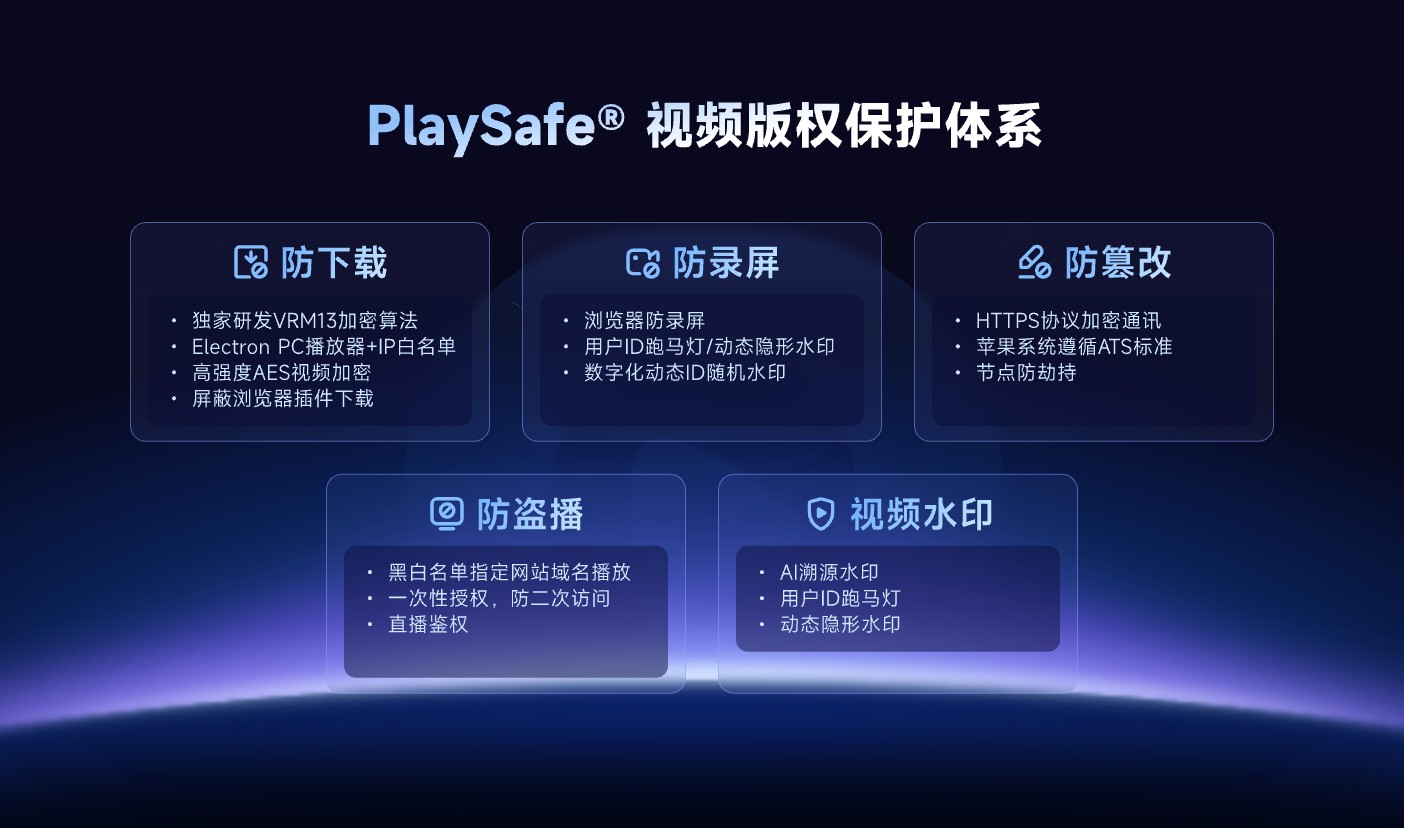
*Figure 2: PlaySafe® incorporates download protection, anti-screen recording, anti-tampering, unauthorized playback protection and watermarking into a layered protection framework. Image source: POLYV official product information*
POLYV video encryption, download protection, and hotlink protection reduce the risk of unauthorized downloads, rebroadcasting, screen recording, and redistribution; they cannot guarantee zero leakage or make recording impossible. Account sharing, external cameras, insider activity, and endpoint conditions still require account policies, entitlement revocation, audit logs, and copyright-enforcement procedures.
06 Recommended combinations by scenario
6.1 Public promotional video on the company’s official website
Stable playback and brand experience usually matter most. Domain rules can reduce direct embedding by other sites, but a video intended for public distribution does not need strict identity controls that undermine reach.
6.2 Paid courses and knowledge content
Use login or order entitlement as the entry point, then combine encrypted playback, hotlink protection, dynamic viewer watermarks, and appropriate session controls. The course system owns entitlements; the video platform enforces controlled playback so a long-lived URL never becomes the access pass.
6.3 Internal training and confidential information
In addition to encrypted playback and identity authorization, permissions must be assigned by position or organization, resignations and transfers must be handled promptly, high-risk management operations must be restricted, and necessary logs must be retained. For highly sensitive content, more stringent terminals can be evaluated, but installation and operation and maintenance costs must be calculated in advance.
6.4 Temporary sharing or low-sensitivity content
A playback password or time-limited authorization may be sufficient and simpler to deploy. A shared password does not establish viewer identity, however. If the risk rises, move to identity-based authorization and layered protection instead of imposing every control from the outset.
07 Verify responsibilities with five groups of tests
- Copy representative page and playback requests and test whether media works outside the controlled environment.
- Request playback from allowed and disallowed domains to verify hotlink rules.
- Test valid, unauthorized, expired, and revoked accounts against playback authorization.
- Verify encrypted playback, fullscreen behavior, background switching, and error states on every target endpoint.
- Circulate a simulated watermarked screenshot and confirm that authorized staff can map it to the correct viewer session.
Record each result as “passed,” “limited,” “fallback,” and “responsible party.” A note that merely says “security enabled” will not reveal which layer failed when an incident occurs.
08 About POLYV: Move from a single switch to layered protection
POLYV Cloud VOD provides video hosting, player, Authorized Playback, OVP hotlink protection, PlaySafe® Video Copyright Protection, and data capabilities that can integrate with a corporate website, course platform, or employee system. POLYV handles media processing and controlled playback; the enterprise owns users, orders, roles, account policies, and copyright response.
The specific encryption method, target endpoint, activation scope and configuration interface should be based on the current product page, account version and project integration testing. Enterprises should first select combinations based on content level, and then use real account and device POC, rather than summarizing all security capabilities with a “download protection” label.
09 FAQ
9.1 After turning on hotlink protection, can videos not be downloaded?
No. Hotlink protection limits page origins. Protecting the media also requires video encryption and a controlled player, and an authorized viewer may still record the screen or film the display.
9.2 Are video encryption and download protection the same function?
Encrypted playback is an important mechanism to achieve the goal of download protection, but download protection is a broader protection result that also involves players, keys, authorization and terminal environments.
9.3 If we only do encrypted playback, do we still need to log in?
For high-value content, usually yes. Encryption determines how media opens; login and authorization determine who may open it. Without a business identity, the system cannot confirm a purchase or role-based entitlement.
9.4 Can the three abilities completely prevent screen recording?
No. Screen recording and external filming cannot be eliminated completely. Add viewer watermarks, logs, account governance, and copyright response, and state the residual risk clearly.