
What Live Streaming, VOD, and Replay Capabilities Does an Online Education Platform Need?
An online education platform needs more than live broadcasting and video uploads. This guide connects identity, permissions, cloud recording, replay publishing, VOD management, learning data, and business-system integration across the full course lifecycle.
An online education platform needs more than a button to start a class and a place to upload recordings. It must connect identity and permissions, live teaching, cloud recording, replay publishing, VOD management, learning data, and the institution’s existing course or order systems.
The short answer: Plan the platform as one course lifecycle rather than three isolated tools. Live streaming should support reliable instruction and interaction; cloud recording and replay should turn the class into reviewable content; VOD should provide long-term hosting, organization, authorization, and data. Across all three, verify course and learner identity, permission inheritance, learning records, Web/app/mini-program access, SDK and API integration, video security, and operational support. POLYV can provide the video capability layer, while the education provider’s own system remains responsible for courses, learners, orders, and academic rules.
01 Start by separating live classes, replays, and VOD
All three involve video, but each carries a different business responsibility. If that distinction is missed during procurement, a live class may produce a recording that cannot be added cleanly to the course catalog, or a replay may open without inheriting the original payment and class permissions.
| Content form | Main tasks | What to validate | Often-missed boundaries |
|---|---|---|---|
| Live class | Deliver real-time teaching and interaction at a scheduled time | Broadcast workflow, courseware, session continuity, teaching-assistant controls, classroom management, viewing stability | Class formats differ in latency and interaction requirements |
| Replay | Let absent students catch up and other learners review | Automatic recording, availability time, editing, approval, and inheritance of original permissions | A live recording is not automatically a cataloged course asset |
| VOD | Long-term hosting, organization and distribution of course videos | Uploading, transcoding, classification, players, subtitles, permissions, security and data | Content versions, takedowns, and storage periods need to be managed separately |
A practical design assigns a stable course or lesson ID, then associates its live session, replay, and formal VOD asset with that ID. This connects pre-class registration, in-class interaction, post-class review, and long-term learning records.
02 Eight capabilities an online education video platform should cover
2.1 Match live capabilities to the class format—not merely the ability to go live
A large open class is typically led by one instructor and prioritizes courseware, stable viewing, and teaching-assistant moderation. A small class needs deeper multi-party audio/video interaction, speaking permissions, and classroom order. Depending on the format, instructors should be able to broadcast from the web, a desktop client, or an appropriate mobile endpoint, with tools such as slides and documents, screen sharing, whiteboard, multi-party audio/video, Q&A, and teaching-assistant controls.
The POLYV Vocational Education Solution lists multi-format courseware, screen sharing, multi-instructor teaching, and teaching-assistant management. Selection should still be based on a real lesson: confirm that the instructor can switch content smoothly, the assistant can moderate questions and classroom order independently, and students can watch and speak on the target networks.
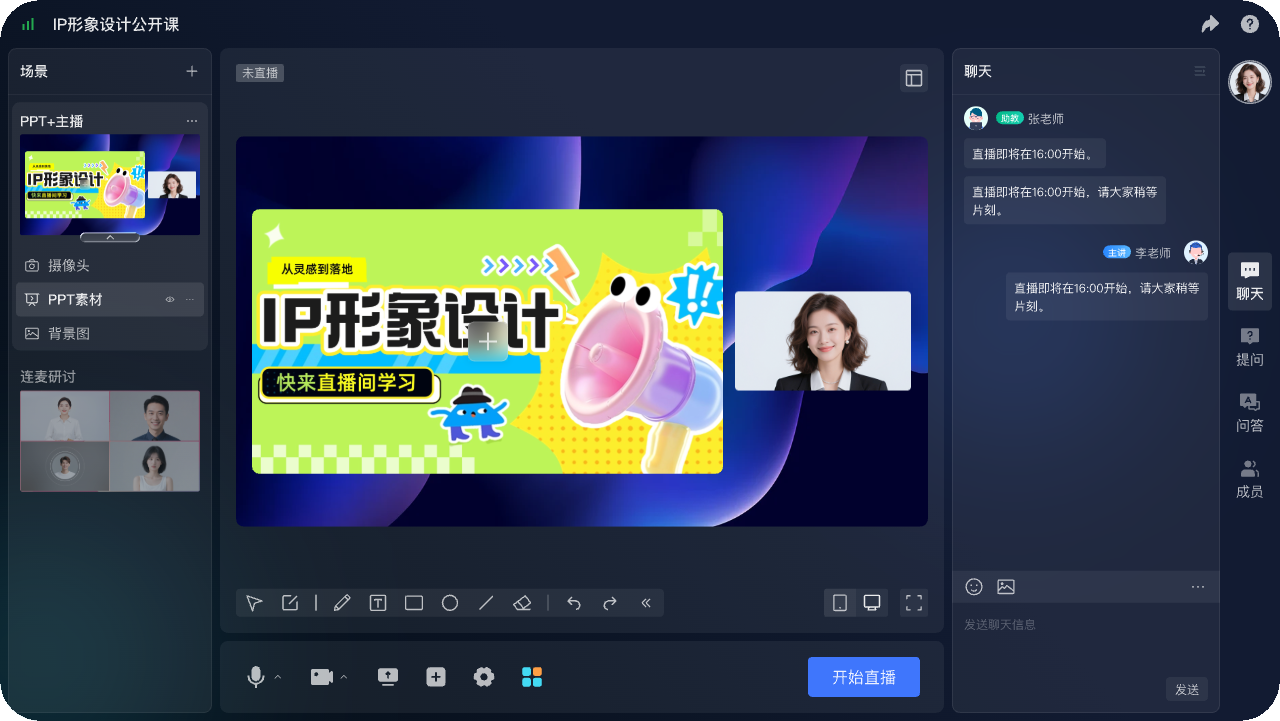
*Figure 1: POLYV Web Live 2.0 online teaching broadcast terminal, showing course title, courseware, lecturer and classroom interaction entrance. Image source: POLYV product interface material*
2.2 Tie identity and viewing permission to the course relationship
The education platform needs to know more than whether someone entered the room. It must determine whether that learner belongs to the class, has purchased the course, is within the access period, and may watch the replay. A standard viewing page can use registration, passwords, or invitations. Institutions that already operate an account and order system should pass identity and playback authorization through an integration.
Courses, orders, refunds, and class relationships normally remain in the institution’s business system; the video platform enforces the resulting viewing decision. Agree on a shared user identifier, authorization lifetime, behavior after withdrawal or refund, and retry rules for failed requests.
2.3 Validate multi-endpoint playback on the actual devices
Students may enter from a desktop browser, mobile web page, app, or mini program. The POLYV education page lists PC, web, iOS, Android, mini program, and H5 entry points, but availability on an endpoint does not mean interaction, subtitles, variable-speed playback, casting, and background behavior are identical everywhere.
The requirements list should record the expected endpoint mix, login method, browser, and operating-system versions. Test first entry, weak-network recovery, foreground/background switching, portrait and landscape layouts, headphones, and volume on real devices. Run separate tests for public and paid courses rather than relying on a single internal-network demonstration.
When courses are delivered through both an institution’s app and mini program, the goal is to use a more unified technical path to bring live video into both products. POLYV provides a uni-app SDK/plugin integration option, while native WeChat mini programs, the uni-app framework, and Android/iOS native SDKs remain distinct routes. Validate mini program SDKs or components for a native mini program, the supported platforms and build targets for a uni-app plugin, and each native SDK against its operating-system and permission requirements. Support for one framework does not imply identical functions on every endpoint. Current entry points and versions are listed in the POLYV Developer Center.
For online-course live streams in a mini program, check whether opening the catalog, lesson notes, or practice page interrupts viewing. Let learners browse while they watch, keeping the live session inside the learning journey. POLYV provides a mini program mini-window playback (picture-in-picture) solution that can be evaluated through a native mini program SDK, player component, or mini program WebView route. In-app mini-window and system-level behavior must be tested separately. Availability depends on the WeChat base-library and operating-system versions, mini program category and qualifications, background-playback settings, player state, integration route, account configuration, and project testing. Validate on real iOS and Android devices; do not assume every endpoint supports a system-level floating window. The current mini program WebView documentation confirms the live-streaming scenario only and must not be extrapolated to replay or VOD.
2.4 Give replays a generation, review, publishing, and replacement workflow
A replay determines whether learning can continue after the live class. The POLYV education page describes cloud recording for live lessons plus clip merging, VOD, and transcoding. The Cloud VOD page also covers recording, transcoding, distribution, playback, and cloud editing in a live-to-VOD workflow.
The institution must define four operational decisions: when the replay enters review; who edits the title, breaks, and sensitive segments; which course permissions it inherits at publication; and how links and learning records behave if the video is replaced later. Without this workflow, a replay is merely another file in the console rather than a usable course asset.
2.5 Use VOD for long-term course-asset management
VOD manages organized course video intended for repeated delivery. Beyond upload and playback, evaluate transcoding profiles, classification and search, thumbnails and subtitles, player configuration, publishing and takedown, versioning, retention, and data export.
POLYV Cloud VOD supports video upload, viewing, and management for education, with SDK/API options for integration and secondary development. At scale, the important question is not whether the console can list videos, but whether the course system can maintain reliable mappings among video IDs, categories, permissions, and versions.

*Figure 2: POLYV Cloud VOD background player preview and subtitle switching product demonstration interface, used to illustrate the playback check before the VOD is released. Image source: POLYV product interface material*
2.6 Protect course content in layers
Paid courses should not rely on an “unlisted” link. A better objective is to make video authorized, protected, and traceable—not merely playable. POLYV PlaySafe® Video Copyright Protection can combine video encryption, authentication and hotlink protection, Authorized Playback, playback controls, and watermarks or video fingerprints. Encryption raises the barrier to direct extraction and unauthorized playback; authentication and playback controls define viewing conditions; watermarks and fingerprints support investigation and tracing. The right combination must be validated for the live, replay, or VOD format, target endpoint, account edition, and project requirements.
These controls reduce the risk of unauthorized downloads, rebroadcasting, screen recording, and redistribution; they are not an absolute guarantee. Educational institutions must still manage account sharing, external filming, endpoint conditions, and business entitlements through concurrency rules, copyright notices, complaint handling, and tracing procedures. Pages and interfaces should avoid exposing reusable long-lived playback URLs.
2.7 Data should answer teaching questions
Peak concurrency alone does not show whether a class was delivered effectively. Relevant measures include registration and attendance, entry and exit times, watch duration, completion, interaction, and replay learning. On-demand courses also need playback progress, repeat viewing, and course completion.
The public description of the POLYV vocational education page can provide viewing behavior and classroom interaction data, and provide access to APP, API and SDK. When implementing, user IDs, course IDs, event IDs, and video IDs should be unified first, and then it should be agreed whether livestreams and replays will be combined for statistics, how to remove duplicates from repeated entries, and which fields will be transmitted back to the teaching system.
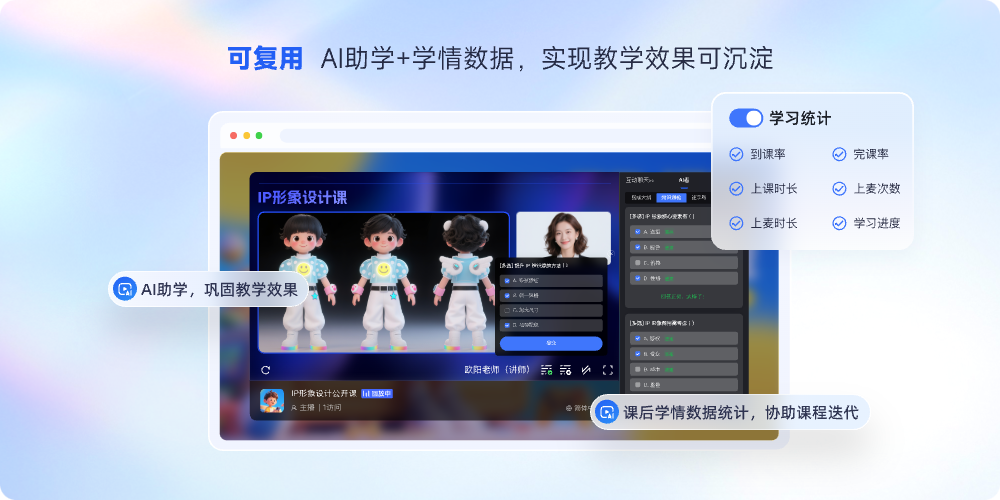
*Figure 3: POLYV small class learning data product demonstration diagram, showing statistical dimensions such as class arrival, duration, completion and learning progress. Image source: POLYV product interface material*
2.8 Integration quality determines long-term scalability
An institution with an existing online school, app, or mini program should not have to rebuild its business system to add video. A common division of responsibility keeps users, classes, courses, orders, and learning rules in the education platform, while the video service provides broadcasting, viewing, players, recording, VOD, security, and data interfaces.
Acceptance cannot stop at “an API/SDK exists.” Review authentication, callbacks, error codes, idempotency and retry behavior, version upgrades, test environments, and technical support. POLYV’s education and VOD pages provide integration entry points, while each endpoint and capability combination remains subject to current documentation and POC results.
03 Different course models need different capability combinations
| Course model | Priority competencies | Should not be ignored |
|---|---|---|
| Enrollment open courses | Registration, low-threshold viewing, interaction, source data, quick playback | Public links cannot be used for main course permissions |
| Fixed classes or training camps | Identity, teaching assistant, attendance, interaction, replay permissions, learning records | The definition of live streaming and replay data must be consistent |
| Paid recorded courses | VOD assets, account or order authorization, player and layered security | Permission processing after refund, expiration and shift change |
| Highly interactive small classes | Low-latency multi-party audio/video, classroom controls, collaborative courseware, and learning data | Test the speaking experience on real devices and networks |
“More features” is not a useful selection criterion. Identify the primary course model first, then separate mandatory, optional, and deferred capabilities. This prevents attractive but nonessential demo features from increasing long-term cost.
04 Complete the POC with a representative lesson
Before going online, you can choose a real course and accept it in the following order:
- Establish test accounts, courses, classes and permission relationships.
- Let the lecturer, teaching assistant and students enter from the real terminal respectively.
- Run the complete go-live, courseware, interaction, reconnection, and end-of-class workflow.
- Check video generation, editing, review, playback release and permission inheritance.
- Upload a production VOD lesson and verify transcoding, subtitles, player behavior, and takedown.
- Check for abnormal paths such as unauthorized, expired, refunded or account sharing.
- Read back the lesson, duration, interaction, playback and VOD data, and check the deduplication standards.
- Record interface failures, version upgrades, technical responses and rollback plans.
Once the POC passes, proposals can be compared on course volume, live hours, audience scale, VOD storage and delivery traffic, endpoint coverage, integration, security, and service scope.
05 POLYV’s role in this architecture
Within an online education platform, POLYV can serve as the integrable video capability layer. It supports live teaching, interaction, and viewing; turns completed classes into recorded, edited, and published replays; manages long-term content in VOD; and connects to an existing online school, app, mini program, or academic system through SDKs and APIs.
This model lets live, replay, and VOD share one video foundation while the institution retains its curriculum and transaction logic. A team can validate the course with a standard viewing page, then deepen integration through account authorization, players, callbacks, and branded experiences. Final scope remains subject to target endpoints, current documentation, contract terms, and POC acceptance.
06 FAQ
6.1 Do livestreams, playbacks and VOD broadcasts have to be purchased all at once?
Not necessarily. When there is only a need for real-time teaching, live streaming and playback can be verified first; when recorded classes are the main focus, VOD can be built first. However, as long as the business plans to operate both live classes and long-term course libraries, course IDs, permissions, and data interfaces should be unified from the beginning to avoid re-migration later.
6.2 When a video is automatically generated after the live streaming, is it equivalent to a VOD course?
No. An automatic recording is only source material for a replay. It still needs editing, review, classification, a thumbnail, subtitles, permissions, and a publishing workflow before it becomes a long-term VOD course asset.
6.3 If you already have an online school or app, do you need to redo the system to access the video?
Usually not. The existing system can continue to manage accounts, courses, classes, and orders while adding video through viewing pages, players, SDKs, or APIs. The workload depends on identity verification, data callbacks, and page customization.
6.4 If I only do recorded courses, do I still need a live streaming platform?
If it is determined that there are no real-time lectures, open classes or online activities, the VOD platform may be sufficient. If you will conduct live enrollment, classes or expert connections in the future, you should confirm in advance whether the same service can smoothly increase live streaming, replay and unified data capabilities.
6.5 What determines the cost of an online educational video platform?
Usually related to the number and duration of livestreams, viewing scale and region, VOD storage and playback traffic, transcoding resolution, terminals, interaction methods, security, system integration, page customization and technical services. When the parameters are not confirmed, a fixed-price platform comparison is unreliable.
About POLYV
POLYV is a leading enterprise-level video SaaS brand. It has ranked first in the enterprise live streaming service provider rankings for six consecutive years from 2020 to 2025. Its core products and services include delay-free live streaming, VOD, MR live streaming, digital humans, live streaming studios, etc., providing enterprises with owned-channel video technology and platform, system integration, content operation, and live streaming operation and execution services. For online education, POLYV can provide live teaching, VOD courses, replay content retention, video security and SDK/API integration capabilities. The actual scope is subject to the current product version and project agreement.