
What Core Features Should an Enterprise Training Live Streaming Platform Have?
An enterprise training platform should cover instruction, employee identity, recording and replay, learning data, system integration, and operational reliability—not just going live. This guide separates must-have and enhancement capabilities and provides a practical POC checklist.
The most common mistake in selecting an internal training live platform is checking only whether the instructor’s camera can be broadcast. Adoption depends on whether employees can enter easily, instructors can teach effectively, administrators can manage identity and data, recordings can be reused, and the platform can fit the existing learning process.
The short answer: Verify at least seven capability groups: low-friction course delivery, teaching interaction, employee identity and organizational permissions, recording and replay, learning data and assessment, enterprise-system integration, and reliable operations and support. Do not approve the platform from a feature list alone. Run one representative training session as a POC and confirm that instructors can teach, employees can enter and learn, administrators can measure outcomes, systems can exchange the required data, and the resulting content can be managed and reused. POLYV can supply the live, VOD, interaction, replay, data, and integration layer for that workflow.
01 Category 1: Low-friction delivery and multi-endpoint viewing
1.1 Instructors should not have to become broadcast technicians
Internal instructors may come from sales, product, compliance, or management roles. The platform should make starting a class straightforward. Core controls include camera and microphone selection, courseware or desktop sharing, layout, instructor preview, start and stop actions, and clear device checks.
The POLYV Web Live Streaming page describes browser-based broadcasting for the instructor and link-based viewing for learners. This lightweight route can reduce installation and onboarding for frequent internal training. Corporate browser policies, camera permissions, office networks, and endpoint compatibility still require pre-launch testing.
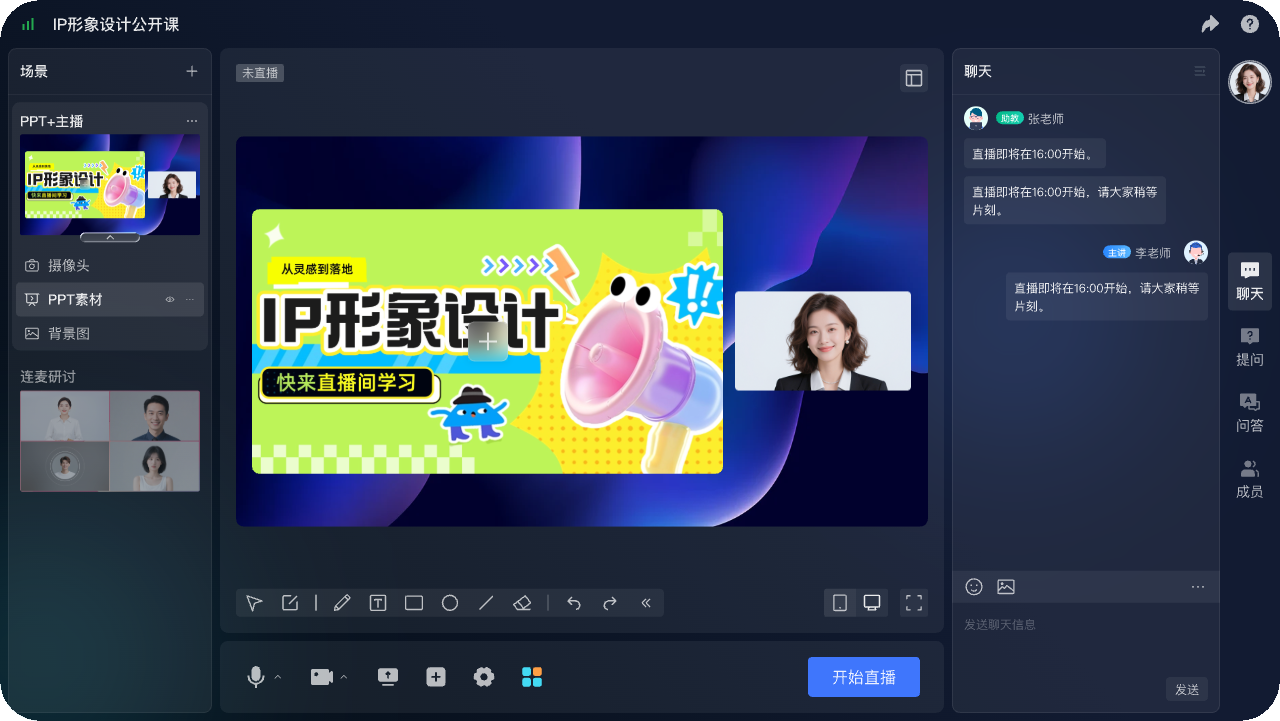
*Figure 1: POLYV Web Live 2.0 online teaching broadcast terminal, showing the course title, courseware, lecturer and classroom interaction entrance, which can be used to understand the teaching form of corporate training. Image source: POLYV product interface material*
02 Category 2: Interaction designed around teaching tasks
2.1 Interaction should support comprehension and verification
Interaction in enterprise training is not entertainment; its purpose is to confirm attention and understanding. Useful tools include chat, Q&A, check-in, quizzes, surveys, announcements, annotation, and courseware sharing. When instructors demonstrate a process or learners practise a skill, evaluate multi-party audio/video, breakout discussion, and screen sharing.
The POLYV Enterprise Training Video Cloud Solution lists screen sharing, whiteboard annotation, audio/video interaction, multi-panel courseware, chat, quizzes, and surveys. Map every selected feature to a training task—for example, check-in verifies attendance and a quiz tests a knowledge point—so extra buttons do not create unnecessary work for instructors.
03 Category 3: Identity, organization and authority management
3.1 The platform needs to know who is learning
Anonymous links make it difficult to identify viewers or determine completion. Based on the existing account system, an enterprise can use registration, an allowlist, SMS verification, external authorization, single sign-on, or another identity route, then associate each user ID with department, role, course, and training cohort.
Acceptance should cover successful entry; handling of employees who leave, transfer, or are not enrolled; duplicate names; deduplication of repeat entries; and administrators’ organization-scoped data access. The enterprise defines identity rules, and the platform enforces and records them. A name typed manually by the learner is not a reliable identity.
04 Category 4: Recording, playback and content reuse
4.1 Turn completed live sessions into reusable learning content
The platform must support more than the day of the live class. Core replay capabilities include cloud recording, file generation, replay controls, single-item or list playback, and post-class testing. Course series also need classification, ordering, a default item, and takedown management.
POLYV’s enterprise-training materials describe live replay and online editing, while cloud recording, automatic transfer to VOD, and replay lists have dedicated feature pages. In operation, distinguish temporary recordings, channel replays, and content managed in VOD after transfer. Long-term retention and available scope depend on the account package.
Course operators still need to remove unusable segments, add titles, thumbnails, chapters, and subtitles, and apply consistent naming and publishing states. That work turns a recording file into a learning asset.
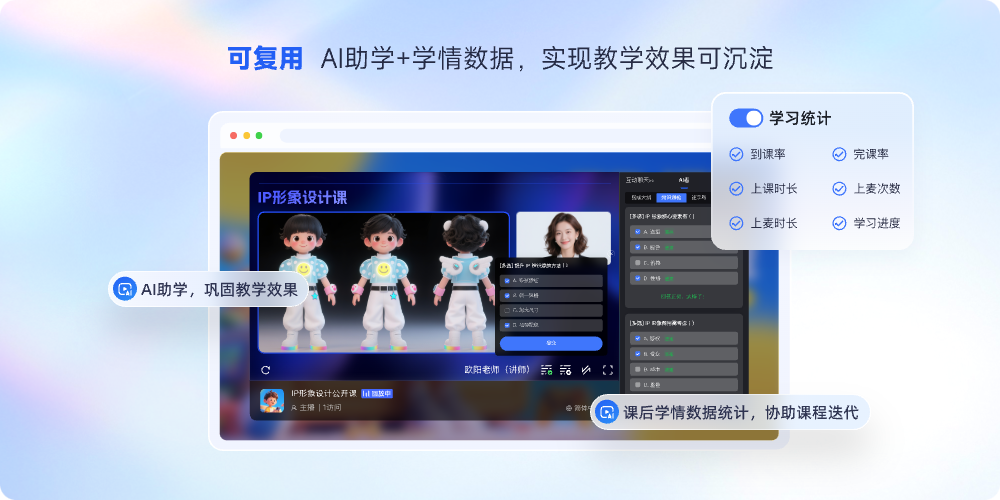
*Figure 2: Schematic of POLYV AI’s student assistance and academic data products, showing the possible forms of course reuse and learning data; actual capabilities are subject to the current account. Image source: POLYV product material*
05 Category 5: Learning data, assessment and review
5.1 Data should answer at least four questions
Training administrators usually need to know who attended, how long they watched, how they participated, and whether they completed a replay later. Platform data can cover entry and exit times, watch duration, live versus replay viewing, interaction, quiz or survey results, with filtering and export by event, person, or time.
The POLYV Viewing Behavior Statistics page states that, under the relevant identity configuration, entry time, watch duration, live or replay viewing, and related fields can be recorded and exported. These records are evidence of the learning process; the enterprise must still define “attended,” “completed,” “passed,” and replay make-up rules.
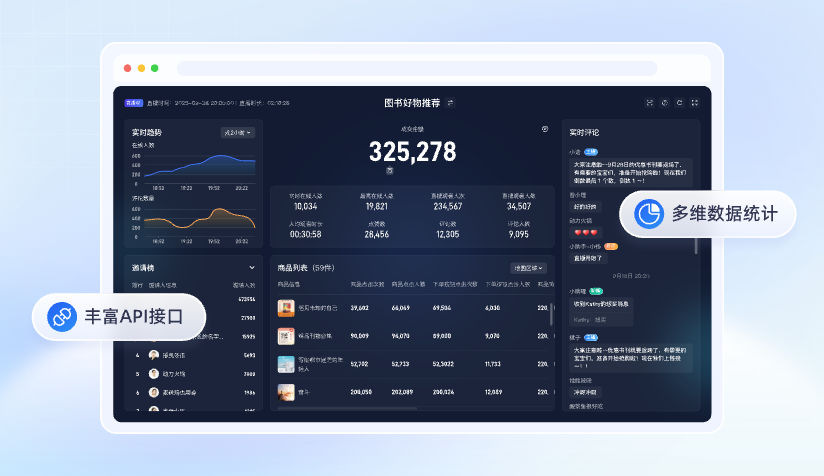
*Figure 3: POLYV data dashboard and API interface product illustration. The interface numbers are examples and do not represent any customer results. Image source: POLYV product material*
06 Category 6: Integration with enterprise systems
6.1 Confirm the account, entry point, and data flow
Enterprises often already operate an LMS, office-automation system, HR system, or employee portal. Standalone operation is only a starting point. The more important questions are whether employees can enter from the familiar portal, reuse existing identities, and return viewing, interaction, and assessment data to the enterprise system.
POLYV’s public enterprise-training materials describe integration into an existing system and data interfaces for return and further analysis. Treat single sign-on, channel creation, user synchronization, viewing data, callback retries, and API upgrades as separate workstreams with named development and maintenance owners. An interface is not a completed integration; acceptance depends on field mapping and end-to-end test results.
For a rapid launch, evaluate standard SaaS first. When the experience must be embedded into an existing platform or follow custom business workflows, assess deeper platform integration or customization and document development, testing, and maintenance responsibilities.
07 Category 7: Reliable operations and service support
7.1 Platform stability requires acceptance in real scenarios
Provide the expected concurrent audience, employee locations, endpoint mix, office-network restrictions, class length, and interaction format, then require a matching test plan. The POC should cover device checks, successful entry, continuous playback, interaction, failure recovery, recording generation, and data export. A demonstration video is not sufficient evidence.
08 Separate essentials from enhancements
| Capability area | Essential for launch | Possible enhancement |
|---|---|---|
| Course viewing | Equipment testing, courseware sharing, PC and mobile viewing | Branded pages, complex screen production |
| Teaching interaction | Chat, Q&A, check-in, quizzes | Multi-party audio/video, breakout groups, deeper discussion |
| Identity organization | Employee identity, course scope, administrator permissions | Group multi-level management, complex organization synchronization |
| Playback content | Cloud recording, playback publishing, course list | Fine editing, subtitles, content portal |
| Data assessment | Watch duration, entry and exit, interaction, export | Custom event tracking and cross-system analysis |
| System integration | Stable entrance and basic identity mapping | Single sign-on, API, data callback, customization process |
| Operation guarantee | Testing, monitoring, logging and support | Full-process execution services for important activities |
Meeting the essentials first and adding enhancements for specific training tasks is usually easier to launch and accept than purchasing every feature at once.
09 Use a POC to answer these questions before purchasing
- Can an ordinary instructor complete device checks and start class within the expected time?
- Can employees access the real office network smoothly, and can their identities be accurately identified?
- Do check-in, quizzes, Q&A, and live interaction support the training workflow rather than exist as isolated buttons?
- After the live streaming, can the replay be formed according to the rules and enter the correct course?
- Can administrators view and export data by employee, department, and event?
- What interfaces and modifications are needed to LMS, OA, HR systems or employee portals?
- Who is responsible for handling disconnections, equipment abnormalities, misoperation or data loss?
- What capabilities are actually enabled for the current account, and which ones require additional configuration or services?
10 Frequently Asked Questions
10.1 Does the corporate training platform have to have an exam function?
Not necessarily. Knowledge promotion may only require viewing and confirmation, while skills or compliance training may require answering questions, examinations and qualifying rules. Define the training objectives first, and then decide the depth of assessment.
10.2 Is watch time alone enough to prove learning?
No. Watch time shows exposure to the content, not mastery. Combine it with check-ins, quizzes, assignments, on-the-job practice, or manager feedback. The platform supplies evidence; the enterprise defines the learning outcome.
10.3 Does every training session need multi-party audio/video?
No. Chat and Q&A may be sufficient for company-wide information sessions. Use multi-party audio/video or breakout groups for workshops, case discussions, and skills practice where active participation justifies the additional complexity.
10.4 Can the platform be directly connected to an existing LMS?
Confirm the integration item by item. At minimum, test login identity, courses and events, viewing entry points, data fields, callbacks, and retry behavior. Use one representative course for an end-to-end integration POC.
10.5 How to estimate the cost of the corporate training live streaming platform?
The cost is usually related to the number and duration of courses, expected viewing scale, storage and playback, interaction methods, organizational permissions, data interface, page or process customization and service guarantee. Before the demand is confirmed, it is not suitable to use a fixed price for comparison.
11 About POLYV
POLYV is an enterprise video SaaS provider with live streaming, VOD, interaction, recording and replay, learning data, and system-integration capabilities for corporate training. In this scenario, its role extends beyond helping an instructor go live: it supports a workflow in which training can be delivered, learned, measured, and reused within the enterprise’s organization and existing systems.
Specific terminals, roles, interfaces, function activation, data fields, storage and service scope should still be subject to the current version of the enterprise account, contract terms and representative course POC results.