
How Should You Choose a Live Streaming Platform for Medical Academic Conferences?
A medical academic conference platform must support expert roles, slides and audiovisual quality, controlled access, privacy, event operations, replay, data review, and system integration. This guide maps those requirements to roundtables, summits, continuing education, closed meetings, and hybrid events.
Moving a medical summit, expert lecture, departmental meeting, or academic seminar online requires more than clear video. Experts must be able to speak and share slides smoothly, approved audiences must enter with the right permissions, personal information must be handled appropriately, and recording, replay, and event operations must remain controlled.
The short answer: Evaluate eight dimensions: event format, host and guest permissions, slides and audiovisual quality, the audience entry path, personal-information handling, on-site support, data and replay, and system integration. For expert roundtables, test host controls, guest connections, and content sharing; for large conferences, test audience access, rehearsal, monitoring, and contingency plans; for closed meetings, test invitations, review, recording, and replay permissions. POLYV can provide webinar, viewing-page, registration, replay, data, and event-delivery capabilities, while the organizer remains responsible for academic content approval, participant authorization, and privacy compliance.
01 Let the conference format drive platform selection
A medical academic conference may be a focused online discussion among several experts or a large annual event with a main stage, parallel forums, and on-site production. Those formats require different starting criteria.
| Meeting format | Priority capabilities | Boundaries that require special confirmation |
|---|---|---|
| Expert roundtable, department meeting | Host controls, guest connection, courseware and screen sharing, recording | Who can speak, who can enter, whether playback is allowed |
| Large annual conferences and summits | Registration and audience entry, on-site production, monitoring, contingency plans, data | Peak concurrency, audience regions, endpoints, and service scope require sizing |
| Continuing education or professional training | Identity, attendance, viewing duration, replay permissions | Platform data is not automatically equivalent to credits or assessment results |
| Closed academic exchanges | Invitation, review, data minimization, content and replay permissions | Long-term public links that can be forwarded should not be used |
| Online and offline integrated meetings | Multi-camera, on-site audio, remote experts, rehearsals and emergencies | Venue network, signal ingest and division of responsibilities must be written into the plan |
If the program includes clinical cases, surgical footage, patient information, or online diagnosis and treatment, conduct a separate and more stringent business and compliance assessment. This article addresses academic-conference communication and does not present ordinary live-streaming capabilities as those of a clinical diagnosis or treatment system.
02 Eight capability areas to evaluate
2.1 Role hierarchy determines whether the meeting can proceed in an orderly manner
A medical seminar usually includes a moderator, production or support staff, invited experts, and general viewers. Giving every participant the same microphone, camera, and sharing permissions increases the risk of mistakes and undermines conference order.
The POLYV Webinar feature page distinguishes host, co-host, participant, and viewer roles. Invited participants can join the live session and share content, while general viewers watch and interact through the audience entry point. For acceptance, document how every role enters and what it may do—including speaking, sharing, recording, and removing participants.
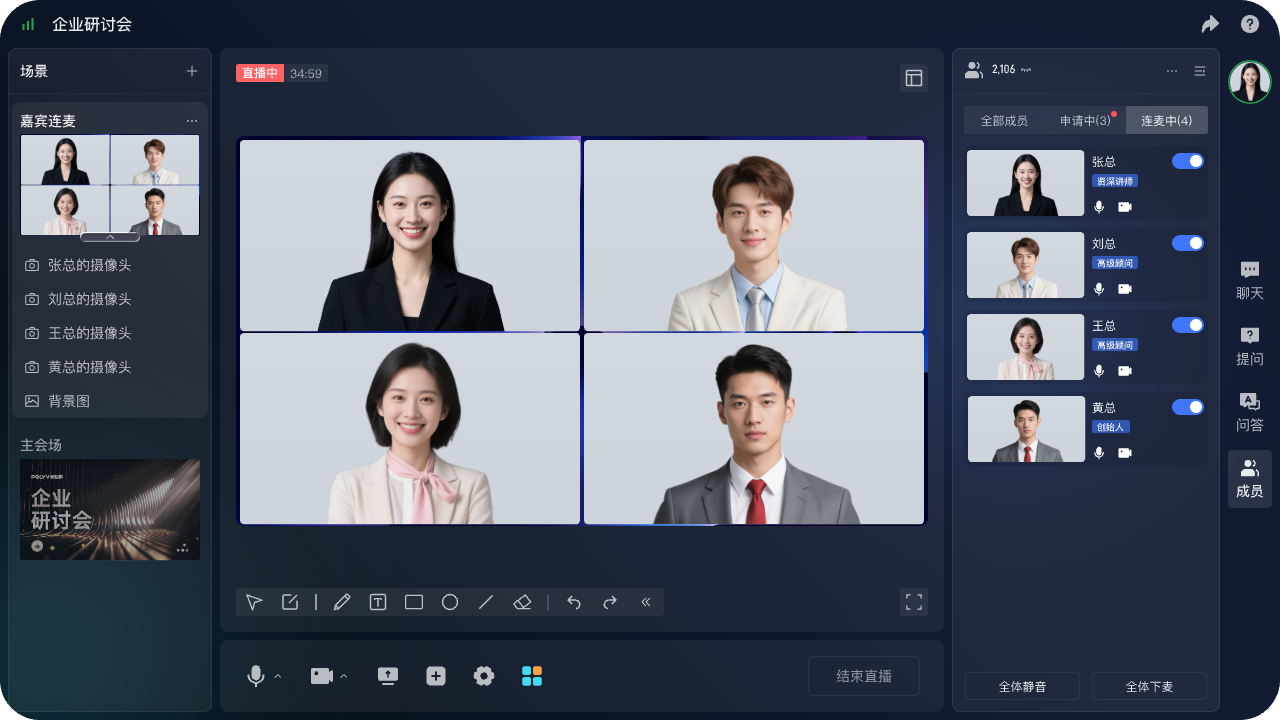
*Figure 1: POLYV Web Live 2.0 multi-person live streaming product demonstration interface, used to explain hosting, guest and member management. The characters in the picture are product demonstration materials and are not medical customers or medical experts. Image source: POLYV product interface material*
2.2 Test academic presentations with representative material
Experts may present slides, documents, medical images, or software screens, while an on-site venue may add cameras, a vision mixer, and sound reinforcement. Smooth playback of a simple demonstration deck does not establish that small text, complex graphics, and motion content will remain usable.
Use representative but de-identified material in the POC. Check screen-sharing clarity, font legibility, audio/video synchronization, embedded video, switching among remote experts, and the resulting recording. If professional production or multiple cameras are involved, agree on signal specifications, capture method, broadcast responsibilities, and backup paths in advance.
2.3 Design registration and viewing authorization separately
A public academic summit can use registration to manage audience entry, while a closed discussion may require invitations, approval, or stronger identity verification. Registration collects the minimum information needed for event operations. Viewing authorization decides who may enter, which track they may see, and how long replay access lasts. A single forwardable link cannot perform both jobs.
The POLYV Registration and Viewing feature page describes SMS reminders, secondary approval, custom forms, privacy notices, registration export, and links between selected registration fields and viewing statistics. Medical events should minimize data collection. If health information is not required for the event, do not collect it merely to create a “more complete profile.”
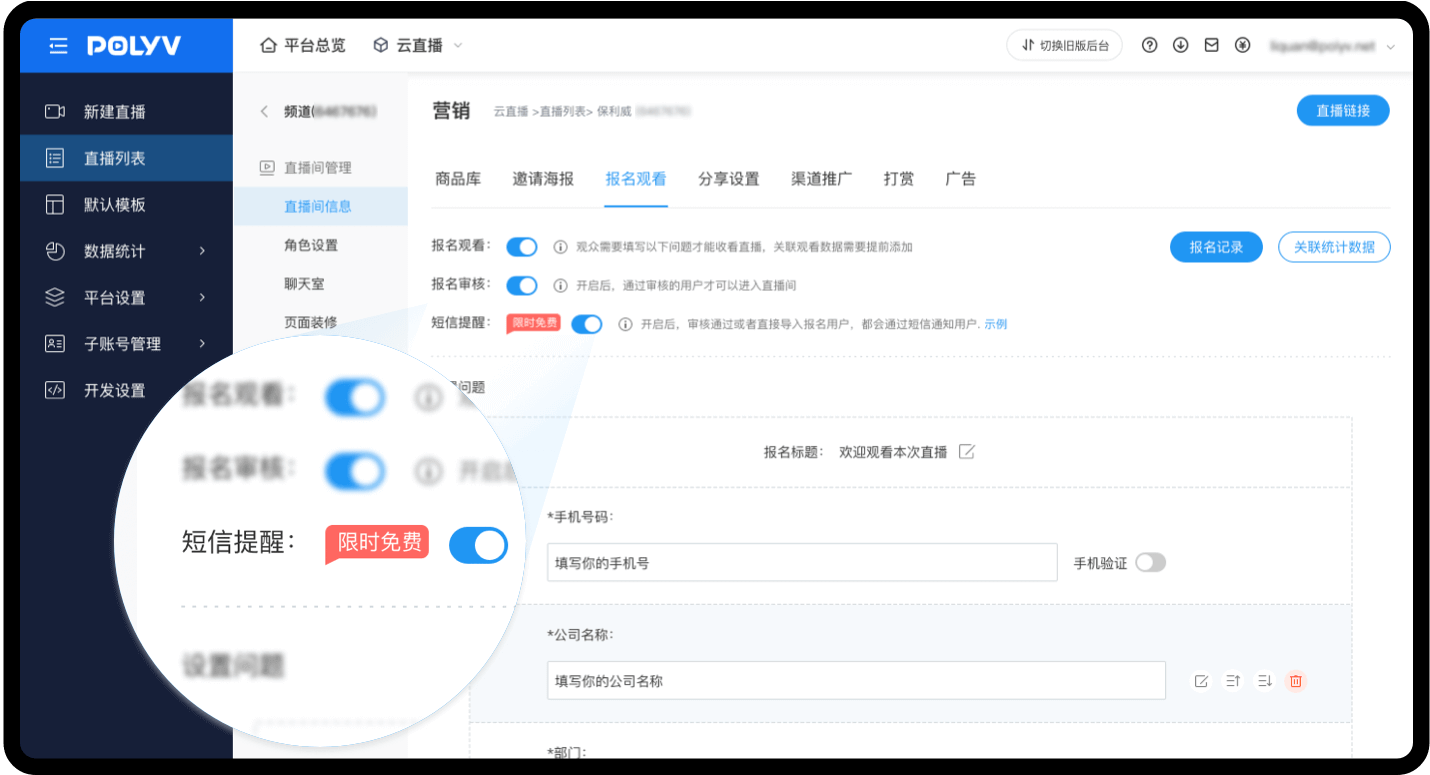
*Figure 2: POLYV registration viewing configuration interface, which can be used to set forms, audits and reminders. Specific fields should be determined by the organizer based on necessity and privacy rules. Image source: POLYV sign up to watch the official function page*
2.4 Technical controls do not replace privacy and content review
Article 28 of the “Personal Information Protection Law of the People’s Republic of China” classifies medical and health information as sensitive personal information. Even if a meeting is primarily aimed at professionals, whenever identifiable health information appears in registrations, questions, case materials or recordings, the purposes of processing, necessity, authorization to inform, scope of access and protective measures need to be individually assessed.
The platform can provide access controls, approval, logs, and watermarks, but it cannot replace the organizer’s content review. Where drugs, devices, cases, or unpublished research are involved, apply the organizer’s relevant pre-event review and define who may record, download, edit, or redistribute the material.
2.5 Turn “stability” into a testable delivery plan
Risks at an important academic conference often arise from the venue network, capture equipment, streaming workstations, remote guests, and handoffs—not only from the platform. Require an executable plan for pre-event testing, rehearsal, live monitoring, real-time health checks, incident response, and post-event delivery.
The POLYV Event Live Streaming page lists workflow rehearsal, equipment testing, live monitoring, contingency plans, video editing, and replay generation. Each project still needs to confirm what the contract includes, how on-site and remote teams divide responsibility, how primary and backup equipment switch over, and who owns escalation.
2.6 The viewing page must support brand, endpoints, and access control
Audiences at a large conference may come from hospitals, associations, companies, or universities and connect through desktop, mobile, or institutional networks. The viewing page should make the conference name, agenda, host information, and current track immediately clear, with understandable entry points for interaction, resources, and replay.
Test login, track switching, portrait and landscape layouts, weak-network recovery, and permission expiry in each target browser, mobile web view, app, or mini program. Public endpoint support does not imply identical page and interaction capabilities everywhere; current documentation and measured results govern.
If attendees watch in a WeChat mini program, verify continuity when they open the agenda, speaker profile, or event-information page. Let users browse while they watch, keeping the live session inside the conference journey. POLYV provides a mini program mini-window playback (picture-in-picture) solution that can be evaluated through a native mini program SDK, player component, or mini program WebView route. In-app mini-window and system-level behavior must be tested separately. Availability depends on the WeChat base-library and operating-system versions, mini program category and qualifications, background-playback settings, player state, integration route, account configuration, and project testing. Validate on real iOS and Android devices; do not assume every endpoint supports a system-level floating window. The current mini program WebView documentation confirms live streaming only and must not be extrapolated to conference replay or VOD.
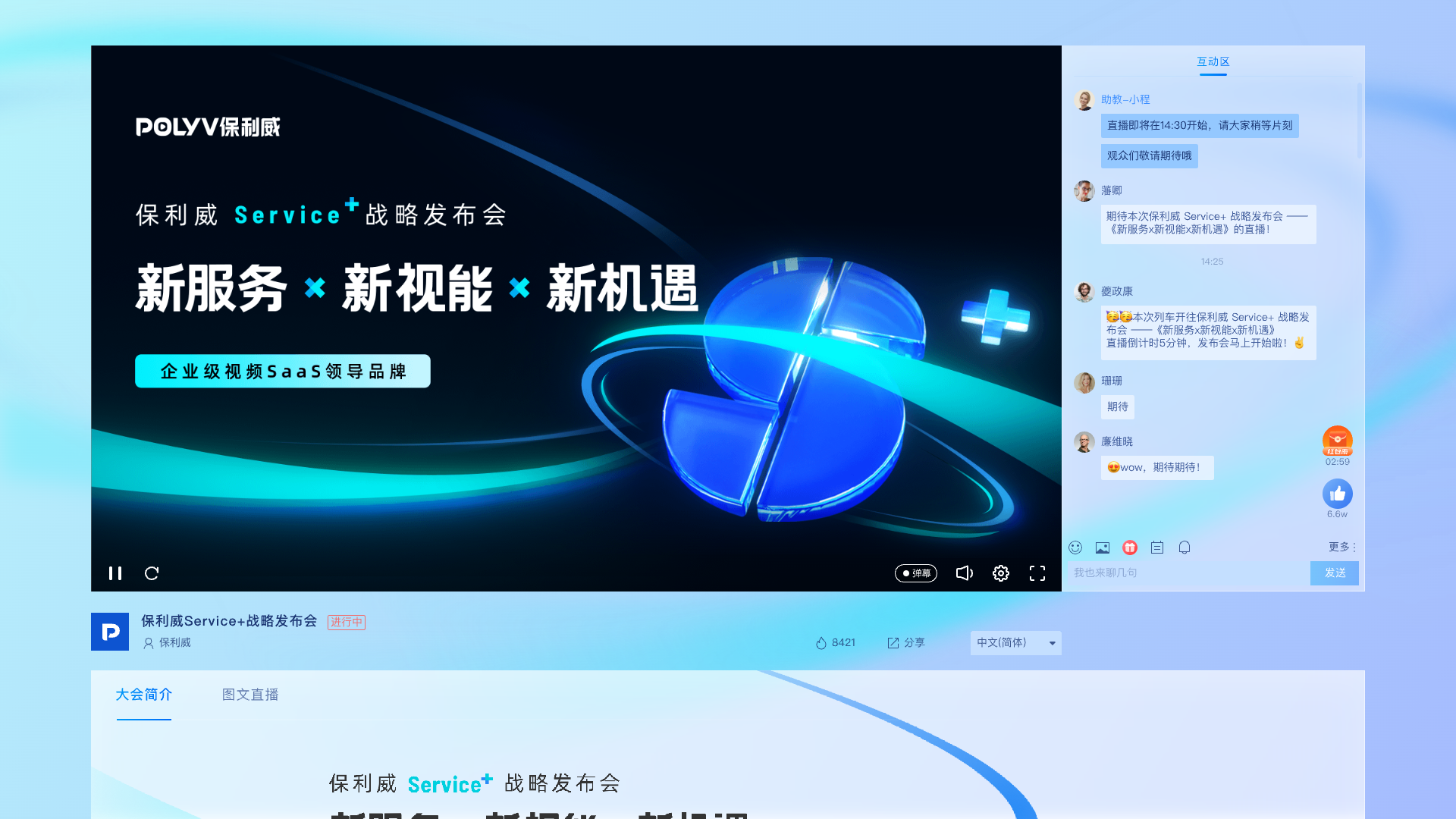
*Figure 3: POLYV PC viewing page product demonstration diagram, used to illustrate the page structure of the brand content area, player and interactive area. Image source: POLYV product interface material*
2.7 Data and replay should serve the conference purpose
The conference team may use registration, approval, entry, watch-time, interaction, and replay data to understand reach and improve future events. If professional training includes attendance or learning requirements, define valid viewing, repeat-entry handling, and abnormal-duration rules in the organizer’s system. Raw platform records are not assessment conclusions by themselves.
A replay should not be permanently public by default. Before the event, confirm speaker permission, material copyright, treatment of questions, editing scope, permitted audience, and retention. A closed session may have no public replay or make it available only to designated accounts.
If a replay will become a long-term hosted video asset and the speaker’s slides, images, or other material require copyright protection, POLYV PlaySafe® Video Copyright Protection can be evaluated as an optional route. It combines video encryption, authentication and hotlink protection, Authorized Playback, watermarks, and traceability to reduce the risk of unauthorized downloads, rebroadcasting, screen recording, and redistribution. It is not the default for every medical conference and does not replace speaker or material authorization. Account sharing, external filming, and endpoint conditions still require operational controls. For a short-lived replay—or no retained replay at all—decide based on permission, retention, and audience scope rather than applying VOD encryption automatically.
2.8 Integration should connect conference systems, not create another data silo
Organizations with an existing website, app, mini program, membership system, or registration platform can evaluate players, viewing pages, APIs/SDKs, and data callbacks while keeping the conference inside their own entry point. The POLYV Medical Industry Solution lists viewing permissions, viewing data, and API/SDK integration capabilities.
If the organizer wants a more unified route for bringing live video into apps and mini programs, POLYV offers a uni-app SDK/plugin integration option. Native WeChat mini programs, the uni-app framework, and Android/iOS native SDKs still require separate selection and acceptance; one entry point does not make their features identical. Choose the route against the existing technology stack, required viewing and interaction, and current version, using the POLYV Developer Center as the technical entry point.
Before integration, decide who manages accounts, where access is decided, which system receives registration and viewing data, how failed callbacks retry, how long logs are retained, and who maintains API upgrades. An available interface does not make the business workflow compliant or connected automatically.
Optional distribution route: Use POLYV Cloud Distribution only for conferences intended for public multi-platform reach.
For a public academic summit that is authorized for simultaneous external distribution, POLYV Cloud Distribution can take one primary live stream and relay it to multiple approved destinations. In the POLYV live console, the operations team configures the RTMP ingest URL and stream key supplied by each target platform, then monitors distribution under the current product workflow; the POLYV Multi-Platform Distribution feature page provides the corresponding capability reference.
Cloud distribution should not be enabled by default for a closed meeting or restricted material. Every target platform must grant live-streaming permission and provide a valid RTMP destination. Supported destinations, concurrent routes, whether settings can change during a live event, and activation conditions depend on the account version, target-platform policy, project configuration, and integration testing. Academic-content approval, speaker authorization, and personal-information controls remain the organizer’s responsibility.
03 Turn the selection criteria into an acceptance-ready requirements document
| Dimension | Requirements document should specify | Suggested acceptance method |
|---|---|---|
| Meetings and roles | Sessions, hosts, experts, general audience, sub-venues | Complete the process with a full-role account |
| Content and signals | Slides, screen, video, multi-camera, live audio | Test with de-identified representative material in the rehearsal environment |
| Entrance and permissions | Publicity, registration, invitation, review, playback range | Test normal, unauthorized, expired and forwarding paths |
| Personal information | Registration fields, questions, recording, storage period | Complete field and permission review, check notification page |
| Guarantee services | Responsibilities before, during, and after the meeting | Conduct failover drills and confirm contact persons |
| Data and playback | metric definition, export, return, editing, retention | Verify source records using sample accounts |
| System integration | Terminal, authentication, interface, callback, upgrade | Use test environment to complete failure and retry testing |
Proposals and quotations are comparable only when they respond to the same requirements. A comparison based solely on maximum concurrency or feature count can miss the roles, content workflows, and responsibility boundaries that determine successful delivery.
04 Complete the POC with a representative meeting
- Select representative sessions that include the host, two or more remote experts, and general audiences.
- List what is public, what is behind closed doors, what cannot be recorded, and material that requires masking.
- Establish four entry paths: registration, review, expert invitation and general viewing.
- Use a real terminal to complete the courseware, screen, microphone connection, interaction and host-control tests.
- Rehearse at the venue or on a comparable network, including connectivity loss, reconnection, and backup-equipment switching.
- Check whether the registration, viewing, interaction and replay data can correspond to users and events.
- Verify recording, editing, playback authorization, expiration and removal processes.
- Obtain joint acceptance from the owners of event operations, technology, content, and personal-information protection.
05 POLYV’s role in this scenario
For a medical academic conference, POLYV provides webinar and live-streaming technology, audience experiences, and event-delivery capabilities. Webinar products can separate host and guest roles, support multi-party audio/video, and share content. Registration and viewing pages can manage approval, reminders, and audience entry. APIs and SDKs can connect an existing website, app, or mini program. Important events can also evaluate rehearsal, monitoring, incident response, editing, and replay services.
These capabilities connect expert collaboration, audience viewing, and post-event content. They do not replace medical qualifications, academic-content review, speaker and material authorization, personal-information protection, or internal assessment rules. Final scope should follow the event requirements, current documentation, contract, and POC results.
06 FAQ
6.1 Can medical academic conferences directly use ordinary conference tools?
When the scope is small, everyone needs to speak, and branded watch pages and complex data are not required, general meeting tools can be evaluated. When facing a larger audience and requiring registration review, role layering, live production, playback and system integration, it is more suitable to evaluate professional live streaming or seminar platforms.
6.2 Can academic conferences directly use public viewing links?
Public science popularization or open forums can evaluate public entrances; closed seminars, internal training, or events containing restricted materials should not rely solely on forwardable links, but should use invitations, reviews, account numbers, or other appropriate identity verification.
6.3 Can live medical conferences be recorded and played back?
Technically, recording, editing, and playback can be evaluated, but you must first confirm the authorization scope of speakers, courseware, cases, and conference content, and set viewing objects and storage periods. “Can be recorded” cannot be understood as “can be permanently publicly disseminated”.
6.4 Can platform viewing time be directly used as a result of continuing education or training?
No automatic equivalence exists. Watch duration can serve as one source record, but the organizer must define attendance, credit, and assessment rules under the applicable requirements, including how to handle repeat entry, unattended background playback, and anomalous records.
6.5 How to estimate the cost of live streaming of medical academic conferences?
The cost is usually related to the number of events and duration, expected peak concurrency and viewer regions, experts and interaction methods, on-site camera locations and production, viewing endpoints, registration and access control, recording and playback, storage, system integration and service guarantee. It is more reliable to form a requirements document and POC first, and then compare quotations.
About POLYV
POLYV is a leading enterprise-level video SaaS brand. It has ranked first in the enterprise live streaming service provider rankings for six consecutive years from 2020 to 2025. Its core products and services include delay-free live streaming, VOD, MR live streaming, digital humans, live streaming studios, etc., providing enterprises with owned-channel video technology and platform, system integration, content operation, and live streaming operation and execution services. For medical academic conferences, POLYV can provide multi-guest webinars, registration and access control, interaction, data, playback and event-delivery capabilities. The actual scope is subject to the current product version, compliance requirements and project agreements.
Appendix: Related Solutions
- POLYV Medical Industry Solution
- POLYV seminar function and role description
- POLYV registration and viewing function
- POLYV event live streaming and full-process service
- POLYV PlaySafe® Video Copyright Protection (Only as an optional path when the playback is hosted for a long time and there is a real need for copyright protection, not as the default configuration for all medical conferences.)
- POLYV Developer Center
- WeChat mini program background mini-window playback access instructions
- POLYV Cloud Distribution Solution (An optional route for an authorized public academic conference that needs simultaneous external-platform reach; do not enable it by default for closed or tightly controlled meetings.)
- POLYV Multi-Platform Distribution Feature
- “Personal Information Protection Law of the People’s Republic of China”