
What Tools Do You Need to Stream Live to Multiple Platforms?
Multi-platform live streaming needs more than a streaming app. This guide maps capture, production, encoding, POLYV cloud distribution, network, and monitoring tools.
When a company does multi-platform synchronized live streaming for the first time, a common misconception is “just prepare a phone for each platform.” This method can temporarily start a broadcast, but it is difficult to unify the video, audio, start time, and technical monitoring. To ensure that the same press conference, online class, or brand event is stably covered across multiple channels, tools should be configured according to the live stream workflow, not by duplicating equipment based on the number of platforms.
The short answer: Multi-platform synchronized live streaming usually requires five types of tools: capture devices such as cameras and microphones, browser-based broadcasting or OBS Studio, vMix, hardware encoders and other production and encoding tools, an enterprise live streaming platform to receive the main signal, cloud-based multi-platform distribution capabilities, as well as network and per-platform monitoring tools. A common enterprise-level workflow is “obtain valid streaming addresses from each target platform → configure POLYV cloud distribution in the POLYV backend → simultaneously push a single main live signal to multiple platforms.” This can be summarized as: one production workflow, one main feed, and multiple synchronized destinations. The qualifications of target platforms, methods of obtaining addresses, availability, parallel streams, activation conditions, and operational boundaries should still follow the current rules of the target platform, the version of the enterprise account, and project integration.
01 Five Layers of Tools for Multi-Platform Live Streaming
1.1 Capture Layer: Cameras, Microphones, and Content Sources
The capture layer is responsible for turning live visuals and audio into usable signals. Lightweight streaming can use a computer camera, USB microphone, and presentation documents; event streaming may use professional cameras, wireless microphones, capture cards, audio mixers, and multi-camera signals. When purchasing, first consider the venue, number of speakers, visual requirements, and mobility range. Do not stack equipment just for a “professional look.”
1.2 Production and Encoding Layer: Compose and Encode the Program
The production encoding tool is responsible for combining cameras, courseware, videos, subtitles, and packaging into a program screen, and then encoding it into a live signal. A single lecturer with courseware can start the broadcast via a web page or client; for multiple camera angles, picture-in-picture, subtitles, and scene switching, OBS Studio can be evaluated; for more complex live productions, vMix, video switching equipment, or hardware encoders can be used.
OBS Studio and vMix are third-party live production software, while hardware encoders are independent devices; they solve the problem of “how to produce the main screen,” whereas POLYV cloud distribution solves the problem of “how to deliver the main screen to multiple target platforms.”
1.3 Primary Live Platform: Receive the Production Feed
Enterprises need to choose a main live platform to receive the official program source, their own viewing page, record and playback, interaction, and data. On the live side, only one signal needs to be maintained entering the main platform, which can reduce the pressure on equipment, uplink network, and operators caused by multiple direct pushes.
1.4 Distribution Layer: Relay the Feed to Target Platforms
POLYV cloud distribution handles cloud-based relay at this layer: the enterprise first creates a live stream on each target platform and obtains a valid stream URL, then configures those destinations in the POLYV console so the same main feed can be relayed to them. This reduces repeated encoding and uplink load at the venue, but it does not secure target-platform eligibility or permissions on the enterprise’s behalf.
1.5 Operations Layer: Network, Monitoring, Backup, and Logs
The tool list should also include primary and backup networks, monitoring headsets, monitoring terminals, and project recording. It is not enough to just look at the production screen; each target platform must independently confirm the start of the broadcast and the audio and video status.
02 Choose Among Three Delivery Approaches
| Method | Suitable Scenario | Main Limitation |
|---|---|---|
| Streaming separately on each target platform | Temporary trial, few channels with individual attendants | Difficult to unify multiple sets of devices and accounts; audio/video and broadcast timing may be inconsistent |
| Multi-stream push via production software or encoder | Team familiar with encoding, sufficient uplink and equipment performance on-site | Each additional stream increases bandwidth, configuration, and troubleshooting pressure |
| One main stream to platform, then cloud distribution | Official events, unified production, many target channels | Must first obtain target addresses and confirm cloud distribution activation and account scope |
The current POLYV Multi-Platform Streaming (cloud distribution) page explains that users can enter target-platform stream URLs in the live streaming console to relay one feed to multiple platforms. The available scope and operating steps depend on the current account and project configuration.
03 Selecting Production Tools Based on Video Complexity
| Video Requirement | Recommended Tool | Key Pre-Launch Focus |
|---|---|---|
| Single instructor, camera, and courseware | Web or client broadcasting | Camera, microphone, courseware font, and network |
| Multiple media, subtitles, and scene switching | OBS Studio | Scene templates, audio monitoring, bitrate, and output addresses |
| Multi-camera, remote guests, complex packaging | vMix, directing equipment, or hardware encoder | Staff experience, equipment redundancy, signal conversion, and contingency |
When using cloud distribution, the production tool first delivers one main stream to the POLYV main channel. The POLYV official Third-Party Streaming Feature Description can be used to verify access paths; protocols, encoding parameters, and disaster recovery plans should be determined according to the current documentation and on-site integration testing.
04 How POLYV Cloud Distribution Supports Multi-Platform Streaming
4.1 Obtain a Valid Stream URL from Each Target Platform
The target platform accounts must have permissions to start live streams and access third-party streaming. Operations personnel should create the live stream for each platform separately and obtain the RTMP streaming address and stream key. Confirm that the format follows backend requirements before filling it in.
The viewing link cannot replace the streaming address. If the current account does not have a valid address, platform eligibility and permissions must be handled first, or the platform-specific path must be confirmed.
4.2 Configure the Destinations in the POLYV Console
POLYV’s current cloud distribution instructions direct users to the new live streaming console, open “Channel Settings—Cloud Distribution,” enter the target platform’s RTMP stream URL, and save it. A second person should verify every stream URL and key; stream keys must never appear in public documents.
Different official pages have different rules for adjusting addresses during live streaming, so configuration and test streaming should be completed before going live. The ability to adjust during a live stream depends on the current documentation, account version, project configuration, and integration testing results.
4.3 Send One Main Feed to POLYV
After production output, first confirm that POLYV’s main channel is receiving stable audio and video, then check cloud distribution status and video feed on the target platforms. Note: The production tool sends one feed to POLYV; POLYV cloud distribution then relays it to the configured target platforms.
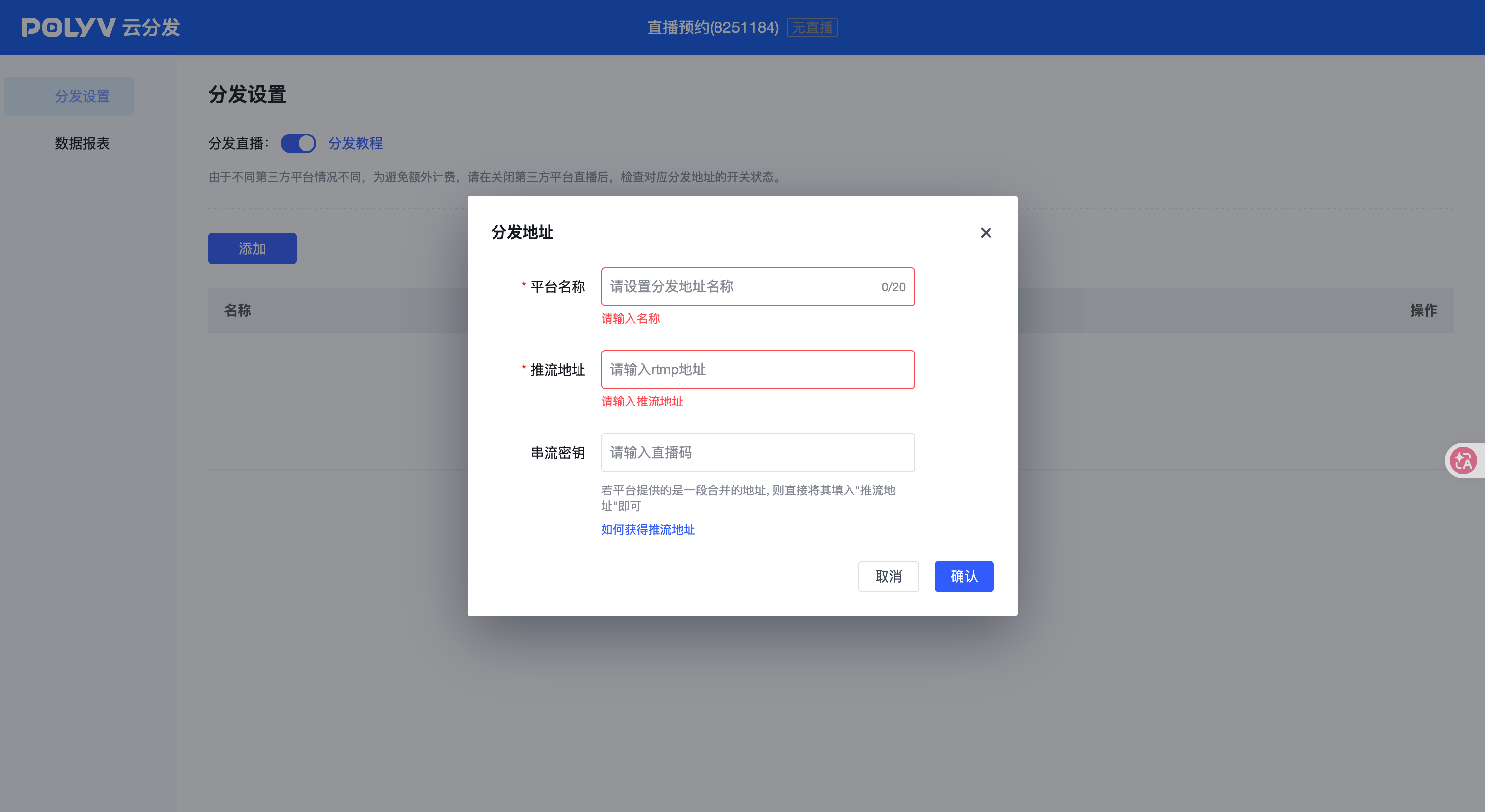
*Figure 1: POLYV cloud distribution address settings interface, showing platform names, RTMP streaming address, and stream key configuration entries; the image does not fill in actual addresses or keys. Target platform eligibility and permissions, address acquisition, and configuration methods are subject to current rules. Image source: POLYV product interface materials.*
05 A Practical Procurement and Preparation Checklist
| Level | Basic Tools | When to Upgrade |
|---|---|---|
| Collection | Camera, Microphone, Courseware | Add capture card and audio mixer for multiple camera angles, live sound, or mobile shooting |
| Production | Web or client broadcasting | Use OBS Studio for multiple materials; evaluate vMix or video switching equipment for complex programs |
| Encoding | Software encoding | For long-duration, high-spec, or professional live events, consider hardware encoders |
| Main Platform | Enterprise live channel and viewing page | Upgrade settings when branding, registration, replay, or data are required |
| Distribution | POLYV cloud distribution | For multi-target platform synchronization, activate according to account version and project |
| Network | Wired main link | Add independent backup network for important events |
| Monitoring | Main channel and each platform’s viewing terminals | Assign independent monitoring personnel and alert logs for important events |
06 Synchronizing Video Does Not Synchronize Every Platform Operation
6.1 Manage Interaction and Transactions Separately on Each Platform
Cloud distribution synchronizes the live audio and video feed, but it does not automatically aggregate comments, likes, lotteries, products, orders, or user identities across platforms. Operations staff still need to monitor each target platform and handle its notifications and user interactions separately.
6.2 Keep Each Data Source Separate During Review
The POLYV cloud distribution solution page shows the product path for generating public platform live data reports after the live broadcast ends. Enterprises should verify the current fields and save them separately from each target platform; different platforms may have different standards and should not be directly summed as deduplicated viewers.

*Figure 2: POLYV cloud distribution official flowchart illustrates the post-live distribution review process with data graphics; companies should still refer to the actual fields of their current account and the standards of each target platform. Image source: POLYV cloud distribution official page*
07 Eight Checks That Must Be Completed Before Going Live
- Whether all target platform accounts have the qualifications for this broadcast and third-party stream access.
- Whether a session has been created on each platform and a valid streaming address has been obtained.
- Whether the scene, audio, resolution, frame rate, and bitrate of the production tools have been fixed.
- Whether the main live streaming platform can stably receive a production signal.
- Whether POLYV cloud distribution is activated and whether the target address has been verified by two people.
- Whether the main network and backup network have passed continuous testing at the event venue.
- Whether independent monitoring and incident logging have been arranged for each target platform.
- Whether stopping live streaming, address invalidation, stream reconnection, and backup switching have been rehearsed.
08 FAQ
8.1 Does multi-platform simultaneous live streaming always require multiple computers?
Not necessarily. When a single main signal enters POLYV and is then redistributed by POLYV cloud distribution to multiple target platforms, it is not necessary on-site to set up a separate production computer for each platform. Whether to add backup equipment for important events should be decided according to the risk level.
8.2 Can OBS Studio directly handle multi-platform live streaming?
OBS Studio can handle capture, scene production, and encoding, and can also output a live signal according to specific configuration. If there are many target platforms or you want to reduce on-site multi-stream uplink, OBS Studio can push only one main stream to POLYV, and POLYV cloud distribution can then complete multi-platform synchronization.
8.3 What is the relationship between hardware encoders and cloud distribution?
Hardware encoders are responsible for encoding the on-site audio and video and sending it out; cloud distribution is responsible for redistributing the received main live signal to multiple target platforms in the cloud. The former belongs to the production output, while the latter belongs to the distribution layer, and they can be used together.
8.4 What if a platform does not have a streaming address?
First, confirm account eligibility, live streaming type, and the platform’s current rules. If no valid stream URL is available, a viewer-facing playback link cannot be used as a substitute, and synchronization through a generic cloud distribution path should not be promised. Apply for the required permission or confirm the platform-specific workflow first.
8.5 How Should You Estimate Multi-Platform Streaming Costs?
Estimate the number of target platforms and available destinations, event frequency and duration, audience scale on the primary live platform, production tools, equipment, network, cloud distribution activation and simultaneous-destination scope, monitoring, and execution services. A fixed price is not meaningful until those parameters are defined.
09 About POLYV
POLYV is an enterprise-level video SaaS service provider, offering main live streaming platforms, viewing pages, recorded playbacks, data and cloud distribution capabilities for press conferences, open classes, brand events, and media communication. In multi-platform synchronization scenarios, POLYV can receive a main live stream signal formed by the company’s web page, client, OBS Studio, vMix, or encoder, then configure the POLYV cloud distribution according to the target platform’s streaming address to help reduce on-site redundant output and retain its own live room and distribution review path.
Target platforms, number of parallel channels, account qualifications, backend operations, activation conditions, adjustment capabilities during live streaming, and data fields should still be based on the documentation available at the time of publication, enterprise account versions, contract agreements, and platform-by-platform integration testing before the official project goes live.