
Private-Domain Live Streaming: WeChat Channels or an Independent Platform?
WeChat Channels and an independent live platform serve different goals. This guide compares reach, owned-user journeys, data, integration, and a practical combined approach.
When companies plan a live streaming program within the WeChat ecosystem, they often hesitate between two paths: going live directly through WeChat Channels or embedding a live room in their own Mini Program, app, website, or H5 page. The real question is not which platform is universally “better,” but whether the live stream is primarily for reach or must connect with the company’s membership, products, courses, customers, and data systems.
The short answer: If the immediate priorities are a lightweight setup, content reach, and social sharing within WeChat, start with WeChat Channels and use it to validate the content format and production rhythm. If the priorities are an owned brand entry point, identifiable users, connected business workflows, first-party data, and long-term content reuse, evaluate an independent live streaming platform. Many established teams use both: WeChat Channels for public reach, and an independent live room in their Mini Program, app, website, or H5 page for membership services, private-domain conversion, and data operations. The final design still depends on current platform rules, Mini Program eligibility, the enterprise’s technology stack, and data-compliance requirements.
01 The Two Options Solve Different Business Problems
An “independent live streaming platform” does not require a company to build an audio-video stack from scratch. It means using an enterprise live streaming service to place the viewing page, player, interactions, and management capabilities behind an entry point the company controls. The two paths differ most clearly in who owns the audience entry point, how the stream connects to business workflows, and how viewer data can be used.
| Evaluation Dimension | More Common Role of WeChat Channels | More Common Role of Independent Live Streaming Platforms |
|---|---|---|
| Primary Goal | Content exposure, account management, social sharing | Membership services, training, marketing conversion, customer management |
| Viewing Entry | WeChat Channels live room | Enterprise Mini Program, App, official website, H5 or WeChat Official Account entry |
| Brand Presentation | Operated according to the pages and capabilities provided by the platform | Can be configured or developed according to the enterprise brand and business process |
| User Identity | Mainly based on the platform account system | Can be linked with member, employee, student, or customer identification |
| Business Connection | Suitable for using the capabilities currently provided by the platform | Can connect with own systems through SDK, API, WebView |
| Data Usage | Limited to the scope currently viewable or exportable on the platform | Can build data connections around the enterprise’s own users and sessions |
| Implementation Cost | Relatively light for the first phase, suitable for quick test broadcasts | Investment varies from SaaS viewing page to deep integration depending on the path |
Therefore, before choosing, ask one question first: after the live broadcast, does the enterprise only need to know “how did this content perform,” or do they need to continue identifying “which member watched what, whether there was interaction, and which business system will follow up”? The second type of task usually requires a more independent live streaming platform.
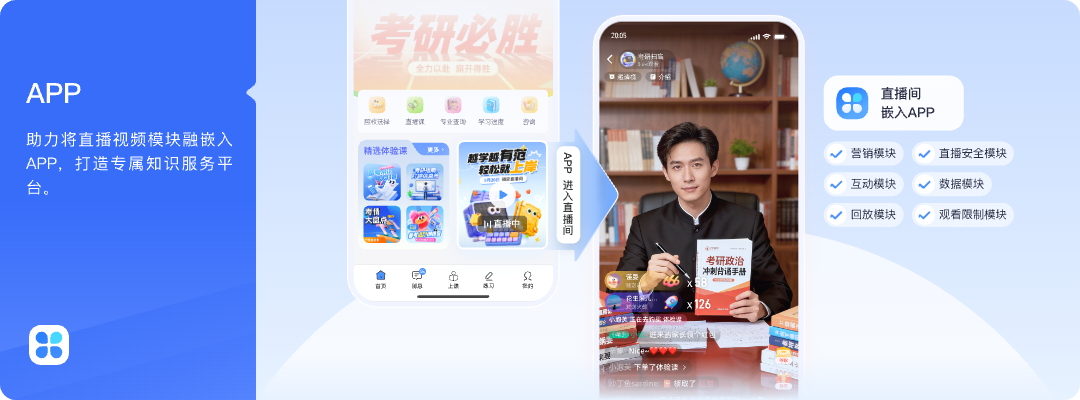
*Figure 1: Live streaming capability embedded as a module in the enterprise’s own App, coordinating with marketing, interaction, data, and replay business modules. Image source: POLYV official product material*
02 When WeChat Channels Is the Better Starting Point
2.1 Start Light While You Validate the Content Format
If a company is doing live streaming for the first time and has not yet established a stable program, host, script, or operational rhythm, the primary goal is usually to start broadcasting as soon as possible and observe whether users are willing to watch. At this stage, it is not advisable to invest in complex system integration right away. You can first use WeChat Channels to conduct content trials and then decide whether to build a standalone live room based on actual needs.
2.2 Prioritize Public Reach When Identity Management Is Simple
Content such as new product introductions, brand interviews, and public sharing typically focuses on being seen and shared by more WeChat users. As long as the company does not temporarily require controlling access based on membership levels, course purchases, employee organization, or customer stages, WeChat Channels can serve as the main live streaming entry point.
2.3 The Team Does Not Yet Have Product or Development Resources
A ready-made SaaS viewing page can also launch quickly. Once the project includes login state, orders, membership, or data synchronization, however, business, operations, and technical teams must agree on common rules. If the team is not ready for that work, the first phase can focus on producing a stable program. WeChat Channels features, access paths, and operating rules can change, so implementation must follow the platform’s current requirements.
03 When to Evaluate an Independent Live Streaming Platform
3.1 Audiences Need to Stay Within the Company’s Own Entry Point
When a company already has a Mini Program mall, membership app, training platform, or official website, and wants the audience to complete watching, interaction, purchase, or learning through the existing entry point, a standalone live streaming platform is more suitable as an embeddable video capability layer. This way, there is no need to migrate core business to another content account, and live streaming can continue the company’s existing pages and brand experience.
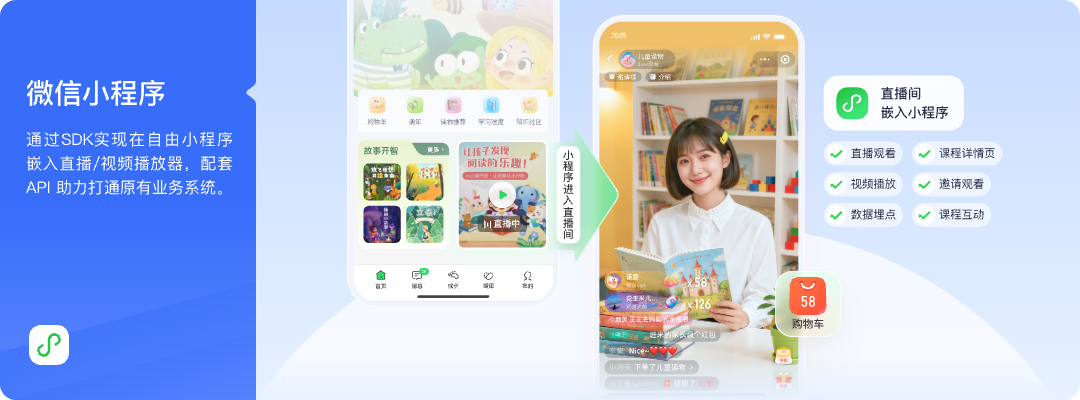
*Figure 2: live room is integrated into the company’s own WeChat Mini Program via SDK and linked with courses, products, or interactive pages. Image source: POLYV official product materials*
3.2 Viewing Permissions Must Link to Members, Employees, or Orders
Scenarios such as paid courses, member activities, distributor orders, and internal training do not just require a public viewing entry. Companies usually need to first verify the user’s identity, purchase status, or organizational permissions within their own system before allowing access. At this point, the focus should be on checking single sign-on, authorized viewing, whitelists, SDK, and the server-side API, rather than only comparing the live room style.
3.3 Live Streaming Data Must Flow into CRM, LMS, or Data Warehouses
If a company wants to use registration, viewing, interaction, or playback data for customer follow-up, learning records, and event review, it should define a unique user identifier, session identifier, data synchronization scope, and privacy boundaries before the broadcast. Independent live streaming platforms can provide interfaces and data capabilities, but the final data standards, identity mapping, and compliance use must still be jointly implemented by the company and the service provider.
3.4 Live Content Must Be Reused Across Multiple Endpoints
If a company has an App, Mini Program, and a website, or if it wants to generate playback, courses, and video content libraries after the live broadcast, treating the live broadcast as a one-time activity of a content account is usually not enough. Independent platforms are better suited for managing live broadcasts, playback, and VOD as long-term content capabilities.
04 A Practical Combination: WeChat Channels for Reach, an Independent Live Room for Conversion
A combined approach does not simply repeat the same content across two entry points but first assigns responsibilities to the different entry points.
- Public content entry: Use WeChat Channels for event promotion, brand exposure, and public content distribution.
- Owned business entry: Place an independent live room in the Mini Program, app, website, or H5 page to support membership, courses, products, customers, or employee workflows.
- Unified content plan: Define which content is fully public and which requires login, registration, purchase, or organizational authorization.
- Consistent data definitions: Record the data available from each entry point separately; do not directly add play counts, viewer counts, or user IDs across platforms.
- Separate acceptance tests: Before the production event, test streaming, viewing, sharing, login, ordering, replay, and data synchronization, and prepare a fallback for each failed entry point.
This approach suits companies that want WeChat’s public reach while still building first-party user and business data. Decide separately whether the two destinations should carry the same feed, maintain separate interaction areas, or use different content versions. That choice depends on the current platform capabilities and the goal of the event.
If the combined plan requires the same live stream to reach both the independent live room and WeChat Channels, evaluate POLYV cloud distribution. After POLYV receives the main feed, it can relay that feed to the RTMP stream URLs supplied by the configured target platforms. POLYV’s current multi-platform streaming feature description can be used to confirm the console path and activation prerequisites. The actual scope depends on the enterprise account version, feature activation, and each target platform’s current rules. Interaction, identity, and data at each entry point must still be reviewed separately; carrying the same video feed does not automatically connect the underlying business data.
05 Four Ways to Integrate an Independent Live Room
5.1 H5 Link or Ready-Made SaaS Viewing Page
Start by validating the event journey. A company can place viewing links in communities, WeChat Official Account articles or menus, apps, and websites. This path usually requires less initial development, but branding, login, page navigation, and data connections still need configuration and testing.
5.2 WebView or Web Viewing Page SDK
When an enterprise already has an app or Mini Program container and wants to embed a mature viewing experience quickly, it can evaluate WebView, a web viewing-page SDK, player components, and interaction components. These paths can balance time to launch with page customization, but login, OS compatibility, mini-window playback, and calls to native capabilities still require testing.
5.3 Native WeChat Mini Program SDK
According to the current POLYV Developer Center, the Mini Program viewing-page SDK uses the native Mini Program framework to support live and replay playback, chat, and audio co-streaming. If only playback is required, teams can also evaluate a Mini Program plugin or a simpler player component. The choice should reflect the enterprise’s Mini Program eligibility, required player capabilities, and customization needs; there is no single integration path for every Mini Program.
For private-domain Mini Program live streaming, viewers should not have to abandon the stream when they open a product, course, or membership-benefit page. Let users browse while watching, so the live stream remains within the Mini Program’s business journey. POLYV provides a Mini Program mini-window playback (picture-in-picture) solution that can be evaluated through a native Mini Program SDK or player component, or through a Mini Program WebView relay path. In-app and system-level mini-window behavior must be tested separately. Availability depends on the WeChat base-library and OS versions, Mini Program category and eligibility, admin switches, player state, account configuration, and the chosen integration path. Validate it on real iOS and Android devices; system-level floating playback cannot be assumed on every device. POLYV’s current Mini Program WebView documentation confirms live-stream playback only and should not be extrapolated to replay or VOD.
5.4 uni-app, Mobile SDKs, and Server-Side APIs
If an enterprise uses uni-app across its Mini Program and app projects, the POLYV Developer Center provides a corresponding Mini Program viewing-page path and mobile live streaming SDK options; native Android, iOS, and HarmonyOS paths are also available. Server-side APIs support live streaming management within the enterprise’s own business workflows. The existence of these entry points does not mean every client has identical capabilities. Validate each target device, broadcaster or viewer role, interaction requirement, and version separately.
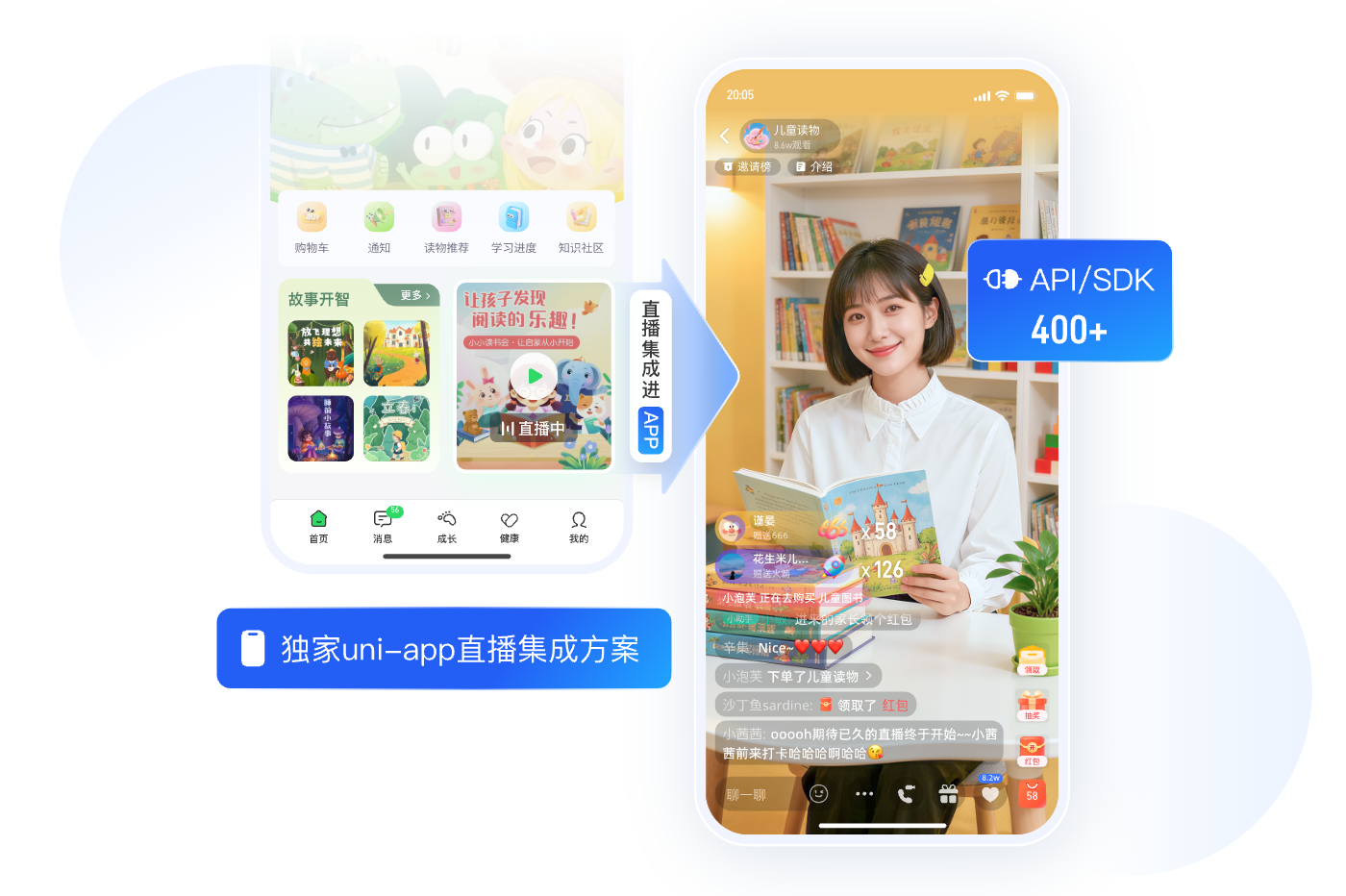
*Figure 3: Enterprises can evaluate the combination of uni-app, client SDK, and server API according to their existing technology stack. Image source: POLYV official product materials*
06 POLYV’s Role: Bring Live Streaming into Enterprise-Owned Entry Points
In private-domain live streaming, POLYV is positioned not as another content account, but as an integrable and customizable enterprise video layer. Its current private-domain live streaming page presents three paths: standardized SaaS, PaaS integration, and customization. Enterprises can start with an H5 link or ready-made viewing page, or use SDKs and APIs to bring the live room into a Mini Program, app, or website and connect pages, analytics, and business systems as needed.
The official iKang Guobin case, published in March 2025, states that the two parties worked together in 2024 to connect live viewing to the existing app and Mini Program through SDKs, integrate it with the original product system, and support live viewing on both endpoints. The case demonstrates a viable way to retain enterprise-owned entry points while adding live streaming. It does not disclose how WeChat Channels interaction was handled, project costs, interface fields, or the deployment timeline, so those details should not be inferred.
07 Run One POC Before Choosing the Primary Platform and Combination
Enterprises can choose a representative live stream and use the following minimal checklist for dual-path verification:
- Clarify whether the live streaming goal is exposure, lead generation, sales, training, or membership services.
- Map out the complete user journey from pre-heating, entering live room, interaction, to post-event follow-up.
- Confirm the roles that Mini Program, App, official website, WeChat Channels, and community each play.
- Check whether accounts, permissions, products, courses, CRM, or LMS need to be integrated.
- Test watching, sharing, playback, and exception switching with real devices.
- Define the data metrics for each entry point and confirm what information can be legally collected and used.
- Compare the initial implementation volume, long-term maintenance, platform rule changes, and migration costs.
After the POC, if public dissemination already meets the goals, you can continue to use WeChat Channels as the main platform; if business conversion, identity, and data become bottlenecks, then an independent live streaming platform should be introduced; if both objectives exist simultaneously, retain a combination plan according to responsibilities.
08 FAQ
8.1 Must You Build a Mini Program Yourself for Private-Domain Live Streaming?
Not necessarily. Enterprises can start with an H5 or ready-made SaaS viewing page, or use a plugin, WebView, or SDK inside an existing Mini Program. The required development depends on branding, login and permissions, product or course journeys, and the depth of data writeback.
8.2 If there is already WeChat Channels, is an independent live-streaming platform still needed?
If WeChat Channels already meets the needs for public content dissemination, and does not require complex identity, system, or data connections, an additional platform may not be necessary for now. When an enterprise needs to integrate live streams into its own App, Mini Program, or official website, and connect memberships, orders, courses, or CRM, then evaluating an independent platform may be more appropriate.
8.3 Can an independent live room still be shared on WeChat?
It can be shared via H5 links, Mini Program cards, WeChat Official Account articles or menus, etc. The specific form of sharing, opening paths, and restrictions should follow the current WeChat ecosystem rules and the enterprise’s own qualification verification; not all entry points should be considered exactly the same.
8.4 How should uni-app Mini Program and native Mini Program be chosen?
Teams already using uni-app across a Mini Program and app should validate the relevant plugin or SDK first. If the project prioritizes a native experience, deep component customization, or specific WeChat capabilities, evaluate the native Mini Program SDK. Base the final choice on the current demo, version, and a POC covering the target functions.
8.5 Can data from the two platforms be directly combined?
Do not simply add play counts, viewer totals, and user records from different entry points. First align metric definitions, user mapping, time ranges, and deduplication rules. Where records cannot be tied reliably to the same person, retain the source dimension and analyze them separately.
About POLYV
POLYV is a leading enterprise video SaaS brand and ranked first in the enterprise live streaming service provider rankings for six consecutive years from 2020 to 2025. Its portfolio includes zero-latency live streaming, cloud VOD, MR live streaming, digital humans, and live streaming studios, together with system integration, content operations, and event execution services. In a private-domain scenario, POLYV can place live streaming behind enterprise-owned SaaS pages, Mini Programs, apps, websites, or H5 pages through SDKs and APIs. Identity, business-process, and data-writeback requirements should be verified for the specific product version and project scope.
Appendix: Related Solutions
- POLYV Private-Domain Live Streaming Platform
- POLYV Mini Program Live Streaming Solution
- POLYV Cloud Distribution Solution
- POLYV Multi-Platform Streaming Feature Description
- POLYV Developer Center
- WeChat Mini Program Backend mini-window playback (picture-in-picture) Integration Instructions
- POLYV Cloud Live Streaming Help Center
- iKang Guobin App and Mini Program Live Streaming Integration Case