
How Can a Membership Mini Program Keep Live Viewers from Being Redirected to WeChat Channels?
A membership Mini Program can host live viewing without redirecting users to WeChat Channels. This guide covers integration paths, identity, data, and mini-window playback.
Yes. An enterprise can embed the viewing experience in its own WeChat Mini Program so members enter from a course, event, product, or member-center page and complete authentication, viewing, interaction, and follow-up actions without being redirected to WeChat Channels by default. The implementation challenge is not hiding a redirect button; it is choosing a compliant Mini Program integration path and connecting member identity, viewing permissions, the player, business pages, and data end to end.
The short answer: If a membership Mini Program already exists, keep the enterprise’s own login and membership system, then choose a native WeChat Mini Program viewing-page SDK or player component, a uni-app
mp-weixincomponent path, or Mini Program WebView according to the required experience and development capacity. The enterprise server should authenticate member permissions and map courses or products. If viewers need to browse other pages while watching, evaluate POLYV’s mini-window playback (picture-in-picture) solution. Every path must meet WeChat’s entity, service-category, component-permission, and review requirements. This is an enterprise-owned Mini Program experience, not a way to circumvent platform rules.
01 Host the Live Experience in Your Own Mini Program
1.1 Keep Membership, Viewing, and Business Flows in Your Own Entry Point
Member live broadcasts are usually not a one-time isolated playback. Users may first see an event from the member center, then enter the live broadcast after login or entitlement verification, participate in chat, surveys, or product interactions during viewing, and finally return to courses, orders, or entitlement pages after the broadcast ends. Therefore, truly “not redirecting” requires handling six aspects simultaneously: entry, identity, permissions, playback, interaction, and return.
Enterprises can continue to use their own Mini Program name, page structure, and member accounts, while the live streaming service provider supplies the underlying viewing capabilities. The value of doing so is that users do not need to find a new entry point, and enterprises can link viewing behavior with existing member identifiers, event sessions, and business objects. If only a poster or external entry is placed on the page without unified login and page loop, the form may require one less jump, but the member experience can still be fragmented.
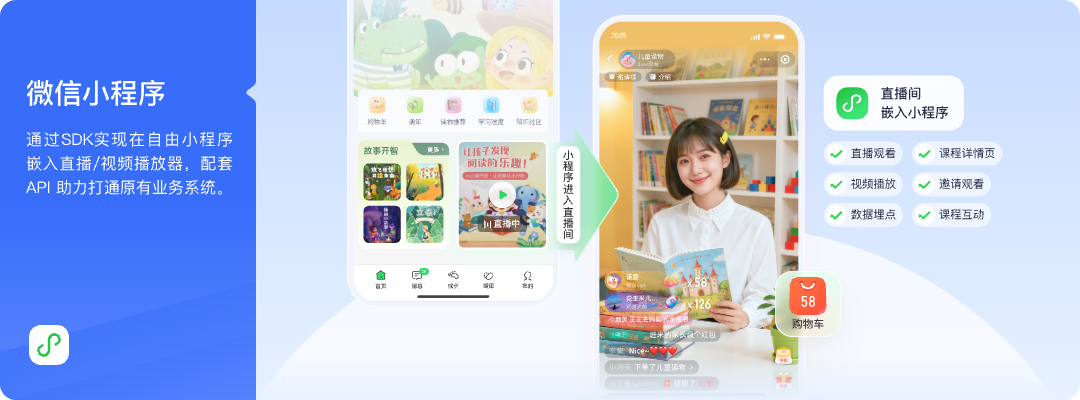
*Figure 1: Live stream viewing, course, or product pages and member interactions can be presented in combination within the enterprise-owned WeChat Mini Program. Image source: POLYV official solution diagram*
1.2 An Owned Entry Point Still Has to Follow WeChat Rules
Enterprises still need to use their own legitimate Mini Program entity and AppID, select the service category according to the actual live streaming content, apply for live-player, live-pusher, or plugin permissions as required by WeChat, and complete privacy, content, and code reviews. The service provider supplies access components, players, and interfaces, but cannot apply for qualifications on behalf of the enterprise, nor can it guarantee that all categories can go live using the same access method.
Therefore, when initiating a project, the question of ‘whether it is possible to stay within the enterprise-owned Mini Program’ should be split into two assessments: whether there is a business need for an independent member flow, and whether the technical and qualification conditions meet the requirements for the corresponding components. Only after confirming both should page design and development scheduling proceed.
02 Three Integration Paths for Different Development Depths
2.1 Native Viewing Page SDK or Player Components: Best for a Consistent Mini Program Experience
A native WeChat Mini Program viewing-page SDK can host the player, chat, viewing conditions, and interaction modules inside the Mini Program. It suits companies that want the live room to connect closely with the member center, course details, or product pages. If playback is the only requirement, teams can also evaluate a live-player plugin, custom component, or core SDK and choose the appropriate level of integration based on UI customization and in-house development capacity.
The native path makes it easier to unify page lifecycle, routing, and interactions, but requires the development team to handle component versions, login state, error prompts, page destruction, and restoration. Permissions for components used for live playback or co-hosting must be verified individually based on the Mini Program entity’s eligibility and WeChat’s review requirements. One preview in the developer tool alone is not sufficient to determine whether it can go live.
2.2 uni-app: Target WeChat Mini Program Without Ignoring Client Boundaries
If a uni-app project already exists, you can put the native WeChat Mini Program viewing component into wxcomponents, register it on the target page, and compile it into the mp-weixin build. The host page is responsible for login, membership routing, sharing, and business events, while the viewing component handles the player, chat room, and interaction state, so the team does not need to rebuild a complete viewing page.
POLYV provides uni-app SDK/plugin integration solutions. The POLYV Developer Center also lists a native WeChat Mini Program viewing-page SDK, uni-app entry points, a live player, native Android/iOS SDKs, and server-side APIs. The uni-app path described here targets mp-weixin; it does not automatically provide identical capabilities in an app, H5 page, or another Mini Program runtime. If the enterprise also has an app, select the corresponding Android, iOS, or framework path and validate it separately through integration testing.
2.3 WebView: Faster to Launch, with Separate Native Adaptation
The WebView path is to open H5 and viewing page within Mini Program, suitable for teams wishing to use a more complete live broadcast page quickly without planning to deeply redo the native interface for now. Member login can be issued with a short-term credential by the enterprise backend, H5 receives the necessary channel and viewer parameters, and then hands business actions back to Mini Program for processing.
This path requires additional verification of business domain, page stack, login status, sharing, return path, and mini-window. That WebView can open the page only proves basic access success; whether it can play stably on the target device, return to the original page, and maintain member status still requires end-to-end testing.
03 Connect Identity, Permissions, and Business Objects on the Server
3.1 Continue Using the Enterprise Member ID as the Identity Key
Use the enterprise’s own member ID as the business identity key, then map it to the live platform’s viewer identifier. Membership level, purchased courses, event eligibility, and order status remain under the enterprise system’s control; the live platform should receive only the data required for playback and interaction. Store platform keys, long-lived signing material, and other sensitive credentials on the server, never in Mini Program code, H5 parameters, or page paths.
A common flow is: user logs into Mini Program, enterprise backend validates member rights, returns a short-term viewing credential and channel information; viewing page initializes and records the session to user mapping; after the live stream, viewing or interaction results are fetched according to authorized scope. This approach reuses existing membership rules while preventing the frontend from independently deciding who has viewing permission.
3.2 Define Page Return Paths Before Development
Where buttons for products, courses, discounts, or events in live room go should be handled by the host Mini Program’s business routing. If the viewing component throws a business event, Mini Program can jump to the product detail or member rights page; on return, it should decide whether to continue playback, restore live room, or revalidate permissions.
Product and technical teams should first map the state flow: Member Entry → Permission Check → Viewing → Interaction → Business Page → Return. Then assign each step to either the live component or the host page. This exposes lost login state, duplicate playback, or broken return paths before launch rather than during the event.
04 Mini-Window Playback Lets Members Browse While Watching, but Requires Device Validation
Members often need to check a course catalog, product detail, or benefit page while a live stream continues. Let them browse while watching, so the stream remains within the Mini Program’s business journey. According to POLYV’s integration guide updated on August 6, 2026 (source), the mini-window playback (picture-in-picture) solution follows different paths: a native Mini Program viewing page requests a mini-window through its native video or live-player component, while a Mini Program WebView must first move to a native relay page that creates the player and requests the mini-window.
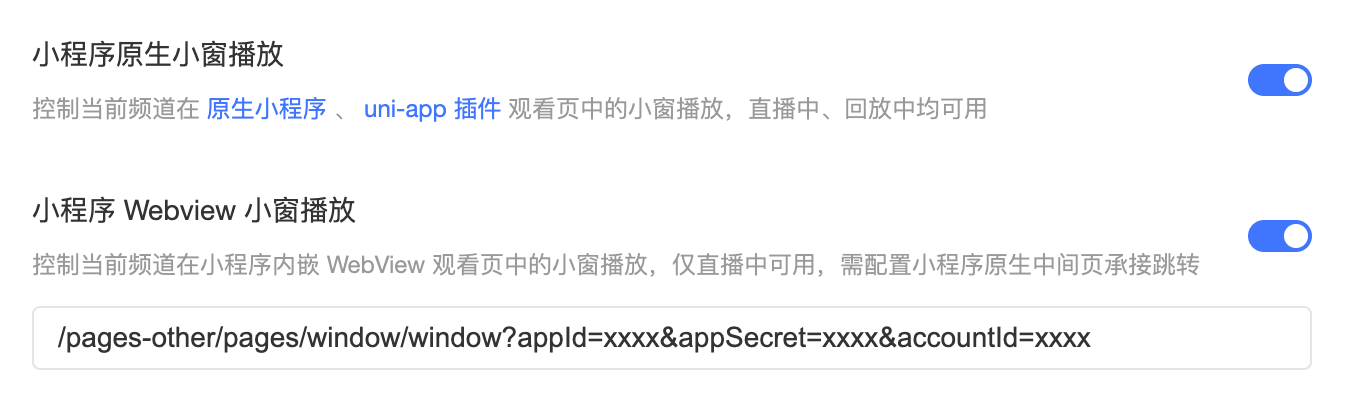
*Figure 2: Native Mini Program and Mini Program WebView mini-window playback (picture-in-picture) need to be configured separately; the current WebView path only verifies live streaming scenarios. Image source: POLYV official product interface image*
Whether the mini window appears is affected by multiple conditions jointly: the WeChat base library needs to reach version 2.14.3 or above, and it is also necessary to check the WeChat and operating system versions, the Mini Program category and qualifications, the backend switches, whether the player has been initialized and started playing, whether the native nodes are still mounted, and whether the project is integrated via the native or WebView path. The developer tool cannot replace real device debugging on iOS and Android.
The native path can currently be evaluated for live and replay playback; POLYV’s current Mini Program WebView documentation confirms live-stream playback only and must not be used to infer replay or VOD support. A system-level mini-window also cannot be expected to remain after WeChat is force-closed, the player page is unloaded, the player is destroyed, or its media source is cleared. Acceptance testing should cover entering the mini-window, switching between foreground and background, returning to the viewing page, recovering playback, and retrying after a failure.
05 Use a Minimal Closed-Loop Verification Plan, Then Gradually Add Membership Features
5.1 Verify First with One Member and One Channel
First, use a test member, a test channel, and a simple entitlement to go through the complete flow of “login—authentication—enter live broadcast—one interaction—open business page—return—logout.” If a mini window is required, then add testing on two target iOS and Android devices. The goal at this stage is not to fill in all features, but to verify that there are no breaks between identity, routing, the player, and the server.
5.2 In the Second Stage, Add Real Business Rules
After the closed-loop is stable, add membership levels, course purchases, product interactions, whitelist or registration fields, and check for repeated logins, permission expiration, live broadcast end, playback switching, and weak network recovery. Before going live, records of SDK/component versions, Mini Program base library range, backend switches, and rollback plans should be kept to avoid losing track of boundaries during subsequent upgrades.
When selecting a service provider, you can focus on checking: whether they can explain the differences between native, uni-app, and WebView; whether they provide continuously updated development documentation and examples; whether they support server-side authentication and data interfaces; and whether, when problems occur, they can pinpoint issues to Mini Program qualifications, host routing, player status, or backend configuration, rather than just giving vague advice like “reopen the page.”
06 FAQ
6.1 If I don’t use WeChat Channels, do I have to develop a complete live streaming system myself?
No. Enterprises can retain their own Mini Program and membership system, using the viewing page SDK, player components, or WebView provided by third-party live streaming platforms, and connect identity and permissions via server-side interfaces. Independent development should focus on business page and system integration, not building the audio and video infrastructure from scratch.
6.2 Can One uni-app Codebase Cover Both the Mini Program and App?
No. That should not be assumed. The components described in this article ultimately run in mp-weixin. The App side needs to select SDK separately according to Android, iOS, or the corresponding framework, and coordinate playback, interaction, co-streaming, and mini-window capabilities individually.
6.3 Can WebView Directly Enable Mini-Window Playback in a Mini Program?
WebView cannot directly access the Mini Program native player context. The current solution requires entering a native transfer page from H5, with the native player hosting the live broadcast and requesting a mini-window; whether it succeeds still depends on the base library, system, qualifications, backend switches, and real-device environment.
6.4 After integration, will membership data automatically enter the enterprise system?
No, a business workflow is not automatically formed. Enterprises should first define membership identifiers, channel, and session mappings, then obtain the needed data through interfaces or callbacks according to the authorized scope, and handle deduplication, retry on failure, and permission control.
About POLYV
POLYV is a leading enterprise video SaaS brand with integrable live streaming and VOD capabilities. For membership Mini Programs, POLYV provides a native WeChat Mini Program viewing-page SDK, player components, a WebView path, uni-app integration, and server-side APIs. Enterprises can start with a ready-made viewing page and deepen the integration as membership rules, page experience, and engineering capacity require. The final scope still depends on Mini Program eligibility, account version, current documentation, and integration tests on target devices.