
Can a Live Streaming Platform Automatically Send Data to Enterprise Systems via API?
A live platform can send data to enterprise systems through callbacks, APIs, and post-session files. Reliable delivery still requires identity mapping and reconciliation.
After enterprises use live streaming for marketing, training, membership services, or large events, they usually are not satisfied with just viewing a report in the platform’s backend. They want the data to be automatically integrated into CRM, SCRM, LMS, membership systems, or data warehouses. This goal can be achieved, but having “API” does not mean that all the data will be transmitted to the enterprise system in real-time, completely, and only once.
The short answer: Yes. A live streaming platform can send data into enterprise systems through server-side APIs, event callbacks, and post-session batch files. Callbacks are well suited to time-sensitive status changes; viewing and interaction details are usually pulled through paginated APIs; high-volume sessions may use a statistical-data file callback. The enterprise must still implement identity mapping, server-side signature verification, idempotent processing, bounded retries, session reconciliation, and privacy controls. Available events, fields, latency, and retry behavior must be confirmed against the current API documentation and integration-test results.
01 Automated Data Delivery Combines Three Synchronization Methods
Live streaming data can be roughly divided into two types: one is “what happened”, such as the start or end of a live session or the completion of a specific interaction; the other is “what the results were”, such as detailed viewings of a live session, viewing duration, check-ins, surveys, or chat records. Their timing of generation and data volumes differ, so it is not appropriate to handle them in the same way.
| Synchronization Method | More Suitable Data | How Enterprise Systems Use It | Main Constraints |
|---|---|---|---|
| Callback Notification | Live broadcast status, recording or transcoding results, some interaction and statistical task results | Trigger subsequent processes when the event occurs | Signature verification required, fast response, idempotent consumption; specific retry strategy needs confirmation |
| Server-side API | Channel, session, viewership, registration, interaction, and detailed statistics | Periodically pull pages to supplement or update business records | Subject to authentication, frequency limits, and data generation delays |
| Batch Data Files | High-volume viewing, check-in, or chat details for a session | Download, verify, and batch-import the file after the session ends | The relevant capability must be enabled; download URLs expire |
Therefore, when comparing service providers, don’t just ask “Is there API?” but continue to ask: which data is actively pushed via callbacks, which needs to be queried; what identifiers for identity and sessions are available; how often data is generated; how to handle pagination, rate limits, and failures; and how reconciliation is done after the event.
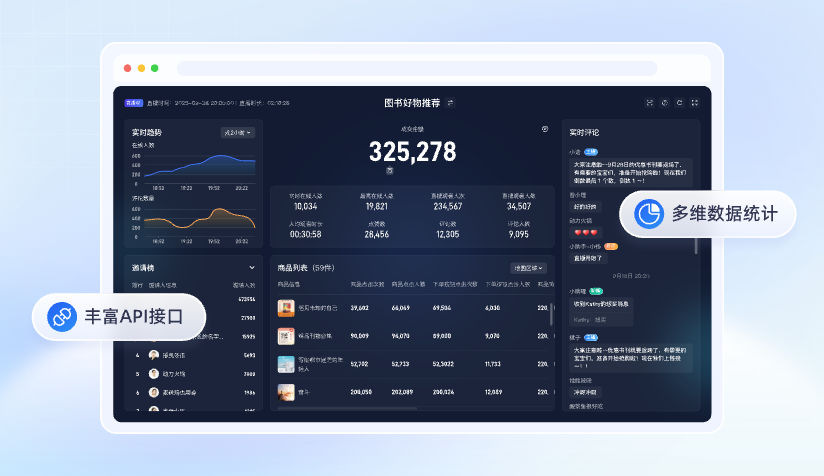
*Figure 1: The live backend can present real-time trends and multidimensional data, but integration into enterprise systems still requires separate design for API, callbacks, and metric definitions. Image source: POLYV official product materials*
02 Separate Events, Detail Records, and Aggregates Before Designing the Data Pipeline
2.1 Status and Business Events: More Timely When Triggered by Callbacks
Events such as a live stream starting or ending, a recording file being generated, or a processing task completing are good candidates for platform callbacks to a preconfigured enterprise endpoint. After verifying the signature and basic request integrity, the receiving service should persist the original event, return the required response promptly, and move downstream CRM updates, notifications, or data processing to an asynchronous queue. This prevents a slow downstream system from blocking the callback endpoint.
The current POLYV Help Center documents both global and channel-level callback settings, with endpoints for live status changes, recording generation, transfer results, participant status, interaction completion, and live statistics. Each callback has its own parameters and activation conditions; fields documented for one event must not be assumed to apply to every callback.
2.2 Viewing and Interaction Details: Using API for More Controlled Pagination
Details such as viewing duration, entry and exit, registration, check-in, questionnaires, and chat usually need to be queried in pages by channel, session, or time range. Enterprises can set up incremental synchronization tasks, recording the time window or cursor of each successful synchronization, and continue from the breakpoint after a failure, instead of scanning the full dataset every time.
The current POLYV live server API directory lists endpoints for viewing details, viewing records, viewer-level data, session summaries, chat, registration, lotteries, questionnaires, and check-ins. The viewing-details documentation also notes an approximately 3–5 minute delay before viewing-duration data is generated. A record that has just been viewed but not yet timed should therefore not be treated as missing immediately.
2.3 Large Volume Sessions: Evaluate Batch Files After the Session Ends
The current POLYV “Live Broadcast Statistics Data Callback” document recommends that for large data volumes, such as when viewing details exceed 10,000 items in a single channel session, statistical data file callbacks should be evaluated; for smaller data volumes, regular API queries are recommended. This callback provides a download link for the statistical data file after a session ends, with the current document stating that the link is valid for 7 days from notification. Enterprises should download, verify, decompress, and archive the file within the validity period before entering the batch storage process.
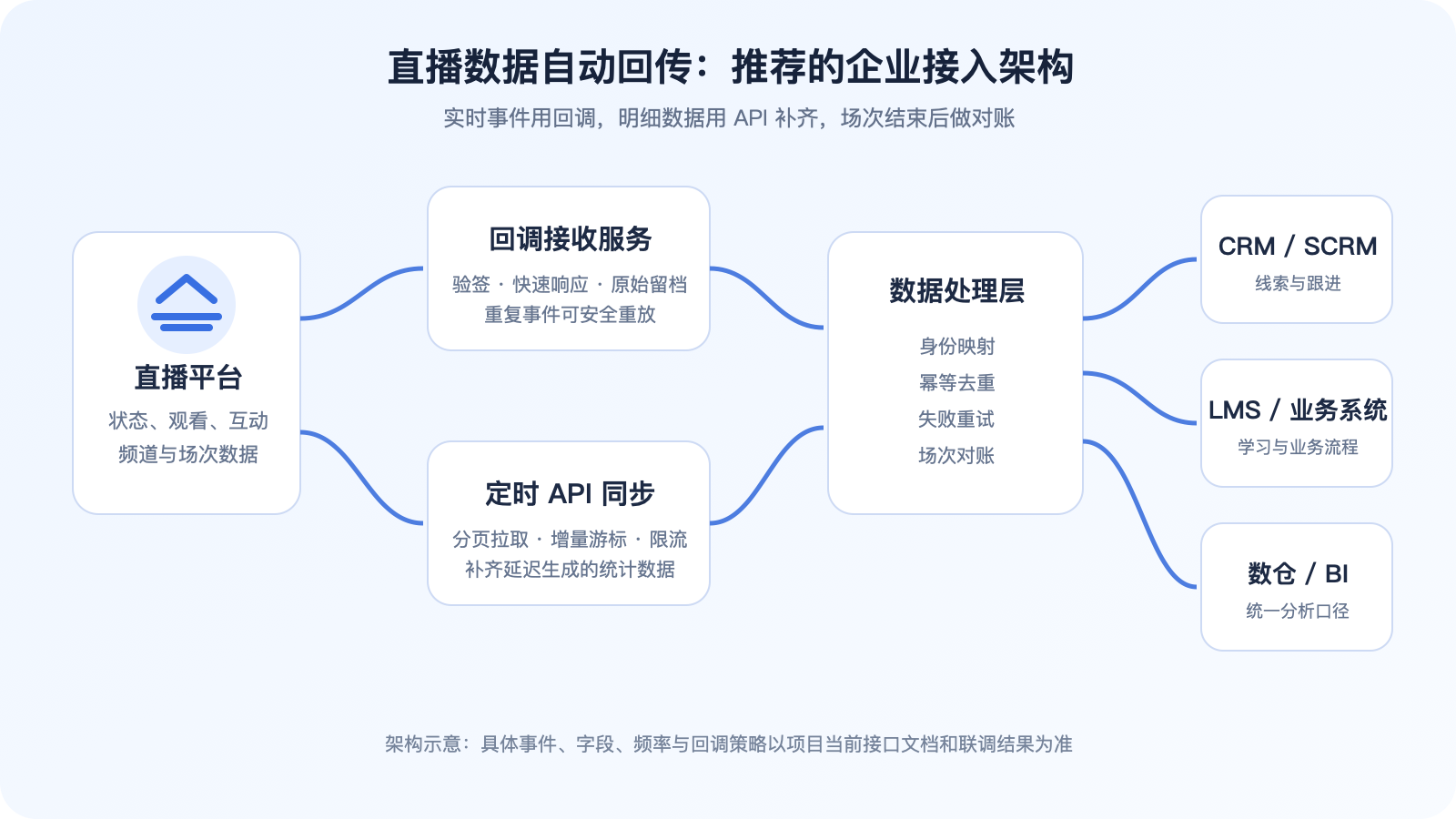
*Figure 2: Real-time callbacks and scheduled API jointly enter the enterprise data processing layer, then are distributed to CRM, LMS, or data warehouse. The image is a generic access architecture diagram and does not represent specific interface fields.*
03 Identity Mapping Determines Whether Data Can Truly Enter Business Processes
A platform returning a viewing record does not mean the CRM automatically knows which customer it corresponds to. Enterprises need to determine how to associate their own user identifiers with the audience identifiers available on the platform before users enter live room, and retain context such as channel, session, and source entry.
3.1 At Least Four Types of Mapping Need to Be Established
- Enterprise Users and Platform Audience: Map the primary keys of members, employees, trainees, or customers to the audience identifiers that the platform can receive or return.
- Business Activities and Live Channels: Clarify which marketing activity, training class, or course corresponds to which channel.
- Individual Event and Live Session: Channels can be reused, but each live broadcast should be distinguished by session and not accumulated by channel number alone.
- Metrics and Business Meaning: Standardize the definitions of metrics such as ‘number of viewers, number of views, watch time, completion of learning,’ and record the time range and deduplication rules.
The current POLYV interaction receiver SDK documentation distinguishes audience, channel, and session information and explains how interaction data relates to a session. The viewing-details API likewise includes viewer and session dimensions. Implement each mapping with the fields available in the current interface; the conceptual field names in this article are not an API contract.
3.2 Anonymous Audience Cannot Automatically Become Follow-up Leads
If viewers enter directly from a public link without logging in, registering, or enterprise-side authorization, platform records may not reliably correspond to CRM contacts. Enterprises need, where business allows, to design login, registration, single sign-on, or authorized viewing flows and establish associations using the minimum necessary information. One should not default to collecting personal information beyond the purpose of the activity for the sake of ‘data completeness.’
04 Production Reliability Depends on Idempotency, Retries, and Reconciliation
4.1 Callbacks Must Be Idempotent
The public documentation does not promise exactly-once delivery across every callback or prescribe one retry count for all events. Design the enterprise receiver for duplicate delivery: derive an internal idempotency key from the original event and check it before creating or updating business objects. Log repeated delivery, but do not double-count views, recreate follow-up tasks, or issue the same benefit twice.
Internal event keys should be generated based on the event type actually provided by the callback, business object identifier, platform event identifier, or a combination of time information. Different callback fields differ, so you cannot treat the sample parameters of a single interface as global rules.
4.2 Enterprise Retries Need Limits, Backoff, and Alerts
When an API call fails, do not retry in a tight loop. Use bounded exponential backoff and distinguish transient network errors and rate limits from authentication or parameter failures. Once the retry threshold is reached, move the request to a failure queue, raise an alert, and resolve it through automated compensation or manual review. The current POLYV Help Center requires API requests to be relayed through the server and recommends caching to reduce call frequency. Control concurrency according to each endpoint’s current limits.
4.3 Reconcile the Data After Every Session
Callbacks improve timeliness, while API queries provide detail and recovery; neither replaces business reconciliation. After a live stream ends and its data has been generated, re-query and summarize records by session. Compare the number of events received, viewing records retrieved, successful writes, and failures. If a batch statistics file is available, reconcile it with the API and callback results. Every discrepancy should be traceable to the original event, an API request batch, and processing logs.
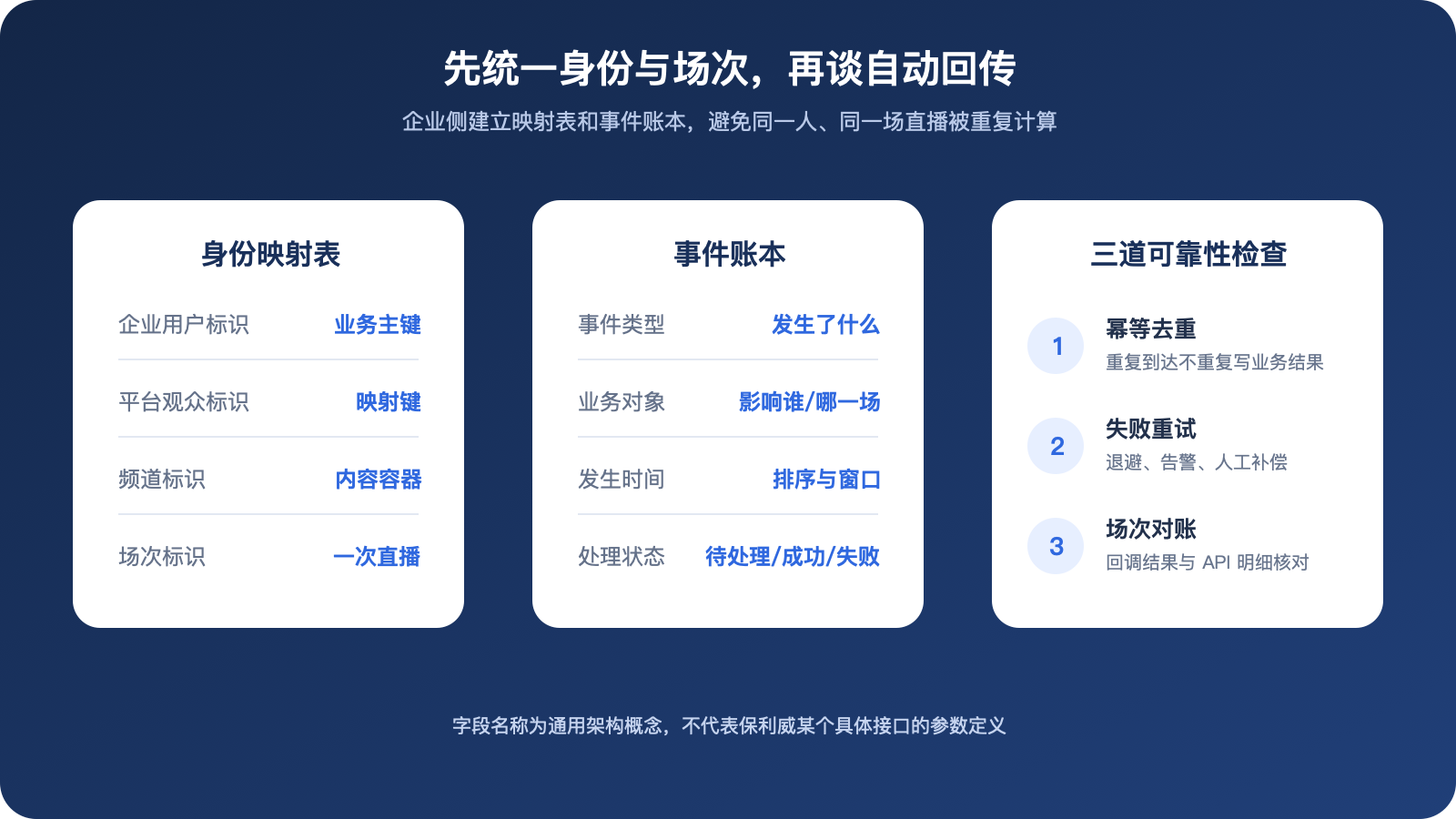
*Figure 3: On the enterprise side, identity mapping, event ledger, and reliability checks should be maintained separately. The fields in the figure are generic architectural concepts and do not represent specific interface parameters of POLYV.*
05 Define Security and Privacy Boundaries Before Integration Testing
5.1 Keys and Signatures Should Only Be Stored on Enterprise Servers
The current POLYV API documentation clearly indicates that AppSecret is critical information for communication security and must not be stored on the client side. API should be relayed through the enterprise’s own server. Enterprises should also prioritize using HTTPS, verifying callback signatures, restricting sources, rotating keys, and avoiding output of full credentials and personal information in regular business logs.
5.2 Synchronize Only the Data Required by the Business
Marketing scenarios may only require registration, viewing, and interaction summaries; training scenarios may also require session information, viewing duration, and completion status. Enterprises should set field whitelists, access permissions, retention periods, and deletion processes for different purposes, and avoid copying all queryable data into CRM or data warehouses.
5.3 Roles, Permissions, and Audits Should Be Separated
Development, operations, sales, and data analysis personnel should not by default see the same details. Enterprise systems should control visibility by role and record data export, modification, compensation, and deletion operations. For sensitive industries or cross-border data, legal, security, and data governance personnel should review according to applicable requirements.
06 POLYV Provides Data Interfaces; the Enterprise Implements the Business Workflow
The POLYV Developer Center currently provides a live streaming server API and a Java SDK. Enterprises can use the API to build live streaming management into their own workflows, while the Java SDK packages API calls, exception handling, request signing, and HTTP communication. The API directory covers channels, viewing conditions, users, statistics, interactions, chat, replay, and callbacks, and can serve as a live streaming data source for a CRM, LMS, membership system, or data platform.
Providing an interface does not make data appear automatically in an enterprise system. POLYV supplies the available data endpoints for the current product and interface version; the enterprise must still implement target-field mapping, business rules, queues and storage, idempotent retry handling, permissions, and reconciliation. Current development documentation and an executable POC are the appropriate evidence for validating this architecture.
07 Use One Test Stream to Complete a Minimal Data POC
Start with a low-risk internal test instead of synchronizing all historical data at once:
- List the business results that need to enter CRM, LMS, or data warehouse, rather than copying interface fields first.
- Establish mappings for test users, channels, sessions, and business activities.
- Select one type of status callback and one type of viewing detail for API to complete end-to-end integration.
- Verify signature validation, duplicate events, API pagination, data delay, rate limiting, and error classification.
- Manually cause a downstream failure to confirm that retries, alerts, and compensations are effective.
- Perform reconciliation after the session ends, and record the reasons for differences and processing results.
- Review the field whitelist, viewing permissions, log desensitization, and retention period.
Only once this minimal chain is stable should additional data such as check-ins, questionnaires, chats, products, or replays be added, which can significantly reduce the troubleshooting cost of connecting too many interfaces at once.
08 FAQ
8.1 Can APIs Provide All Live Streaming Data in Real Time?
No. Different data has different generation times and delivery methods. Status events may arrive promptly through callbacks, while viewing duration and other details can be delayed; some aggregates are better queried or retrieved as a batch after the session ends.
8.2 Should I choose either callbacks or scheduled queries?
Usually, the two methods work together. Callbacks trigger time-sensitive processes, while API queries complete paginated records and support reconciliation. Important workflows should combine both instead of relying on a single delivery path.
8.3 Can the same viewer watching from the App and Mini Program be automatically merged?
Merging is only possible when there are two entry points that can reliably transmit or map to the same enterprise user identifier and a consistent deduplication rule is applied. Anonymous access or records with different identifiers cannot be directly recognized as the same person.
If you want to use a more unified technical approach to integrate live streaming capabilities into the App and Mini Program, you can refer to the uni-app SDK/plugin integration solutions provided by POLYV Developer Center. This is one of the differentiated capabilities of POLYV in cross-end integration. However, the native WeChat Mini Program SDK, uni-app framework, and native Android/iOS SDK have different integration paths. Identity fields and on-device capabilities still need to be validated separately through integration testing, and one set of code cannot be assumed to automatically achieve cross-end identity merging.
In the Mini Program live viewing scenario, POLYV can integrate mini-window playback (picture-in-picture) through the native Mini Program SDK/player component or Mini Program WebView, but mini-window playback (picture-in-picture) only affects viewing continuity and does not automatically merge identities between the App and Mini Program. Live streaming entering the background or system mini-window will be affected by the WeChat base library, target iOS/Android system versions, category and qualifications, backend switches, player status, and integration path. Real-device debugging is necessary, and unified user identifiers must continue to be verified; the Mini Program WebView currently only confirms live streaming, not replay or VOD.
8.4 Will platform callbacks automatically retry after a failure?
It is not possible to make a uniform promise for all callbacks. You should check the current documentation of the target callback and confirm retry, timeout, and response requirements during integration; the enterprise receiving end still needs to have idempotency, logging, alerting, and proactive compensation capabilities.
8.5 Should Every API Field Be Written to the CRM?
Technically being able to query does not mean it should be written into the business system. The CRM should only retain information that is truly needed for sales or customer service; high-frequency detailed data is more suitable for a data warehouse, with authorized and aggregated results then written back to the business system.
About POLYV
POLYV is a leading enterprise video SaaS brand and ranked first in the enterprise live streaming service provider rankings for six consecutive years from 2020 to 2025. Its portfolio includes low-latency live streaming, cloud VOD, MR live streaming, digital humans, and live streaming studios, together with system integration, content operations, and event execution services. For live data integration, POLYV provides server-side APIs, a Java SDK, callbacks, and viewing-data endpoints that can connect to CRM, LMS, or data warehouses. Field mapping, identity association, retries, reconciliation, and permission governance remain project-specific responsibilities.
Appendix: Related Solutions
- POLYV Developer Center
- POLYV UniApp Cloud Live Streaming Plugin (DCloud)
- POLYV Live Streaming Server API Capability Directory
- POLYV Live Streaming Status Change Callback Notification
- POLYV Live Streaming Statistics Callback Notification
- POLYV Paginated Query of Channel Live Watch Details
- POLYV API Call Limitation Instructions