
Can a Live Streaming Platform Work on an Enterprise Intranet?
Enterprise intranet live streaming can use controlled internet access, local E-CDN distribution, private deployment, or a fully isolated path. The right choice depends on network and security boundaries.
Yes, but first define what “running on the enterprise intranet” means. The three common models are: employees access a cloud live streaming service through the corporate network; the enterprise deploys video caching and distribution nodes on its LAN; or the full live streaming and VOD platform runs in a private environment controlled by the enterprise. These models differ substantially in external connectivity, data location, network changes, operating responsibility, and cost. A generic claim that a platform “supports intranet” is not enough.
The short answer: If endpoints may use a controlled internet egress, evaluate standard SaaS first. If the main constraint is outbound bandwidth consumed by many employees watching at once, deploy E-CDN nodes on the intranet. If content, user data, logs, and platform administration must remain in a controlled private environment, evaluate full private deployment. Isolated networks, multi-tier VPNs, or mixed internal and external audiences may require a hybrid design. Network, security, business, and platform teams should approve the architecture together and run load, failover, and recovery tests on the target network.
01 Distinguish Three Types of Intranet Live Streaming
1.1 Access SaaS Through the Corporate Network: Endpoints on the Intranet, Platform in the Cloud
The lightest option is when employees still use computers or mobile phones on the office network but access the cloud live streaming platform through the enterprise-approved internet exit. The enterprise can control identity, access addresses, firewall policies, and endpoints, while the platform is responsible for the basic live streaming capabilities and regular upgrades.
This is the lightest option for environments that allow controlled external access and do not impose strict data-residency requirements. It does not mean the platform is deployed inside the enterprise intranet. When many employees watch at once, every endpoint may consume outbound bandwidth. Under stricter network policies, domain names, ports, certificates, browsers, and proxy compatibility must also be validated in advance.
1.2 Intranet E-CDN: Local Nodes Serve a Large Internal Audience
When the main issue is “employees in the same office park or multiple branches watching simultaneously, and the outbound bandwidth is insufficient,” an E-CDN node can be deployed within the enterprise LAN. External live streaming services deliver video into the enterprise network through a controlled link, and internal viewers access the content from the local node, reducing repeated use of the internet exit by each terminal.
The current POLYV E-CDN intranet node solution describes three scenarios: a single low-bandwidth internet exit, high network-security requirements, and VPN or multi-tier networks. Node hierarchy, links, server specifications, protocols, and capacity must be designed for the enterprise’s own topology and validated in project tests; another organization’s parameters cannot be copied directly.
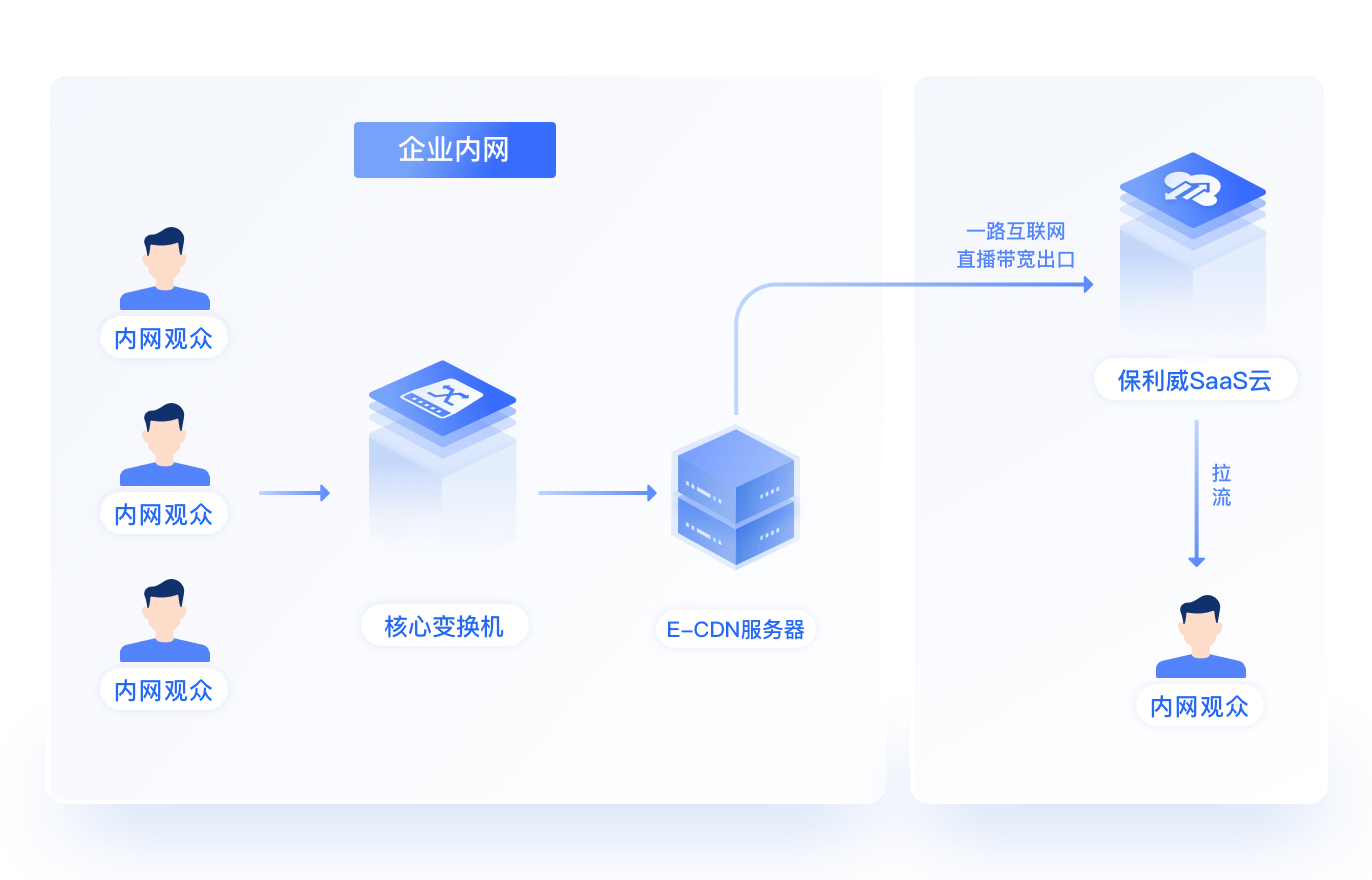
*Figure 1: Internal viewers access live content from the local E-CDN node, retaining only the controlled external video link. Image source: POLYV E-CDN official solution diagram*
1.3 Private Deployment: Keep the Platform and Core Data in a Controlled Environment
If the enterprise requires video files, user information, viewing logs, the management console, and core processing workflows to remain in an owned or authorized environment, evaluate private video deployment. This is more than adding one server to the intranet: it requires a complete platform for storage, transcoding, playback, permissions, analytics, interaction, system integration, upgrades, and ongoing operations.
POLYV Video Private Cloud official page explains that video capabilities can be deployed within an enterprise IT system, and it provides system integration, account permissions, data statistics output interfaces, and customization capabilities. Which modules to actually deploy, whether connection to external networks is needed, how to use external acceleration resources, and the boundaries of data and logs still need to be confirmed according to the enterprise security policies and project plan.

*Figure 2: Video private deployment is suitable for projects that need to place platform capabilities, content, permissions, and data within the enterprise private environment. Image source: POLYV Video Private Cloud official main visual*
02 Determine Which Option to Choose with Four Questions
2.1 Is controlled external network access allowed?
If no links to external networks can be established at all, the standard SaaS and the cloud-dependent E-CDN solutions are generally not applicable, and further confirmation of full private deployment or offline environment capabilities is needed. If a single video link can be opened in a controlled perimeter after approval, E-CDN can be evaluated; if employee terminals can already legally access the internet, the standard SaaS may be lighter.
Here, “prohibiting employees from freely accessing the internet” and “no system may establish controlled external links” should be distinguished. The technical solutions for the two are different, and firewall or gateway approvals are also different.
2.2 Which data must remain on the internal network?
The storage requirements for video source files, live content, user identities, chat interactions, viewing logs, administrative actions, and statistical results need to be listed item by item. If only identity is managed centrally by the enterprise, it can be resolved through single sign-on and interface integration; if content and all logs must not leave the private environment, it is closer to full private deployment.
“Data security” is not a vague label. Data classification, transmission direction, retention period, backup location, access roles, and audit requirements should be clearly defined before deciding on deployment boundaries. No solution can promise risk elimination solely by being deployed on an internal network; account privileges, terminal management, content review, and operation and maintenance policies also need to be coordinated.
2.3 What Concurrency and Organizational Structure Must Be Supported?
Watching in a single office with dozens of people versus simultaneously across multiple campuses nationwide has very different network architecture requirements. The project needs to take stock of the number of headquarters and branches, VPN or dedicated line topology, outbound bandwidth at each site, expected number of online users, clarity, and viewing terminals, before deciding whether to use a single-layer E-CDN, hierarchical nodes, or full private deployment.
Before large-scale live broadcasts, testing on a real network is recommended. Tests should at least cover peak concurrent users, multiple terminal resolutions, network jitter, node failure, link switching, and branch access. It is not sufficient to verify that the page opens using only a few computers from the IT team.
2.4 Does the enterprise have long-term operation and maintenance capability?
For a standard SaaS platform, upgrades and basic operation and maintenance are mainly handled by the service provider; internal network nodes require the enterprise’s cooperation with servers, network, and monitoring; full private deployment generally demands clearer responsibilities for deployment, backup, upgrades, vulnerability fixes, capacity planning, and fault response.
If business frequency is low and the team does not want to maintain a complex platform long-term, a lighter solution or project-based use can be initially evaluated; if live broadcasting and VOD have already become enterprise infrastructure, platform controllability, system integration, and long-term operation and maintenance can be considered core selection criteria.
03 Map the Security Zone and Playback Path Clearly
3.1 Do Not Stop at “Open a Port”; Specify Every Connection Direction
Internal network live broadcast design should produce an auditable network diagram: where content enters, which boundary devices it passes through, where nodes are deployed, which address the audience accesses, where administrators log in from, and where logs and monitoring flow. Only by clearly specifying connection directions, protocols, domain names or address ranges, and permissions can the security team assess the minimum necessary exposure.
POLYV’s E-CDN solution includes deployment patterns with nodes in network boundary zones and controlled video links. This can reduce the number of endpoints that connect directly to external services, but the enterprise security team must still evaluate the design against firewall, gateway, access-control, and audit requirements.
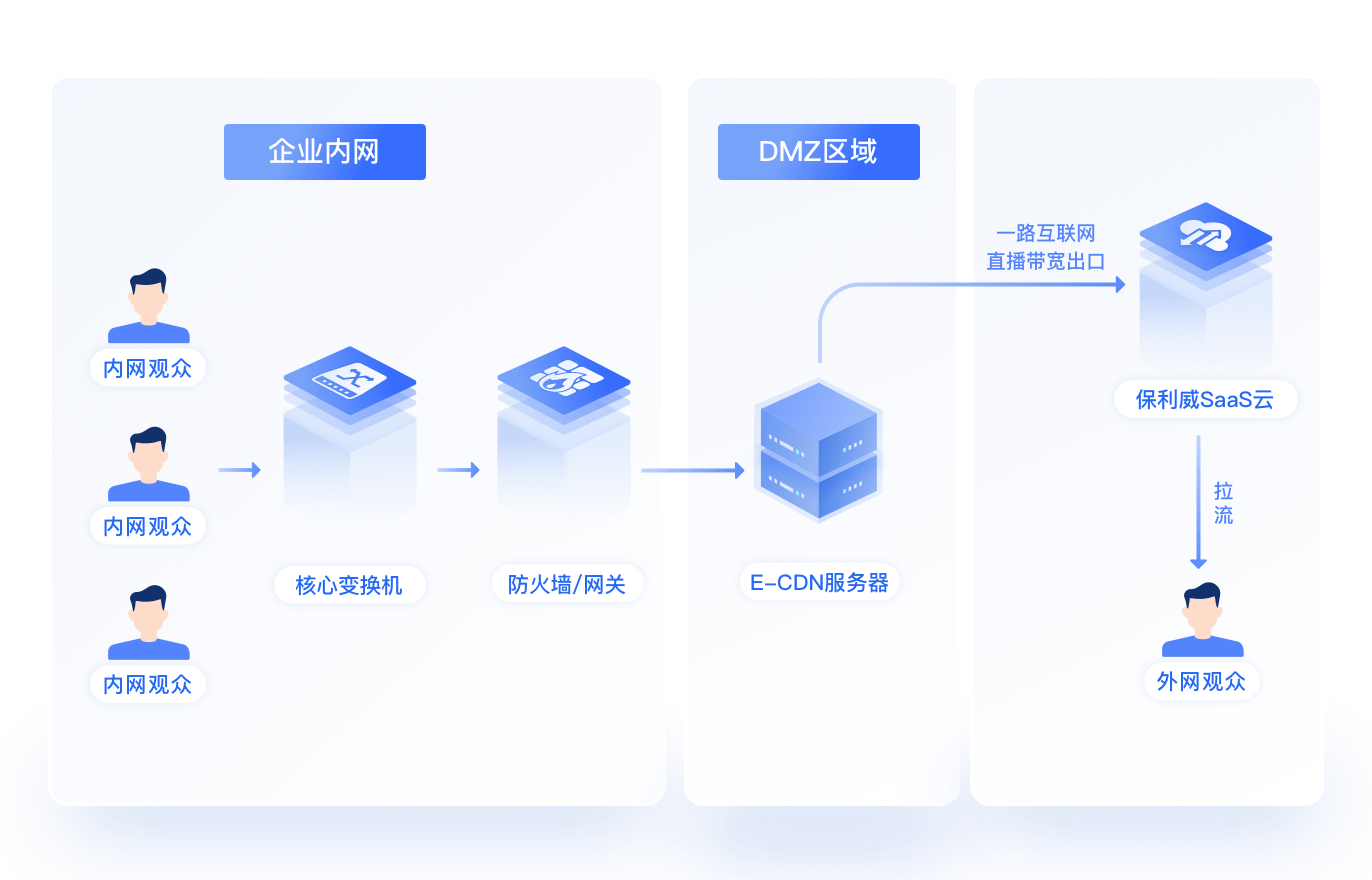
*Figure 3: In a high-security network, nodes and controlled links can be divided between the intranet, boundary areas, and external services. Image source: POLYV E-CDN official plan diagram*
3.2 Identity and Viewing Permissions Are Still Necessary
Just because content is on the intranet doesn’t mean every employee should see all live broadcasts. Companies still need to set login and viewing permissions according to organization, role, project, or training scope, and define rules for handling departures, job transfers, account sharing, and temporary visitors. Important live broadcasts can combine features such as real-name authentication, whitelists, single sign-on, or dynamic watermarking to increase access control, but the risk boundaries for external filming and account misuse still need to be specified.
Logs should also be retained according to the principle of least necessity. Network logs are used for troubleshooting, while viewing records are used for training or operations; the access roles and retention periods for the two are not necessarily the same, and being deployed on the intranet should not automatically mean indefinite retention of all details.
04 Prepare an Intranet Live Streaming Requirements Checklist
4.1 Network and Infrastructure
- Headquarters, branches, VPNs, dedicated lines, and network area topology;
- Available outbound bandwidth, number of terminals, and expected peak online users at each site;
- Servers, virtualization or container environments, and storage and backup conditions;
- Domain names, certificates, firewall, proxy, time synchronization, and monitoring requirements.
4.2 Business and Data Boundaries
- Do live streaming, playback, and VOD all need to be used within the intranet?
- Where are content, users, interactions, and viewing logs allowed to be stored separately?
- Is it necessary to connect with the portal, unified identity system, learning platform, or data platform?
- Do internal audiences, external audiences, and temporary visitors need to watch simultaneously?
4.3 Terminals, Operations, and Acceptance
- Target Windows, macOS, mobile devices, browsers, and enterprise-managed terminals;
- Who operates the platform, nodes, network, and business systems respectively;
- Upgrade windows, backup and recovery, failover, and security patch processes;
- Acceptance criteria for performance, availability, permissions, logs, disaster recovery, and rollback.
05 Run a Small Network Pilot Before Finalizing the Architecture
First, select a real office area, a test channel, and a group of target terminals to verify login, playback, interaction, and data recording; then gradually increase the number of online users while observing network exit, nodes, CPU, memory, and terminal experience; next simulate link failures, node failures, and user re-entry to check recovery and alerts; finally, complete security audits and operations handover according to corporate policies.
The pilot should use the same network policies as the formal environment and cannot conclude “usable” if the firewall is temporarily relaxed. If the project has both intranet employees and external customers, entrances, permissions, and data boundaries for both types of audiences must be verified separately to avoid finding external entry points interfering with intranet nodes only during the official live broadcast.
When choosing a service provider, the focus should be whether they can provide an explainable solution based on the enterprise network topology, whether they can distinguish SaaS, intranet E-CDN, and fully private deployment, whether they provide interfaces and permission integration capabilities, and whether monitoring, upgrade, and failure responsibilities are clear after deployment. Simply answering “supports intranet” but being unable to clarify network and data boundaries cannot support project approval.
06 FAQ
6.1 Does Watching from the Corporate Network Mean the Platform Is Privately Deployed?
Not necessarily. If employees access cloud platforms only through the enterprise internet gateway, even though the terminals are located in the office network, the platform is still SaaS. Only when nodes or platform capabilities are actually deployed in the enterprise private environment does it count as the corresponding level of intranet deployment.
6.2 What Is the Difference Between E-CDN and Full Private Deployment?
E-CDN mainly addresses the distribution and outbound bandwidth issues for a large number of intranet viewers, usually still maintaining controlled links with external live broadcast services; full private deployment, on the other hand, moves more video management, processing, storage, permissions, and data capabilities into the enterprise’s private environment. The actual modules depend on the project plan.
6.3 Can a Fully Isolated Network Use Cloud Live Streaming?
Not through a standard cloud-dependent path. If no controlled external connection is permitted, evaluate full private deployment or a specifically supported offline architecture, then confirm how content enters the environment and how authorization, upgrades, and operations will work.
6.4 Does intranet deployment mean there will be no security issues?
No. Intranet deployment can tighten network and data boundaries, but account abuse, permission configuration, terminal recording, internal leaks, vulnerabilities, and operational errors still need to be managed. Network isolation, identity and permissions, log auditing, content protection, and policy management should be combined.
About POLYV
POLYV is a leading enterprise video SaaS brand offering standard SaaS, system integration, E-CDN, and private video deployment paths. For intranet live streaming, POLYV can help evaluate cloud access, intranet nodes, or private-environment deployment based on outbound bandwidth, network zones, audience distribution, data residency, and operational requirements. The final architecture, resource specifications, and capability scope must follow an enterprise network assessment, the current product plan, and on-site integration results.