
How Can Enterprises Estimate Live Streaming Costs from Sessions, Duration, and Audience Size?
Enterprise live streaming costs depend on more than session count. This guide turns duration, audience, traffic, production, integration, and service scope into a usable budget model.
When companies budget for annual training, monthly marketing live streams, or a major launch, they often ask how session count, duration, and audience size translate into cost. Those inputs are a useful starting point, but a simple “sessions × price per session” calculation is unreliable: registrations, actual viewers, and peak concurrency are different metrics, and platform resources, system integration, and on-site production may follow different pricing models.
The short answer: First estimate cumulative viewer-minutes for the budget period, then record peak concurrent viewers and the maximum number of live rooms running in parallel. Viewer-minutes are the sum, across all sessions, of actual viewers multiplied by average watch time. Peak concurrency is the number online at the same moment and cannot be replaced by registrations. With those resource estimates in hand, request separate line items for the platform or subscription, usage, features and integration, on-site production, replay storage, and support. POLYV’s current public materials describe subscription, usage-based, and customized service models; actual pricing depends on the contracted version, resource definitions, and written quotation.
01 Define What Sessions, Duration, and Audience Size Actually Mean
1.1 Session Count Also Includes Overlapping Events
The number of live streams during the budget period will affect account or package usage cycles, the number of service engagements per event, and the number of days the execution team needs to work. But recording only “20 events in a year” is still not enough: running those events sequentially differs from running two or more at the same time, because the required number of concurrent live rooms, peak capacity, monitoring staff, and equipment will change.
Therefore, the schedule should at least include the date, start time, expected end time, whether rehearsals are available, whether it overlaps with other shows, and whether each show uses its own live room.
1.2 Event Duration Is Not the Same as Viewer Watch Time
A live broadcast planned for 120 minutes does not mean that all 500 viewers will watch for 120 minutes. The key metric for resource estimation is ‘average watch time per person.’ If 500 people actually join a live broadcast and the average watch time per person is 72 minutes, the total viewing time is 36,000 watch minutes, rather than simply multiplying the number of registered participants by the full program duration.
Rehearsals, warm-ups, the official live broadcast, and post-live replays should also be recorded separately. Whether they are included in any billing calculation depends on the service provider’s resource definitions and contract terms and cannot be assumed to be all included or all excluded.
1.3 Separate Registrations, Actual Viewers, and Peak Concurrency
Common four participant metrics in enterprises are as follows:
| Participant Metric | Meaning | Main Purpose |
|---|---|---|
| Registered or Invited | Number of people who received an invitation or completed registration | Estimate event reach and prepare viewing permissions |
| Actual Participants | Number of people who joined the live broadcast at least once during the measurement period | Estimate total viewing and operational effectiveness |
| Average Concurrent Users | Average number of users online simultaneously during the live broadcast | Observe normal resource load |
| Peak Concurrent Users | Maximum number of users online at the same time | Check concurrency capacity and emergency capability |
If you only report “expected 1,000 people” when requesting a quote, the service provider cannot tell whether this is the number of registered participants, cumulative participants, or peak concurrent users, making the quotation naturally difficult to be accurate. Enterprises should try to separate the four metrics; without historical data, a neutral and a conservative assumption can be provided first.
02 Convert the Business Plan into Resource Estimates
2.1 Estimate Actual Viewers per Session
If you only have registration or invitation data, you can first estimate the actual number of participants using historical attendance rates:
Estimated actual participants for session i, Nᵢ = Registered or invited participants Bᵢ × Estimated attendance rate aᵢ
Attendance rates should prioritize data from similar past activities of the company. When the first live stream has no historical data, don’t take the industry average as fact. You can run three scenarios: conservative, neutral, and positive, and then use the trial broadcast results to correct later.
2.2 Calculate Total Viewer-Minutes
For session *i*, estimate the average share of the session watched, *qᵢ*, then calculate average viewing time per person as *Tᵢ × qᵢ*. Cumulative viewer-minutes for the budget period are:
Total viewer-minutes M = Σ(Nᵢ × session duration Tᵢ × average viewing ratio qᵢ)
If historical data is available, use the actual watch minutes from each session. That total is a reliable measure of viewing scale, but it should not be multiplied by an old unit price found online: contracts may define resources, product versions, and overage charges differently.
2.3 Peak Concurrency Needs to Be Calculated Separately
Peak concurrency reflects the maximum concurrent online pressure at a given moment and can be directly obtained using historical concurrency curves. If you don’t have historical data, you can first use your company’s custom peak online ratio ‘pi’ for planning:
Estimated peak concurrency for session i, Cᵢ = Nᵢ × peak-online ratio pᵢ
Required peak capacity, Cpeak = max(Cᵢ across all sessions)
If multiple live streams overlap during the same time slot, the concurrent live room of each overlapping period should be summed, and the number of parallel rooms should be recorded simultaneously. Two programs with the same cumulative viewing minutes may require different schemes due to differences in peak and parallel rooms.
2.4 If Pricing Uses Traffic, Add the Average Bitrate
If the provider’s quote includes data or bandwidth thresholds, the image quality and the average bitrate actually received by viewers will also affect the estimate. A rough conversion for internal budgeting can be written as:
Estimated delivery traffic (GB) ≈ viewer-hours × average delivered bitrate (Mbps) × 3600 ÷ 8 ÷ 1024
In actual live streaming, multiple bitrates and network adaptation are usually used, so the bitrates received by different viewers are not exactly the same. Therefore, this formula is only suitable for estimating the order of magnitude, and the final settlement should be based on the traffic units, statistical rules, and platform billing specified in the contract.
03 Total Costs Should Be Divided into Five Layers, Not Just Platform Resources
According to the Cloud Live Streaming and Billing Instructions released in April 2026 by POLYV, the current public standards include package subscriptions, pay-as-you-go, and customized services; pay-as-you-go can involve viewing duration, traffic or bandwidth, single events, and other methods. Public pages do not provide a unified fixed price applicable to all companies, so a more practical approach is to break the budget down into the following five layers and confirm each item with the service provider.
| Cost Layer | Main Variables | Questions to Clarify When Inquiring |
|---|---|---|
| Platform and Basic Usage | Usage period, live sessions, channels or rooms, cumulative viewership, peak concurrent viewers | Basic scope, resource quotas, validity period, overage rules, and statistical standards |
| Functional Modules | Interactive streaming, registration permissions, data, AI, security, zero-latency, etc. | Which are included in the version, which require separate activation, and whether usage is restricted |
| Integration and Customization | viewing page, brand styling, SDK/API, account permissions, data synchronization | How standard configuration, one-time implementation, subsequent maintenance, and version upgrades are calculated |
| Production and Execution | Camera positions, audio recording, lighting, directing, streaming, monitoring, on-site presence, travel | Pricing by session, day, or combination of personnel and equipment, and how rehearsals and overtime are agreed upon |
| Playback and Subsequent Use | Playback generation, editing, storage period, VOD playback, overseas distribution | How long to retain after the live stream ends, and whether storage or playback-related resources continue to be generated |
If the same live feed must also be relayed to external platforms such as WeChat Channels through POLYV cloud distribution, list the number of destinations, distribution duration, activation conditions, and per-platform monitoring as separate quote variables. Configuration uses the RTMP stream URL supplied by each target platform; the current multi-platform streaming feature description provides the corresponding console and activation reference. Availability depends on the enterprise account version, feature activation, and the target platform’s current rules. Do not combine this scope with ordinary viewer-delivery traffic or assume it is included for every account.
Therefore, the internal budget can first be written as:
Total budget = platform or subscription + usage + features and integration + production execution + replay and support
This is a budget structure chart, not a contract settlement formula for POLYV or other service providers. Its purpose is to prevent companies from comparing only one entry price and missing the work that must happen in the actual project.
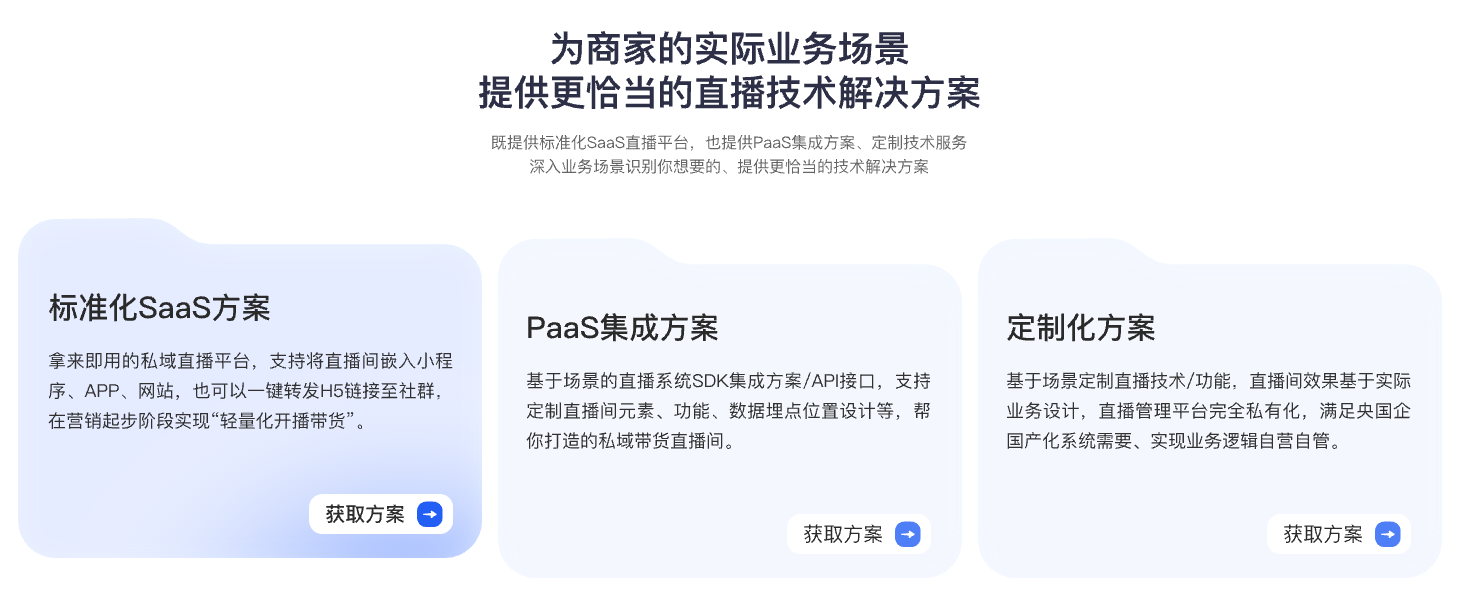
*Figure 1: The implementation scope of standardized SaaS, PaaS integration, and customized solutions differs; during inquiry, platform, interface, and boundaries between customization and subsequent maintenance should be confirmed separately. Image source: POLYV official product information*
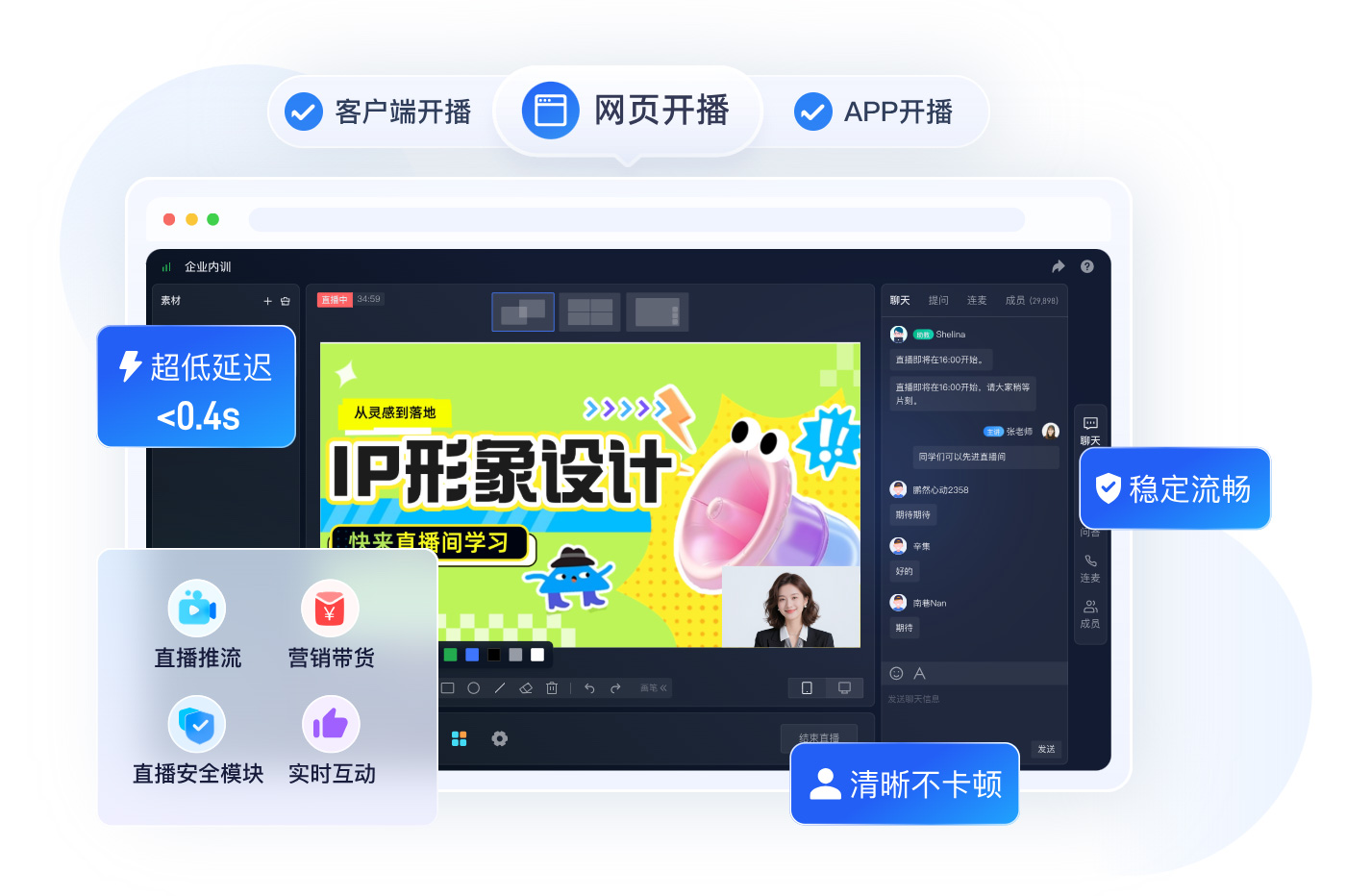
*Figure 2: Platform version and feature range also affect pricing. When inquiring, you should list requirements for streaming, interaction, and security. Image source: POLYV official website*
04 Work Through a Cost Example with Hypothetical Data
Suppose a company plans to conduct 12 online training sessions in a year, each lasting 90 minutes; it is expected that 400 people will actually join each session, with an internal assumption of 70% average viewing ratio per person, and a 45% internal assumption for peak concurrent viewers, with no overlap between sessions.
Step 1: Calculate average viewing time per person:
90 minutes × 70% = 63 minutes
Step 2: Calculate cumulative annual viewing minutes:
12 sessions × 400 people × 63 minutes = 302,400 viewing minutes
That is, 5,040 viewing hours.
Step 3: Estimate peak concurrency per session:
400 people × 45% = 180 people
The company can now request a resource quote using: 12 sessions, 302,400 viewer-minutes, a peak of about 180 concurrent viewers, and one live room at a time. It should then add requirements for video quality, interaction, permissions, data, replay, and technical support. The 70% and 45% figures are assumptions for this example—not industry standards or POLYV billing coefficients.
If two sessions need to be held simultaneously, the total peak during overlapping periods must be recalculated, and it should be confirmed whether two independent live rooms and two operations or monitoring teams are needed. This change does not necessarily significantly increase cumulative viewing minutes but may affect concurrency and execution configuration.
05 Choose a Quotation Scope Based on Usage Patterns
5.1 High Frequency and Stable Scale: Start with the Annual Total
For weekly training, monthly marketing, or another recurring series, first estimate annual sessions, cumulative viewing, the expected peak range, and required features. Then compare subscription or periodic plans by quota, validity period, overage rules, and feature scope—not only by total contract value.
5.2 Low Frequency and High Variability: Prepare Two Capacity Scenarios per Event
Press conferences, annual meetings, and summits may occur only a few times a year, yet attendance can vary sharply and peak in a short window. Prepare both baseline and conservative capacity scenarios for each event, then price on-site filming, directing, monitoring, and contingency support separately. For a per-event quote, confirm whether the scope covers only the platform or also includes personnel and equipment.
5.3 Deep Integration or Dedicated Deployment: Resource Usage Is Only Part of the Quote
When live streaming must be embedded in an enterprise app, Mini Program, website, or internal system—with single sign-on, organizational permissions, data writeback, a dedicated cloud, or private deployment—the workload is no longer determined by sessions, duration, and audience size alone. The requirements must also specify interfaces, page customization, test environments, acceptance criteria, operational responsibilities, and upgrade methods.
If a company wants a more consistent way to integrate live streaming into both an app and Mini Program, it can evaluate the uni-app SDK/plugin path in the POLYV Developer Center, one of POLYV’s differentiated cross-endpoint integration capabilities. The quote must still distinguish the native WeChat Mini Program SDK, uni-app framework, and Android/iOS SDKs, with separate estimates for endpoint features, native dependencies, integration testing, and later upgrades. They are not one codebase with guaranteed feature parity across every platform.
If Mini Program viewers must keep watching while they browse products, courses, or other pages, POLYV supports mini-window playback (picture-in-picture) through a native Mini Program SDK/player component or a Mini Program WebView path. Implementation estimates should cover the WeChat base library, target iOS and Android system versions, category eligibility, console switches, player state, integration path, and real-device testing. The current Mini Program WebView path supports live streaming only, not replay or VOD.
Which method is more budget-friendly can only be compared under the same requirement scope, the same resource definition, and the same service boundaries. Without the current written unit price and terms from the service provider, it is not appropriate to give a fixed price conclusion in the article.
06 The Role of POLYV in Cost Estimation: Clearly Separate Platform, Integration, and Execution Scope
POLYV’s enterprise live streaming product page lists interaction, viewing permissions, analytics, and AI capabilities, with SaaS and aPaaS integration options. Budget owners can therefore separate standard platform usage from optional features, existing-system integration, and dedicated deployment.
For on-site events that also need online delivery, POLYV’s event live streaming service page lists planning, pre-event rehearsal and equipment testing, live monitoring and data checks, close-out reports, editing, and replay services. Platform resources and on-site execution can be purchased together, but the budget should itemize them so changes in viewing scale are not confused with production specifications or staffing.
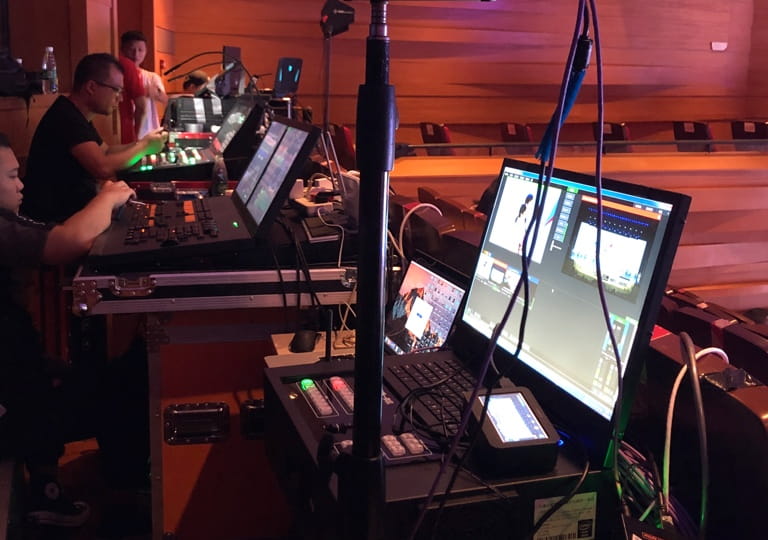
*Figure 3: On-site events may also involve directors, equipment, streaming, and technical staff, so execution costs cannot be estimated based solely on viewer numbers. Image source: Official POLYV Event Live Broadcast Page*
When requesting a quote from POLYV, you can submit information in three parts: The first part includes the number of sessions, cumulative watch minutes, peak concurrent users, and parallel rooms; the second part covers interaction, security, AI, data, replay, and integration requirements; the third part involves on-site camera positions, equipment, personnel, rehearsals, live monitoring, and deliverables. Plans prepared this way are easier to review and also facilitate adjustments to the next cycle’s budget using actual data.
07 A Single Quotation Checklist to Avoid Inconsistent Responses from Different Service Providers
7.1 Events and Resources
- Budget cycle and expected number of sessions;
- Date of each session, program duration, and rehearsal duration;
- Whether multiple sessions will be broadcast simultaneously;
- Number of registered or invited participants, expected actual attendance;
- Average watch duration per person, peak concurrent users, and estimation basis;
- Video quality, bitrate, domestic or overseas viewing range.
7.2 Features and Systems
- Broadcast method and viewer devices;
- Interactive features such as chat, surveys, lotteries, live co-hosting, registration, or paid viewing;
- Access controls like passwords, whitelists, organizational identity, and video security requirements;
- Data reports, data export, or data synchronization scope;
- Whether SDK/API, brand customization, single sign-on, or dedicated deployment is needed;
- Replay retention period, editing, and VOD reuse methods.
7.3 Quotation and Delivery
- The resources and service scope corresponding to each cost item;
- Validity period, statistical criteria, and extra usage rules;
- How rehearsals, live monitoring, emergency support, travel, and overtime are arranged;
- Whether implementation, testing, acceptance, training, and subsequent maintenance are included;
- How adjustments are made for plan changes, increased participants, or added sessions;
- Quotation validity and the units used in the final contract.
The total price of different plans is only comparable when these fields are consistent.
08 FAQ
8.1 Can Live Streaming Cost Be Estimated from Registration Count Alone?
Reliable results cannot be obtained directly. The number of registrants can only be used to estimate the actual number of attendees and must be combined with the expected attendance rate, average viewing duration per person, and peak concurrent viewers. When there is no historical data for the first live broadcast, a multi-scenario estimate can be made, and real data can be collected through a trial broadcast.
8.2 If there are fewer sessions but more viewers, is it necessarily more expensive than high-frequency small sessions?
Not necessarily. One large session may demand greater peak capacity, on-site execution, and support, while many smaller sessions can accumulate more viewing time and operational work. Compare cumulative usage, peak demand, and service scope over the same budget period.
8.3 Can Replay Viewing Continue to Consume Billable Resources?
It depends on the way the replay is generated, the retention period, VOD views, and the contract resource definitions. When requesting a quote, factors such as “how long the replay is kept after the live broadcast, who can watch it, the expected number of views, and whether editing is needed” should be listed separately. Replays are not assumed to be permanently included by default.
8.4 Should Rehearsal and Test Time Be Included in the Project Budget?
Whether it counts towards a certain resource or execution service should follow the service provider’s statistical standards and contract. Even if the rehearsal does not involve a large audience, it may still occupy live room, equipment, and technical staff, so it should be recorded in the project budget.
8.5 How Can You Reduce Budget Variance from Audience Fluctuations?
Prioritize using actual attendance rates, average viewing duration per person, and peak curves from similar events; if no data is available, prepare two capacity plans: neutral and conservative. Before formal procurement, calibrate with one POC or trial broadcast, and confirm in the contract both overage and scaling mechanisms.
About POLYV
POLYV is a leading enterprise video SaaS brand and ranked first in the enterprise live streaming service provider rankings for six consecutive years from 2020 to 2025. Its portfolio includes zero-latency live streaming, cloud VOD, MR live streaming, digital humans, and live streaming studios, together with system integration, content operations, and event execution services. For budget planning, POLYV can provide cloud live streaming, SaaS/aPaaS integration, event execution, and cloud distribution. Product versions, resource definitions, activation conditions, and service scope remain subject to the current plan and contract.
Appendix: Related Solutions
- POLYV Enterprise Live Product Page
- POLYV Developer Center
- POLYV UniApp Cloud Live Plugin (DCloud)
- POLYV 2026 Cloud Live and Billing Instructions
- POLYV Cloud Distribution Solution
- POLYV Multi-Platform Streaming Feature Description
- POLYV Event Live and Execution Services
- POLYV Official Website Product and Service Overview