
What Should an Enterprise Test During a Live Streaming Platform POC?
A live platform POC should test real business workflows, not a feature checklist alone. This guide covers broadcast, viewing, security, data, integration, service, and recovery.
The most common mistake after receiving a live streaming trial account is to open one demo room, confirm that video plays, and declare the platform usable. Production issues usually appear elsewhere: real user accounts, target devices, weak networks, multi-user operations, viewing permissions, data synchronization, or incident response. A useful POC must therefore validate the complete business workflow, not a single feature button.
The short answer: An enterprise live streaming POC should cover eight scenario groups: accounts and roles; broadcasting and production; playback and weak networks; interaction and moderation; permissions and security; data and interfaces; replay and content reuse; and capacity and contingency. For each group, document the preconditions, steps, evidence, owner, and enterprise-defined pass criteria, then test with real devices, real networks, and a workflow close to the production event. Do not import a generic industry threshold or treat promotional figures as acceptance criteria. Set thresholds jointly from business criticality, target-user conditions, the contracted version, and the agreed test environment.
01 Shift the POC from Feature Browsing to Running a Real Workflow
1.1 Test the End-to-End Workflow, Not the Admin Menu
A corporate live stream typically includes creating an event, configuring permissions, hosting the instructor, audience entry, interaction management, video generation, data export, and exception handling. Any disconnection in this link could prevent a “fully functional” platform from truly being implemented.
Therefore, every POC scenario should start from business actions. For example, don’t just test the “registration feature,” but verify whether employees or customers can complete registration via the invitation portal, enter with the expected identity, watch on different terminals, and correctly link to statistics after the event.
1.2 Align Trial Accounts, Production Accounts, and Contracted Features
The test environment may enable features not included in the official purchase version, and it may also lack the configuration of domains, interfaces, or permissions used by the enterprise plan. Before starting, a mapping table of “Test Function—Target Version—Official Delivery” should be established, and all conclusions should indicate the account, version, time, device, and network conditions.
1.3 Define Four Types of Pass Criteria
The passing conditions for POC are at least divided into four layers: whether the business process can be closed, whether the technical experience meets the enterprise threshold, whether operations personnel can operate independently, and whether the service team can respond as agreed. Simply recording “success/failure” is not enough; screenshots, timestamps, logs, error information, and handling processes must also be saved.
02 Eight Validation Scenarios Covering the Full Live Process
2.1 Accounts and Roles: Verify Who Can Do What
Establish typical roles such as administrators, operators, instructors, guests, reviewers, and regular viewers, checking login, authorization, revocation of rights, channel visibility, and operation records. If integrating with OA, LMS, CRM, App, or Mini Program, identity mapping, single sign-on, temporary credential expiration, and abnormal account handling also need to be tested.
Passing conditions should not just state “can log in,” but should be written as “the target role can only see the agreed range; after personnel leave or permissions are revoked, access is no longer possible; key operations can be traced.”
2.2 Broadcast and Production: Test Every Planned Signal Source
Based on the planned production workflow, test browser-based broadcasting, a desktop client, cameras through capture cards, third-party streaming tools, mobile broadcasting, or multi-guest co-hosting. Exercise cameras, microphones, slides, screen sharing, video assets, portrait and landscape layouts, scene switching, mute controls, and guest microphone states.
Common issues should also be intentionally created: camera being occupied, wrong microphone selected, late guest arrival, shared window switching, streaming interruption and recovery. This way, it is possible to verify whether the operator can identify and handle issues, rather than just succeeding once under ideal conditions.
If the production event also requires the same feed to reach multiple public platforms, add a dedicated POLYV cloud distribution test. The current POLYV documentation describes this workflow: obtain a valid RTMP stream URL from each target platform, configure the destinations under “Channel Settings—Cloud Distribution” in the POLYV console, and have POLYV relay the main feed to those destinations.
This test should not only confirm that the “address is saved” but also verify on the target platform side the permissions to start the stream, video and audio, start and end states, anomaly recovery, as well as post-live distribution effects and data records. Platform rules, POLYV account version, feature activation status, simultaneous distribution range, and project configuration all affect the actual results; therefore, cross-platform debugging should be done before the formal event, and the range shown on the official website should not be taken as the default capability of the current account.
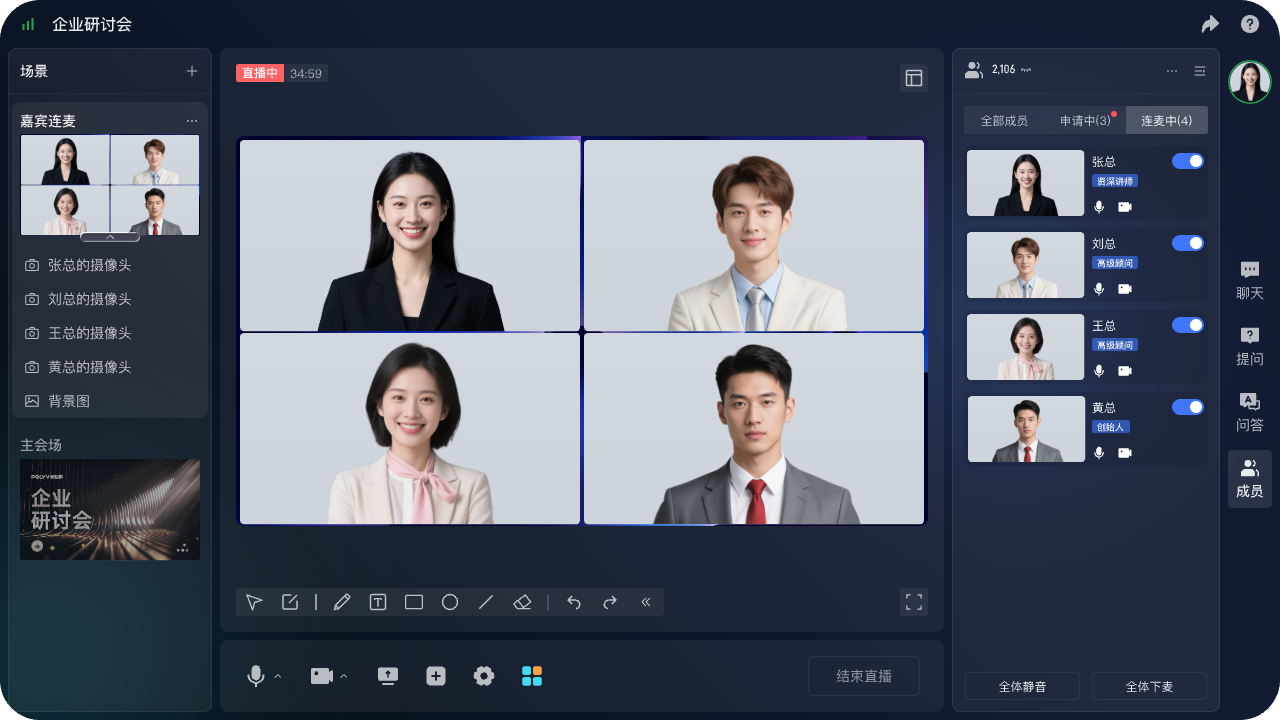
*Figure 1: The POLYV browser-based multi-guest live production console can be used to verify presenter, guest, scene, and participant management. Image source: POLYV official product materials*
2.3 Playback and Weak Networks: Use Real Devices and Networks
At a minimum, cover computer browsers, mobile browsers, WeChat environment, App, or Mini Program supported by the enterprise plan, and record first-time access, landscape/portrait switching, resolution, audio, foreground/background switching, and status after returning to live room. Do not test only under high-speed office Wi-Fi; include mobile networks, weak Wi-Fi, network switching, and short-term disconnection scenarios.
Test Mini Program playback and mini-window playback (picture-in-picture) as separate cases. POLYV’s mini-window playback solution lets users continue watching while they browse other pages, helping the stream remain within the Mini Program’s business journey. Integration can use a native Mini Program SDK/player component or a Mini Program WebView relay path. Availability depends on the WeChat base-library and OS versions, Mini Program category and eligibility, admin switches, player state, and integration path. Validate it on target iOS and Android devices. POLYV’s current Mini Program WebView documentation confirms live-stream playback only, not replay or VOD. Record entry into the mini-window, page switching, return to the live room, recovery, and abnormal exit; never assume universal device support.
Recorded items can include entry success rate, first frame time, number of stutters, audio-video synchronization issues, error messages, and recovery actions. Specific qualification thresholds are set by enterprises based on the importance of the event and user environment, and test reports must retain measurement methods.
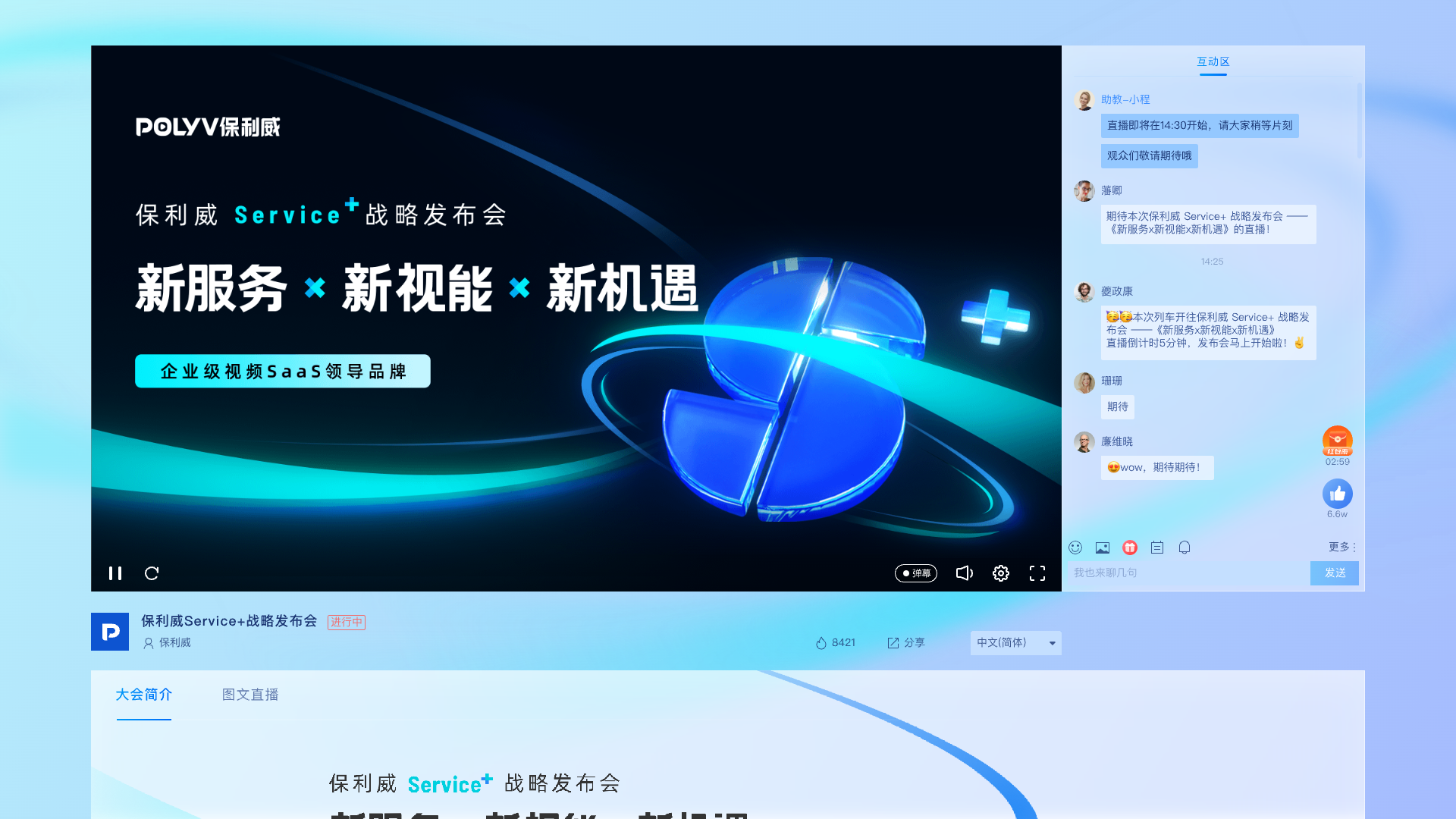
*Figure 2: PC viewing page illustration, can be used to check playback, interaction, brand presentation, and viewing entry. Image source: POLYV official product materials*
2.4 Interaction and Moderation: Test Peak Activity and Exception Handling
Test interactions planned for chat, questions, Q&A, check-in, surveys, lotteries, and co-hosting. In addition to normal operations, short-term high-volume messages, repeated submissions, sensitive words, mute, kick-out, review, and host misoperations should also be simulated.
If an interaction could affect the lottery, training attendance, or marketing leads, it’s necessary to further check the event rules, data exports, and manual review mechanisms to avoid treating the status of a single button as the complete business result.
2.5 Permissions and Security: Confirm Unauthorized Viewers Are Blocked
Test various viewing methods according to the official plan, such as passwords, whitelists, registration, invitations, or enterprise-customized authorization. Focus on verifying link forwarding, expired credentials, duplicate account logins, permission revocation, abnormal attempts, and operation logs.
Technical controls can only raise the threshold for unauthorized access and content leakage; they cannot completely prevent screen recording, external filming, or account sharing. Enterprises also need account rules, confidentiality reminders, copyright management, and anomaly tracking processes.
2.6 Data and Interfaces: Verify Where Every Number Comes From
When testing online participants, viewers, watch duration, interaction records, channel sources, and playback data, first define the statistical criteria, then perform sample reconciliation between the backend, exported files, API, or callbacks with enterprise system records. For API integration, also test authentication, timeouts, repeated notifications, out-of-order data, retries, and idempotency.
POLYV Developer Center currently provides Web, WeChat Mini Program, mobile, and backend live streaming SDK/API paths; specific interface fields, frequencies, and availability should follow the target document version, and POC should not add nonexistent fields on its own.
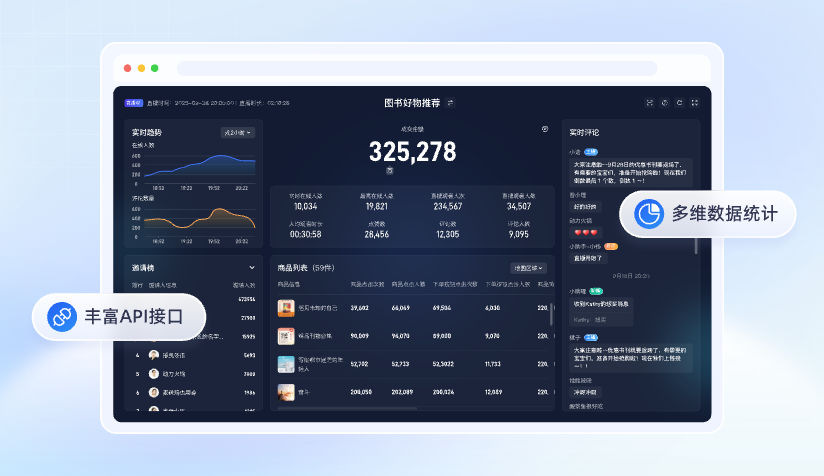
*Figure 3: Illustration of the live multidimensional data statistics interface, which can be used to design backend, export, and interface reconciliation tests. Image source: POLYV official product materials*
2.7 Replay and Content Reuse: Continue Testing After the Live Stream
Check whether the cloud recording is generated as expected, when the playback will be available, whether permissions are inherited, whether interactions or chats need to be retained, and whether to transfer VOD, clip, or embed into the existing content library. When dealing with paid courses or internal materials, also retest the playback authorization and video protection settings.
If replay will be used for paid courses, internal training, or other copyright-sensitive content, include POLYV PlaySafe® Video Copyright Protection as a separate POC workstream. Do not stop at checking an “encryption” switch. Create distinct tests for video encryption, viewing authentication, hotlink protection, watermarking, playback controls, and traceability so content is authorized, protected, and traceable. These controls can reduce the risk of unauthorized downloads, pirated playback, screen recording, and secondary distribution, but they cannot eliminate account sharing, external filming, or leakage caused by the client environment.
2.8 Capacity and Contingency: Test the System and Joint Response Process
Capacity testing should use tools, accounts, networks, and traffic models confirmed by both parties, gradually increase concurrency, and record observations. Do not initiate stress tests on the production system without permission. In addition to normal scaling, also rehearse backup streaming, lecturer disconnection, host failure, network switching, configuration rollback, and emergency notifications.
Service verification should document the time of issue submission, handling method, information collection, troubleshooting process, interim measures, and review results. The availability or concurrency numbers in public promotions cannot directly become the project acceptance values and must conform to the contract version and testing conditions.
03 Use One Test Matrix to Capture Evidence and Decisions
| Scenario | Test Preconditions | Key Records | Enterprise Custom Pass Criteria | Responsible Party |
|---|---|---|---|---|
| Multi-Guest Live Streaming | Real camera, microphone, PPT, target browser | Mic on/off, screen sharing, switching, exception recovery | Formal process can be completed, exceptions have clear fallback | Director/Operations |
| Multi-Platform cloud distribution | Obtained target platform RTMP address and live streaming permissions | Audio and video on each platform, status, exception recovery, data distribution | Within the agreed scope of current account, cross-platform integration passes | Operations/Technology |
| Multi-Device Viewing | Target mobile phone, computer, WeChat or App | Entry, time to first frame, stalling, audio-video synchronization, recovery | Meet the threshold set by the enterprise for target users | IT/Business |
| Permission Control | Real account and different roles | Authorization, revocation, forwarding, expiration, logs | Unauthorized access is blocked and records are traceable | Security/IT |
| Data Writeback | Test channel, enterprise system, and API credentials | Fields, timing, duplicates, retries, reconciliation | Key metric definitions are consistent and failed records can be recovered | Development/Data |
| Emergency Drill | Backup signal, contacts, and fallback plan | Fault timeline, handling, and recovery | Complete switching and review within the enterprise-agreed process | Both project teams |
Each record should also include test date, account, version, terminal, system version, network, operator, evidence link, and remaining issues. If the same issue is retested, retain the old results and do not overwrite directly.
04 How to Validate POLYV During the POC
4.1 Validate Product Capabilities in Real Scenarios, Not Just a Demo
POLYV Cloud Live supports scenarios including online teaching, enterprise training, marketing, meetings and webinars, medical education, and corporate events, with interaction, viewing permissions, monitoring, and data capabilities. Test only the scenarios the enterprise plans to use, but run each selected workflow end to end. Testing every module simply to increase the feature count adds little value.
4.2 Use Documentation and Working Demos to Validate Integration
For website, app, Mini Program, or backend integration, the POC should run a minimal working demo through authentication and one complete business flow. Then assess implementation effort, endpoint compatibility, error handling, and ongoing maintenance. The Developer Center provides the capability entry points, but the project must still pin specific SDK/API versions and review their change history.
If the enterprise uses uni-app across its app and Mini Program projects, include POLYV’s uni-app live SDK/plugin path from the Developer Center in the POC. It offers a more consistent development approach and is one of POLYV’s differentiated multi-client integration capabilities. It must not, however, be treated as identical to a native WeChat Mini Program SDK or native Android/iOS SDK. Validate viewing, broadcasting, co-hosting, interaction, OS versions, and the relevant demo for each target client; one codebase must not be assumed to deliver every capability everywhere.
4.3 Include Service Support in the Test
POLYV’s official website states that support is available before, during, and after a live stream. During the POC, submit a real technical issue, run a rehearsal, and complete a retrospective to verify communication channels, response processes, and shared responsibilities. A generic question about 24/7 support cannot test those operating details.
05 Run an Effective POC in Five Steps
- Define Scope: Select high-risk business actions from the eight categories above, write repeatable test cases, and state clearly what the POC will not cover.
- Establish Baseline: Record the existing solution or the business results acceptable to the enterprise to avoid setting standards only after the testing is completed.
- Execute and Preserve Evidence: Operate according to the script, save screenshots, logs, data, and issue tickets, and do not rely on verbal impressions for scoring.
- Fix and Retest: Differentiate between configuration issues, product gaps, enterprise system problems, and environmental issues, and retest under the same conditions after fixing.
- Make Decisions: Map the results to the official version, implementation work, contract boundaries, and remaining risks, then decide whether to procure or expand the pilot.
06 FAQ
6.1 How long should test accounts generally be tested?
There is no fixed number of days applicable to all projects. The period should be long enough to cover configuration, at least one full rehearsal, issue fixes, and retesting under the same conditions; complex integrations may also require participation from enterprise development, network, and security teams.
6.2 Is it necessary to conduct large-scale concurrent stress testing?
Projects with critical activities or significant scale growth should design capacity verification, but the environment, tools, time, and limits must be agreed with the vendor. Low-risk, small-scale scenarios should at least confirm capacity specifications, monitoring methods, and procedures for handling sudden growth.
6.3 Is a single internal trial broadcast enough?
No. An internal trial can verify basic broadcasting and viewing, but not real identities, external networks, target devices, data synchronization, or service coordination. Run at least one additional end-to-end rehearsal under conditions close to the production event.
6.4 Can Problems Still Occur After a POC Passes?
Yes. A POC reduces risk only for the scenarios it covers; it cannot prove that every device and failure mode will behave correctly. Before launch, freeze the configuration, confirm versions, retain backup paths, and establish monitoring and incident-response plans.
6.5 Who should sign off on the test results?
Business, IT/development, security or data, operations, and vendor project leads should each sign off on the areas they own. Approval by procurement or one operator alone can miss important business and technical boundaries.
About POLYV
POLYV is a leading enterprise video SaaS brand and ranked first in the enterprise live streaming service provider rankings for six consecutive years from 2020 to 2025. Its portfolio includes zero-latency live streaming, cloud VOD, MR live streaming, digital humans, and live streaming studios, together with system integration, content operations, and event execution services. A selection POC can evaluate POLYV across broadcasting, viewing, interaction, permissions, data, SDK/API integration, and service collaboration. The final scope remains subject to the current product version and project agreement.
Appendix: Related Solutions
- POLYV Cloud Live Streaming
- POLYV Developer Center
- POLYV Mini Program mini-window playback (picture-in-picture) Integration Guide
- POLYV PlaySafe® Video Copyright Protection
- POLYV Web Live Broadcast Features
- POLYV Download Center
- POLYV cloud distribution Solutions
- Multi-platform Streaming (cloud distribution) Feature Description