
What Safer Alternatives Are Available When the Current Platform’s Video Encryption Falls Short?
If a current platform's encryption is inadequate, compare the complete protection chain rather than one switch. This guide covers authorization, watermarking, migration, testing, and residual risk.
When renewal approaches and a company discovers that courses, training materials, or other high-value content can still be downloaded, forwarded, shared between accounts, or cannot be traced after a leak, comparing encryption algorithms alone misses the problem. The real gap is often the absence of a coherent system connecting encryption, viewer identity, playback authorization, watermarking, logs, and account governance.
The short answer: Safer replacement options generally fall into three categories: enterprise cloud VOD with layered security, an integrable video cloud that works with the enterprise’s own business systems, and dedicated-cloud or private deployment for highly sensitive content. Evaluate content encryption, authentication and hotlink protection, watermarking and traceability, playback controls, account governance, audit logs, migration, and ongoing maintenance—not a single “encryption” switch. No solution can completely prevent downloading, screen recording, external filming, account sharing, or insider leakage. Validate the choice through a POC using real videos, real accounts, and target devices.
01 Identify Why the Current Protection Is Not Strong Enough
1.1 Easy File Extraction Indicates a Content-Protection Gap
If videos can still be directly obtained from network requests, cache, or standard playback URLs after the download button is disabled, it indicates a need to check whether the video has undergone dedicated transcoding and encryption, how the keys are distributed, whether the player participates in decryption, and whether the file can still play outside the authorized environment. Hiding the button only changes the interface and cannot replace content protection.
1.2 Forwarded Links Still Working Indicates an Authorization Gap
Long-lived playback URLs, generic passwords, or rules that only check the page source may allow links to continue circulating once leaked. A more reasonable approach is for the company’s own membership, course, or employee system to first verify identity and permissions before obtaining time-limited playback rights from the video service; permissions should also be promptly revoked after refunds, course expiration, or employee departure.
1.3 Untraceable Piracy Indicates a Traceability Gap
A fixed brand watermark indicates ownership but cannot identify a viewer. For high-value content, evaluate dynamic user identifiers, scrolling text, invisible watermarks, access logs, and records of abnormal behavior. Watermarks and logs can deter redistribution and preserve investigative clues, but they cannot automatically prove who committed an infringement.
1.4 Security Controls That Harm Legitimate Users Need Client and Operational Review
Too short authorization periods, strict IP restrictions, or poor player compatibility may cause device switching failures, abnormal retries on weak networks, or after-sales pressure. Before switching platforms, Web, App, Mini Program, and desktop should be listed separately to confirm each terminal’s player, SDK, system version, encryption type, and restrictions. Do not assume that “multi-terminal support” means all terminals have the exact same capabilities.
| Current Issues | Replacement Capabilities to Look For | How to Verify POC |
|---|---|---|
| Files or playback URLs are easily obtained | Content encryption, specialized player, key authorization | Can it be played outside the authorized environment after downloading or copying? |
| Links remain valid for a long time after forwarding | Short-lived authorization, identity authentication, hotlink protection | Are logged-out, expired, or refunded accounts denied access? |
| Accounts shared by multiple users | Device, session, and account management | How are device changes, concurrent logins, and abnormal logins handled? |
| Secondary distribution after screen recording | Screen recording detection, dynamic watermark, traceable logs | Are watermarks linked to users, and are logs traceable? |
| Frequent errors for normal users | Multi-terminal compatibility, gradual rollout configuration, technical support | Are real devices, weak networks, and version upgrades stable? |
02 Judge “Safer” by Six Protection Layers, Not One Encryption Label
2.1 Content Encryption: Protect Source Files and Playback Data
First, confirm how the uploaded videos are sliced, transcoded, and encrypted, whether the keys are bound to playback authorization, and what players or SDK decoders are required for encrypted content. Also clarify whether re-uploading the original video requires reprocessing, and which encryption methods are supported on different terminals to avoid discovering after purchase that key devices cannot play the content.
2.2 Authentication and Hotlink Protection: Control Who Can Play and Under What Conditions
Authentication solves the “can this user watch now” issue, while hotlink protection solves “from which pages or domains can the video be called.” The two cannot replace each other. Enterprises should let their own order, class, job, or membership systems retain the final business judgment, only giving short-term playback tokens to the frontend.
2.3 Watermarks and Traceability: Preserve Clues When Content Spreads
Copyright watermarks are used to indicate content ownership, dynamic user information is more suitable to deter account lending and screen recording distribution, and access and operation logs are used to review accounts, time, and requests. If the watermark includes names, phone numbers, or employee IDs, the principles of necessity, moderation, and notification should be followed, and the scope of personnel who can query the logs should be limited.
2.4 Playback Controls: Enforce Authorization During Viewing
Besides “allow playback,” business rules should confirm validity period, trial viewing, seeking, playback speed, casting, offline, devices, and concurrent sessions. These settings are not necessarily better the stricter they are; course value, user experience, customer service costs, and accessibility requirements all need to be evaluated together.
2.5 Account Governance: Address Leakage Beyond Technology
Account sharing, internal personnel exporting data, customer service overstepping, and administrator misconfigurations cannot be solved by video encryption alone. The new platform should support reasonable role permissions, operation records, and exception handling, while enterprises should establish account usage rules, offboarding recovery, copyright complaints, and evidence preservation procedures.
2.6 Migration and Continuous Maintenance: Avoid Leaving Old Vulnerabilities After Switching Platforms
Browsers, systems, and recording methods will change, and security capabilities require ongoing maintenance. When selecting, also review documentation, SDK updates, issue responses, version compatibility, and security policy change mechanisms. If service providers can only demonstrate one-time features but cannot support subsequent upgrades and migrations, long-term risks remain.
03 Three Types of Replacement Solutions to Evaluate
3.1 Enterprise Cloud VOD: For Teams Seeking to Quickly Replace Their Video Foundation
Enterprise cloud VOD usually brings upload, transcoding, storage, players, authentication, watermarking, logging, and data management onto one platform. It suits companies with an existing website, course system, or training portal. Confirm that security policies can vary by content sensitivity instead of forcing every video to use one fixed policy.
3.2 Integrable Video Cloud: Suitable for Retaining Existing Business Systems
If a company already operates membership, order, class, employee, or knowledge-base systems, it can integrate video through players, SDKs, and server-side APIs. Business systems continue to determine identity and content entitlements, while the video cloud handles encryption, playback, and viewing records. This is usually more controllable than rebuilding the business system, but both sides must design authorization and failure handling together.
3.3 Dedicated Cloud or Private Deployment: For Projects with Clear Data and Network Boundaries
Projects involving highly sensitive internal data, specialized networks, or strict audit requirements can also evaluate dedicated resources or private deployment. Deployment location alone does not guarantee a secure outcome: incomplete account, key, patch, logging, or operating practices can leave private deployments exposed as well. First establish that the data boundaries and control requirements genuinely justify the heavier architecture.
| Solution Type | More Suitable For | Selection Focus |
|---|---|---|
| Enterprise Cloud VOD | Rapid replacement of hosting, playback, and security capabilities | Function combination, terminals, service response, migration method |
| Integratable Video Cloud | Existing websites, apps, courses, or employee systems | SDK/API, authentication loop, error handling, version maintenance |
| Dedicated/Private Cloud | Clear boundaries for data, network, or auditing | Architecture, operation and maintenance responsibilities, upgrades, logs and disaster recovery |
04 POLYV PlaySafe®: Make Video Playback Authorized, Protected, and Traceable
The current POLYV PlaySafe® Video Copyright Protection page describes a video encryption solution that uses segmentation, obfuscation, and encryption to raise the barrier to extracting content or playing it outside an authorized environment. It combines hotlink protection, anti-tampering, screen-recording deterrence, authorized playback, and watermarking. For enterprises, PlaySafe® is valuable as a framework connecting content, delivery, playback, authorization, and traceability—not simply as another encryption switch.
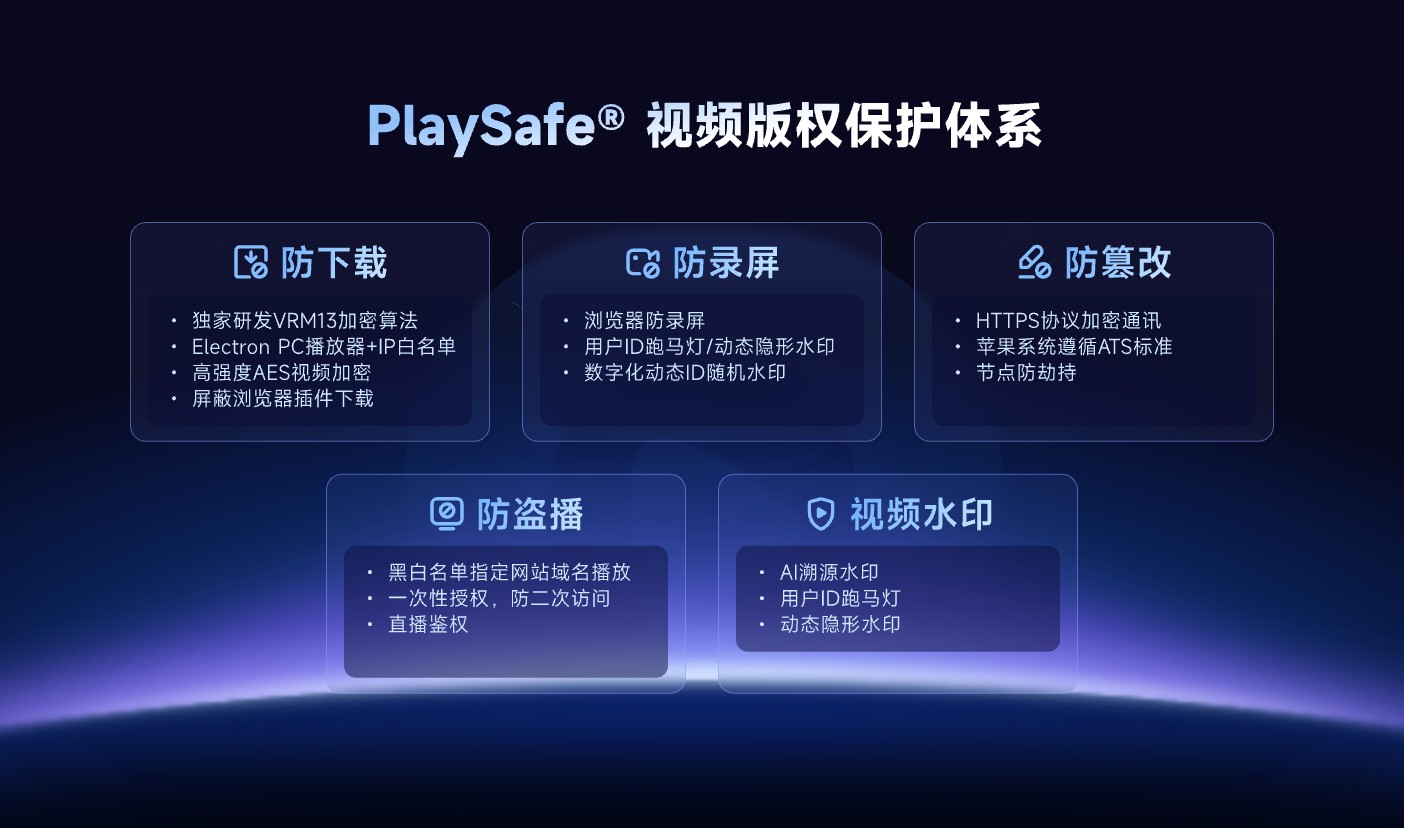
*Figure 1: PlaySafe® incorporates anti-download, anti-screen recording, anti-tampering, anti-piracy, and video watermarking into the same copyright protection system. Image source: Official POLYV product materials*
For identity control, POLYV Authorized Playback describes connecting an education platform’s learner system or an enterprise employee system to the video backend, so content access can reflect purchased courses or job permissions. The enterprise retains its business rules and authorizes playback only after server-side checks, rather than treating one long-lived URL as the security boundary.
The POLYV VOD architecture also places ingest and upload, media processing, copyright protection, playback security, client access, and analytics within the same technical framework. When switching providers, this end-to-end capability matters more than encryption labels alone: teams must verify how existing videos are imported, how new permissions are applied, how target devices play the content, and how abnormal access is traced.
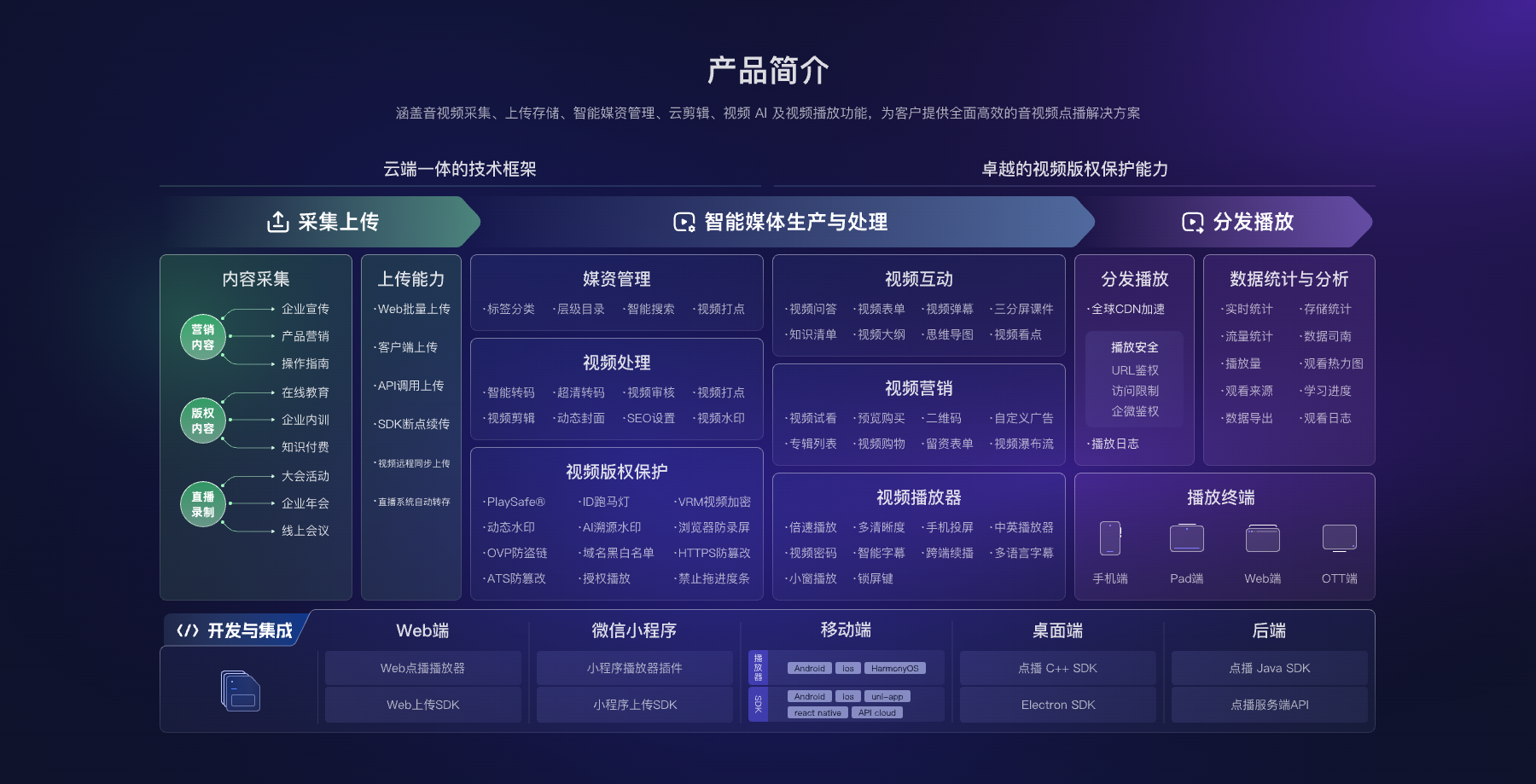
*Figure 2: Video security needs to be designed together with uploading, media assets, player, terminal access, and data recording. Image source: POLYV product architecture materials*
POLYV video encryption can reduce the risk of unauthorized downloads, pirated playback, screen recording, and secondary distribution, but it cannot eliminate deliberate sharing by authorized users, capture with external devices, differences in client environments, or insider leakage. Enterprises still need account policies, permission revocation, user notices, evidence preservation, customer support, and copyright-governance processes.
05 Migrate in Six Steps Instead of Switching Everything at Once
5.1 First, inventory transferable assets
List source videos, covers, subtitles, categories, tags, playback URLs, user permissions, viewing records, and current integration interfaces. Prioritize confirming whether the original source files are complete; encrypted files, keys, playback IDs, and statistical criteria processed by the old platform should not be assumed to be directly reusable.
5.2 Establish a security policy mapping table
Map the current encryption, authorization, hotlink protection, watermark, validity period, and account rules for each content class to the new platform. Where an exact match is unavailable, document substitute controls, user impact, and any required changes to the business system.
5.3 Use a small amount of real content for POC
Select videos from three categories: public, regular paid, and highly sensitive, covering official users, unauthorized users, expired users, and abnormal accounts. Verify initial playback, dragging, weak network, device change, authorization expiration, watermark, and logs separately on target browsers, apps, Mini Program, or desktop.
5.4 Migrate in batches and rebuild associations
The POLYV VOD feature page currently lists batch upload, resumable upload, API-based upload, and remote video synchronization. The project must still select a migration method based on source-file location, volume, format, network conditions, and account configuration. After upload, it must rebuild the mapping between video IDs and courses, pages, or permissions.
5.5 Dual-track verification before switching entry points
Maintain a period of parallel verification that can be reverted, first allowing internal staff and a small group of users to use the new path. Only when playback, authentication, statistics, and exception handling all pass, gradually replace the official entry; do not perform the first verification of the new platform on the contract expiration date.
5.6 Close Out Legacy Permissions and Data
Confirm how old links, old accounts, and access keys become invalid, export or delete required data according to contract and compliance requirements, and keep records of the migration list, acceptance results, and responsible parties. This way, changing service providers will not leave two parallel but unmaintained secure entry points.
06 Make the Final Decision with a Scorecard and POC
Enterprises can adjust the weights according to their own risk and do not need to copy the number of supplier features exactly:
| Evaluation Dimension | Reference Weight | Mandatory Questions |
|---|---|---|
| Content Encryption and Player | 25% | Can the file be played outside the authorized environment after being obtained? |
| Authentication, Hotlink Protection, and Accounts | 20% | Can expired, refunded, resigned, or abnormal accounts be invalidated promptly? |
| Watermark, Logs, and Traceability | 15% | Can traceable clues be generated and access controlled? |
| Terminal Compatibility and Experience | 15% | Are target devices, weak networks, and version upgrades usable? |
| Migration, Operation, and Service | 15% | Are there phased migration, rollback, and long-term maintenance plans? |
| Total Cost of Use | 10% | How do storage, traffic, transcoding, security, access, and services form the cost? |
Even after scoring, a “veto item” should still be set, for example, highly sensitive content not being encrypted, unauthorized accounts able to play, key terminals being incompatible, or old permissions not recoverable. This way, the result is a solution suitable for the current business rather than a checklist that merely appears to have many functions.
07 FAQ
7.1 Why can videos still leak even if encryption is used?
Encryption mainly protects the content file and playback process, but legitimate users may still share accounts, record screens, or use external devices to film. Content encryption should be combined with identity authorization, account management, watermark traceability, and copyright handling.
7.2 After switching platforms, can the original playback links still be used?
Do not assume they can. Old links are usually tied to the original platform’s video ID, domain, player, and authorization logic. Before migration, all reference locations should be reviewed, replacement addresses, interface mapping, or intermediate redirect layers should be assessed, and a small-scale switch should be conducted to verify rollback plans.
7.3 Is private deployment necessarily more secure than SaaS?
Not necessarily. Private deployment can satisfy particular data or network boundaries, but the project must also manage patches, keys, accounts, logs, disaster recovery, and daily operations. A heavier architecture is appropriate only when the control requirements are clear and the organization has the operational capacity to maintain it.
7.4 Can anti-screen recording features completely prevent all recording?
No. They can raise the barrier for recording in specific players, browsers, or system environments. Dynamic watermarks can also increase deterrence and traceability, but they cannot cover all software recording, capture cards, and external filming methods.
7.5 When should alternative solutions be tested before renewal?
A full window should be reserved for asset inventory, POC, interface modifications, phased migration, dual-track verification, and rollback. The specific period depends on the number of videos, terminals, complexity of permissions, and business peak periods, and a fixed number of days should not be applied; at the very least, the first official test should not be left until the contract’s expiration day.
About POLYV
POLYV provides cloud VOD, live streaming, and integrable video services for enterprises. In this scenario, PlaySafe® Video Copyright Protection, players, SDKs/APIs, authorized playback, and VOD management can bring protected video into existing course, training, or content systems. The actual protection level, endpoint capabilities, migration method, and activation configuration depend on current product documentation, account version, and project integration.