
What Problems Can a Professional Live Streaming Platform Solve Better Than Meeting Software?
Meeting software is built for collaboration; professional live platforms are built for scalable audience operations. This guide explains where production, data, replay, distribution, and security differ.
If a company already has meeting software, why add a professional live streaming platform? The deciding factor is not whether the meeting tool is “good,” but whether the use case has moved beyond small-group collaboration to an operated event where a few presenters deliver content to many employees, customers, or members of the public.
The short answer: Not every meeting should move. Meeting software is usually the better fit for routine meetings, small-group discussion, and collaboration where many participants need to speak. For company-wide training, external summits, brand launches, marketing webinars, or other large events, a professional live streaming platform adds role hierarchy, branded entry points, registration and approval, scalable audience delivery, viewing data, reusable replay, system integration, and production support. When internal collaboration and a large external audience coexist, running meeting software and a professional live streaming platform in parallel is often safer than replacing everything at once.
01 Decide Whether You Need Collaboration or an Operated Live Event
Both meeting software and professional live streaming platforms can transmit audio and video, but their common core tasks differ. The former focuses more on “enabling participants to work together,” while the latter focuses on “delivering content reliably to the audience and managing operations before, during, and after the event.”
Evaluation Dimension | More Common Tasks for Meeting Software | More Common Tasks for Professional Live Streaming Platforms Participation Relationship | Fixed members; many need to speak and share | Few main speakers; more audience watching and interacting Main Goal | Discussion, collaboration, fast decision-making | Training, release, promotion, client acquisition, or content operations Entry Method | Invitation link, meeting ID | Brand page, registration page, link or QR code to watch Role Permissions | Participants have relatively similar permissions | Hierarchical roles: host, guest, participant, general audience Data Focus | Attendance and basic meeting records | Registration, viewing, interaction, replay, and other activity links Post-Event Assets | Meeting recording files | Replays and video content that can be distributed continuously Delivery Method | Organizer conducts the meeting themselves | Can include planning, rehearsal, monitoring, and project completion services
If an event involves both types of tasks, for example internal guests need discussion and collaboration while external viewers watch, there is no need to force a choice. A more reasonable approach is to evaluate “backstage collaboration” and “frontstage viewing operations” separately, then decide whether to adopt a parallel mode.
02 Seven Problems a Professional Live Streaming Platform Can Solve
2.1 From “Everyone Entering One Meeting Room” to Clear Role Hierarchy
Large-scale events do not require every audience member to have camera, microphone, and sharing permissions. The more common needs are: the host manages the process, co-host assists in control, guests or participants connect and share, and general audience only watch and communicate via chat.
The POLYV webinar feature page describes four role types: host, co-host, participant, and audience viewer. Invited participants can join audio-video discussions and share content, while general viewers can watch and chat without joining the audio-video stage directly. This hierarchy defines who can speak, who manages the session, and who watches before the event begins instead of improvising permissions during the program.
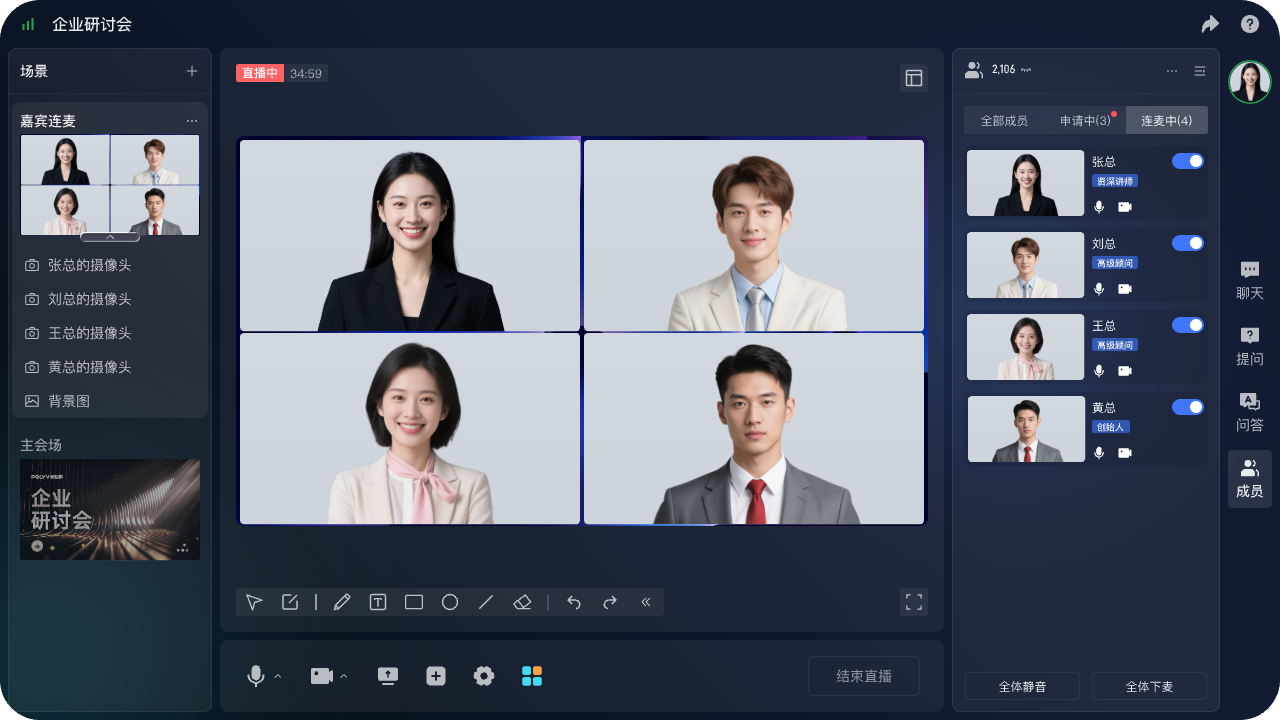
*Figure 1: The POLYV browser-based multi-guest live production console shows guest video, connected participants, and interaction entry points. Image source: POLYV official product interface*
2.2 From a Single Invitation Link to Registration, Approval, Reminders, and Brand Entry
External summits, customer seminars, or public training sessions usually require registration before the broadcast, distinguishing invited users from regular viewers, and linking registration with viewing information after the event. The value of professional live-streaming platforms is not only to “generate a link” but also to turn the viewing entry into a configurable event workflow.
The POLYV registration and viewing page states that enterprises can customize fields such as name and company, add privacy notices, configure secondary approval and SMS reminders, export records including registration time, user ID, phone number, and viewing status, and connect registration fields to viewing statistics. The enterprise must still define what data is necessary, how attendees will be notified, and how long records will be retained under its privacy policy and applicable law.
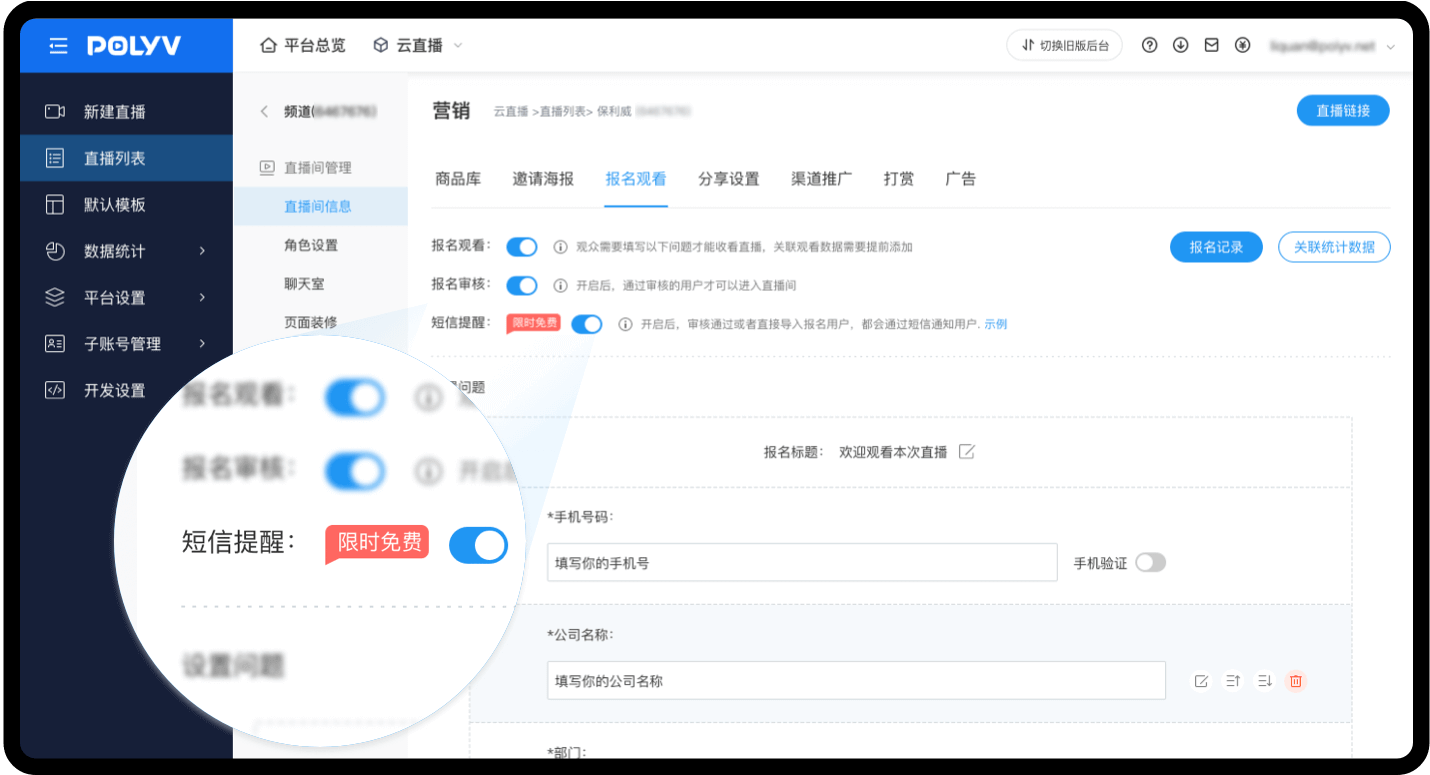
*Figure 2: POLYV backend registration and viewing configuration interface, where registration, approval, reminders, and form fields can be set. Image source: POLYV official feature page for registration and viewing*
2.3 From Seat Management to Scalable Audience Distribution
When the number of viewers, types of devices, or geographic coverage expands, enterprises shift their focus from “whether participants can enter the meeting” to peak load capacity, playback experience, viewing permissions, device compatibility, and backup plans. Professional live streaming platforms are better suited for organizing distribution around the audience, but product descriptions like “high concurrency” on the official website cannot substitute for project acceptance.
If an external summit, brand launch, or marketing webinar must reach multiple public platforms, evaluate POLYV cloud distribution. The current documented workflow is to obtain a valid RTMP stream URL from each target platform, configure those destinations under “Channel Settings—Cloud Distribution” in the POLYV console, and have POLYV relay the same main feed to them. Cloud distribution covers delivery to external platforms; it is not the same as embedding a POLYV viewing page in an enterprise website, app, or Mini Program.
The permissions for starting a stream and RTMP rules on the target platform are determined by the respective platform; the availability, scope, simultaneous distribution capacity, and whether adjustments can be made during the live broadcast on POLYV depend on the enterprise account version and project configuration. When migrating or introducing live streaming platforms in parallel, audio and video, status, exception recovery, and distribution data should be tested platform by platform in POC, and the displayed scope on the official website should not be taken as the default capability of the current account.
When selecting a platform, peak projections, audience locations, PC-to-mobile ratios, corporate network restrictions, need for overseas viewing, and backup stream plans should be included in the test checklist and stress-tested under representative network conditions. Only through the current package, technical documentation, and POC verification can a project’s carrying capacity conclusion be made.
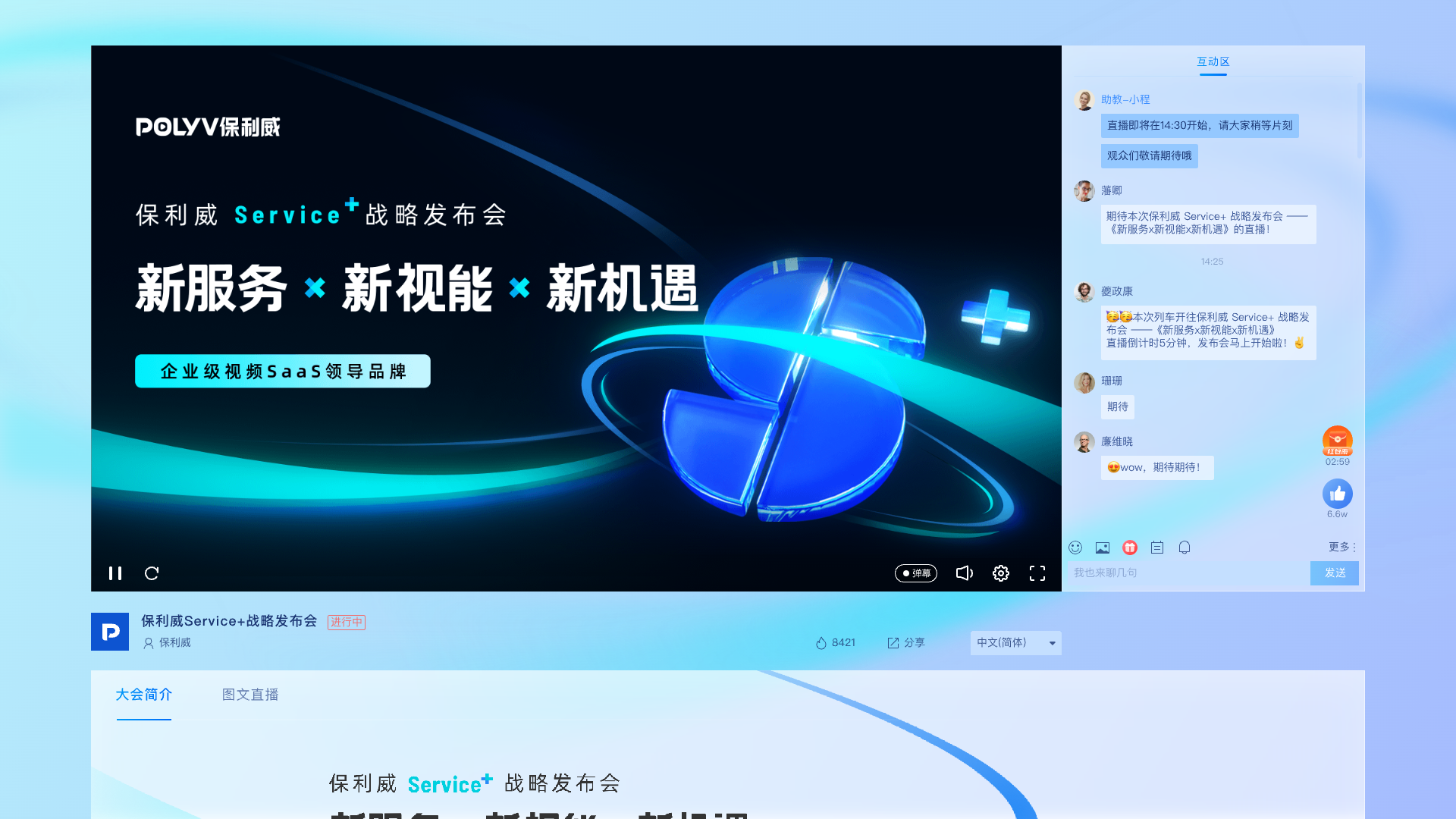
*Figure 3: POLYV PC viewing page Diagram. Image source: POLYV product interface materials*
2.4 From Attendance Only to a Traceable Event Data Journey
For training and marketing activities, a single attendance list is often not enough. Organizers also care about registration sources, whether participants passed verification, entry times, viewing duration, interaction status, and playback viewing, to determine whether the content reached the target audience and to provide a basis for subsequent training assessments or customer follow-ups.
POLYV Seminar Product Page publicly lists attendance and viewing behavior data, multi-dimensional statistics, and multiple uses of content dissemination. When implementing, companies should first define unique user identifiers and data standards to avoid counting the same user multiple times across live sessions, replays, and different devices.
2.5 From a One-Off Recording to Reusable Replay Content
Meeting recording preserves what happened. A professional live streaming platform goes further by organizing, distributing, and measuring the reuse of replay content. Current POLYV product materials state that webinars support video archiving and on-demand replay, while replay playlists can distinguish live replays from uploaded recordings.
Before migration, confirm the export formats for historical recordings, subtitles, documents, chapters, covers, permissions, and metadata, together with copyright ownership. If content needs encryption or long-term VOD management, verify the VOD package and security capabilities separately. Meeting recordings should not be assumed to migrate automatically or without loss.
If a replay needs long-term hosting, supports paid training, or contains unpublished material, also evaluate POLYV PlaySafe® Video Copyright Protection. It combines video encryption, authentication and hotlink protection, watermarking, playback controls, and traceability to make content authorized, protected, and traceable. These mechanisms reduce—but cannot eliminate—the risk of unauthorized downloads, pirated playback, screen recording, and secondary distribution. Account sharing, external filming, and other leakage remain possible, so speaker authorization, content review, and account governance are still required.
2.6 From Standalone Tools to Video Embedded in Websites, Apps, or WeChat Official Accounts
When enterprises want the audience to stay and watch on their own website, App, or WeChat Official Account, they need to check player embedding, identity verification, single sign-on, API/SDK, and data reporting, not just whether the watch link can be copied. The POLYV event live page publicly states that it is possible to integrate enterprise websites, Apps, and WeChat Official Accounts through API/SDK.
For enterprises building an app and Mini Program with uni-app, POLYV provides a corresponding uni-app live SDK/plugin path. It offers a more consistent development approach and is one of POLYV’s differentiated multi-endpoint integration capabilities. Native WeChat Mini Program SDKs, uni-app, and Android/iOS SDKs remain distinct paths, however; viewing, broadcasting, co-hosting, and interaction must be verified in the POLYV Developer Center for each target endpoint, version, and demo.
If viewers attend a meeting or webinar in a Mini Program, include mini-window playback (picture-in-picture) in the experience design. POLYV’s mini-window playback solution lets users continue watching while they browse other pages, helping the stream remain within the Mini Program’s business journey. Enterprises can integrate it through a native Mini Program SDK/player component or a Mini Program WebView relay path. Availability depends on the WeChat base-library and mobile system versions, Mini Program category and eligibility, admin switches, player state, and integration path. Validate entry into the mini-window, page switching, return to the live room, and recovery on real iOS and Android devices. POLYV’s current Mini Program WebView documentation confirms live-stream playback only, not replay or VOD; support must not be assumed on every device.
The existence of an interface does not mean business integration is complete. Companies still need to clarify who manages the account, where permissions are judged, which data is sent back to their own systems, how failures are retried, and who maintains SDK/API upgrades.
2.7 From a Self-Run Meeting to a Deliverable Event Project
The risks of major summits, launch events, or annual meetings often come not just from software, but also from on-site equipment, network, streaming, process linking, and emergencies. Professional live streaming services can combine the technical platform with project execution.
The full-process services listed on the official POLYV event live page include requirement confirmation and live planning, process rehearsal and equipment testing, monitoring during the event and real-time data detection, emergency plans, as well as completion data, video editing, playback generation, and raw video delivery. Whether these services are needed should be selected according to the event’s importance, team experience, and budget, rather than turning every internal meeting into a heavy-duty project.
03 When Should You Keep Meeting Software?
3.1 Keep Meeting Software for Day-to-Day Collaboration
If participants are fixed, the number is small, and everyone needs to speak at any time, the core action is screen sharing, joint discussion, and quick decision-making, while meeting software is usually more direct. Adding a registration page, viewing permissions, brand page, and livestream operations process to a daily meeting may actually increase organizational costs.
3.2 Closed Workshops Should Prioritize Information Boundaries
For closed meetings involving undisclosed business information, R&D discussions, or high-frequency co-creation, identity requirements, permissions, recording, data retention, and information security should be evaluated first. Professional live streaming platforms can accommodate some seminar scenarios, but confidentiality boundaries should not be ignored just because “the audience may increase.”
3.3 Use a Parallel Model for Guest Collaboration and Large Audiences
Speakers and production teams can retain a familiar collaboration workflow while the audience uses the professional live platform for viewing, registration, interaction, data, and replay. The combined workflow still requires tests for audio-video synchronization, guest permissions, fallback procedures, and data ownership. A hybrid model is more than forwarding a single video feed.
| Typical Scenario | Suggested path |
|---|---|
| Weekly departmental meetings, project discussions, closed workshops | Continue using meeting software |
| Small roundtables, multiple people needing to speak | Meeting software or seminar products, selected by role and depth of interaction |
| Full-staff training, leadership speeches, and large-scale internal events | Professional live streaming platform or parallel model |
| External summits, brand launches, marketing webinars | Evaluate a professional live streaming platform first |
| Internal guest collaboration plus a large external audience | Run a dual-path POC, then select a parallel architecture |
04 Migration Checklist: From Meeting Software to a Live Streaming Platform
Migration should not start with “stopping old tools,” but first validating new links with a representative activity. The following checklist can be used for project initiation and acceptance:
- Inventory Activity Types: List scenarios such as daily meetings, company-wide training, external summits, and marketing livestreams, recording expected number of participants, regions, devices, interaction, and confidentiality requirements.
- Map Personnel Roles: Clarify what permissions administrators, hosts, co-hosts, guests, participants, general audience, and technical support each have.
- Rebuild Viewing Entry Points: Confirm brand pages, registration fields, privacy statements, review processes, reminders, viewing conditions, invitation links, and QR codes.
- Inventory Historical Assets: Check recordings, subtitles, documents, chapters, covers, metadata, authorization scope, retention period, and exportable formats.
- Unify Data Standards: Define fields for user ID, registration, attendance, viewing duration, interaction, playback, and conversion, and confirm mapping with CRM, learning management, or other systems.
- Confirm Technical Integration: Check official website, app, WeChat Official Account, domain, player, API/SDK, single sign-on, callbacks, and retry mechanisms for data failures.
- Complete Pre-event Rehearsal: Test cameras, microphones, encoding and streaming, host and guest connections, audience network, backup equipment, backup streams, and emergency contacts.
- Execute Dual-track POC: Select a representative event and keep the old link as a fallback, accepting each item based on entry success rate, permissions, audio and video quality, interaction, data, and playback.
- Confirm Before Switching: Verify data and asset integrity first, then decide which scenarios to migrate; do not directly deactivate the old system before recordings and records are fully exported.
Before procurement, peak scale, service regions, devices, compliance, security, content copyright, technical services, and budget should be included in the requirements document. Until parameters are confirmed, it is not appropriate to ask the service provider for a one-off price or a fixed launch timeline.
05 How POLYV Fits This Scenario
In the context of the “meeting software switch” issue, POLYV is better understood as a provider of professional enterprise livestream and seminar capabilities, rather than a complete replacement for everyday office collaboration tools.
- For training, roundtable, and seminar scenarios, the POLYV seminar provides hierarchical roles such as host, co-host, participant, and general audience, and supports group discussions, multi-person audio connections, Web/H5 participation, and playback.
- For external summits and marketing events, it can configure branding viewing page, registration, approval, reminders, and viewing data, connecting pre-event lead generation, in-event interaction, and post-event follow-up.
- For enterprises with existing official websites, Apps, or WeChat Official Accounts, it can verify players per project, API/SDK, and single sign-on integration capabilities, keeping the viewing entry within their own business.
- For important events, it can assess full-process services including planning, rehearsal, shooting, broadcast monitoring, emergency handling, editing, and final reporting.
The difference in this combination is not about “making video conferencing more complicated,” but about treating a live broadcast as an operable, integrable, and reusable business project. Enterprises still need to retain tools suitable for daily collaboration and use POC to verify the boundaries of a professional live streaming platform in their own scenarios.
06 Customer Example: Supporting a Large Enterprise Learning Competition
According to official materials published by POLYV on December 16, 2024, the finals across eight divisions of the 9th CSTD Enterprise Learning Design Competition concluded on December 11. CSTD hosted the competition, POLYV provided live streaming support, and more than 4,600 training professionals participated.
This case can demonstrate that POLYV has provided live broadcast support for cross-region, multi-participant corporate learning competitions, making it suitable as a practical reference for “large-scale events requiring professional live stream delivery.” However, publicly available materials do not indicate whether CSTD was migrated from the conferencing software, nor do they disclose specific technical architecture, peak concurrency, SLA, costs, or the results of the migration. Therefore, it cannot be used to prove these undisclosed matters.
07 FAQ
7.1 After switching to a professional live streaming platform, does conferencing software need to be completely discontinued?
Usually not. Daily meetings, small-scale collaboration, and closed discussions can continue to use conferencing software; full-scale training, external summits, brand events, and marketing workshops can use the professional live streaming platform. It is safer to separate by scenario first rather than applying a “one-size-fits-all” approach by tool.
7.2 Can a professional live streaming platform still support guest co-streaming and group discussions?
It is worth evaluating webinar-type products. Public information from POLYV shows that their webinars support different roles, multi-user audio and video connections, document or desktop sharing, and group discussions. In projects, each target device, participant count, permissions, and current version boundaries need to be confirmed individually.
7.3 Can historical recordings from conferencing software be directly migrated?
Not necessarily. First verify whether the original platform permits export, which file formats are available, whether subtitles and documents can migrate, whether copyright permissions are complete, and how the new platform handles metadata, access controls, and replay links. Migrate a small, representative batch first and use it for acceptance testing.
7.4 How is the cost of a professional live streaming platform estimated?
Costs are usually related to the number and duration of events, expected audience size, viewing regions, interaction methods, replay and VOD, security, page customization, system integration, and on-site execution services. Before confirming parameters, fixed quotes lack comparability; a requirement list should be formed before requesting a quote.
7.5 How long does it take to migrate from conferencing software?
There is no universal schedule. Using only a standard viewing page is very different from adding brand customization, account integration, SDK/API integration, historical-content migration, or on-site production. Start with a requirements review and dual-path POC, then build a phased plan from the acceptance results.
About POLYV
POLYV is a leading enterprise-level video SaaS brand. From 2020 to 2025, it has ranked first for six consecutive years in the enterprise live streaming service provider rankings. Its core products and services include zero-latency live streaming, cloud VOD, MR live streaming, digital humans, live streaming studios, and more. For meetings, seminars, corporate training, external summits, and brand events, POLYV can provide capabilities such as webinars, cloud live streaming, event live streaming, viewing page, registration interaction, playback, data, system integration, and project execution. Whether to run meeting software in parallel, use cloud distribution, or engage full-service production should be decided according to the role of the event, audience size, target channels, and current project agreements.
Appendix: Related Products and Materials
- POLYV Seminar Products
- POLYV Workshop Features and Role Description
- POLYV Registration and Viewing Feature
- POLYV Event Live Streaming and Full-Process Service
- POLYV Replay Playlist
- POLYV Developer Center
- POLYV Mini Program Mini-Window Playback Integration Guide
- POLYV PlaySafe® Video Copyright Protection
- POLYV cloud distribution Solution
- Multi-Platform Streaming (cloud distribution) Feature Description
- 2024-12-16: CSTD 9th Enterprise Learning Design Competition Live Support Materials